
LivePNG
LivePNG is a format to create avatars based on PNG images.
Demo
https://github.com/user-attachments/assets/efdddbcf-2850-4325-ab2c-0381f46072f1
Examples
The easiest way to understand the format is by looking at the examples folder.
Models structure
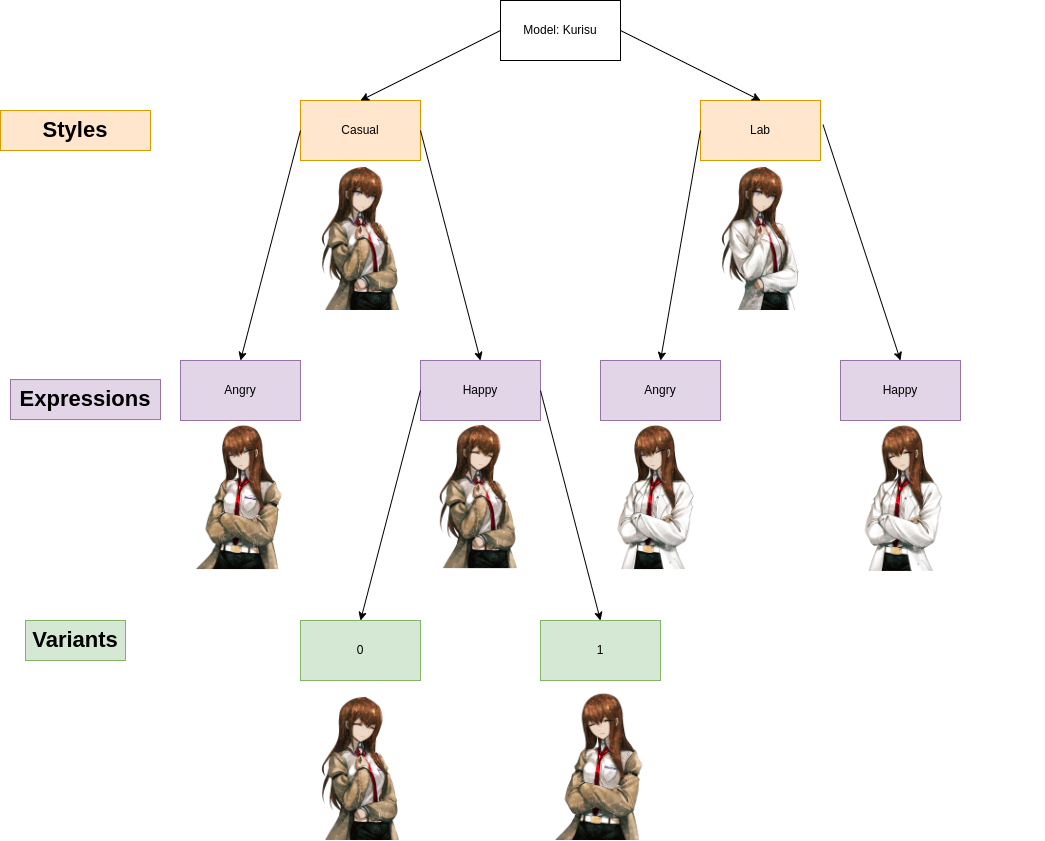
Every model is described by a JSON file called model.json inside its folder.
Its properties are:
name: Name of the modelversion: Version of LivePNG (for now only 1 is available)styles: The list of styles a model has.
Styles
A style is supposed to be a different style for a model, for example a clothes change or a different state.
Every style has a name style_name, and is contained in the assets/style_name folder.
Every style has at least one expression.
Expressions
An expression is supposed to be a different expression for a model, for example a different face expression based on the mood or the emotions of a character.
Every expression has an expression_name, and is contained in the assets/style_name/expression_name.
Expressions might be different for each style.
If you want a default expression, name it idle, otherwise the first expression in alphabetic order is taken.
Every expression has at least one variant
Variants
Variants are different variants of an expression. Their objective is to make the character appear more lively, and show different images for each expression.
Every variant has a variant_name and is contained in the assets/style_name/expression_name/variant_name.
The variant_name folder must contain the image files that show different states of the lips.
Python Examples
Installing
To install and update the package, you can user pip:
pip install -U livepng
Quick start
from livepng import LivePNG

model = LivePNG("path/to/model.json")
# Setting the second style
styles = model.get_styles()
model.set_current_style(styles[list(styles.keys())[1]])
# Setting an happy expression
model.set_current_expression("happy")
# Add a function as a callback
# we are setting a stub function `update_image` as callback
# this function will be called every time there is a frame update
# You can subscribe to more events implementing th Live2DModelObserver interface
model.subscribe_callback(update_iamge)
# Start speaking with lipsync
# It will play audio and set a random variant before starting to speak
# It will call update_image every 0.1s passing the frame to show
model.speak("file.wav", random_variant=True, play_audio=True, frame_rate=10, interrupt_others=True, start_thread=True)
1 maintainer

Metadata
1 maintainer
Release files for livepng 0.1.8
For a detailed explanation of source distributions (sdists) and built distributions (wheels), please see the package formats documentation.
Source distribution (sdist)
| File | Size | Uploaded | Provenance | |
|---|---|---|---|---|
| livepng-0.1.8.tar.gz | 24.0 kB | Without provenance | Details |
Built distribution (wheel)
| File | Interpreter | ABI | Platform | Reset |
|---|---|---|---|---|
| livepng-0.1.8-py3-none-any.whl | Python 3 | none | any | Details |
Total release size: 48.8 kB
Release files / livepng-0.1.8.tar.gz
| Download URL | livepng-0.1.8.tar.gz |
|---|---|
| Size | 24.0 kB |
| Tags | Source |
|
SHA-256 checksum How to use checksums |
3dd7ee7e45362beda48ad30628bdb53af8fcb1e9af2d3e817cef68e4c2082cf9
|
|
BLAKE2b-256 checksum How to use checksums |
5ff646460592a722da0a2bb2630f351780fd1ad1280fee10b62b9f3da4188234
|
| Upload date | |
|
Uploaded using Trusted Publishing? What is trusted publishing? |
No |
| Uploaded via |
twine/5.1.1 CPython/3.12.7
|
Release files / livepng-0.1.8-py3-none-any.whl
| Download URL | livepng-0.1.8-py3-none-any.whl |
|---|---|
| Size | 24.8 kB |
| Tags | Python 3 |
|
SHA-256 checksum How to use checksums |
d0ac790bcef7b3e2088aa434bb9ca7fc68800d3db8e46697f07d7ddc91285a97
|
|
BLAKE2b-256 checksum How to use checksums |
0c48ed7addd0d500857ab36a74497ee712bd5f2a3915bbe488089c21a4e690a1
|
| Upload date | |
|
Uploaded using Trusted Publishing? What is trusted publishing? |
No |
| Uploaded via |
twine/5.1.1 CPython/3.12.7
|
Security for livepng 0.1.8
Provenance
Provenance describes where a file came from. On PyPI, provenance is shared via attestations, which provide a verifiable record of the build or publishing details. View details, limitations and caveats.
No provenance found
None of the files in this release were uploaded with provenance metadata.
A note on package security
PyPI is a repository for distributing packages, not a service for auditing them. While third-party security researchers and our staff do their best to detect and remove malicious packages, PyPI cannot guarantee the quality, security or suitability of any given package.
To learn more about protecting yourself from malicious actors, visit our package security documentation.














