
LiveSynth
A streaming neural synthesizer for instrument cloning and text-to-instrument
Kyungsu Kim, Yejin Kim, Kyogu Lee
Music and Audio Research Group, Seoul National University



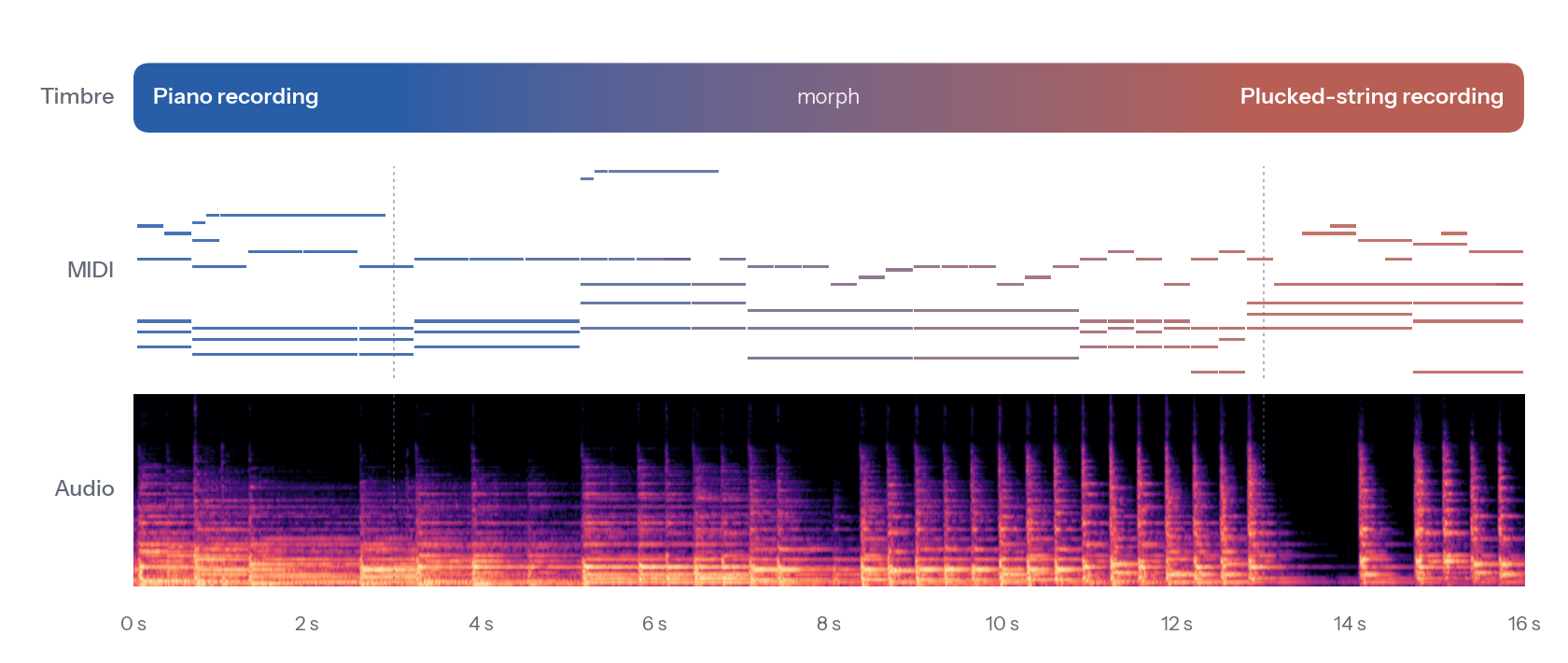
One streamed performance. The timbre moves from a piano recording to a plucked-string recording
between 3 s and 13 s while the MIDI keeps playing.
MIDI excerpt from the Lakh MIDI Dataset; reference recordings from NSynth.
LiveSynth turns MIDI into 48-kHz audio in the timbre of any instrument, given a short reference recording or a text prompt. It generates one frame at a time with no lookahead, so the same model renders files offline and plays live from a MIDI keyboard, and its timbre can change on every frame.
Installation
pip install livesynth
Note
LiveSynth needs Python 3.10, 3.11 or 3.12. On Linux with an NVIDIA GPU, first install
torchandtorchvisionfrom the PyTorch build that matches your driver; the default build on PyPI needs a recent driver. The model weights (about 400 MB) and the CLAP timbre encoder are downloaded from the Hugging Face Hub the first time the model is loaded.
Quick start
import soundfile as sf
from livesynth import LiveSynth

synth = LiveSynth.from_pretrained()

timbre = synth.embed_audio("cello.wav")      # any recording of the instrument
audio = synth.render("song.mid", timbre)
sf.write("song_cello.wav", audio, synth.sample_rate)
python quickstart.py song.mid [reference.wav] writes one example of each
feature below.
What you can do
Clone an instrument from a recording. LiveSynth listens to the loudest 10 s of the recording. Fifty-three built-in presets are ready to use; each is the embedding of a 10-s clip of an NSynth instrument held out from training.
audio = synth.render("song.mid", synth.embed_audio("my_synth.wav"))
audio = synth.render("song.mid", "keyboard_acoustic_004")    # a preset
synth.preset_audio("keyboard_acoustic_004")                  # the recording behind it
Describe an instrument in words.
audio = synth.render("song.mid", synth.embed_text("the sound of an acoustic string"))
Morph between instruments. The timbre follows a spherical path between two embeddings and is updated every frame. The performance above was made with this call:
audio = synth.morph("song.mid", "keyboard_acoustic_004", "string_acoustic_056",
                    start=3.0, end=13.0)
Render in batches.
audios = synth.render_batch(["a.mid", "b.mid"],
                            ["brass_acoustic_059", "organ_electronic_057"])
The full Python API, including per-frame timbre paths and the streaming engine, is described in docs/api.md.
Play it live
pip install "livesynth[live]"
livesynth-live
The window has two timbre slots and a morph slider between them. Each slot
takes a preset, a recording dropped onto it, or a text prompt. Play from any
MIDI controller (or the virtual port LiveSynth In) or from the computer
keyboard: A W S E D F T G Y H U J K play one octave, Z/X shift the
octave, C/V change the velocity and Space releases every note. The
engine runs on MLX on Apple Silicon (installed automatically there) and on
PyTorch with a CUDA graph on NVIDIA GPUs.
How it works
- Causal VAE codec. Audio is represented by 128-dimensional continuous latents at 100 frames per second. Only its small causal decoder is needed for synthesis.
- Feedback-free generator. A 190 M-parameter causal Transformer maps per-frame Gaussian noise, MIDI and timbre to latents. It never reads its own output, so it runs as one parallel pass offline or frame by frame with a bounded key/value cache in real time, and both paths compute the same function.
- Conditioning. MIDI enters once at the input as a per-pitch state with note velocity and note age. The timbre, a LAION-CLAP embedding, modulates every block through adaLN-Zero and may differ from frame to frame.
Roadmap
- Offline inference API (rendering, batching, morphing)
- Automatic weight download from the Hugging Face Hub
- Real-time GUI with MIDI controller and computer-keyboard input
- VST3 / AU plug-in and standalone app
License
LiveSynth is released under the MIT License, both the code and the model weights.
Acknowledgements
Reference recordings and presets come from the NSynth dataset (CC BY 4.0), and the MIDI excerpt in the figure from the Lakh MIDI Dataset (CC BY 4.0). LiveSynth uses LAION-CLAP for timbre embeddings and a Vocos-style decoder.
1 maintainer

Metadata
1 maintainer
Release files for livesynth 0.1.0
For a detailed explanation of source distributions (sdists) and built distributions (wheels), please see the package formats documentation.
Source distribution (sdist)
| File | Size | Uploaded | |
|---|---|---|---|
| livesynth-0.1.0.tar.gz | 49.4 kB | Details |
Built distribution (wheel)
| File | Interpreter | ABI | Platform | Reset |
|---|---|---|---|---|
| livesynth-0.1.0-py3-none-any.whl | Python 3 | none | any | Details |
Total release size: 100.1 kB
Release files / livesynth-0.1.0.tar.gz
| Download URL | livesynth-0.1.0.tar.gz |
|---|---|
| Size | 49.4 kB |
| Tags | Source |
|
SHA-256 checksum How to use checksums |
c388724c91a44e6b980b18c078a1383358421d0babf8bdc11186146b7732fab5
|
|
BLAKE2b-256 checksum How to use checksums |
6fcc3bbad9482edbf078296697e35a292afc0df1396c7110f27e43fc52a60a95
|
| Upload date | |
|
Uploaded using Trusted Publishing? What is trusted publishing? |
Yes |
| Uploaded via |
twine/7.0.0 CPython/3.13.14
|
Provenance
Provenance describes where a file came from. On PyPI, provenance is shared via attestations, which provide a verifiable record of the build or publishing details. View details, limitations and caveats.


PyPI Publish Attestation
PyPI verified that this artifact, at this checksum, originated from the publisher listed below.
Signed by GitHub Actions, verified by PyPI on Oct 9, 2026.
Transparency logRelease files / livesynth-0.1.0-py3-none-any.whl
| Download URL | livesynth-0.1.0-py3-none-any.whl |
|---|---|
| Size | 50.7 kB |
| Tags | Python 3 |
|
SHA-256 checksum How to use checksums |
6ba35ca691f6e169bfe9c0ebf09964e5730136ebde09bb25132085b1585f3f8a
|
|
BLAKE2b-256 checksum How to use checksums |
8c39f334b2bbf2357f0142f26432292c20fa219a0ef3bb7ca79ecdd9bd1f7778
|
| Upload date | |
|
Uploaded using Trusted Publishing? What is trusted publishing? |
Yes |
| Uploaded via |
twine/7.0.0 CPython/3.13.14
|
Provenance
Provenance describes where a file came from. On PyPI, provenance is shared via attestations, which provide a verifiable record of the build or publishing details. View details, limitations and caveats.
PyPI Publish Attestation
PyPI verified that this artifact, at this checksum, originated from the publisher listed below.
Signed by GitHub Actions, verified by PyPI on Oct 9, 2026.
Transparency log













