



lkspacecraft
This package provides a way to access the orbital parameters for the Kepler and TESS spacecrafts. This will enable you to access
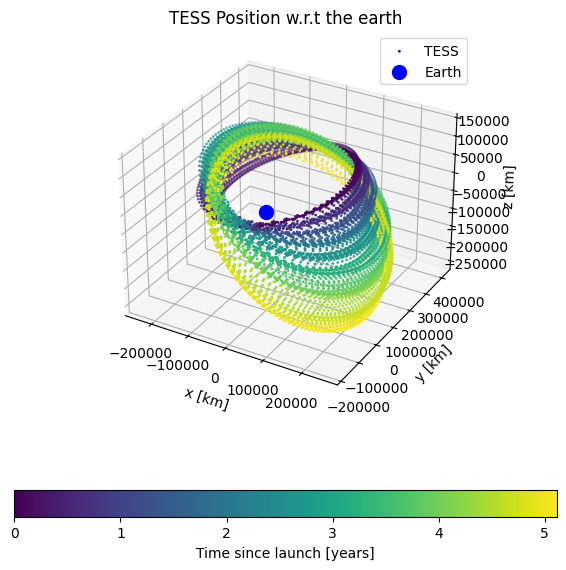
Spacecraft position at any given time with respect to the solar system barycenter, the earth, or the moon
Spacecraft velocity at any given time with respect to the solar system barycenter, the earth, or the moon
The baycentric time correction for any target RA/Dec at any time
The velocity aberration for any target RA/Dec at any time
Requirements
This package relies heavily on spiceypy which wraps SPICE. It also relies on astropy.
Installation
You can install this package with pip using
pip install lkspacecraft --upgradeYou can also install this package by cloning the repo and then installing via poetry
git clone https://github.com/lightkurve/lkspacecraft.git
cd lkspacecraft
pip install --upgrade poetry
poetry install .
This package will download and store SPICE kernels into a directory in your home area when you use any of the objects. This is approximately 1Gb of data at time of writing. This means that if you install this package in multiple environments, the SPICE kernels will not be redownloaded and will be shared between multiple installs.
To uninstall this package from your machine entirely you should clear the cache of SPICE kernel files using
from astropy.utils.data import clear_download_cache
clear_download_cache(pkgname='lkspacecraft')
or by deleting the .lkspacecraft/cache/ directory in your home area. You can then uninstall with pip, or if you cloned the repository you can delete the directory.
This package now installs with a lightweight set of truncated kernels which can be used to test the functionality, but cover a very limited time range and set of bodies. These files are available in src/data/kernels/testkernels.
Usage
lkspacecraft provides Spacecraft object which will enable you to access the orbital parameters of either the Kepler or TESS spacecraft. lkspacecraft will obtain the relevant SPICE kernels to calculate the spacecraft position and velocity. To get the orbital elements you will need to pick a time that is within the relevant window of those SPICE kernels (i.e. when the mission was operational).
You can find the start and end times of the kernels using the following
from lkspacecraft import KeplerSpacecraft

ks = KeplerSpacecraft()
ks.start_time, ks.end_time
All times in lkspacecraft use astropy.time.Time objects. Using the get_spacecraft_position or get_spacecraft_velocity functions will provide you with the position or velocity in cartesian coordinates, for example
from lkspacecraft import KeplerSpacecraft
from astropy.time import Time

ks = KeplerSpacecraft()
t = Time("2009-04-06 06:22:56.000025")
ks.get_spacecraft_velocity(t)
will result in
array([[ 6.94188023, -26.24714425, -11.16828662]])
This will give the velocity with respect to the solar system barycenter by default, but you can specify the earth or moon using
from lkspacecraft import KeplerSpacecraft
from astropy.time import Time

ks = KeplerSpacecraft()
t = Time("2009-04-06 06:22:56.000025")
ks.get_spacecraft_velocity(time=t, observer="earth")
You are able to calculate the light arrival time of observations of a source at a given RA/Dec using lkspacecraft’s get_barycentric_time_correction function. This will give you the time delay in seconds from spacecraft time to time at the barycenter.
from lkspacecraft import KeplerSpacecraft
from astropy.time import Time

ks = KeplerSpacecraft()
t = Time("2009-04-06 06:22:56.000025")
ks.get_barycentric_time_correction(time=t, ra=290.666, dec=44.5)
Finally you can calculate velocity aberration using
from lkspacecraft import KeplerSpacecraft
from astropy.time import Time

ks = KeplerSpacecraft()
t = Time("2009-04-06 06:22:56.000025")
ks.get_velocity_aberrated_positions(time=t, ra=290.666, dec=44.5)
Units
In lkspacecraft, just as in SPICE, units are km and s, unless otherwise specified.
Kernels
lkspacecraft will obtain the SPICE kernels for Kepler and TESS for you store them. Kernels can be found here:
The generic kernels can be obtained from NAIF generic kernels: https://naif.jpl.nasa.gov/pub/naif/generic_kernels/ The Kepler kernels can be obtained from MAST: https://archive.stsci.edu/missions/kepler/spice/ The K2 kernels can be obtained from MAST: https://archive.stsci.edu/missions/k2/spice/ The TESS kernels can be obtained from MAST: https://archive.stsci.edu/missions/tess/engineering/ https://archive.stsci.edu/missions/tess/models/
When you first initialize an lkspacecraft.Spacecraft object in Python all the kernels will be downloaded for you, and lkspacecraft will check if there are new kernels available. This will take approximately 5 minutes if you have no kernels, depending on your internet connection. Once this has been done, the kernels will be cached. If there are new TESS kernels available lkspacecraft will retrieve them for you and update the cache.
The total file volume for the kernels is ~1GB. These cached files are stored using astropy’s cache. If you want to clear the cache you can do either of the following;
from lkspacecraft.utils import clear_download_cache
clear_download_cache()
from astropy.utils.data import clear_download_cache
clear_download_cache(pkgname='lkspacecraft')Because the kernels need to be checked, every time you initialize a Spacecraft, like below, object there will be a slight delay, and lkspacecraft will connect to the internet to check for new kernels.
ks = KeplerSpacecraft()Testing lkspacecraft
If you need to run tests for lkspacecraft or run tests of your own package where lkspacecraft is a dependency, you will not want to download the kernels as this will slow down your continuous integration. lkspacecraft has a “test mode” which will use small, truncated SPICE kernels that are valid for specific dates:
For Kepler, the test kernels cover approximately one day around July 25th 2010
For TESS, the test kernels cover Sector 4 (10/18/18 - 11/15/18)
When you load lkspacecraft test mode will always be turned off. You can enable or disable test mode using
import lkspacecraft
lkspacecraft.enable_test_mode()
lkspacecraft.disable_test_mode()
If you are designing continuous integration and have lkspacecraft as a dependency, make sure to include “lkspacecraft.enable_test_mode()” before the test function.
Note that using test mode is less accurate, because the truncated files are small and interpolated. This should test functionality, but be careful when using test mode to test accuracy.
Extending lkspacecraft
If you wanted to extend lkspacecraft to include more spacecraft you would need to include more kernels in the kernel directory and ensure they are added to the meta kernel. You can then create a new class in the spacecraft.py module with the correct NAIF code.
Caveats
Velocity Aberration vs. Differential Velocity Aberration
This package will provide you velocity aberration. However, each of these spacecrafts repoint during observations to account for the bulk offset of velocity aberration. If you are interested in where stars will fall on pixels, you should consider calculating the differential velocity aberration.
Spacecraft Time
This package assumes you will provide time as the time at the spacecraft. For SPOC products, this is the time in the 'TIME' column of any fits file, with the time corrections from TIME_CORR subtracted. i.e.
t = np.asarray(hdulist[1].data['TIME'], dtype=float)
tcorr = np.asarray(hdulist[1].data['TIMECORR'], dtype=float)
# Spacecraft time:
t -= tcorr
If you are trying to accurately calculate time corrections, it is important you use the spacecraft time in all functions.
The easiest way to install lkspacecraft and all of its dependencies is to use the pip command, which is a standard part of all Python distributions. (upon release)
To install lkspacecraft, run the following command in a terminal window:
$ python -m pip install lkspacecraft --upgradeThe --upgrade flag is optional, but recommended if you already have lkspacecraft installed and want to upgrade to the latest version.
You can use lkspacecraft to access position and velocity information of Kepler and TESS using input times
from lkspacecraft import KeplerSpacecraft
ks = KeplerSpacecraft()
t = Time("2009-04-06 06:22:56.000025")
ks.get_velocity_aberrated_positions(time=t, ra=290.666, dec=44.5)
Contributing
lkspacecraft is an open-source, community driven package. We welcome users to contribute and develop new features for lkspacecraft.
For further information, please see the Lightkurve Community guidelines.
Citing
If you find lkspacecraft useful in your research, please cite it and give us a GitHub star! There is a short publication describing lkspacecraft and how it works, which you should add as a citation. Please consider adding the following acknowledgement
` This research made use of lkspacecraft, a Python tool for understanding the positions and velocities of the Kepler and TESS spacecrafts, based on SPICE and spiceypy.` `
If you use Lightkurve for work or research presented in a publication, we request the following acknowledgment and citation:
This research made use of Lightkurve, a Python package for Kepler and TESS data analysis (Lightkurve Collaboration, 2018).
See full citation instuctions, including dependencies, in the Lightkurve documentation.
Contact
lkspacecraft is an open source community project created by the TESS Science Support Center. The best way to contact us is to open an issue or to e-mail tesshelp@bigbang.gsfc.nasa.gov.
Please include a self-contained example that fully demonstrates your problem or question.
License
This project is licensed under the MIT License. See the LICENSE file for details.
Changelog:
- v1.3.0
Fixed documentation for times, forced times to be TDB, added tdb_to_utc function
- v1.2.0
Added in testing capabilities using truncated SPICE kernels
- v1.1.0
Bug fix @jorgemarpa for light travel time
- v1.0.5
Added a function for calculating DVA
- v1.0.4
Made Python version >=3.9 compliant
- v1.0.3
Added ability to calculate velocity aberration on an array of RA/Decs.
Added ability to calculate barycentric time correction on an array of RA/Decs.
- v1.0.0
First version
3 maintainers


Metadata
3 maintainers
Release files for lkspacecraft 1.3.1
For a detailed explanation of source distributions (sdists) and built distributions (wheels), please see the package formats documentation.
Source distribution (sdist)
| File | Size | Uploaded | |
|---|---|---|---|
| lkspacecraft-1.3.1.tar.gz | 361.1 kB | Details |
Built distribution (wheel)
| File | Interpreter | ABI | Platform | Reset |
|---|---|---|---|---|
| lkspacecraft-1.3.1-py3-none-any.whl | Python 3 | none | any | Details |
Total release size: 722.1 kB
Release files / lkspacecraft-1.3.1.tar.gz
| Download URL | lkspacecraft-1.3.1.tar.gz |
|---|---|
| Size | 361.1 kB |
| Tags | Source |
|
SHA-256 checksum How to use checksums |
a83708b23278c38cf19ab0abb9a69eb17a410fa00f1eb86a9e4470cd569c3a9e
|
|
BLAKE2b-256 checksum How to use checksums |
0173acf109248ab6847ece2b7270b1fbad4406d5d82e8b6e8b9f52efb59b31e5
|
| Upload date | |
|
Uploaded using Trusted Publishing? What is trusted publishing? |
No |
| Uploaded via |
poetry/2.2.1 CPython/3.9.13 Darwin/24.6.0
|
Release files / lkspacecraft-1.3.1-py3-none-any.whl
| Download URL | lkspacecraft-1.3.1-py3-none-any.whl |
|---|---|
| Size | 361.0 kB |
| Tags | Python 3 |
|
SHA-256 checksum How to use checksums |
6439fff9945123114206fb0c0f78b1fe7fd221035e4da3e865e2024d62f287c3
|
|
BLAKE2b-256 checksum How to use checksums |
ca86ce2444b770631867eda9450ed505bfd3fbe57261c8cf12c8112beed8f8c4
|
| Upload date | |
|
Uploaded using Trusted Publishing? What is trusted publishing? |
No |
| Uploaded via |
poetry/2.2.1 CPython/3.9.13 Darwin/24.6.0
|














