
Seedance by Ace Data Cloud for LlamaIndex
简体中文 · Current model access and prices
Independently maintained by Ace Data Cloud, not an official Seedance or LlamaIndex product.
The native BaseToolSpec package exposes three sync/async FunctionTools accepted
by FunctionAgent, without an MCP address or hand-written HTTP wrapper:
seedance_generate_video: submit text-to-video once.seedance_generate_video_from_image: first-frame image-to-video once.seedance_get_task: query an existing task ID, including after a process restart.
1. Install the correct native package
Python 3.10+. Standard package llama-index-tools-seedance-acedatacloud, import seedance_acedatacloud.
Source is merged; release distribution: GitHub v0.1.0.
PyPI publication is pending the shared new-project quota; an official LlamaIndex
listing is not yet approved. Install the wheel from the GitHub release after
checking that the release assets are present:
python -m pip install "https://github.com/AceDataCloud/SeedanceLlamaIndex/releases/download/v0.1.0/llama_index_tools_seedance_acedatacloud-0.1.0-py3-none-any.whl"
This package reuses the released Ace SDK, with fixed API base and retries disabled. It does not modify the shared SDK/MCP repositories. Official ToolSpec pattern.
2. Register/sign in and get the application API Token
- Register or sign in to Ace Data Cloud.
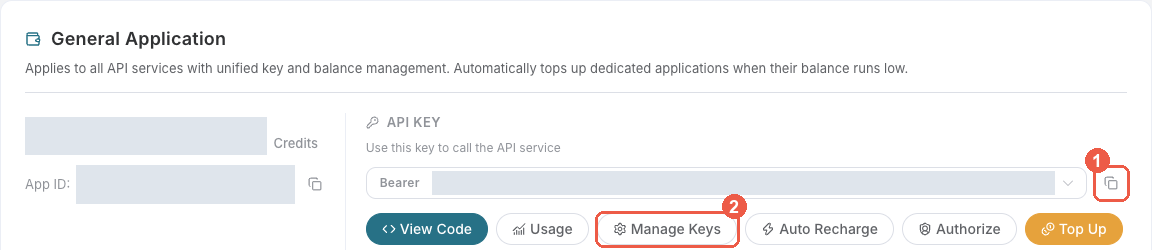
- Open Applications. Find General application; if absent, click Initialize General Application. Its key uses only the services permitted for your account; a dedicated application's key is service-limited.
- Copy an API Key, or choose Manage Keys → Create for a separate
LlamaIndex Seedancekey. Check model availability, service access, balance and current pricing before generating.
- Review Expiration Time, Set Usage Limitation, Allowed APIs.
If restricting APIs, allow
/seedance/videosand/seedance/tasks. Create, return to the key list and copy only the raw token; do not includeBearer, spaces, quotes or redacted screenshot characters.platform-...management tokens do not work here.
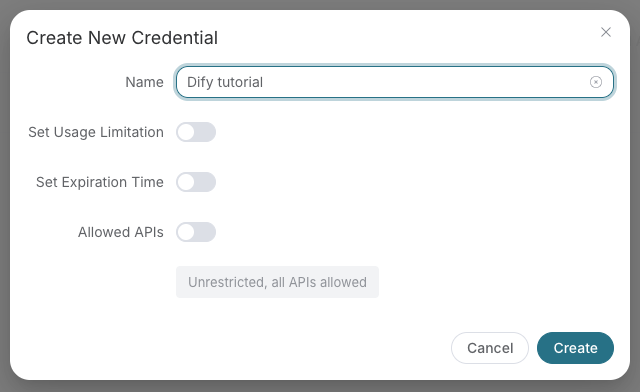
These real redacted images are reused from SunoDify's linked fixed commit,
retrieved 2026-10-18. The old example name Dify tutorial is historical;
use LlamaIndex Seedance. These show generic Ace account setup, not this tool running.
3. Paste the key in the native configuration
Set ACEDATACLOUD_API_TOKEN in the application environment, or pass api_token
from a secret store. No key is included in the agent-visible tool schema.
from llama_index.tools.seedance_acedatacloud import SeedanceToolSpec

spec = SeedanceToolSpec()
tools = spec.to_tool_list()
print([tool.metadata.name for tool in tools])
# With your existing supported LlamaIndex LLM:
# agent = FunctionAgent(llm=llm, tools=tools)
Constructing tools and inspecting schemas sends no generation. LlamaIndex is a code framework: no new settings page, provider dropdown or media GUI is promised. Do not put credentials in prompts, logs, exported notebooks or Git.
4. First use and same-task recovery
The next snippet creates a billable task. Replace the model placeholder with a model currently available to your account and approve the cost before running it. There is no default or fallback model. Output/cost parameters are explicit.
import asyncio
from llama_index.tools.seedance_acedatacloud import SeedanceToolSpec


async def main():
    spec = SeedanceToolSpec()
    try:
        tools = spec.to_tool_list()
        submission = (
            await tools[0].acall(
                prompt="A quiet sunrise garden, gentle camera movement.",
                model="YOUR_AVAILABLE_MODEL",
                duration=5,
                resolution="720p",
            )
        ).raw_output
        task_id = submission["task_id"]  # save outside this process
        await asyncio.sleep(15)
        result = (await tools[2].acall(task_id=task_id)).raw_output
        print(result)
    finally:
        await spec.aclose()


asyncio.run(main())
One submit and one query only. A pending result is normal. Query only the same
ID after at least 15 seconds; never rerun the whole generation to check progress.
After restarting your application, load a new SeedanceToolSpec with the same authorized
application key and call the query tool. No local generation state is required:
python examples/query_existing.py YOUR_EXISTING_TASK_ID
Final output requires status=succeeded, success=true and non-empty media_urls.
Pending/processing preview links are hidden. Failed task states stay failed;
unknown IDs return not_found, not an invitation to resubmit. A returned task ID
that differs from the requested one is rejected. 401/403/429/500 keep SDK error meaning,
and there are zero automatic retries. For ambiguous timeouts/missing task IDs,
inspect account history before considering another paid submission.
Service contract and supported scope
The text tool maps prompt to content=[{"type":"text","text":prompt}]. First-frame animation adds an image_url block with role="first_frame". generate_audio=false is explicit. Duration is explicit (2–12 for 1.0; 4–12 for 1.5; 4–15 for 2.0; 4–30 for 2.5). 4k is only allowed for doubao-seedance-2-0-260128; 2.0 fast/mini max 720p. Advanced multimodal, edit/extend and callback options are not exposed by this focused package.
Image inputs are public HTTP(S) URLs without embedded credentials. Local files and inline data URIs are intentionally outside this adapter's input surface. Current contracts and pinned sources. Other endpoints/advanced actions are not implied by the presence of these tools.
5. Verify without paid API calls
pip install -e ".[dev]"
python examples/offline.py
pytest
ruff check .
ruff format --check .
python -m build
The offline example calls real native tools/SDK with mocked HTTP and synthetic IDs/media URLs. CI installs a built wheel outside the source tree and verifies submit → recover with a new tool instance → same-ID query. This is not a real media/billing receipt. The package does not synthesize a final text answer.
| Symptom | What to do |
|---|---|
| Package absent on PyPI | Use the GitHub release wheel while PyPI quota is pending. |
| Missing key / 401 | Recopy raw application token; check expiry, API restrictions and service access. |
| 403 or balance error | Check the exact service/model entitlement and budget, not repeated generation. |
| 429 / network timeout | No retries; inspect whether the task was accepted before another submission. |
| Pending / preview URLs | Wait, query the same ID. Only final media_urls are deliverable output. |
| not_found / denied query | Verify task ID and owning application access. Knowing an ID does not grant permission. |
| Unsupported action/model options | Choose explicit parameters for this tool's documented action; no model substitution. |
Release and official discovery
The existing authorized organization publisher is reused; no new account or Trusted Publisher setup is required for this token path. PyPI publication is pending the shared new-project quota. GitHub wheel/sdist assets are published independently. See release and retry details. Official documentation discovery is coordinated via https://github.com/run-llama/llama_index/pull/23574 ; draft is not approved inclusion.
MIT. Seedance names identify the supported service; Ace Data Cloud maintains this integration.
1 maintainer

Metadata
1 maintainer
Release files for llama-index-tools-seedance-acedatacloud 0.1.0
For a detailed explanation of source distributions (sdists) and built distributions (wheels), please see the package formats documentation.
Source distribution (sdist)
| File | Size | Uploaded | Provenance | Actions |
|---|---|---|---|---|
| llama_index_tools_seedance_acedatacloud-0.1.0.tar.gz | 15.4 kB | Without provenance | Details for llama_index_tools_seedance_acedatacloud-0.1.0.tar.gz |
Built distribution (wheel)
| File | Interpreter | ABI | Platform | Actions Reset |
|---|---|---|---|---|
| llama_index_tools_seedance_acedatacloud-0.1.0-py3-none-any.whl | Python 3 | none | any | Details for llama_index_tools_seedance_acedatacloud-0.1.0-py3-none-any.whl |
Total release size: 25.0 kB
Release files / llama_index_tools_seedance_acedatacloud-0.1.0.tar.gz
| Download URL | llama_index_tools_seedance_acedatacloud-0.1.0.tar.gz |
|---|---|
| Size | 15.4 kB |
| Tags | Source |
|
SHA-256 checksum How to use checksums |
2215e4b88d2e96be64d6aaa41dadfac89b2553349578a3436652c4d1a31f5481
|
|
BLAKE2b-256 checksum How to use checksums |
6ff86e9a179349f5fe9b7850eee78debfbf95f105bad22cea484a66980b37aaf
|
| Upload date | |
|
Uploaded using Trusted Publishing? What is trusted publishing? |
No |
| Uploaded via |
twine/7.0.0 CPython/3.13.16
|
Release files / llama_index_tools_seedance_acedatacloud-0.1.0-py3-none-any.whl
| Download URL | llama_index_tools_seedance_acedatacloud-0.1.0-py3-none-any.whl |
|---|---|
| Size | 9.7 kB |
| Tags | Python 3 |
|
SHA-256 checksum How to use checksums |
a54172e1e7373e2bb152c65ba76d1dac357766d8bf0f9862fe65fde84de63eb8
|
|
BLAKE2b-256 checksum How to use checksums |
f8bab926a75ae6a9f225c11d6eb3768e9cfe06b07d60e5ead264e23e4604797b
|
| Upload date | |
|
Uploaded using Trusted Publishing? What is trusted publishing? |
No |
| Uploaded via |
twine/7.0.0 CPython/3.13.16
|
Security for llama-index-tools-seedance-acedatacloud 0.1.0
Provenance
Provenance describes where a file came from. On PyPI, provenance is shared via attestations, which provide a verifiable record of the build or publishing details. View details, limitations and caveats.
No provenance found
None of the files in this release were uploaded with provenance metadata.
A note on package security
PyPI is a repository for distributing packages, not a service for auditing them. While third-party security researchers and our staff do their best to detect and remove malicious packages, PyPI cannot guarantee the quality, security or suitability of any given package.
To learn more about protecting yourself from malicious actors, visit our package security documentation.













