
Suno by Ace Data Cloud for LlamaIndex
简体中文 · API access and current pricing
Native LlamaIndex music tools, maintained by Ace Data Cloud. Install this
single-service package and pass SunoToolSpec().to_tool_list() to your agent.
You do not configure an MCP server or implement your own HTTP tools. This is an
Ace-provided Suno integration, not an official Suno or LlamaIndex product.
suno_generate_music: submit once, returning a task ID.suno_get_task: retrieve the same task; final audio URLs appear after success.- Synchronous and asynchronous native
FunctionToolcalls share the same schema. - A model must be chosen explicitly. No fallback or automatic generation retries.
1. Install this integration
Python 3.10–3.12 are tested. The standard distribution name is
llama-index-tools-suno-acedatacloud (namespace llama_index.tools.suno_acedatacloud).
Source is merged; release distribution: GitHub v0.1.0.
PyPI publication is pending the shared new-project quota; an official LlamaIndex
listing is not yet approved. Install the wheel from the GitHub release after
checking that the release assets are present:
python -m pip install "https://github.com/AceDataCloud/SunoLlamaIndex/releases/download/v0.1.0/llama_index_tools_suno_acedatacloud-0.1.0-py3-none-any.whl"
This installs the native tool package, not the older SDK search/extraction example. The package uses the published Ace SDK; it does not copy shared SDK or MCP code. Official LlamaIndex tool concepts.
2. Register and get an application API Token
- Register or sign in to Ace Data Cloud.
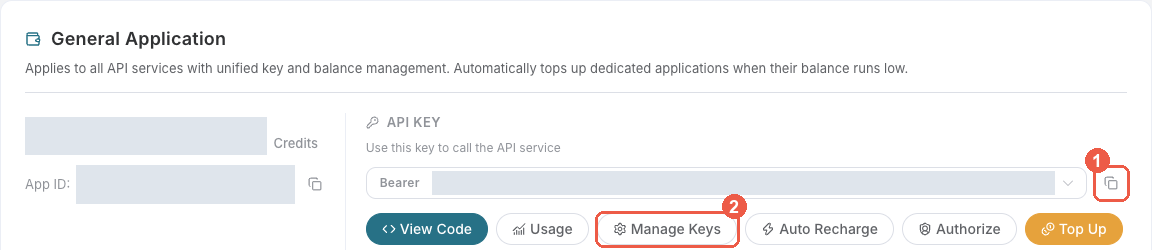
- Open Applications. Find General application; if absent, select Initialize General Application. Its key can use services your account is entitled to. A service-specific application's key is limited to that service.
- Copy an existing API Key, or choose Manage Keys → Create for a dedicated
LlamaIndex Sunokey. Check Suno access, current model availability, usage limits and balance/pricing first.
- When creating a key, review Expiration Time, Set Usage Limitation,
and Allowed APIs. If API restrictions are enabled, allow both
/suno/audiosand/suno/tasks. Create the key, return to the key list, then copy the token value.
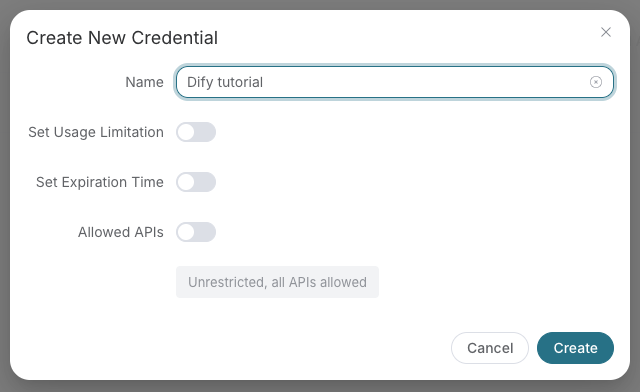
These are real Ace console screenshots reused from the Suno Dify guide at the
linked fixed source commit, retrieved 2026-10-18 (the create-key image retains the
old example name Dify tutorial; enter LlamaIndex Suno instead); they show account setup, not
LlamaIndex execution. Visible key values are redacted. Layout can change.
Use the raw application token, without Bearer , quote characters or spaces.
A platform-... account-management token cannot replace it. Never paste a key
into an agent prompt, notebook output, committed code or screenshot.
3. Put the token in the native tool constructor
Set ACEDATACLOUD_API_TOKEN in your environment; SunoToolSpec() reads it.
Alternatively pass api_token=your_secret_from_a_credential_store in application
code. The token is never an argument in the agent-visible tool schema.
from llama_index.tools.suno_acedatacloud import SunoToolSpec

spec = SunoToolSpec()
tools = spec.to_tool_list()
print([tool.metadata.name for tool in tools])
# ['suno_generate_music', 'suno_get_task']

# With your existing function-calling LlamaIndex LLM:
# from llama_index.core.agent.workflow import FunctionAgent
# agent = FunctionAgent(llm=llm, tools=tools)
Constructing the tools and inspecting metadata sends no generation request. This is a code framework: there is no claimed new settings page, provider selector or music GUI. Official debugging screenshots are historical references only; the free consumer test below runs native tools.
4. Submit once, then query the same task
The following creates a billable music task if run with a valid token. Use only after you have authorized its cost and chosen an available Suno model from your current account. The integration deliberately has no default model.
import asyncio
from llama_index.tools.suno_acedatacloud import SunoToolSpec


async def main():
    spec = SunoToolSpec()
    try:
        generate, retrieve = spec.to_tool_list()
        submission = (
            await generate.acall(
                prompt="A gentle instrumental piano melody for a sunrise.",
                model="YOUR_AVAILABLE_SUNO_MODEL",
                instrumental=True,
            )
        ).raw_output
        print(submission["task_id"])
        # Store this ID. Wait at least 15 seconds before each pending query.
        await asyncio.sleep(15)
        result = (await retrieve.acall(task_id=submission["task_id"])).raw_output
        print(result)
    finally:
        await spec.aclose()


asyncio.run(main())
This makes one submission and one query; it does not wait indefinitely. If the
result is pending, save its task ID and call only suno_get_task again after
15 seconds. Do not rerun generation to check progress. You can also query a
previous ID using python examples/query_existing.py YOUR_EXISTING_TASK_ID.
Query access does not authorize a new paid task. See task API.
Only status="succeeded", success=true and non-empty media_urls represent
completed audio. processing and streaming preview URLs remain pending and are
hidden from media_urls. A task failure stays failed. An HTTP 401/403/429/500
keeps the SDK error type. On an ambiguous timeout or missing task ID, inspect
your account history instead of automatically generating again.
A completed tool result has this shape (illustrative values, not a live receipt):
{"task_id":"your-task-id","status":"succeeded","success":true,
 "media_urls":["https://.../final.mp3"],"trace_id":"your-trace-id",
 "polling_interval_seconds":null}
5. Verify without a real key or paid request
python -m pip install -e ".[dev]"
python examples/offline.py
pytest
ruff check .
ruff format --check .
python -m build
The offline consumer uses synthetic HTTP responses, a dummy token and
example.invalid media URLs. It calls real LlamaIndex native tools and the
published SDK; it does not generate real music. CI also installs the built wheel
in a separate environment before running that consumer. Passing tests do not
prove a paid generation, final media, a unique bill, official listing or revenue.
Troubleshooting
| Symptom | Action |
|---|---|
| Package not found on PyPI | Use the published GitHub wheel while PyPI project-creation quota is pending. |
| Missing key or 401 | Copy the full raw application token; check expiry, permissions and service access. |
| 403 or insufficient balance | Inspect the upstream SDK error and account limits; do not generate repeatedly. |
| 429 or network timeout | Automatic retries are off; inspect submission/task history before another generation. |
| Still pending / preview audio | Wait, then query the same ID; do not resubmit. |
| Query denied | Allow /suno/tasks for the same application/key; another account's ID is not access. |
| No final media after a success flag | Inspect the same task; do not fabricate a final URL or resubmit. |
Distribution and official discovery
This package follows LlamaIndex's independent integration naming and namespace. Upstream policy no longer accepts new packages in the monorepo. The existing authorized organization publisher is reused. The shared registry new-project quota is the current PyPI gate; GitHub assets are independent. See release and retry details. The old LlamaHub site has moved to the current official integration docs. Official discoverability and default inclusion are not claimed.
MIT. Suno names identify the supported service; Ace Data Cloud maintains this integration.
1 maintainer

Metadata
1 maintainer
Release files for llama-index-tools-suno-acedatacloud 0.1.0
For a detailed explanation of source distributions (sdists) and built distributions (wheels), please see the package formats documentation.
Source distribution (sdist)
| File | Size | Uploaded | Provenance | Actions |
|---|---|---|---|---|
| llama_index_tools_suno_acedatacloud-0.1.0.tar.gz | 14.2 kB | Without provenance | Details for llama_index_tools_suno_acedatacloud-0.1.0.tar.gz |
Built distribution (wheel)
| File | Interpreter | ABI | Platform | Actions Reset |
|---|---|---|---|---|
| llama_index_tools_suno_acedatacloud-0.1.0-py3-none-any.whl | Python 3 | none | any | Details for llama_index_tools_suno_acedatacloud-0.1.0-py3-none-any.whl |
Total release size: 23.1 kB
Release files / llama_index_tools_suno_acedatacloud-0.1.0.tar.gz
| Download URL | llama_index_tools_suno_acedatacloud-0.1.0.tar.gz |
|---|---|
| Size | 14.2 kB |
| Tags | Source |
|
SHA-256 checksum How to use checksums |
33a8ff791a80b7d1e9a24a44da887fceede8003a24f3ed23abb3b1e9b32bbace
|
|
BLAKE2b-256 checksum How to use checksums |
16421eddedc5a1c4781913789cdca82a66a8b4b0205165043d2c59fd172f08a9
|
| Upload date | |
|
Uploaded using Trusted Publishing? What is trusted publishing? |
No |
| Uploaded via |
twine/7.0.0 CPython/3.13.16
|
Release files / llama_index_tools_suno_acedatacloud-0.1.0-py3-none-any.whl
| Download URL | llama_index_tools_suno_acedatacloud-0.1.0-py3-none-any.whl |
|---|---|
| Size | 9.0 kB |
| Tags | Python 3 |
|
SHA-256 checksum How to use checksums |
8a32e778b7ebe76461d5f70f1fe581a01bde3cc6bacc09f6b93d3615bfe8b159
|
|
BLAKE2b-256 checksum How to use checksums |
aa24afd77077e0e7b000fc82455be80f21a4358c40cf6c71cd64d5b1b1196eed
|
| Upload date | |
|
Uploaded using Trusted Publishing? What is trusted publishing? |
No |
| Uploaded via |
twine/7.0.0 CPython/3.13.16
|
Security for llama-index-tools-suno-acedatacloud 0.1.0
Provenance
Provenance describes where a file came from. On PyPI, provenance is shared via attestations, which provide a verifiable record of the build or publishing details. View details, limitations and caveats.
No provenance found
None of the files in this release were uploaded with provenance metadata.
A note on package security
PyPI is a repository for distributing packages, not a service for auditing them. While third-party security researchers and our staff do their best to detect and remove malicious packages, PyPI cannot guarantee the quality, security or suitability of any given package.
To learn more about protecting yourself from malicious actors, visit our package security documentation.













