
llamagent
Un agent de code minimal en Python, écrit à la main pour comprendre comment fonctionne un agent de code : boucle agentique, harness, outils, prompt système, skills et garde-fous.
Il pilote un LLM local servi par Ollama (par défaut qwen3.5:4b) via l'API native /api/chat. Aucun framework d'agent : une seule dépendance, requests.
📖 Tutoriel complet, étape par étape : nils-malmberg.fr/project8.html
Installation
Prérequis : un serveur Ollama avec un modèle qui gère les outils (ollama pull qwen3.5:4b).
uv tool install llamagent # ou : pipx install llamagent
Si Ollama ne tourne pas sur la même machine, indiquez son adresse dans ~/.llamagent/config.toml (sous Windows : C:\Users\<vous>\.llamagent\config.toml) :
url = "http://192.168.1.76:11434"
Utilisation
cd chemin/vers/mon-projet
llamagent                                   # mode conversation
llamagent "Trouve le bug dans @calc.py"     # une seule demande, puis on quitte
llamagent -c                                # reprendre la dernière conversation
llamagent -m qwen3.5:9b -t 0.5              # choisir le modèle et la température
llamagent --help
Le dossier depuis lequel on lance llamagent devient le dossier de travail : les outils de fichiers ne peuvent ni lire ni écrire ailleurs.
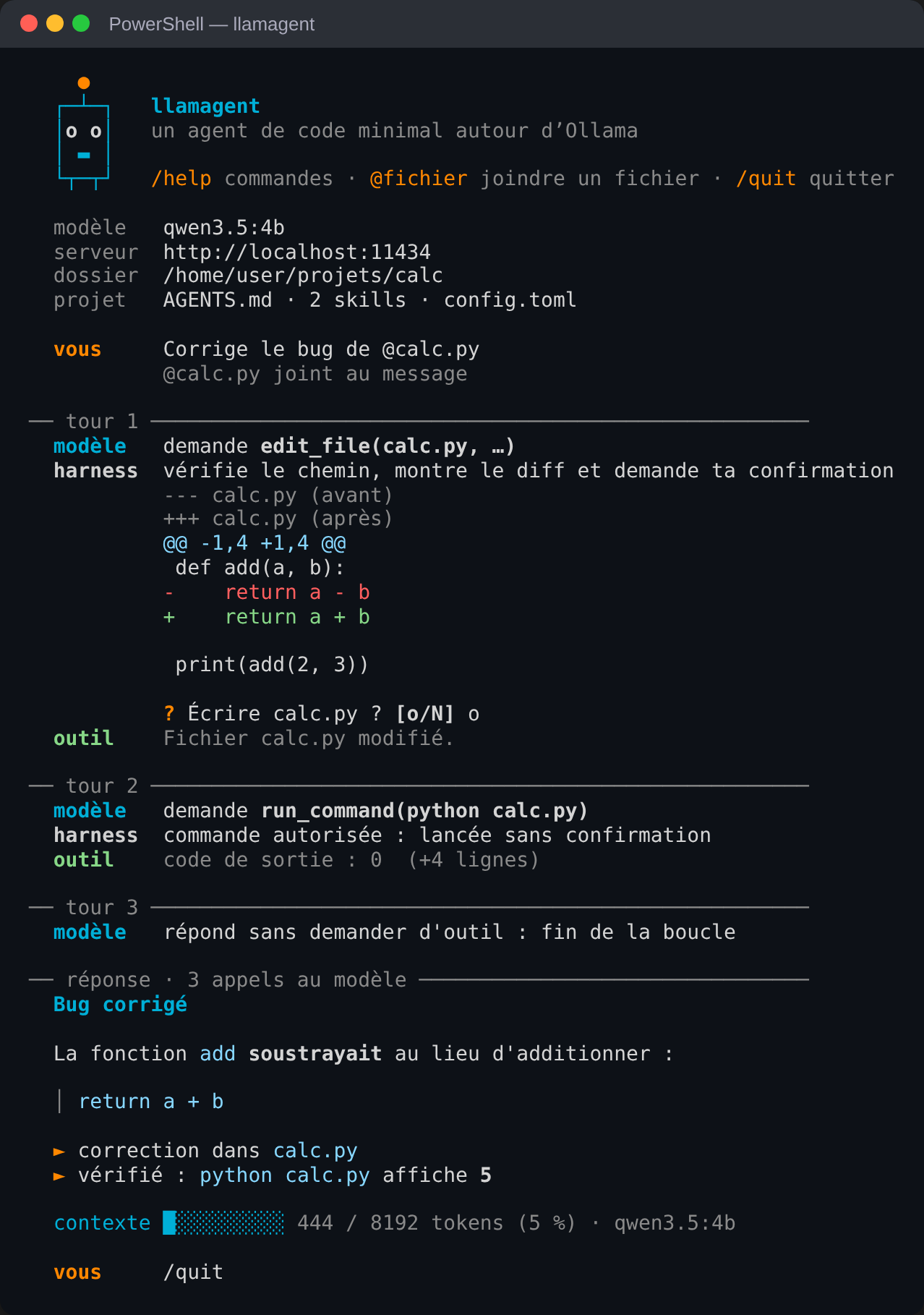
Chaque tour de la boucle est affiché avec ses trois acteurs : le modèle (ce qu'il demande), le harness (ce que les garde-fous en font) et l'outil (ce qu'il renvoie).
Commandes
| Commande | Rôle |
|---|---|
/help |
liste des commandes |
/init |
préparer le projet : crée AGENTS.md et le dossier .llamagent/ |
/config |
réglages actuels |
/models, /model qwen3.5:9b |
modèles installés, changer de modèle |
/temp 0.5, /ctx 16384 |
changer la température, la taille du contexte |
/skills, /skill corriger-un-bug |
skills disponibles, charger une skill |
/context, /compact |
ce qui occupe le contexte, le compacter (automatique à 80 %) |
/sessions, /resume 2, /delete 2 |
conversations sauvegardées |
/allow python -m pytest |
lancer une commande sans confirmation pour la session |
/clear, /quit |
effacer la conversation, quitter |
@chemin dans une demande joint le contenu du fichier.
Configuration
Les réglages viennent de cinq sources ; chacune remplace la précédente :
- les valeurs par défaut ;
- le fichier global
~/.llamagent/config.toml; - le fichier du projet
.llamagent/config.toml; - les variables d'environnement
OLLAMA_URLetOLLAMA_MODEL; - les options de la ligne de commande.
url = "http://localhost:11434"
model = "qwen3.5:4b"
temperature = 0.2
num_ctx = 8192
allowed_commands = ["python -m pytest", "git status", "git diff"]
Autres variables : LLAMAGENT_WORKDIR (dossier de travail) et NO_COLOR (affichage sans couleurs).
Personnaliser un projet
mon-projet/
├── AGENTS.md              # consignes du projet, ajoutées au prompt système
└── .llamagent/
    ├── .gitignore         # exclut sessions/ de git
    ├── config.toml        # réglages du projet
    ├── sessions/          # conversations sauvegardées
    └── skills/            # skills du projet (remplacent les globales de même nom)
/init crée ces fichiers. Une skill est un fichier Markdown avec un en-tête description: ; le modèle la charge avec l'outil load_skill quand la demande correspond.
---
description: Écrire des tests pytest pour un module Python.
---
# Écrire des tests pytest

1. Lis le module à tester avec read_file.
2. ...
Limites
- Seuls les outils de fichiers sont confinés au dossier de travail. Une commande lancée par
run_commandpeut écrire ailleurs : la protection est la confirmation[o/N]. Les commandes autorisées sont un confort, pas une barrière de sécurité. - Avec un modèle 4B et 8192 tokens, le contexte se remplit vite :
/compactle résume. - Un petit modèle peut inventer un outil, se tromper de chemin ou répéter un appel. Les erreurs lui sont renvoyées pour qu'il se corrige, mais il n'y arrive pas toujours.
Développement
git clone https://github.com/nils-malmberg/llamagent.git
cd llamagent
uv sync
uv run pytest -q
uv tool install -e .     # la commande llamagent utilise ce dossier
Chaque push lance les tests sous Windows, macOS et Linux (Python 3.11 à 3.13). Pour publier une version : mettre à jour version dans pyproject.toml, puis créer et pousser l'étiquette correspondante (git tag v0.1.0 && git push origin v0.1.0) ; le paquet est publié sur TestPyPI, puis sur PyPI après validation.
Licence
MIT, voir LICENSE.
1 maintainer

Metadata
1 maintainer
Release files for llamagent 0.1.0
For a detailed explanation of source distributions (sdists) and built distributions (wheels), please see the package formats documentation.
Source distribution (sdist)
| File | Size | Uploaded | Provenance | |
|---|---|---|---|---|
| llamagent-0.1.0.tar.gz | 296.3 kB | With provenance | Details |
Built distribution (wheel)
| File | Interpreter | ABI | Platform | Reset |
|---|---|---|---|---|
| llamagent-0.1.0-py3-none-any.whl | Python 3 | none | any | Details |
Total release size: 332.8 kB
Release files / llamagent-0.1.0.tar.gz
| Download URL | llamagent-0.1.0.tar.gz |
|---|---|
| Size | 296.3 kB |
| Tags | Source |
|
SHA-256 checksum How to use checksums |
66f81bae0fd709957fd889282d2dffb0e93d32d67aa3e87132cdbb5ca28ea4ef
|
|
BLAKE2b-256 checksum How to use checksums |
1bf1250d02e6642f026fce10ee9bf8928157208c8cf80ab9f03e56af4d70a5b7
|
| Upload date | |
|
Uploaded using Trusted Publishing? What is trusted publishing? |
Yes |
| Uploaded via |
twine/7.0.0 CPython/3.13.16
|
Provenance
Provenance describes where a file came from. On PyPI, provenance is shared via attestations, which provide a verifiable record of the build or publishing details. View details, limitations and caveats.


PyPI Publish Attestation
PyPI verified that this artifact, at this checksum, originated from the publisher listed below.
Signed by GitHub Actions, verified by PyPI on Oct 25, 2026.
Transparency logRelease files / llamagent-0.1.0-py3-none-any.whl
| Download URL | llamagent-0.1.0-py3-none-any.whl |
|---|---|
| Size | 36.5 kB |
| Tags | Python 3 |
|
SHA-256 checksum How to use checksums |
8f8e4f37a7056219595625074889a3c530fe90b5b23ca1ce04dbcc4de9704d84
|
|
BLAKE2b-256 checksum How to use checksums |
68f264bfdff0d3f6acf6b1f3a969995f31ba7a1402a574c4e0565c02c8364a6f
|
| Upload date | |
|
Uploaded using Trusted Publishing? What is trusted publishing? |
Yes |
| Uploaded via |
twine/7.0.0 CPython/3.13.16
|
Provenance
Provenance describes where a file came from. On PyPI, provenance is shared via attestations, which provide a verifiable record of the build or publishing details. View details, limitations and caveats.
PyPI Publish Attestation
PyPI verified that this artifact, at this checksum, originated from the publisher listed below.
Signed by GitHub Actions, verified by PyPI on Oct 25, 2026.
Transparency logSecurity for llamagent 0.1.0
Provenance
Provenance describes where a file came from. On PyPI, provenance is shared via attestations, which provide a verifiable record of the build or publishing details. View details, limitations and caveats.
Full provenance
All 2 files in this release have been uploaded with provenance metadata.
Attestation for llamagent-0.1.0.tar.gz
PyPI Publish Attestation
PyPI verified that this artifact, at this checksum, originated from the publisher listed below.
Signed by GitHub Actions, verified by PyPI on Oct 25, 2026.
Transparency logA note on package security
PyPI is a repository for distributing packages, not a service for auditing them. While third-party security researchers and our staff do their best to detect and remove malicious packages, PyPI cannot guarantee the quality, security or suitability of any given package.
To learn more about protecting yourself from malicious actors, visit our package security documentation.













