
Llamathon
Put your LLM server through a marathon.
One command to benchmark its inference capacity — real workloads, race-ready reports.



📊 Voir un rapport réel →
— live report.html from an actual run, no setup.
llamathon is an orchestrator around
llama-benchy. It:
- Finds the model(s) — either the name(s) you pass, or by auto-detecting
what is installed on the machine where the script runs (Ollama, an
OpenAI-compatible endpoint, or local
.gguffiles). - Sizes the workload from a real prompt + result — it counts their token length with the model's own tokenizer, so the benchmark reflects a realistic request instead of arbitrary default token counts.
- Runs llama-benchy against the endpoint and exports JSON stats.
- Renders charts (PNG) and a Markdown report so results are easy to read, share, and compare between models and servers.
Built to be dropped onto a server and run unattended.
Table of contents
- Example report
- Quick start
- How it works
- Installation
- Usage
- Exit codes
- Model auto-detection
- Token counting
- Output
- Server deployment
- Development
- Troubleshooting
- FAQ
Example report
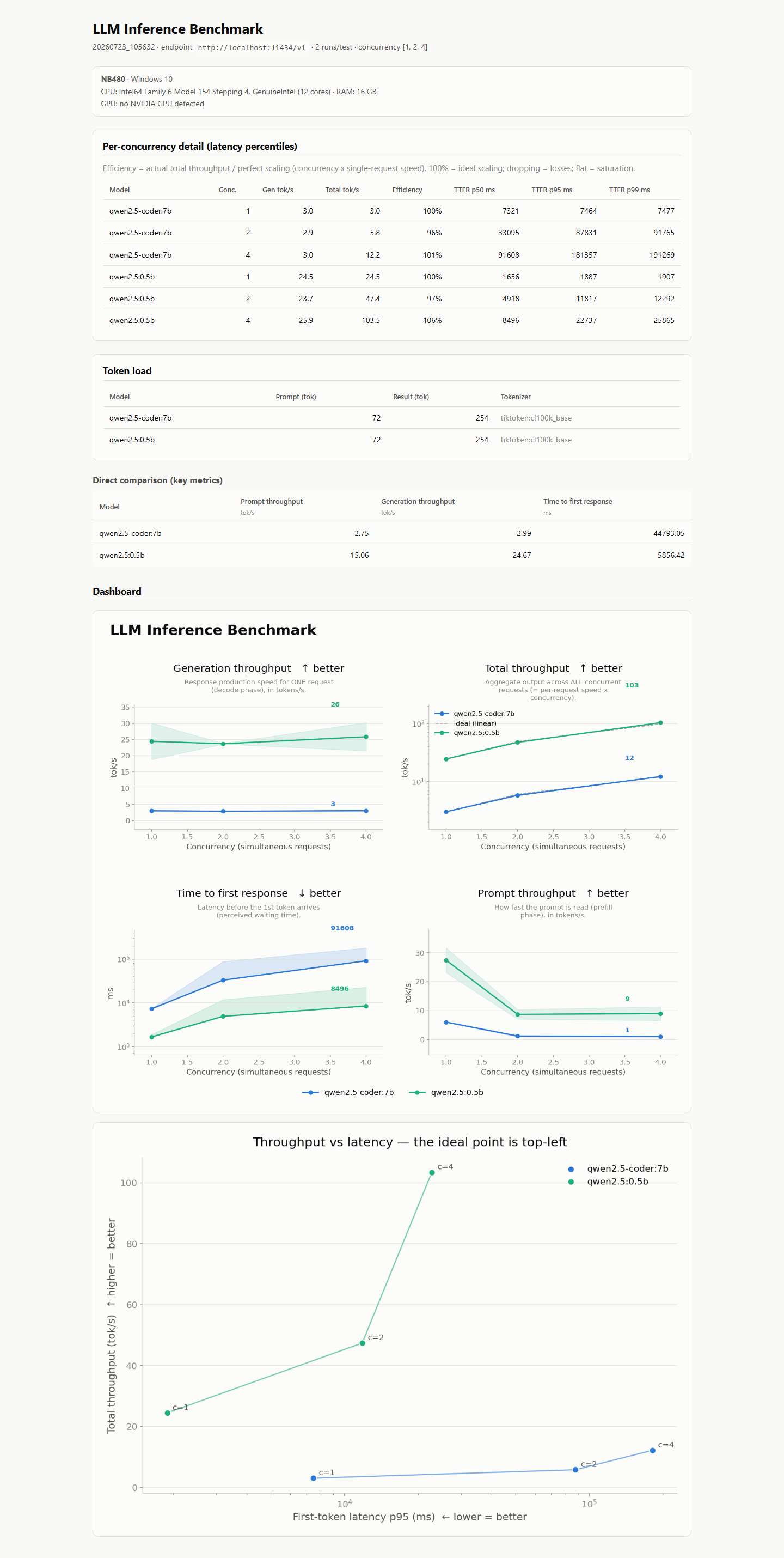
Real output from a run on a 12-core CPU laptop (no GPU), racing
qwen2.5-coder:7b against qwen2.5:0.5b through Ollama.
report.html — one self-contained page: server specs, latency percentiles
per concurrency level, token load, model comparison, dashboard and Pareto chart:
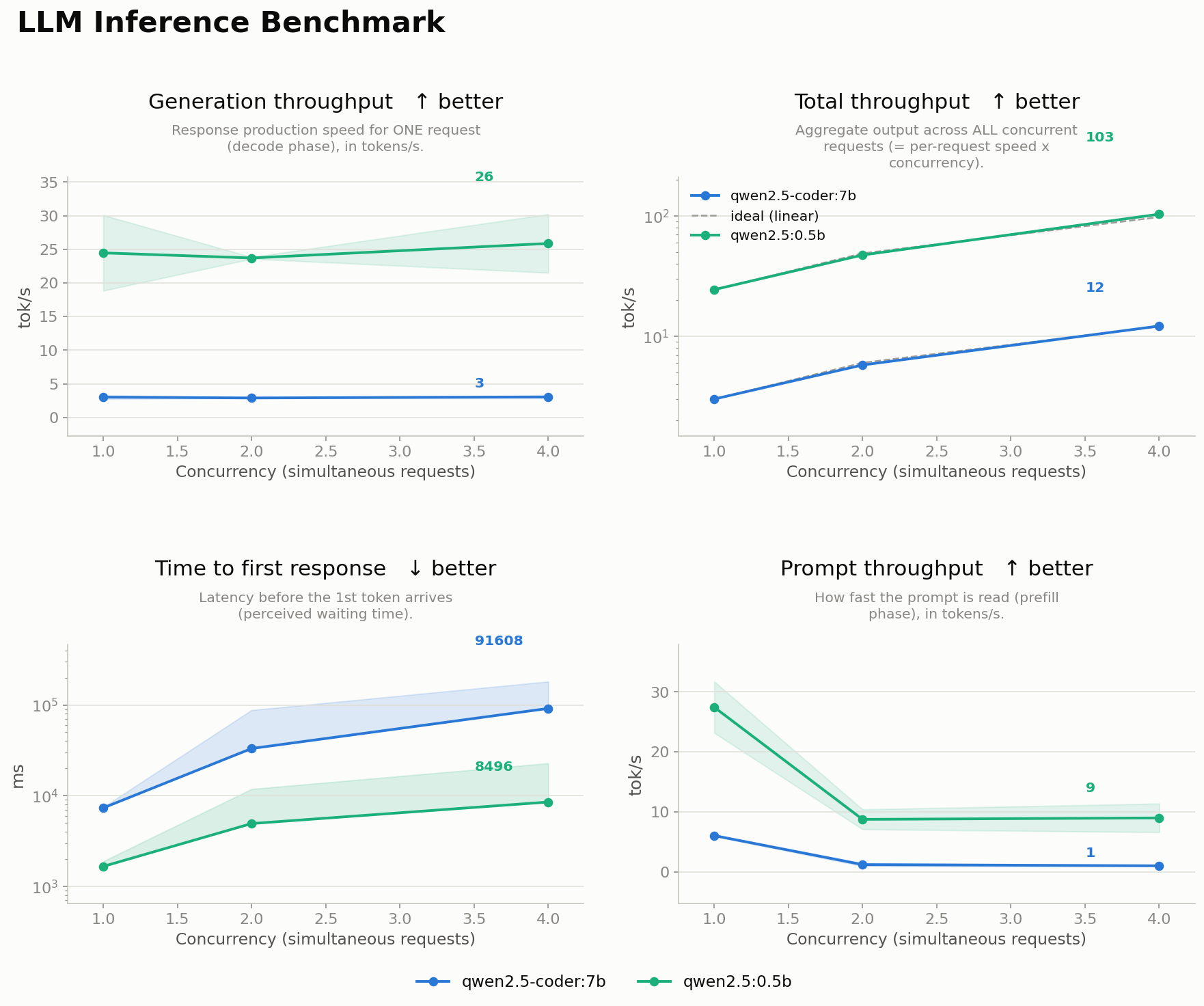
dashboard.png — throughput & latency curves vs concurrency, one line per model:
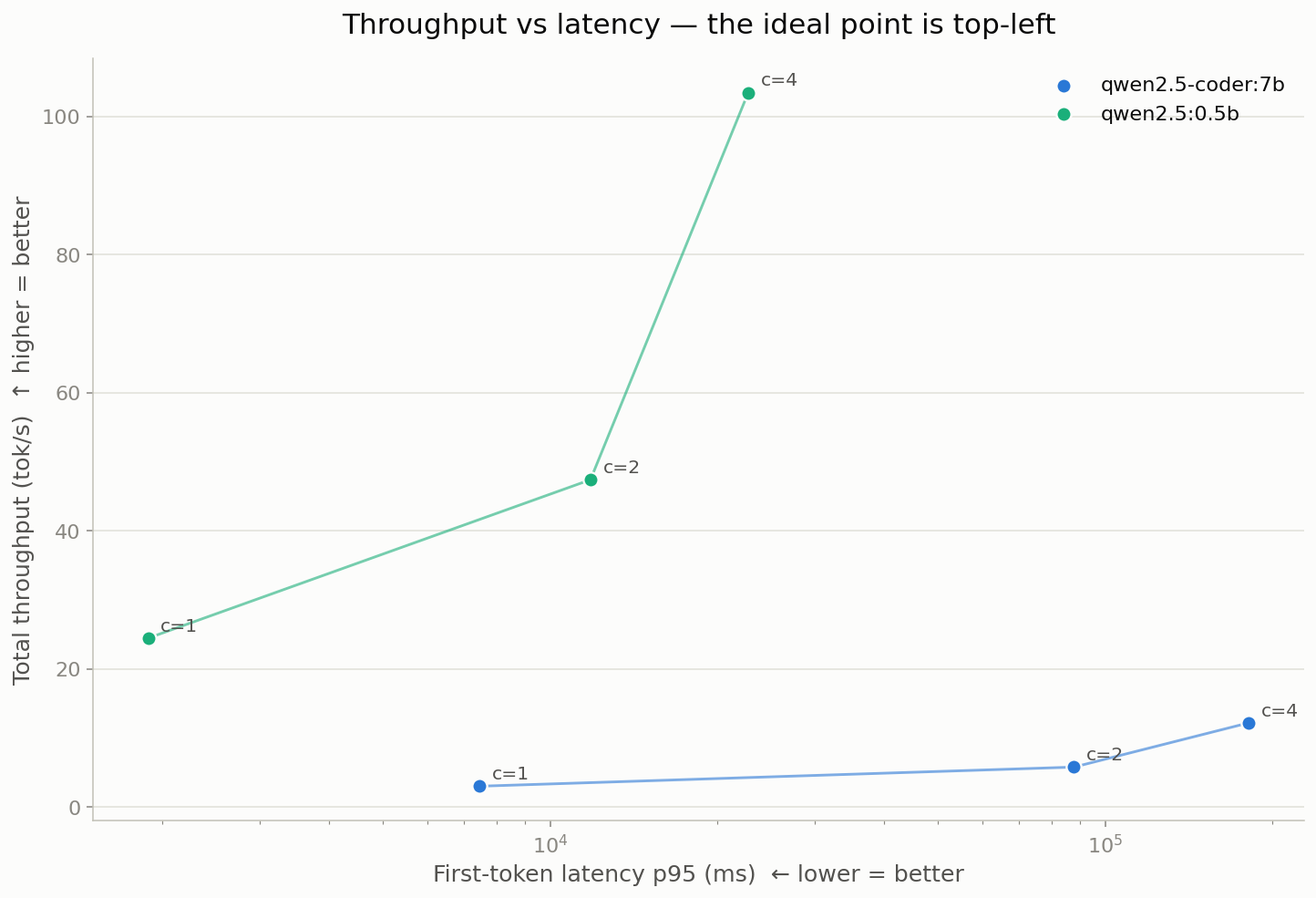
pareto.png — throughput vs latency trade-off, one point per concurrency level:
Quick start
# 1. Install (Python 3.10+)
pip install llamathon

# 2. Make sure your model server is up and OpenAI-compatible.
#    e.g. Ollama exposes http://localhost:11434/v1 automatically.

# 3. Benchmark everything installed, sizing load from a real prompt:
llamathon \
  --base-url http://localhost:11434/v1 \
  --prompt "Summarise the causes of World War I in 5 bullet points." \
  --result prompts/sample_result.txt

# 4. Look in results/run_<timestamp>/ for report.html, REPORT.md,
#    dashboard.png and pareto.png
Benchmark a single named model:
llamathon --model llama3.1:8b --base-url http://localhost:11434/v1
python benchmark.pystill works as a backwards-compatible alias for thellamathoncommand.
How it works
             ┌──────────────┐  detection.py — auto-detect (concurrent probes,
 --model ───▶│   resolve    │  priority: ollama list → GET /v1/models → *.gguf,
             │   models     │  first source with hits wins)
             └──────┬───────┘
                    │  for each model
   --prompt ─┐      ▼
   --result ─┴▶┌──────────────┐  tokenization.py — transformers → tiktoken →
               │ count tokens │  heuristic  => --pp (prompt) / --tg (generation)
               └──────┬───────┘
                      ▼
               ┌──────────────┐  runner.py — uvx / llama-benchy --format json
               │ llama-benchy │  (timeout, retries, stderr captured)
               └──────┬───────┘
                      ▼
               ┌──────────────┐  metrics.py + charts.py + reporting.py
               │charts+reports│  => dashboard.png, pareto.png, REPORT.md,
               └──────────────┘     report.html
The code lives in the llamathon/ package (one module per stage above,
plus constants.py for every default/tunable); benchmark.py is a thin
compatibility shim and cli.py the entry point.
Installation
Python package
pip install llamathon                # core: llama-benchy + matplotlib
pip install "llamathon[tiktoken]"    # + fast generic token counting (recommended)
pip install "llamathon[tokens]"      # + transformers for exact per-model counts
Token counting degrades gracefully: if neither transformers nor
tiktoken is installed, the tool falls back to a char/word heuristic and
says so in the logs and report.
From source
git clone https://github.com/qthullie/Llamathon
cd Llamathon
python -m pip install .               # or ".[tiktoken]" / ".[tokens]"
(pip install -r requirements.txt still works and mirrors the core +
tiktoken set.)
llama-benchy
Installed as a dependency of this package. If you prefer the zero-install path, install
uv instead and the script will invoke
uvx llama-benchy automatically — no separate install needed.
Resolution order the script uses to find the engine:
llama-benchyonPATHuvx llama-benchyuv tool run llama-benchy
A model server
llama-benchy talks to an OpenAI-compatible endpoint. Any of these work:
| Server | Default base URL | Notes |
|---|---|---|
| Ollama | http://localhost:11434/v1 |
ollama serve; auto-detected |
| llama.cpp | http://localhost:8080/v1 |
llama-server |
| vLLM | http://localhost:8000/v1 |
vllm serve <model> |
| LM Studio | http://localhost:1234/v1 |
enable the local server |
Usage
llamathon [options]
| Flag | Default | Description |
|---|---|---|
--model NAME |
auto-detect | Model to benchmark. Repeat for several. |
--base-url URL |
http://localhost:11434/v1 |
OpenAI-compatible endpoint (http/https only). Env: BENCHY_BASE_URL. |
--api-key KEY |
EMPTY |
Endpoint API key. Env: BENCHY_API_KEY. Redacted from logs. |
--prompt TEXT|FILE |
sample text | Input prompt (inline or a file path). Sizes --pp. A path-looking value that doesn't exist is an error. |
--result TEXT|FILE |
empty | Expected/sample output (inline or a file path). Sizes --tg. |
--tokenizer NAME |
model name | Override HuggingFace tokenizer id. |
--trust-remote-code |
off | Let transformers run custom tokenizer code from the HF repo. Security: opt-in only. |
--runs N |
3 |
Iterations per test (must be ≥ 1). |
--concurrency N [N...] |
1 2 4 8 |
Concurrency level(s), positive ints. Several levels → throughput curves; a single value → one point. |
--depth N [N...] |
— | Context depth(s) to test (≥ 0). |
--exact-tg |
off | Force exact output length. |
--benchy-timeout SECONDS |
3600 |
Kill a llama-benchy run after this long. |
--benchy-retries N |
0 |
Extra attempt(s) after a failed llama-benchy run. |
--gguf-dir DIR |
. |
Where to scan for .gguf during auto-detection. |
--out-dir DIR |
results |
Output root; a run_<timestamp>/ is created inside. |
--extra ... |
— | Everything after --extra passes verbatim to llama-benchy (place it last). |
-v, --verbose |
off | Debug logging (prints the exact llama-benchy command, API key masked). |
--log-file PATH |
— | Also write logs (uncoloured) to a file. |
--version |
— | Print version and exit. |
Examples
Compare two models under load, exact output length, deep context:
llamathon \
  --model llama3.1:8b --model qwen2.5:7b \
  --base-url http://localhost:8000/v1 \
  --prompt prompts/sample_prompt.txt \
  --result prompts/sample_result.txt \
  --runs 5 --concurrency 1 2 4 --depth 0 4096 --exact-tg
Pass an advanced flag straight through to llama-benchy:
llamathon --model llama3.1:8b --extra --latency-mode generation --no-warmup
Racing several models produces side-by-side curves, a comparison table and a Pareto chart:
Exit codes
Designed so cron/CI can react to partial failures:
| Code | Meaning |
|---|---|
| 0 | all benchmarks succeeded |
| 1 | every benchmark failed |
| 2 | bad command-line arguments |
| 3 | no models detected (and none passed via --model) |
| 4 | llama-benchy not found |
| 5 | partial failure — some models failed, some succeeded (details in REPORT.md) |
Model auto-detection
When --model is omitted the tool probes three sources concurrently, then
applies a priority order — the first source that yields models wins:
- Ollama —
ollama list(if theollamabinary is onPATH). - Endpoint —
GET {base_url}/modelson the OpenAI-compatible server (with retries + exponential backoff on transient network failures). - Local weights — recursive scan of
--gguf-dirfor*.gguffiles.
Sources are not merged: mixing them would benchmark names the target endpoint
can't serve (e.g. local .gguf stems against a remote vLLM). When several
sources have hits, the ignored ones are listed in the log — pass --model to
override. Duplicates are removed by name. If nothing is found, the tool exits
with code 3 and a clear message telling you to pass --model.
Token counting
The point of feeding a real prompt + result: the benchmark's prompt-processing
size (--pp) and generation size (--tg) match what the model would actually
handle, so throughput/latency numbers are meaningful.
Counting strategy (first available wins):
transformersAutoTokenizer — exact, per-model (needs the model name to be a valid HuggingFace repo id, or use--tokenizer).tiktokencl100k_base — a solid generic BPE approximation.- Heuristic —
~4 chars/token, floored at the whitespace word count.
The method actually used is printed and recorded in REPORT.md. Tokenizers
are cached per name, so multi-model runs never reload the same tokenizer.
Security note: custom tokenizer code from HuggingFace repos (
trust_remote_code) is disabled by default — it would execute arbitrary code from the repo. Enable with--trust-remote-codeonly for tokenizers you trust.
Output
Each run creates results/run_<YYYYMMDD_HHMMSS>/ containing:
results/run_20260710_143000/
├── stats_llama3.1_8b.json     # raw llama-benchy JSON, one per model
├── stats_qwen2.5_7b.json
├── dashboard.png              # one clean multi-panel figure (see below)
├── pareto.png                 # throughput-vs-latency trade-off (concurrency sweep)
├── report.html               # self-contained report (charts embedded) — open in a browser
└── REPORT.md                  # Markdown tables + failures + chart
See Example report above for what these actually look like.
pareto.png (when sweeping concurrency): aggregate throughput (y, higher
better) vs first-token latency p95 (x, log, lower better), one point per
concurrency level. The top-left corner is ideal; it shows at a glance which
concurrency buys throughput without wrecking latency, and which levels are
dominated.
dashboard.png adapts to the data:
- Several concurrency (or depth) levels → line charts — throughput/latency curves vs load, one line per model, with a legend and direct labels.
- A single point → stat tiles — a big number per metric instead of a lonely
bar. (This is why the default sweeps
--concurrency 1 2 4 8.)
Parsed metrics (llama-benchy ≥0.4.0): prompt throughput (pp_throughput),
generation throughput (tg_throughput), peak throughput, time-to-first-response
(ttfr), estimated prompt-processing time (est_ppt), end-to-end TTFT. Missing
metrics are skipped.
report.html is the one to download — a single self-contained file (opens
in any browser, light/dark aware) that adds, on top of the dashboard:
- Detail by concurrency — a per-configuration table with throughput, scaling efficiency, and TTFR p50 / p95 / p99 percentiles (tail latency, not just the mean).
- Server specs — hostname / OS / CPU / RAM / GPU of the machine that ran the inference (numbers are meaningless without the hardware).
- Failures — any model that failed, with the llama-benchy error tail.
- Side-by-side model comparison + token load tables.
Readability choices baked into the charts:
- Latency (time-to-first-response) is shown as the median with a shaded p50–p95 band, not mean ± std — tail latency is what hurts and the mean hides it.
- Total throughput is derived (
per-request speed × concurrency) so you can see whether the server actually scales or just queues. - Y-axis switches to log scale automatically when a metric spans >30×.
- Every panel is tagged ↑ better / ↓ better.
Server deployment
The script is headless-safe (matplotlib Agg backend) and writes only into
--out-dir. Typical patterns:
One-shot on a remote box
ssh gpu-server
git clone <this-repo> && cd Llamathon
python -m pip install ".[tiktoken]"
llamathon --base-url http://localhost:11434/v1 \
  --prompt prompts/sample_prompt.txt --result prompts/sample_result.txt
Scripted wrapper
Use run.sh (POSIX) or run.ps1 (Windows) to pin env vars per server:
BENCHY_BASE_URL=http://localhost:8000/v1 ./run.sh
Scheduled (cron) capacity check
# Nightly at 02:30, benchmark all installed models.
# Exit code 5 = partial failure, worth alerting on.
30 2 * * *  cd /opt/Llamathon && llamathon \
             --base-url http://localhost:11434/v1 \
             --prompt prompts/sample_prompt.txt \
             --result prompts/sample_result.txt \
             >> /var/log/llamathon.log 2>&1
Containerised
A Dockerfile ships with the repo (slim Python 3.11 base, tiktoken included):
docker build -t llamathon .
docker run --rm --network host \
  -e BENCHY_BASE_URL=http://localhost:11434/v1 \
  -v "$PWD/results:/app/results" llamathon \
  --prompt prompts/sample_prompt.txt
--network hostlets the container reach a model server running on the host.
Development
pip install -e ".[dev,tiktoken]"
ruff check . && ruff format llamathon tests   # lint + format
mypy llamathon                                # type-check
pytest                                           # unit + integration tests
CI (GitHub Actions) runs lint, type-check and the test suite on Python 3.10–3.12 for every push/PR. The integration test mocks both the OpenAI-compatible endpoint and the llama-benchy binary — no model server needed. See CONTRIBUTING.md and CHANGELOG.md.
Troubleshooting
| Symptom | Cause / fix |
|---|---|
No models detected |
No --model, and no Ollama/endpoint/.gguf found. Pass --model, or check the server is up and --base-url is right. |
llama-benchy not found |
Install it (pip install -U llama-benchy) or install uv for the uvx path. |
Falling back to heuristic token estimate |
Neither transformers nor tiktoken installed — token counts are approximate. pip install tiktoken. |
| transformers can't load tokenizer | Model name isn't a valid HF repo id. Pass --tokenizer <hf-id>, or rely on the tiktoken fallback. |
llama-benchy exited with code N |
Endpoint unreachable or model name unknown to the server. The stderr tail is included in the error and REPORT.md; re-run with -v for the full command (API key masked). |
looks like a file path but no such file |
The --prompt/--result value has a path separator or text extension but the file doesn't exist. Fix the path (a silent fallback to inline text would corrupt the workload sizing). |
| Run hangs forever | It can't: llama-benchy is killed after --benchy-timeout (default 3600 s). |
| Charts missing | matplotlib not installed, or no parseable metrics in the JSON. Check stats_*.json. |
| Connection refused | Model server not listening on --base-url. curl <base-url>/models to verify. The /models probe retries with backoff before giving up. |
FAQ
Does it need a GPU? No — the script itself is light. The model server it benchmarks may use a GPU; that's what you're measuring.
Does it work fully offline? Yes, if tiktoken is installed (no network) and
you pass --model explicitly. transformers may fetch a tokenizer on first
use; the tiktoken/heuristic fallbacks are offline.
Can it benchmark a remote endpoint? Yes — point --base-url at any
reachable OpenAI-compatible URL. Auto-detection of .gguf/Ollama only sees the
local box, but endpoint /models detection works remotely.
Where's the raw data? stats_*.json per model — untouched llama-benchy
output, safe to post-process yourself.
License
MIT.
1 maintainer

Download files
Download the file for your platform. If you're not sure which to choose, learn more about installing packages.
Source Distribution
Built Distribution
Filter files by name, interpreter, ABI, and platform.
If you're not sure about the file name format, learn more about wheel file names.
Copy a direct link to the current filters
File details
Details for the file llamathon-1.0.1.tar.gz.
File metadata
- Download URL: llamathon-1.0.1.tar.gz
- Upload date:
- Size: 51.9 kB
- Tags: Source
- Uploaded using Trusted Publishing? Yes
- Uploaded via: twine/6.1.0 CPython/3.13.14
File hashes
| Algorithm | Hash digest | |
|---|---|---|
| SHA256 |
64f27ea648377710bd5211be82a5fc127798de64b9368efc3753161208c0ae34
|
|
| MD5 |
a0ea4c2cf15796df141b65d6b7083b7a
|
|
| BLAKE2b-256 |
3aba8fe17e6d6c6be9e7c0b9d51b2b0b65453ff113137ff0cddf314e9c24b1f3
|
Provenance
The following attestation bundles were made for llamathon-1.0.1.tar.gz:
Publisher:
release.yml on qthullie/Llamathon
-
Statement:
-
Statement type:
https://in-toto.io/Statement/v1 -
Predicate type:
https://docs.pypi.org/attestations/publish/v1 -
Subject name:
llamathon-1.0.1.tar.gz -
Subject digest:
64f27ea648377710bd5211be82a5fc127798de64b9368efc3753161208c0ae34 - Sigstore transparency entry: 2232535364
- Sigstore integration time:
-
Permalink:
qthullie/Llamathon@c19787004b3377ccc621b78ed39de84a9511a965 -
Branch / Tag:
refs/tags/v1.0.1 - Owner: https://github.com/qthullie
-
Access:
public
-
Token Issuer:
https://token.actions.githubusercontent.com -
Runner Environment:
github-hosted -
Publication workflow:
release.yml@c19787004b3377ccc621b78ed39de84a9511a965 -
Trigger Event:
push
-
Statement type:
File details
Details for the file llamathon-1.0.1-py3-none-any.whl.
File metadata
- Download URL: llamathon-1.0.1-py3-none-any.whl
- Upload date:
- Size: 41.1 kB
- Tags: Python 3
- Uploaded using Trusted Publishing? Yes
- Uploaded via: twine/6.1.0 CPython/3.13.14
File hashes
| Algorithm | Hash digest | |
|---|---|---|
| SHA256 |
f65ab3c8576fcc3b8bbc09f5ca6c396d79562f4a859a3dabbf6481b77e72f329
|
|
| MD5 |
7863c95cc0bd7489a7f6806e9303b177
|
|
| BLAKE2b-256 |
b4cd1f55cc5f931a6ad89ef94e4b7c1df19637fe9a9455296cf28d5c2ee8d52d
|
Provenance
The following attestation bundles were made for llamathon-1.0.1-py3-none-any.whl:
Publisher:
release.yml on qthullie/Llamathon
-
Statement:
-
Statement type:
https://in-toto.io/Statement/v1 -
Predicate type:
https://docs.pypi.org/attestations/publish/v1 -
Subject name:
llamathon-1.0.1-py3-none-any.whl -
Subject digest:
f65ab3c8576fcc3b8bbc09f5ca6c396d79562f4a859a3dabbf6481b77e72f329 - Sigstore transparency entry: 2232535835
- Sigstore integration time:
-
Permalink:
qthullie/Llamathon@c19787004b3377ccc621b78ed39de84a9511a965 -
Branch / Tag:
refs/tags/v1.0.1 - Owner: https://github.com/qthullie
-
Access:
public
-
Token Issuer:
https://token.actions.githubusercontent.com -
Runner Environment:
github-hosted -
Publication workflow:
release.yml@c19787004b3377ccc621b78ed39de84a9511a965 -
Trigger Event:
push
-
Statement type:







