
LLGS Simulation




This package provides tools for simulating and analyzing spin dynamics using the Landau-Lifshitz-Gilbert-Slonczewski (LLGS) equation on two-dimensional lattices. It supports antiferromagnetic exchange, DMI, anisotropy, external fields, and spin-orbit torque.
Install
LLGS Simulation requires Python 3.9 or newer:
python -m venv .venv
source .venv/bin/activate
python -m pip install llgs-simulation
Example Usage
Below is a step-by-step demonstration of how to use the repository to simulate spin dynamics and visualize the results.
1. Creating a Lattice Object
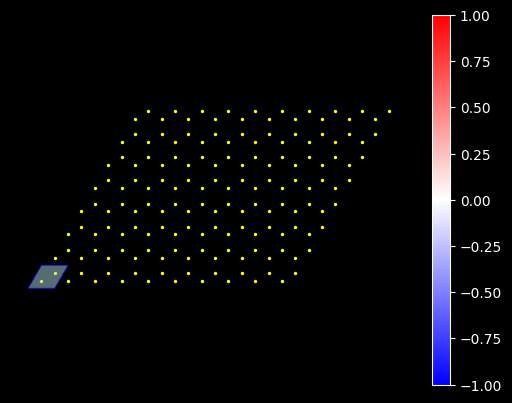
The lattice.py module allows you to define a spin lattice. Here's an example of creating a hexagonal lattice:
import numpy as np

from llgs import Lattice_2D

honeycomb = Lattice_2D(
    n_a=10,
    n_b=8,
    n_site=2,
    r_a=[np.sqrt(3), 0],
    r_b=[0.5 * np.sqrt(3), 1.5],
    r_site=[
        [1 / 3, 1 / 3],
        [2 / 3, 2 / 3],
    ],
)
honeycomb.plot(draw_unitcell=True)
2. Initializing Spins
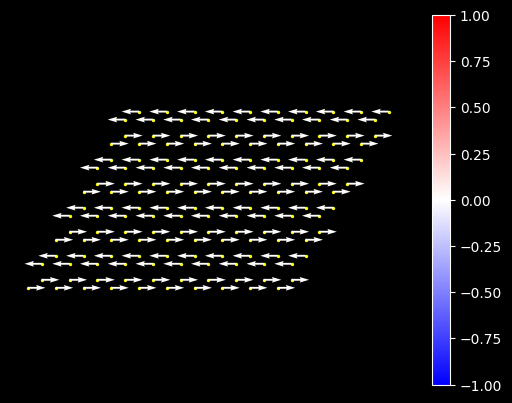
Initialize the spins on the lattice to a desired configuration:
zigzag_config = {
    "b % 2 == 0": np.array([1, 0, 0]),
    "b % 2 == 1": np.array([-1, 0, 0]),
}
honeycomb.initialize_spin(zigzag_config)
honeycomb.plot()
3. Setting Up Parameters for Simulation
Build the exchange matrix from exact lattice bonds, then configure the
simulation. Each bond is (source_site, target_site, cell_offset, coupling);
the reverse bond is added automatically.
from llgs import LLGS_Simulation_2D, build_exchange

J1 = -11.2  # exchange-matrix coefficient, Tesla
exchange_bonds = [
    (0, 1, (0, 0), J1),
    (1, 0, (0, 1), J1),
    (1, 0, (1, 0), J1),
]
H_E = build_exchange(honeycomb, exchange_bonds)
H_ext = np.array([5.0, 5.0, 0.0])

sim = LLGS_Simulation_2D(
    honeycomb,
    H_E=H_E,
    H_ext=H_ext,
    alpha=0.1,
    H_para=0.086,
    H_perp=1.812,
    io_foldername="Data",
    io_filename="results_RK4",
    method="RK4",
)
H_E may be a dense (N, N) array or a SciPy sparse matrix. For sparse DMI,
pass H_DMI as a sequence of three sparse (N, N) matrices, one for each
Cartesian component. Dense DMI remains a (3, N, N) array. Use
matrix_type="sparse" to convert both fields to CSR matrices,
matrix_type="dense" to convert them to NumPy arrays, or the default
matrix_type="auto" to preserve the supplied representation.
4. Running the Simulation
Run the simulation for a specified number of steps and save the results:
sim.evolve(dt=2e-4, max_iters=1000)
5. Visualizing Spin Dynamics
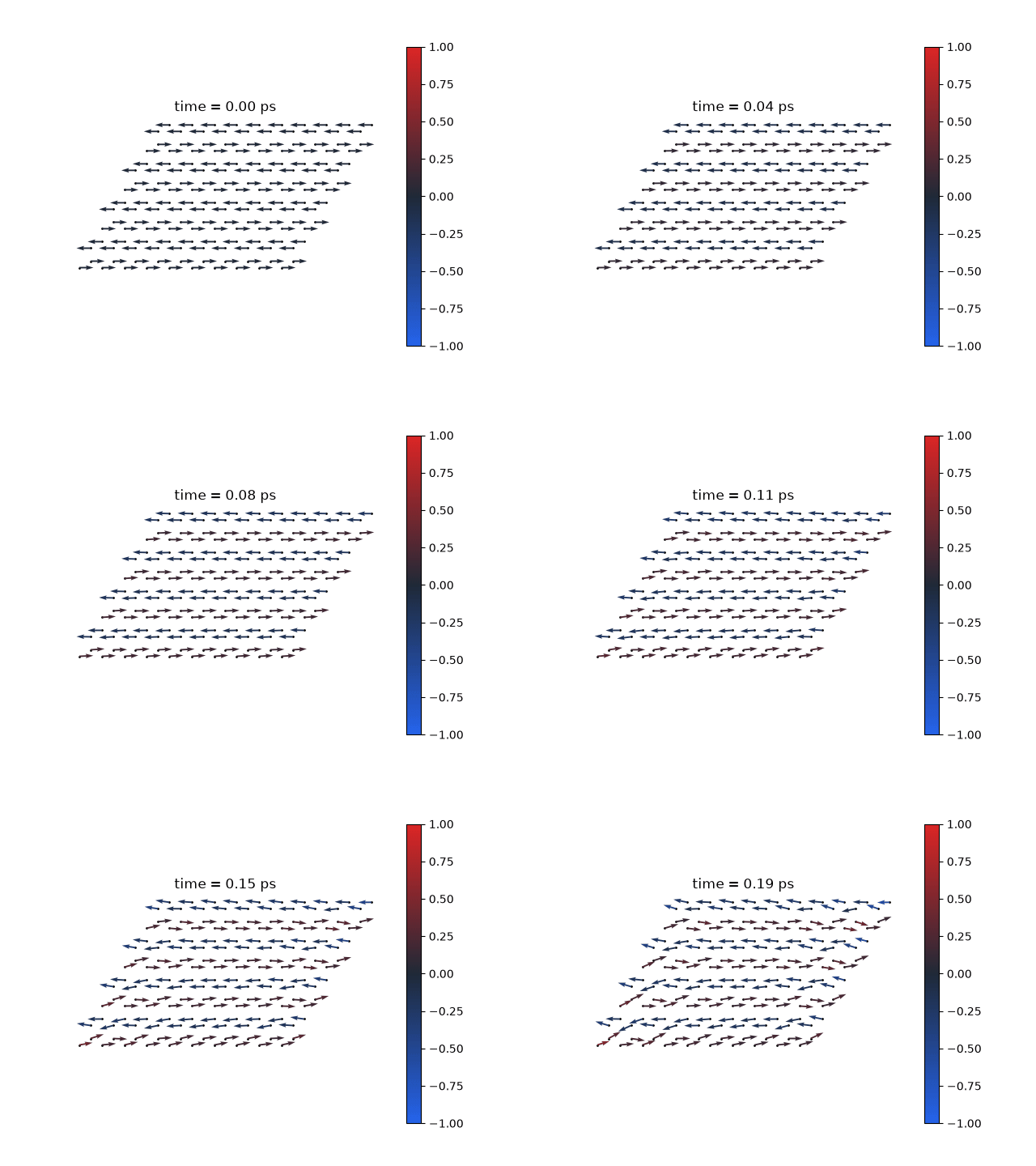
The read_result.py module reads the simulation results and creates visualizations. Here is how you can animate the spin dynamics:
from llgs import ReadResult

results = ReadResult("Data/results_RK4.h5")

results.animate(period=50, save_fn="Data/movie.gif")
Example Output
Here is an example of how the animation might look:
Additional Details
For a comprehensive explanation of the methods, equations, and parameters, see the example notebook.
This notebook includes:
- Detailed descriptions of lattice construction.
- Explanation of the exchange field matrix and LLGS simulation.
- Mathematical derivations and parameter setups.
1 maintainer

Release files for llgs-simulation 0.1.0
For a detailed explanation of source distributions (sdists) and built distributions (wheels), please see the package formats documentation.
Source distribution (sdist)
| File | Size | Uploaded | |
|---|---|---|---|
| llgs_simulation-0.1.0.tar.gz | 20.3 kB | Details |
Built distribution (wheel)
| File | Interpreter | ABI | Platform | Reset |
|---|---|---|---|---|
| llgs_simulation-0.1.0-py3-none-any.whl | Python 3 | none | any | Details |
Total release size: 35.9 kB
Release files / llgs_simulation-0.1.0.tar.gz
| Download URL | llgs_simulation-0.1.0.tar.gz |
|---|---|
| Size | 20.3 kB |
| Tags | Source |
|
SHA-256 checksum How to use checksums |
df47375c1f3a39a664dc661eb38beabf6bd51e6b56f39f47b03702262fef54f2
|
|
BLAKE2b-256 checksum How to use checksums |
f4fbd4572ad3d6f9f2ee893726190faaf28ef274ffb5d49ca5f816ed144bf313
|
| Upload date | |
|
Uploaded using Trusted Publishing? What is trusted publishing? |
Yes |
| Uploaded via |
twine/7.0.0 CPython/3.13.14
|
Provenance
Provenance describes where a file came from. On PyPI, provenance is shared via attestations, which provide a verifiable record of the build or publishing details. View details, limitations and caveats.


PyPI Publish Attestation
PyPI verified that this artifact, at this checksum, originated from the publisher listed below.
Signed by GitHub Actions, verified by PyPI on Sep 26, 2026.
Transparency logRelease files / llgs_simulation-0.1.0-py3-none-any.whl
| Download URL | llgs_simulation-0.1.0-py3-none-any.whl |
|---|---|
| Size | 15.5 kB |
| Tags | Python 3 |
|
SHA-256 checksum How to use checksums |
da495493ebd7da00b1c081a94c8951634c7d1425ebf4e197cadd72f588468108
|
|
BLAKE2b-256 checksum How to use checksums |
9d7458cb85134fe91e13f2104b5b6531f94c45d144d887bb4dee21cdc54e0816
|
| Upload date | |
|
Uploaded using Trusted Publishing? What is trusted publishing? |
Yes |
| Uploaded via |
twine/7.0.0 CPython/3.13.14
|
Provenance
Provenance describes where a file came from. On PyPI, provenance is shared via attestations, which provide a verifiable record of the build or publishing details. View details, limitations and caveats.
PyPI Publish Attestation
PyPI verified that this artifact, at this checksum, originated from the publisher listed below.
Signed by GitHub Actions, verified by PyPI on Sep 26, 2026.
Transparency log












