
A bridge library for operating Unity Editor features from an external Python process via JSON-RPC.
Verified details
These details have been verified by PyPIProject links
GitHub Statistics
Maintainers

Project description
python
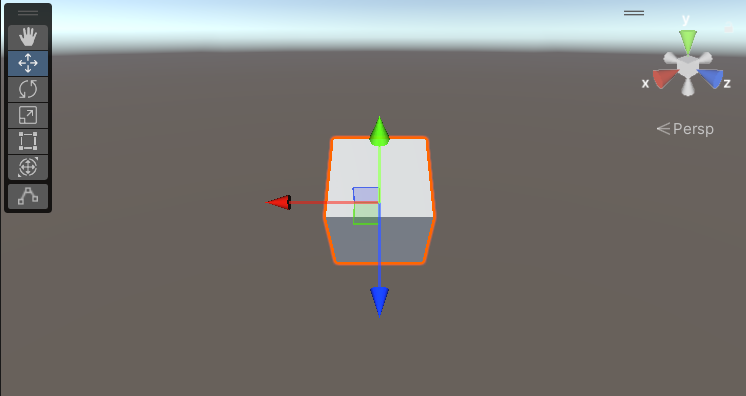
cube = client.GameObject.CreatePrimitive(enum("Cube"))
cube.transform.Rotate(30, 45, 0)
To Unity
LLiquidLink / UniLiquidLink
A bridge library for operating Unity Editor features from an external Python process via JSON-RPC. It lets you call Unity from Python using almost the same syntax as Unity C#.
Features
- Write with almost the same syntax as Unity C#
- C#:
cube.transform.Rotate(30, 45, 0)Python:cube.transform.Rotate(30, 45, 0) - Property chains and method calls are converted as-is
- C#:
- Runs from Python with no compilation and no types
- The compilation and type declarations required in C# are not needed in Python
- Unity and Python are completely independent Unity (C#) and Python are separate processes that communicate only via JSON-RPC. Since they have no direct bindings or DLL dependencies on each other, they work with any combination of Unity version and Python version the user chooses.
- Only functionality registered on the C# side can be executed From Python you can only call methods/properties that were explicitly registered on the C# side. Unregistered APIs cannot be called at all (whitelist approach)
- Built on anyio, supporting a wide range of transport layers
The core communication layer (
lliquidlink.core/lliquidlink.client) is implemented on top of anyio. Currently only TCP and stdio are supported, but the design allows extension via anyio.
Architecture
A 3-process configuration consisting of the Python "user client", the "middleware", and the Unity "C# server".
flowchart LR
    subgraph SG1["User Python Process"]
        PythonClient["lliquidlink.client"]
    end
    subgraph SG2["Python Middleware Process"]
        PythonServer["lliquidlink.server"]
    end
    subgraph SG3["Unity Editor Process (C#)"]
        Sharp["UniLiquidLink.Server"]
    end
    PythonClient <-->|tcp| PythonServer
    PythonServer <-->|stdio| Sharp
Installation
Unity (C#) side
-
In Unity, open
Window > Package Manager > + > Add package from git URL...and enter:https://github.com/hide00310/UniLiquidLink.git(Replace the tag with the latest released version. It is treated as an Editor-only assembly via
UniLiquidLink.asmdef.) -
UniLiquidLink.asmdefreferences the following precompiled DLL. If this is not present in your project, you will get a compile error.System.Text.Json.dll
Example ways to obtain it:
- Get the NuGet package (
System.Text.Json) via NuGetForUnity or similar, and place the DLL underAssets/Pluginsetc. - Since these are only needed in the Editor, it is recommended to set the target platform to Editor only in the Plugins Inspector
Python side
pip install lliquidlink
How to run
You can verify it works using the UniLiquidLink Samples sample, which bundles Cube Demo and All Features Tour in a single window. In Window > Package Manager, select the UniLiquidLink package, open the Samples tab, and click Import next to UniLiquidLink Samples. It is copied into Assets/Samples/UniLiquidLink/<version>/UniLiquidLinkSample/.
- Run
UniLiquidLink/Samples/Sample Windowfrom the Unity menu, pickCube Demo, and pressStart— no command needs to be entered: the Python command defaults topythonand the middleware script path is resolved automatically. Start the server on the C# side (it listens onhttp://localhost:8700by default).
// CubeDemoServer.cs (excerpt)
server = new Server();
server.RegisterCallerAssembly();

// Create a primitive: client.GameObject.CreatePrimitive(enum("Cube"))
server.Rpc.AddRpcMethod((Func<PrimitiveType, GameObject>)GameObject.CreatePrimitive);

// Property chain: cube.transform.Rotate(...) or cube.transform.position = ...
server.Rpc.AddRpcGetProperty((GameObject obj) => obj.transform);
- Run the sample script on the Python side.
python Assets/Samples/UniLiquidLink/<version>/UniLiquidLinkSample/CubeDemo/create_and_rotate_cube.py
# create_and_rotate_cube.py (excerpt)
from lliquidlink.client import Client, TcpJsonRpcTransport
from lliquidlink.client.models import type_, enum

def on_execute(client):
    cube = client.GameObject.CreatePrimitive(enum("Cube"))
    renderer = cube.GetComponent(type_("Renderer"))
    renderer.material.color = {"r": 1, "g": 0, "b": 0, "a": 1}
    cube.transform.Rotate(30, 45, 0)

client = Client(TcpJsonRpcTransport("localhost", 8700))
client.on_execute += on_execute
client.mainloop()
When run, a red Cube is created in the Unity scene and rotates.
Supported features
- RPC method registration (C# side)
- Register static/instance methods individually
- Register property getters/setters individually
- Bulk RPC method registration (C# side)
- Register all public methods/properties of a class at once
- Passing instance objects Instance objects such as Unity's GameObject can be passed back and forth on the Python side
- Type/Enum resolution
Resolves Unity types by name, such as
type_("Renderer")orenum("Cube") - Serialization
Mainly uses
System.Text.Json, while Unity-specific value types such asVector3are converted usingJsonUtility-based serialization - Method overload support
- If a registered method has overloads, they are resolved in order and the one that succeeds is used
Security notes
- This library implements no authentication or authorization mechanism whatsoever. The HTTP server (by default
localhost:8700) unconditionally accepts any client that connects. - The only real protective boundary is that it binds to
localhostonly by default. If you configure it to be exposed to a LAN or the internet, add a reverse proxy, VPN, or token authentication/TLS termination via a transport-layer subclass, etc. - The whitelist approach — where only RPCs explicitly registered on the C# side can be executed — is the only execution control in place, but note that if you bulk-register an entire class with
AddRpcAllMethod, a wider API surface than intended may become externally callable. - Arbitrary registered C# code executes with the same privileges as the Unity Editor process, so do not start this server on an untrusted network.
Development
The following are additionally required only if you want to run the tests.
pip install pytest pytest-asyncio
Verified tool versions
The following are combinations that have been developed and verified to work (not strict required versions).
| Tool / Library | Version |
|---|---|
| Unity Editor | 2022.3.22f1 (Editor only) |
| Python | 3.13.11 |
| anyio | 4.14.1 |
| pytest (for testing) | 9.0.3 |
| pytest-asyncio (for testing) | 1.3.0 |
Project details
Verified details
These details have been verified by PyPIProject links
GitHub Statistics
Maintainers
Release history Release notifications | RSS feed


Download files
Download the file for your platform. If you're not sure which to choose, learn more about installing packages.
Source Distribution
Built Distribution
Filter files by name, interpreter, ABI, and platform.
If you're not sure about the file name format, learn more about wheel file names.
Copy a direct link to the current filters
File details
Details for the file lliquidlink-1.2.0.tar.gz.
File metadata
- Download URL: lliquidlink-1.2.0.tar.gz
- Upload date:
- Size: 124.1 kB
- Tags: Source
- Uploaded using Trusted Publishing? Yes
- Uploaded via: twine/6.1.0 CPython/3.13.12
File hashes
| Algorithm | Hash digest | |
|---|---|---|
| SHA256 |
243d39805921c1eb29a40a52c7cb53be3cf2f52ebe0cf4bc59701f32cc30de35
|
|
| MD5 |
d42acdf12705e1aa784e078f7c79bb18
|
|
| BLAKE2b-256 |
aeb1eefcde1ae75169c0434551d76567ab410a1db75b6c21ced3cba5ec3282fb
|
Provenance
The following attestation bundles were made for lliquidlink-1.2.0.tar.gz:
Publisher:
release.yml on hide00310/UniLiquidLink
-
Statement:
-
Statement type:
https://in-toto.io/Statement/v1 -
Predicate type:
https://docs.pypi.org/attestations/publish/v1 -
Subject name:
lliquidlink-1.2.0.tar.gz -
Subject digest:
243d39805921c1eb29a40a52c7cb53be3cf2f52ebe0cf4bc59701f32cc30de35 - Sigstore transparency entry: 2143315297
- Sigstore integration time:
-
Permalink:
hide00310/UniLiquidLink@2399fc071f939ca1e148d0ffe9d7c9894e55c5ea -
Branch / Tag:
refs/heads/main - Owner: https://github.com/hide00310
-
Access:
public
-
Token Issuer:
https://token.actions.githubusercontent.com -
Runner Environment:
github-hosted -
Publication workflow:
release.yml@2399fc071f939ca1e148d0ffe9d7c9894e55c5ea -
Trigger Event:
push
-
Statement type:
File details
Details for the file lliquidlink-1.2.0-py3-none-any.whl.
File metadata
- Download URL: lliquidlink-1.2.0-py3-none-any.whl
- Upload date:
- Size: 28.9 kB
- Tags: Python 3
- Uploaded using Trusted Publishing? Yes
- Uploaded via: twine/6.1.0 CPython/3.13.12
File hashes
| Algorithm | Hash digest | |
|---|---|---|
| SHA256 |
64cb44ef873d6f165ba7ce032f508434620c89e417390170d379ffb4cf8e5408
|
|
| MD5 |
f25f778ee05ccead6e5ae6b74325c692
|
|
| BLAKE2b-256 |
44c43b827060f0b1d867c679323fb9631560e85885f4c8a9e995cecede2da586
|
Provenance
The following attestation bundles were made for lliquidlink-1.2.0-py3-none-any.whl:
Publisher:
release.yml on hide00310/UniLiquidLink
-
Statement:
-
Statement type:
https://in-toto.io/Statement/v1 -
Predicate type:
https://docs.pypi.org/attestations/publish/v1 -
Subject name:
lliquidlink-1.2.0-py3-none-any.whl -
Subject digest:
64cb44ef873d6f165ba7ce032f508434620c89e417390170d379ffb4cf8e5408 - Sigstore transparency entry: 2143315308
- Sigstore integration time:
-
Permalink:
hide00310/UniLiquidLink@2399fc071f939ca1e148d0ffe9d7c9894e55c5ea -
Branch / Tag:
refs/heads/main - Owner: https://github.com/hide00310
-
Access:
public
-
Token Issuer:
https://token.actions.githubusercontent.com -
Runner Environment:
github-hosted -
Publication workflow:
release.yml@2399fc071f939ca1e148d0ffe9d7c9894e55c5ea -
Trigger Event:
push
-
Statement type:






