
agent-playbook

One playbook, any agent: Claude Code, Codex CLI, Gemini CLI. (formerly claude-playbook — the claude-runner command still works as a legacy alias)
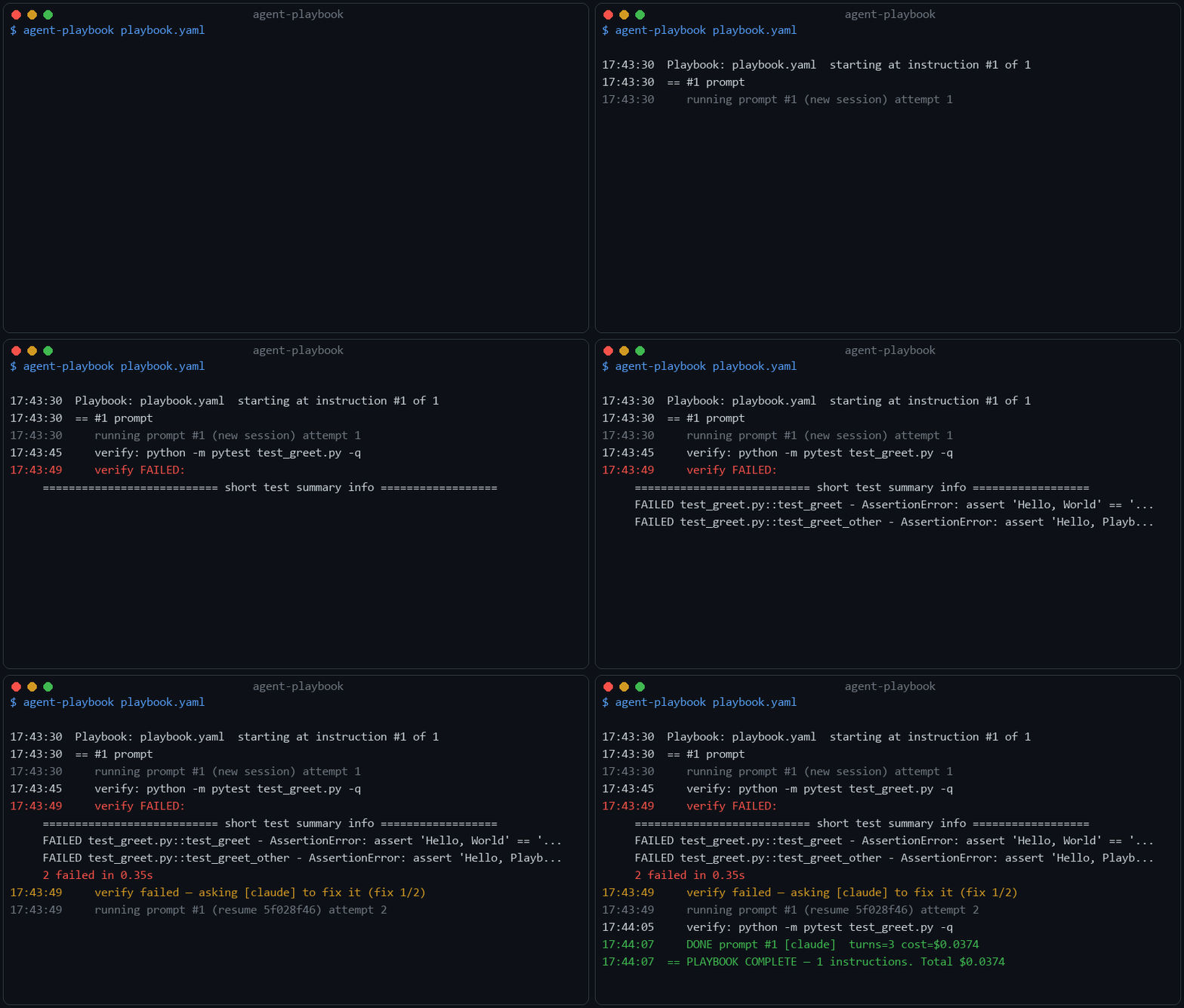
Real, unedited run: the agent's first attempt fails the test suite, the failing
output is fed back to the same session (fix_attempts), and the second attempt
goes green — unattended, for $0.04.
Run an ordered playbook of AI coding-agent instructions. The runner walks the list
top to bottom: a prompt is executed as an agent prompt (Claude Code by default; Codex
CLI and Gemini CLI are also supported); a notify sends a message; end of list → it
stops.
If a running prompt hits the usage limit, the runner waits until the window resets
and then continues the same prompt (resuming the threaded session) the moment the
window reopens — no manual restart. With fallback_agents, it doesn't even wait: the
prompt is handed to your next subscription's agent, and only when every agent is
limited does it wait for the first reset. Every limit event is recorded — see
agent-playbook --windows.
Install (one-time)
pipx install llm-agent-playbook   # gives you a global `agent-playbook` command
agent-playbook init                # scaffold a small, runnable starter playbook.yaml
agent-playbook playbook.yaml       # run it — succeeds as-is, in under two minutes
No pipx? pip install --user llm-agent-playbook. From a checkout: pipx install .,
or just chmod +x claude_runner.py && ./claude_runner.py …
(The PyPI package is llm-agent-playbook; the command it installs is agent-playbook.)
Optional: claude --playbook shim
To launch via claude --playbook <file> instead of agent-playbook, append the shell
function in claude-playbook.sh to your ~/.bashrc (or ~/.zshrc) and re-source it:
cat claude-playbook.sh >> ~/.bashrc && source ~/.bashrc
On Windows, add the function in claude-playbook.ps1 to your PowerShell profile instead
(notepad $PROFILE, paste, then . $PROFILE).
Then claude --playbook playbook.yaml --detach works, and every other claude … call
passes straight through to the real binary. (--playbook must be the first argument.)
Run
claude login                              # be authenticated (uses your Max plan)

agent-playbook init                        # create a small, runnable starter playbook.yaml
claude --playbook                          # no file -> generate a starter playbook.yaml
agent-playbook playbook.yaml               # run
agent-playbook playbook.yaml --detach      # background, survives logout
agent-playbook playbook.yaml --dry-run     # print the plan, run nothing
agent-playbook playbook.yaml --restart     # ignore saved progress, start over
agent-playbook playbook.yaml --from 3      # start at instruction #3 (1-based)
agent-playbook init writes a starter that runs as-is — one haiku prompt that writes
hello.txt, with a verify: line — so a brand-new user's first run succeeds in under
two minutes with zero edits. (The no-file scaffold above writes a placeholder prompt
you're expected to fill in before running.)
--dry-run doubles as the playbook validator: it checks structure and types,
labels and on_fail targets, and agent names — and warns about unknown (typo'd)
keys with a did-you-mean suggestion (on_fial → did you mean 'on_fail'?).
Unknown keys only warn, so playbooks stay forward-compatible; add --strict to
turn those warnings into errors (useful in CI).
--detach prints the pid + tail/stop commands and logs to playbook.logs/runner.log.
Works on Linux, macOS, and Windows (on Windows the detached run survives closing the
terminal via DETACHED_PROCESS, not setsid).
Stopping a run: kill <pid> (POSIX) or taskkill /PID <pid> /T /F (Windows) — or,
on any OS, create a stop.request file in the run's .logs dir. The runner notices it
within a few seconds (even while waiting out a usage-limit window), saves state, and
exits; the next start resumes where it left off.
Run with Docker
No local Python or Node needed — the image bundles the runner and the Claude Code CLI:
docker build -t agent-playbook .

# reuse your host `claude` login, run the playbook in the current directory
docker run --rm -it \
  -v ~/.claude:/root/.claude \
  -v ~/.claude.json:/root/.claude.json \
  -v "$PWD":/work \
  agent-playbook playbook.yaml
State and logs land next to the playbook on the host, so stopping the container and re-running resumes as usual. Worth knowing:
- Authenticate once on the host with
claude login; the two~/.claude*mounts reuse that login. There is no login flow inside the container. - For background runs use Docker itself instead of
--detach:docker run -d --name pb … agent-playbook playbook.yaml, thendocker logs -f pb(a--detachchild would die with the container's main process). - Pass notification secrets with
--env-file .env— they are never baked into the image (the build context is whitelisted to just the runner sources). - Only the default
claudeagent ships in the image; add Codex/Gemini CLIs in a derived image if you usefallback_agents.
Playbook format
session: keep              # keep = one threaded Claude session across prompts; fresh = independent
continue_on_limit: true    # hit the usage limit? wait for reset, then continue the prompt
notify_on_finish: true     # ping when the whole playbook finishes
notify_backend: telegram   # telegram | ntfy | none
defaults:                  # applied to every prompt unless overridden
  cwd: ~/projects/verb-drill
  permission_mode: dontAsk
  allowed_tools: [Read, Write, Edit, "Bash(npm:*)"]
  max_turns: 50
limits:
  resume_poll_sec: 30      # after the first wait, poll this often -> resume ASAP after reset
  poll_interval_sec: 300   # fallback wait if reset time can't be parsed

instructions:              # ordered; prompt or notify
  - prompt: "Implement the scheduler per CLAUDE.md. Commit when tests pass."
    verify: "npm test"     # prompt counts as done only if this exits 0
  - notify: "scheduler done"
  - prompt: "Now add streak tracking."
  - notify: "all done — review the branch"
Each prompt is a full Claude Code prompt (same as typing into claude), with the tools
you allow. prompt_file: ./x.md keeps long prompts in their own file.
Safety nets & self-healing
Unattended runs need guardrails. All of these are optional:
max_cost_usd: 10             # top level: hard budget for the whole playbook —
                             # exceeded -> stop + notify; raise it and re-run to resume
defaults:                    # (each also settable per instruction)
  timeout_min: 180           # agent call producing nothing for this long is killed
                             # (whole process tree) and retried once, then fails
  max_attempts: 25           # runaway guard: max attempts per prompt (0 = unlimited)
  fix_attempts: 2            # self-healing verify — see below
Self-healing verify turns verify: from a gate into a repair loop: when the
verify command fails, its output is fed back to the same agent session —
"the verification command failed with this output: … fix it" — up to
fix_attempts times before the prompt counts as failed. A test suite that fails
on the first pass gets fixed overnight instead of stopping the playbook:
   verify: python -m pytest -q
   verify FAILED: ... 2 failed, 93 passed
   verify failed — asking [claude] to fix it (fix 1/2)
   running prompt #3 (resume 49c6a83a) attempt 2
   verify: python -m pytest -q
   DONE prompt #3 [claude]
protect: — a list of files/globs (relative to the instruction's cwd) the
agent must not touch. Self-healing feeds verify failures back to the same
agent, and a struggling agent can "fix" a failing test by editing the test
instead of the code — protect closes that loophole by guarding the files
the agent is supposed to satisfy, not rewrite:
instructions:
  - prompt: "Make the tests in tests/ pass. Do not edit the tests themselves."
    protect: ["tests/**", "package-lock.json"]
    verify: "npm test"
    fix_attempts: 2
Every matched file is hashed before the agent runs; if any is changed, deleted,
or a new file appears that matches the glob, the attempt fails exactly like a
failed verify: — the agent is told which files it must restore, and gets
fix_attempts chances to do so before on_fail applies.
Control flow (on_fail, label, when)
By default a hard-failed prompt stops the playbook. For unattended runs you can declare what should happen instead — per instruction:
instructions:
  - prompt: "Attempt the risky refactor. Commit only if tests pass."
    verify: "npm test"
    on_fail: goto cleanup     # stop (default) | continue | goto <label>

  - prompt: "Build on the refactor."      # skipped if the goto fires

  - label: cleanup
    when: "git status --porcelain | grep -q ."   # gate: run only if dirty
    prompt: "Revert uncommitted changes and file an issue describing the failure."

  - notify: "run finished — check the branch"
    on_fail: continue
on_fail—continuelogs the failure and moves on;goto <label>jumps to the labeled instruction (forward or backward). Failedverify:(after itsfix_attemptsare exhausted) follows the same policy. Onlystopsends the failure notification —continue/gotojust log.label— names an instruction as a goto target. Duplicate labels and gotos to unknown labels are rejected at startup, before anything runs.when— a shell command gating the instruction (any kind): non-zero exit skips it. The cheap way to make re-entry idempotent ("skip if the artifact already exists") without spending an agent call.- Loop guard — jumps are capped per run (
limits: {max_gotos: 20}to tune); exceeding the cap stops the playbook with a notification.
Deliberately not included: variables, expressions, parallel steps. The
playbook stays a schedule + safety harness — complex logic belongs in the
prompt or in a verify:/when: script.
Multiple agents (Claude, Codex, Gemini)
The runner can drive more than one CLI coding agent — useful when you hold several subscriptions: while one agent's usage window is closed, another is usually open.
defaults:
  agent: claude              # who runs prompts: claude | codex | gemini
  fallback_agents: [codex]   # agent hit its usage limit? hand the prompt to these
                             # instead of only waiting for the reset
  models:                    # optional per-agent model choices
    claude: sonnet
    codex: gpt-5-codex

instructions:
  - prompt: "Fix all failing tests. Idempotent: if green, do nothing."
    verify: "npm test"
  - prompt: "Write the CHANGELOG entry for this release."
    agent: gemini            # per-instruction override
Semantics worth knowing:
- Sessions thread per agent (
claudevia--resume,codexviaexec resume;geminiruns stateless). Context does NOT transfer between agents — write prompts with fallbacks to be self-contained. - Only a usage limit triggers fallback. Hard failures stop the playbook as usual; transient rate limits are retried on the same agent with backoff.
- When every agent in the chain is limited, the runner waits and retries the chain.
agent-playbook --agentsshows which agent CLIs are installed. Binaries can be overridden withCLAUDE_BIN,CODEX_BIN,GEMINI_BIN.- The codex and gemini adapters are experimental: their contracts are covered by stub tests; verify once against your installed CLI versions.
Usage windows
Every observed usage-limit event (any agent) is recorded to
~/.agent-playbook/windows.json. See when windows closed and when they reopen:
agent-playbook --windows # per agent: hits in the last 7 days, last hit, next known reset
Notifications
Secrets never go in the playbook. Either export them as env vars:
# Telegram:
export TELEGRAM_BOT_TOKEN=...    export TELEGRAM_CHAT_ID=...
# or ntfy:
export NTFY_TOPIC=my-claude-runs   # then subscribe to the topic in the ntfy app
…or put them in a .env file next to the playbook (auto-loaded on every run;
real env vars always take precedence). Never commit the .env file.
# .env
TELEGRAM_BOT_TOKEN=123456:ABC...
TELEGRAM_CHAT_ID=123456789
notify_on_failure: true (default) also pings you if a prompt hard-fails, then stops.
State & logs
<playbook>.state.json— next instruction index, threaded session id, running cost. Re-running resumes there; Ctrl-C flushes safely;--restartwipes it.<playbook>.logs/—runner.log+ rawclaudeoutput per prompt/attempt, plusrun.pid(the single-runner lock: a second runner on the same playbook refuses to start, so two processes can never share one session).<playbook>.report.md— written at the end of every run (complete, failed, budget stop, orstop.request), overwriting the previous one: outcome, start/end time and duration, a per-instruction table (status, attempts, cost), total cost, and — on failure — the last few log lines.
Things worth knowing
- No
--bare, no API key, on purpose: keeps the run on your OAuth login so it bills against your Max subscription, not per-token API billing. - Write prompts to be idempotent. Resuming after a limit can occasionally lose track
of progress; an idempotent prompt + a
verify:gate makes re-entry safe. - Prompts are passed to
claudevia stdin (UTF-8), so longprompt_fileprompts, quotes, and non-ASCII text survive on every OS. CLAUDE_BINenv var overrides whichclaudebinary the runner invokes (useful for testing or non-standard installs).
Examples
examples/dependency-upgrade— audits a Python project's outdated packages, upgrades them in batches from least- to most-risky with the test suite as a self-healingverify:gate, and rolls back with a written note if a batch can't be fixed.examples/failover-demo— a fake, always-limited Codex binary so you can watchfallback_agentshand a prompt to Claude within a second, without needing an actually exhausted subscription.
Tests
python -m pytest tests
The suite runs the real runner and MCP tools against a stub claude binary (via
CLAUDE_BIN) that simulates success / usage-limit / transient responses — no actual
usage is consumed.
Use it as a Claude Code tool (MCP)
playbook_mcp.py exposes the runner as Claude Code tools, so you can say "scaffold a
playbook", "start playbook.yaml", "what's the status" inside a session.
pip install mcp pyyaml
# register it (run in a terminal, not inside Claude Code):
claude mcp add --scope user --transport stdio claude-playbook \
    -- python3 /ABSOLUTE/PATH/playbook_mcp.py
The server finds the runner via agent-playbook on PATH, a sibling claude_runner.py,
or the CLAUDE_RUNNER env var.
Tools:
scaffold_playbook(path=".")— write a starter playbook to edit (no overwrite).start_playbook(path)— launch it detached and return pid + logfile.playbook_status(path)— phase (running/complete/stopped), N done / total, cost, log tail.stop_playbook(path)— stop it; progress is saved andstart_playbookresumes it.
start_playbook is fire-and-forget on purpose: a run can wait out usage-limit windows
for hours, so it detaches and survives both this server and the calling session instead
of blocking it (which would burn the session's own usage). Check back with
playbook_status.
Resuming an existing (interactive) session
A long interactive prompt about to hit the wall? Hand the session to the runner so it waits out the reset and finishes unattended.
agent-playbook --list-sessions # find the session id (newest first)
Then point a one-prompt playbook at it (CLI flag overrides the playbook field):
agent-playbook continue.yaml --resume-session <id> # or: --resume-session latest
# continue.yaml
notify_backend: telegram
notify_on_finish: true
resume_session: latest        # or a specific id
defaults: { cwd: ~/projects/verb-drill }
instructions:
  - prompt: "Continue exactly where you left off and finish the remaining work."
latest picks the newest transcript, preferring the project dir matching cwd. Session
transcripts live at ~/.claude/projects/<project>/<session-id>.jsonl — the filename is
the id, so claude --resume (interactive picker) shows the same ids.
Hand off the session you're in (/playbook handoff)
If you're inside a session that's about to hit the wall, capture it in one step instead of copying ids around. From the stuck session:
- Esc to interrupt the running turn (the session is saved).
/playbook handoff→ writes aplaybook.yamlpinned to this session's id, with a "continue where you left off" prompt. (CLI equivalent:agent-playbook --handoff.)- Quit the interactive session (so two processes don't share one session).
agent-playbook playbook.yaml --detach— or/playbook startfrom a fresh session.
It waits out the reset, resumes your conversation with full context, finishes, and pings
you. Works because the session you're in is the newest transcript for the project, so
handoff resolves and pins its id automatically.
1 maintainer

Download files
Download the file for your platform. If you're not sure which to choose, learn more about installing packages.
Source Distribution
Built Distribution
Filter files by name, interpreter, ABI, and platform.
If you're not sure about the file name format, learn more about wheel file names.
Copy a direct link to the current filters
File details
Details for the file llm_agent_playbook-0.6.0.tar.gz.
File metadata
- Download URL: llm_agent_playbook-0.6.0.tar.gz
- Upload date:
- Size: 50.3 kB
- Tags: Source
- Uploaded using Trusted Publishing? No
- Uploaded via:
twine/7.0.0 CPython/3.14.3
File hashes
| Algorithm | Hash digest | |
|---|---|---|
| SHA256 |
2b52c93adcb9974bb7203673288147563d5482b1e3bd34f5817e14deefda96e6
|
|
| MD5 |
bf557dc41bd7c8b8039fd12efb637d9f
|
|
| BLAKE2b-256 |
c626f3c0021d75c0095fe87206bdaa38bbecc681a2724de25242293c62b5153c
|
File details
Details for the file llm_agent_playbook-0.6.0-py3-none-any.whl.
File metadata
- Download URL: llm_agent_playbook-0.6.0-py3-none-any.whl
- Upload date:
- Size: 31.4 kB
- Tags: Python 3
- Uploaded using Trusted Publishing? No
- Uploaded via:
twine/7.0.0 CPython/3.14.3
File hashes
| Algorithm | Hash digest | |
|---|---|---|
| SHA256 |
70bdd441cc4f7ee5daedaf26f32ed23c235149b278cd7d2f60b99559575560f9
|
|
| MD5 |
5a95c78238fc6496f195d26e1ec74125
|
|
| BLAKE2b-256 |
bc322d94e4dea447e28c097bc1b9b1659a7e4ba74828540a9892f271be957679
|







