
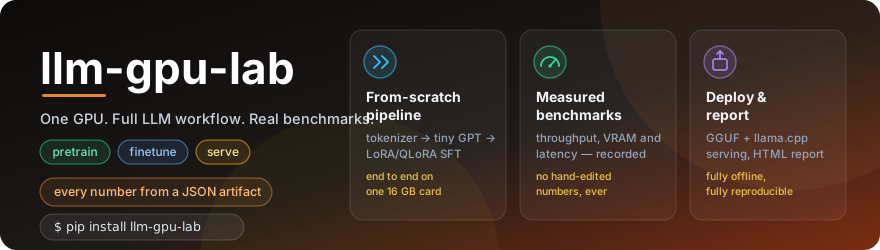



One GPU. Full LLM workflow. Real benchmarks. No cloud required.
llm-gpu-lab is a hands-on, end-to-end LLM toolkit you can run on a single
NVIDIA GPU. It walks you from "I have a 4080 and curiosity" to a fine-tuned
small LLM, a GGUF deployment, and a self-contained HTML benchmark report —
without any paid hosted inference and without any cloud training.
Every number in the report comes from a JSON artifact written on the machine that ran it. There are no fake screenshots, no hand-edited numbers, and no "expected" results substituted for measured ones.
Who this is for
A developer with one consumer NVIDIA GPU (RTX 4080 / 4070 Ti SUPER / 3090 class, 12–24 GB) who wants to learn — or demonstrate — the full local LLM workflow:
- environment diagnosis
- tokenizer training
- tiny GPT pretraining from scratch
- generation from the trained checkpoint
- LoRA / QLoRA supervised fine-tuning of a small open model
- lightweight evaluation
- (optional) lm-evaluation-harness integration
- GGUF export and llama.cpp serving
- GPU benchmarking and a reproducible HTML report
If you already know all of those, this is also a clean, opinionated template you can extend.
Architecture
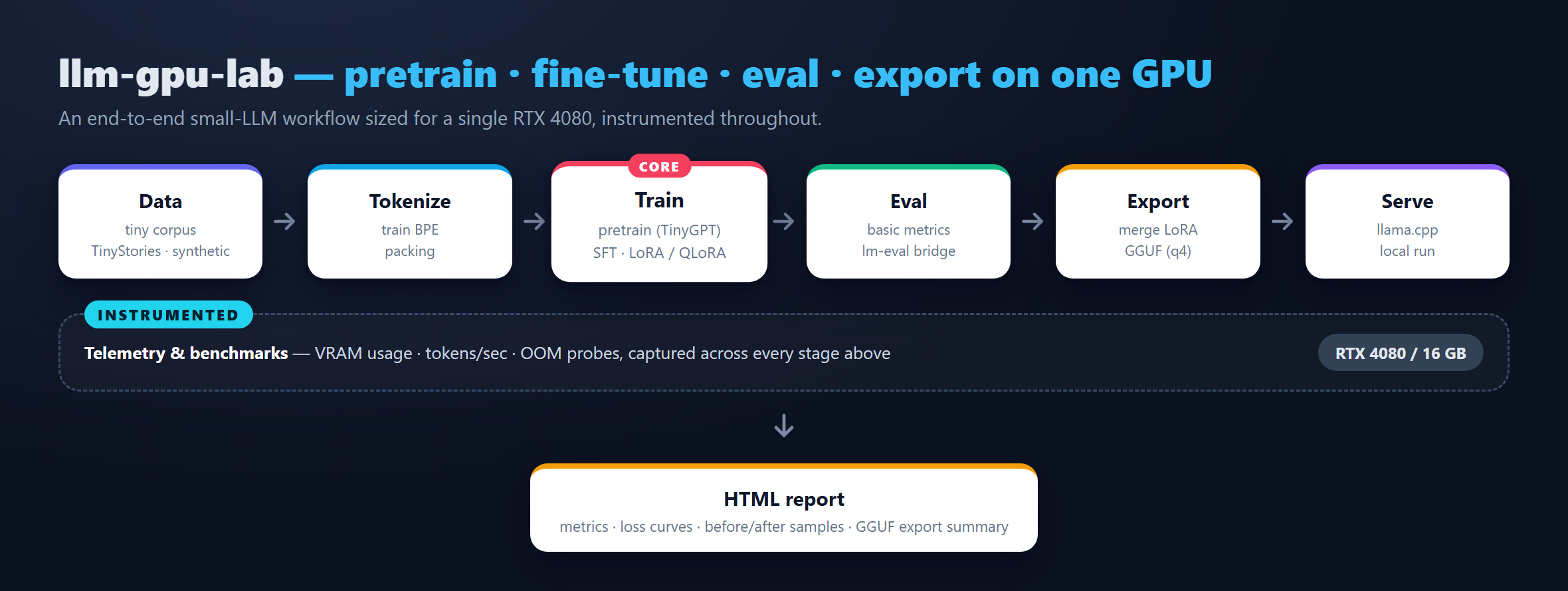
Two parallel paths share the tokenizer + eval + benchmark + report
infrastructure: a from-scratch TinyGPT pretraining path (top) and an
open-Hub model + LoRA / QLoRA SFT path (middle), with an optional
GGUF export + llama.cpp serve branch off the SFT path. Every box
writes a JSON artifact under results/<gpu>/, and the final HTML report
renders all of them together.
Quickstart
# 1. Create a venv (uv recommended; plain python -m venv also works)
uv venv --python 3.11 .venv
source .venv/Scripts/activate

# 2. Install PyTorch with the CUDA wheel that matches your driver
pip install --index-url https://download.pytorch.org/whl/cu124 "torch>=2.4"

# 3a. Install from PyPI (most users)
pip install "llm-gpu-lab[nlp,hub]"

# 3b. ...or from source if you want to hack on it
git clone https://github.com/DaoyuanLi2816/llm-gpu-lab && cd llm-gpu-lab
pip install -e ".[dev,nlp,hub]"

# 4. Verify the environment
python -m llm_gpu_lab doctor --out results/rtx4080/environment.json

# 5. Run the full smoke pipeline
make smoke

# 6. Open the HTML report
xdg-open results/rtx4080/report.html      # Linux
open    results/rtx4080/report.html      # macOS
start   results\rtx4080\report.html      # Windows
The smoke pipeline takes about 30 seconds of compute on an RTX 4080 plus a one-time ~270 MB Hugging Face download for SmolLM2-135M.
What runs on an RTX 4080
| Step | Config | Wall clock | Notes |
|---|---|---|---|
| Pretrain (smoke) | configs/pretrain/tiny_10m_smoke.yaml |
~1.5 s | 200 steps, 1.3 M params, ~600 MB VRAM |
| Pretrain (30 M) | configs/pretrain/tiny_30m_4080.yaml |
~30 s | 2 000 steps, ~30 M params |
| Pretrain (100 M) | configs/pretrain/tiny_100m_4080.yaml |
~30 min | TinyStories, ~100 M params |
| SFT LoRA (smoke) | configs/sft/smollm2_135m_lora_fallback.yaml |
~8 s | SmolLM2-135M, LoRA r=8, peak ~1.2 GB VRAM |
| SFT LoRA (Qwen) | configs/sft/qwen2_5_0_5b_lora_smoke.yaml |
~30 s | Qwen2.5-0.5B-Instruct, LoRA r=8 |
| SFT QLoRA | configs/sft/qwen3_0_6b_qlora_4080.yaml |
~1 min | Qwen3-0.6B, bnb 4-bit, LoRA r=16 |
Measured benchmarks (RTX 4080 16 GB)
These are the literal numbers from results/rtx4080/benchmark_summary.json
and results/rtx4080/pretrain_metrics.json after running make smoke on
the maintainer's machine. Re-run on yours and the report will overwrite
them with your numbers.
| Metric | Value |
|---|---|
| Pretrain throughput (TinyGPT, 1.3 M params, bf16) | 274 152 tokens / s |
| Pretrain loss (200 steps, smoke config) | 8.37 → 2.11 (eval 2.18) |
| Tiny-GPT autoregressive generation (cuda, 64 new tokens) | ~271 tokens / s |
| Matmul TFLOPS — 2048 × 2048 FP16 | 36.9 TFLOPS |
| Matmul TFLOPS — 2048 × 2048 BF16 | 34.5 TFLOPS |
| Matmul TFLOPS — 2048 × 2048 FP32 | 12.6 TFLOPS |
| LoRA SFT on SmolLM2-135M (30 steps, r=8, seq 256) | loss 3.30 → 2.40 (eval 2.66) in ~8 s |
| Basic eval pass rate (12 prompts, SFT'd SmolLM2-135M) | 6 / 12 = 0.50 |
| GGUF F16 export | 269 MB |
| GGUF Q4_K_M quantization | 101 MB, 6.17 BPW |
These deliberately include a small failure mode: the basic eval scores 50 % because some of its arithmetic prompts use the first regex-matched number as the answer, and SmolLM2-135M echoes the operands first. We keep that honest — it is a real artifact of the chosen extraction rule, not a bug we hid.
CLI
python -m llm_gpu_lab doctor           --out results/rtx4080/environment.json
python -m llm_gpu_lab train-tokenizer  --config configs/pretrain/tiny_10m_smoke.yaml
python -m llm_gpu_lab pretrain         --config configs/pretrain/tiny_10m_smoke.yaml
python -m llm_gpu_lab generate         --checkpoint artifacts/checkpoints/tiny_10m_smoke/final.safetensors \
                                       --prompts examples/prompts/generation_prompts.txt \
                                       --out results/rtx4080/generation_samples.json
python -m llm_gpu_lab sft              --config configs/sft/smollm2_135m_lora_fallback.yaml
python -m llm_gpu_lab eval             --config configs/eval/smoke_eval.yaml
python -m llm_gpu_lab bench-gpu        --out results/rtx4080/benchmark_summary.json
python -m llm_gpu_lab export-gguf      --config configs/export/gguf_q4_k_m.yaml
python -m llm_gpu_lab serve-llamacpp   --model artifacts/gguf/smollm2_135m_lora.Q4_K_M.gguf --port 8080
python -m llm_gpu_lab report           --results-dir results/rtx4080 --out results/rtx4080/report.html
python -m llm_gpu_lab lm-eval          --base-model HuggingFaceTB/SmolLM2-135M-Instruct --task arc_easy --limit 20
Every command writes a machine-readable JSON artifact under
results/rtx4080/. The HTML report only renders sections for artifacts
that actually exist on disk.
Project layout
llm-gpu-lab/
├── src/llm_gpu_lab/        # Python package (CLI, models, train, eval, …)
├── configs/                # YAML configs for pretrain / sft / eval / export
├── scripts/                # Shell helpers (setup_env, setup_llamacpp, smoke)
├── examples/prompts/       # eval prompts (jsonl) + generation prompts (txt)
├── docs/                   # quickstart, design, troubleshooting, licenses, …
├── tests/                  # pytest suite (CPU-friendly, GPU tests auto-skip)
├── results/rtx4080/        # committed JSON / HTML artifacts from real runs
├── pyproject.toml          # Python project metadata + ruff + pytest config
├── Makefile                # `make smoke`, `make test`, `make lint`, …
└── .github/workflows/ci.yml# CPU-only CI (lint + tests + audit)
License
Apache-2.0 — see LICENSE. The licence choice and the
licences of major dependencies are explained in
docs/licenses.md.
Troubleshooting
Start with docs/troubleshooting.md. It
covers the issues we actually hit while building this repo: CUDA not
available, bitsandbytes import errors, OOM during QLoRA, HF rate
limits, llama.cpp build failures, GGUF conversion edge cases, Windows
- Unicode console issues, and more.
Roadmap
See docs/roadmap.md — that is also the only file
where TODO / FIXME are allowed (enforced by
scripts/audit_placeholders.sh).
Contributing
CONTRIBUTING.md. Short version:
make lint,make test,make auditmust pass.- Numbers in docs must come from a JSON in
results/<gpu>/. No fake benchmark numbers. - Public datasets / models only, with licences documented.
1 maintainer

Metadata
1 maintainer
Release files for llm-gpu-lab 0.1.1
For a detailed explanation of source distributions (sdists) and built distributions (wheels), please see the package formats documentation.
Source distribution (sdist)
| File | Size | Uploaded | |
|---|---|---|---|
| llm_gpu_lab-0.1.1.tar.gz | 58.6 kB | Details |
Built distribution (wheel)
| File | Interpreter | ABI | Platform | Reset |
|---|---|---|---|---|
| llm_gpu_lab-0.1.1-py3-none-any.whl | Python 3 | none | any | Details |
Total release size: 119.7 kB
Release files / llm_gpu_lab-0.1.1.tar.gz
| Download URL | llm_gpu_lab-0.1.1.tar.gz |
|---|---|
| Size | 58.6 kB |
| Tags | Source |
|
SHA-256 checksum How to use checksums |
82bfa36ab9ca72f82980524a2cbe3a4a5c9c231e604c6fb2aab960a4de1d0233
|
|
BLAKE2b-256 checksum How to use checksums |
b21db953f3b8ec1fa285226b366c4e54c720eff7d8152b079844f834024ba545
|
| Upload date | |
|
Uploaded using Trusted Publishing? What is trusted publishing? |
Yes |
| Uploaded via |
twine/6.1.0 CPython/3.13.12
|
Provenance
Provenance describes where a file came from. On PyPI, provenance is shared via attestations, which provide a verifiable record of the build or publishing details. View details, limitations and caveats.


PyPI Publish Attestation
PyPI verified that this artifact, at this checksum, originated from the publisher listed below.
Signed by GitHub Actions, verified by PyPI on Jun 10, 2026.
Transparency logRelease files / llm_gpu_lab-0.1.1-py3-none-any.whl
| Download URL | llm_gpu_lab-0.1.1-py3-none-any.whl |
|---|---|
| Size | 61.1 kB |
| Tags | Python 3 |
|
SHA-256 checksum How to use checksums |
0e10c8327a92b0dff55d43030c6a8d9dd11edce6918a5a18912ebfdf6cb4c1d0
|
|
BLAKE2b-256 checksum How to use checksums |
28e73630ba7c3435efe82f3dc58c74e9b14cc9a39ac06caa8409e83af2f02d92
|
| Upload date | |
|
Uploaded using Trusted Publishing? What is trusted publishing? |
Yes |
| Uploaded via |
twine/6.1.0 CPython/3.13.12
|
Provenance
Provenance describes where a file came from. On PyPI, provenance is shared via attestations, which provide a verifiable record of the build or publishing details. View details, limitations and caveats.
PyPI Publish Attestation
PyPI verified that this artifact, at this checksum, originated from the publisher listed below.
Signed by GitHub Actions, verified by PyPI on Jun 10, 2026.
Transparency log













