
Effortlessly run LLM backends, APIs, frontends, and services with one command.

Project description








Effortlessly run LLM backends, APIs, frontends, and services with one command.
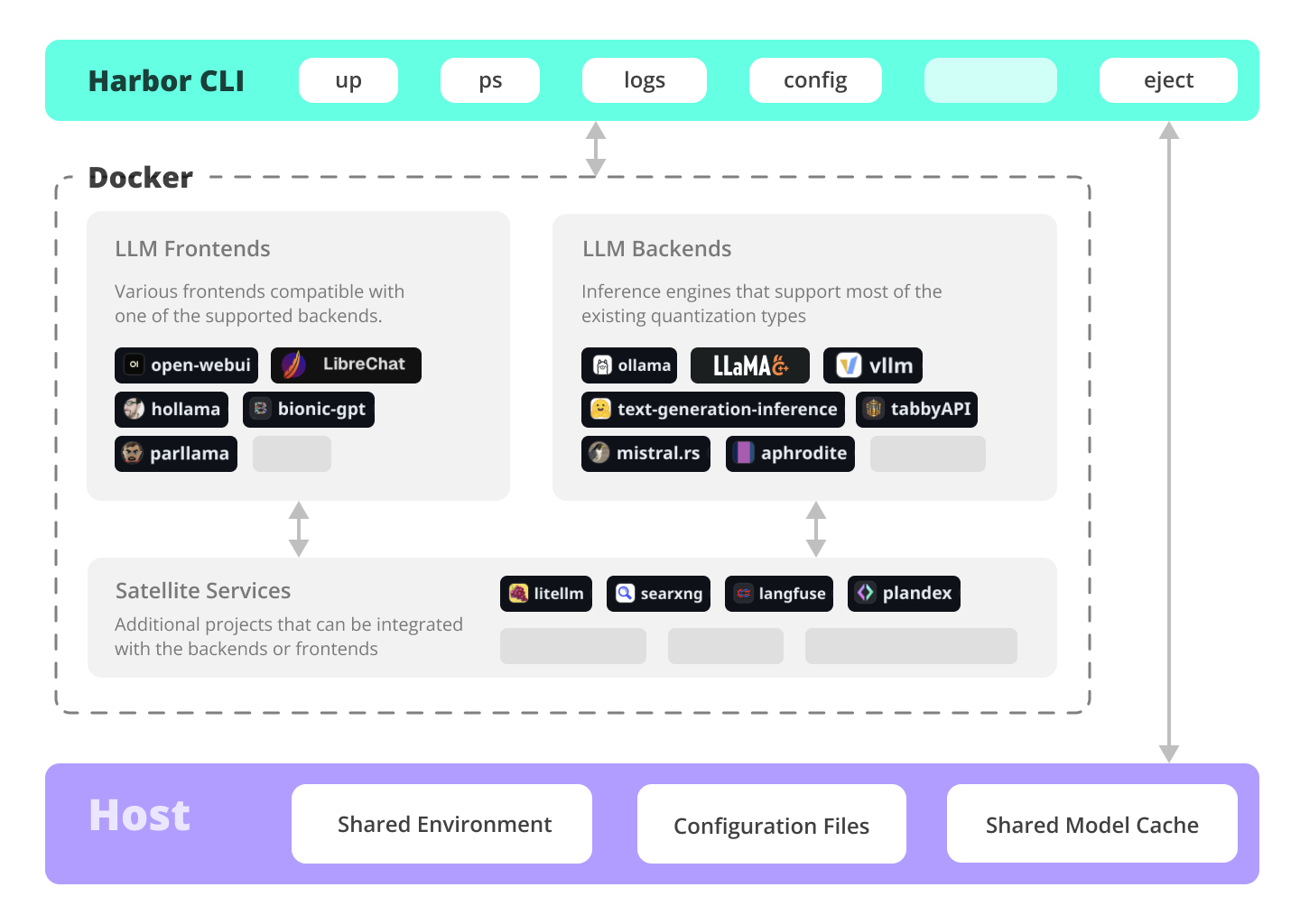
Harbor is a containerized LLM toolkit that allows you to run LLMs and additional services. It consists of a CLI and a companion App that allows you to manage and run AI services with ease.
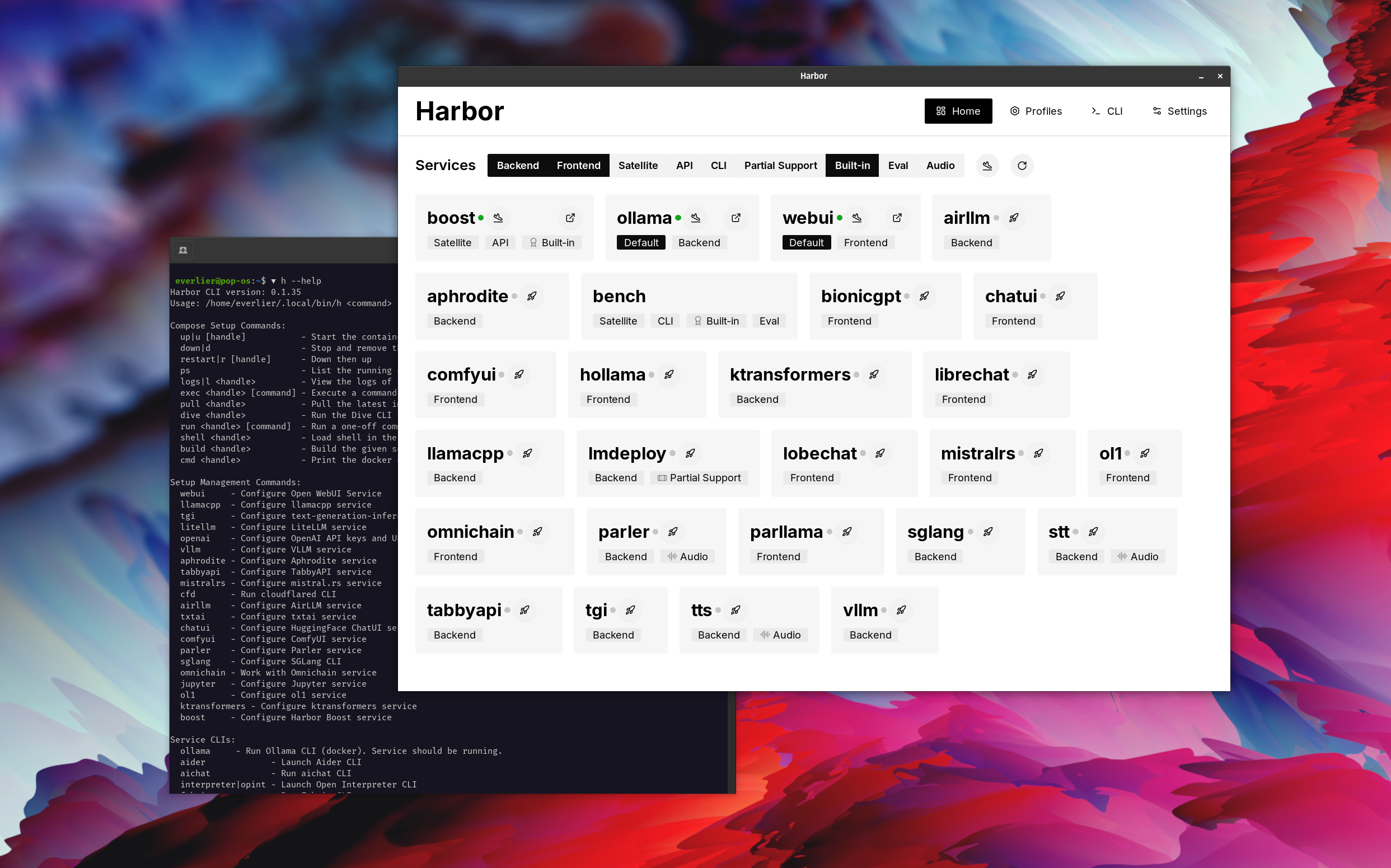
Services
UIs
Open WebUI ⦁︎ ComfyUI ⦁︎ LibreChat ⦁︎ HuggingFace ChatUI ⦁︎ Lobe Chat ⦁︎ Hollama ⦁︎ parllama ⦁︎ BionicGPT ⦁︎ AnythingLLM ⦁︎ Chat Nio
Backends
Ollama ⦁︎ llama.cpp ⦁︎ vLLM ⦁︎ TabbyAPI ⦁︎ Aphrodite Engine ⦁︎ mistral.rs ⦁︎ openedai-speech ⦁︎ Speaches ⦁︎ Parler ⦁︎ text-generation-inference ⦁︎ LMDeploy ⦁︎ AirLLM ⦁︎ SGLang ⦁︎ KTransformers ⦁︎ Nexa SDK ⦁︎ KoboldCpp
Satellites
Harbor Bench ⦁︎ Harbor Boost ⦁︎ SearXNG ⦁︎ Perplexica ⦁︎ Dify ⦁︎ Plandex ⦁︎ LiteLLM ⦁︎ LangFuse ⦁︎ Open Interpreter ⦁ ︎cloudflared ⦁︎ cmdh ⦁︎ fabric ⦁︎ txtai RAG ⦁︎ TextGrad ⦁︎ Aider ⦁︎ aichat ⦁︎ omnichain ⦁︎ lm-evaluation-harness ⦁︎ JupyterLab ⦁︎ ol1 ⦁︎ OpenHands ⦁︎ LitLytics ⦁︎ Repopack ⦁︎ n8n ⦁︎ Bolt.new ⦁︎ Open WebUI Pipelines ⦁︎ Qdrant ⦁︎ K6 ⦁︎ Promptfoo ⦁︎ Webtop ⦁︎ OmniParser ⦁︎ Flowise ⦁︎ Langflow ⦁︎ OptiLLM
See services documentation for a brief overview of each.
Blitz Tour
# Run Harbor with default services:
# Open WebUI and Ollama
harbor up

# Run Harbor with additional services
# Running SearXNG automatically enables Web RAG in Open WebUI
harbor up searxng

# Speaches includes OpenAI-compatible SST and TTS
# and connected to Open WebUI out of the box
harbor up speaches

# Run additional/alternative LLM Inference backends
# Open Webui is automatically connected to them.
harbor up llamacpp tgi litellm vllm tabbyapi aphrodite sglang ktransformers

# Run different Frontends
harbor up librechat chatui bionicgpt hollama

# Get a free quality boost with
# built-in optimizing proxy
harbor up boost

# Use FLUX in Open WebUI in one command
harbor up comfyui

# Use custom models for supported backends
harbor llamacpp model https://huggingface.co/user/repo/model.gguf

# Access service CLIs without installing them
# Caches are shared between services where possible
harbor hf scan-cache
harbor hf download google/gemma-2-2b-it
harbor ollama list

# Shortcut to HF Hub to find the models
harbor hf find gguf gemma-2
# Use HFDownloader and official HF CLI to download models
harbor hf dl -m google/gemma-2-2b-it -c 10 -s ./hf
harbor hf download google/gemma-2-2b-it

# Where possible, cache is shared between the services
harbor tgi model google/gemma-2-2b-it
harbor vllm model google/gemma-2-2b-it
harbor aphrodite model google/gemma-2-2b-it
harbor tabbyapi model google/gemma-2-2b-it-exl2
harbor mistralrs model google/gemma-2-2b-it
harbor opint model google/gemma-2-2b-it
harbor sglang model google/gemma-2-2b-it

# Convenience tools for docker setup
harbor logs llamacpp
harbor exec llamacpp ./scripts/llama-bench --help
harbor shell vllm

# Tell your shell exactly what you think about it
harbor opint
harbor aider
harbor aichat
harbor cmdh

# Use fabric to LLM-ify your linux pipes
cat ./file.md | harbor fabric --pattern extract_extraordinary_claims | grep "LK99"

# Open services from the CLI
harbor open webui
harbor open llamacpp
# Print yourself a QR to quickly open the
# service on your phone
harbor qr
# Feeling adventurous? Expose your Harbor
# to the internet
harbor tunnel

# Config management
harbor config list
harbor config set webui.host.port 8080

# Create and manage config profiles
harbor profile save l370b
harbor profile use default

# Lookup recently used harbor commands
harbor history

# Eject from Harbor into a standalone Docker Compose setup
# Will export related services and variables into a standalone file.
harbor eject searxng llamacpp > docker-compose.harbor.yml

# Run a build-in LLM benchmark with
# your own tasks
harbor bench run

# Gimmick/Fun Area

# Argument scrambling, below commands are all the same as above
# Harbor doesn't care if it's "vllm model" or "model vllm", it'll
# figure it out.
harbor model vllm
harbor vllm model

harbor config get webui.name
harbor get config webui_name

harbor tabbyapi shell
harbor shell tabbyapi

# 50% gimmick, 50% useful
# Ask harbor about itself
harbor how to ping ollama container from the webui?
Harbor App Demo
https://github.com/user-attachments/assets/a5cd2ef1-3208-400a-8866-7abd85808503
In the demo, Harbor App is used to launch a default stack with Ollama and Open WebUI services. Later, SearXNG is also started, and WebUI can connect to it for the Web RAG right out of the box. After that, Harbor Boost is also started and connected to the WebUI automatically to induce more creative outputs. As a final step, Harbor config is adjusted in the App for the klmbr module in the Harbor Boost, which makes the output unparseable for the LLM (yet still undetstandable for humans).
Documentation
- Installing Harbor
Guides to install Harbor CLI and App - Harbor User Guide
High-level overview of working with Harbor - Harbor App
Overview and manual for the Harbor companion application - Harbor Services
Catalog of services available in Harbor - Harbor CLI Reference
Read more about Harbor CLI commands and options. Read about supported services and the ways to configure them. - Compatibility
Known compatibility issues between the services and models as well as possible workarounds. - Harbor Bench
Documentation for the built-in LLM benchmarking service. - Harbor Boost
Documentation for the built-in LLM optimiser proxy. - Harbor Compose Setup
Read about the way Harbor uses Docker Compose to manage services. - Adding A New Service
Documentation on bringing more services into the Harbor toolkit.
Why?
- Convenience factor
- Workflow/setup centralisation
If you're comfortable with Docker and Linux administration - you likely don't need Harbor per se to manage your local LLM environment. However, you're also likely to eventually arrive to a similar solution. I know this for a fact, since I was rocking pretty much similar setup, just without all the whistles and bells.
Harbor is not designed as a deployment solution, but rather as a helper for the local LLM development environment. It's a good starting point for experimenting with LLMs and related services.
You can later eject from Harbor and use the services in your own setup, or continue using Harbor as a base for your own configuration.
Overview and Features
This project consists of a fairly large shell CLI, fairly small .env file and enourmous (for one repo) amount of docker-compose files.
Features
- Manage local LLM stack with a concise CLI
- Convenience utilities for common tasks (model management, configuration, service debug, URLs, tunnels, etc.)
- Access service CLIs (
hf,ollama, etc.) via Docker without install - Services are pre-configured to work together (contributions welcome)
- Host cache is shared and reused - Hugging Face, ollama, etc.
- Co-located service configs
- Built-in LLM benchmarking service
- Manage configuration profiles for different use cases
- Eject to run without harbor with
harbor eject
Release history Release notifications | RSS feed


Download files
Download the file for your platform. If you're not sure which to choose, learn more about installing packages.
Source Distribution
Built Distribution
Filter files by name, interpreter, ABI, and platform.
If you're not sure about the file name format, learn more about wheel file names.
Copy a direct link to the current filters
File details
Details for the file llm_harbor-0.2.23.tar.gz.
File metadata
- Download URL: llm_harbor-0.2.23.tar.gz
- Upload date:
- Size: 6.2 MB
- Tags: Source
- Uploaded using Trusted Publishing? No
- Uploaded via: poetry/1.8.3 CPython/3.12.2 Linux/6.9.3-76060903-generic
File hashes
| Algorithm | Hash digest | |
|---|---|---|
| SHA256 |
0a4873946b7afd6103554bcb0673e4413628175b93394bf899853f4d3ff46044
|
|
| MD5 |
123713ce34723652812014a8d5e7a89d
|
|
| BLAKE2b-256 |
74ef1c160d1bee622b3bd9100aab21665f9beaefcfd42b8edb6594659e3033fd
|
File details
Details for the file llm_harbor-0.2.23-py3-none-any.whl.
File metadata
- Download URL: llm_harbor-0.2.23-py3-none-any.whl
- Upload date:
- Size: 6.4 MB
- Tags: Python 3
- Uploaded using Trusted Publishing? No
- Uploaded via: poetry/1.8.3 CPython/3.12.2 Linux/6.9.3-76060903-generic
File hashes
| Algorithm | Hash digest | |
|---|---|---|
| SHA256 |
a5a139c97dc6f24ce9bbc47c2a386714526b3ba1f5745d570977ccb7aa92cdce
|
|
| MD5 |
829911e6cef92e82891b3486886b133e
|
|
| BLAKE2b-256 |
91a28a2c04d734ff31a2179b125f7b706bef0ea302ad6e910dfe30ad8b406fd6
|






