
LLM-in-Sandbox
🌐 Project Page • 📄 Paper • 🤗 Huggingface
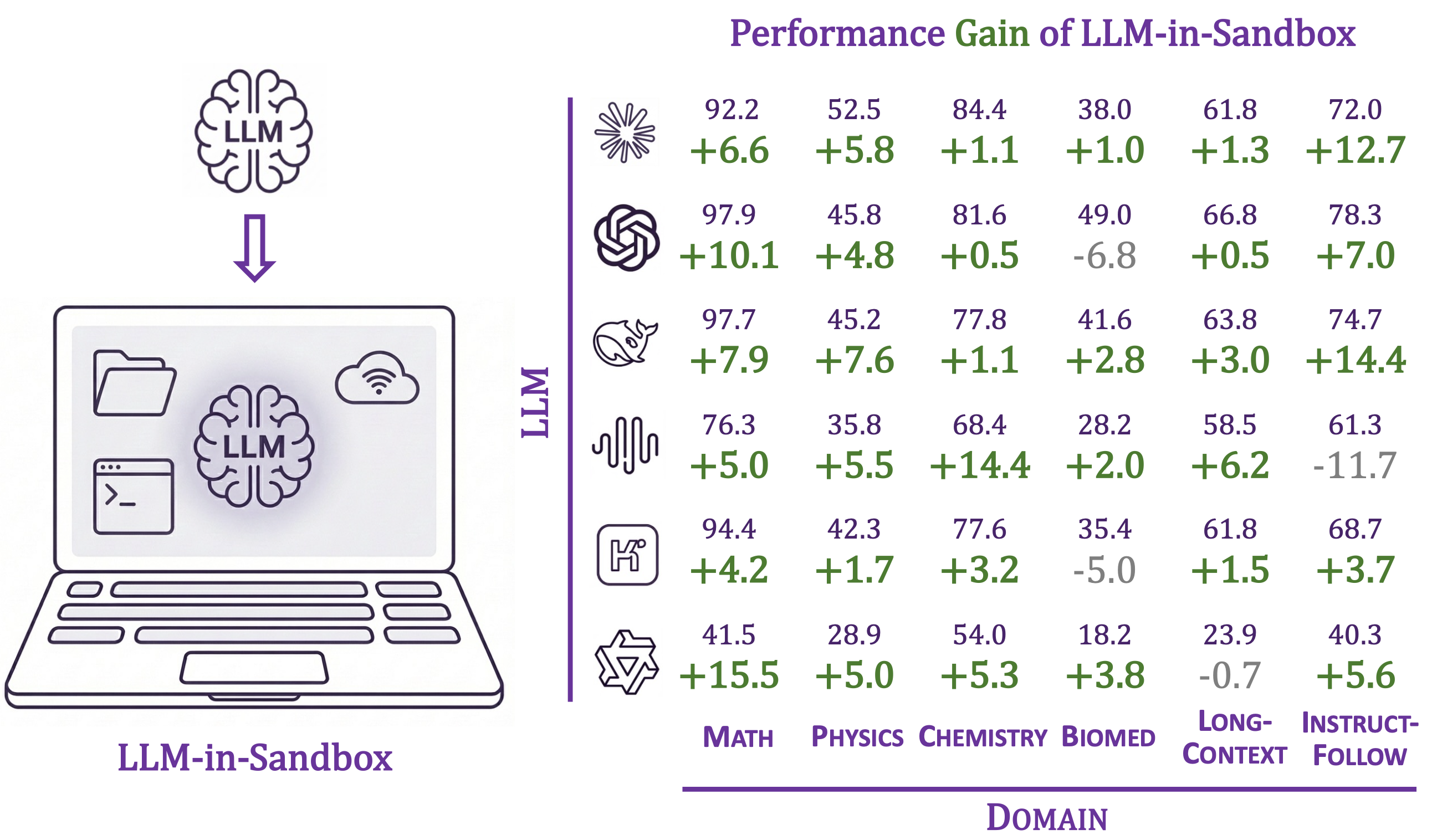
Enabling LLMs to explore within a code sandbox (i.e., a virtual computer) to elicit general agentic intelligence.
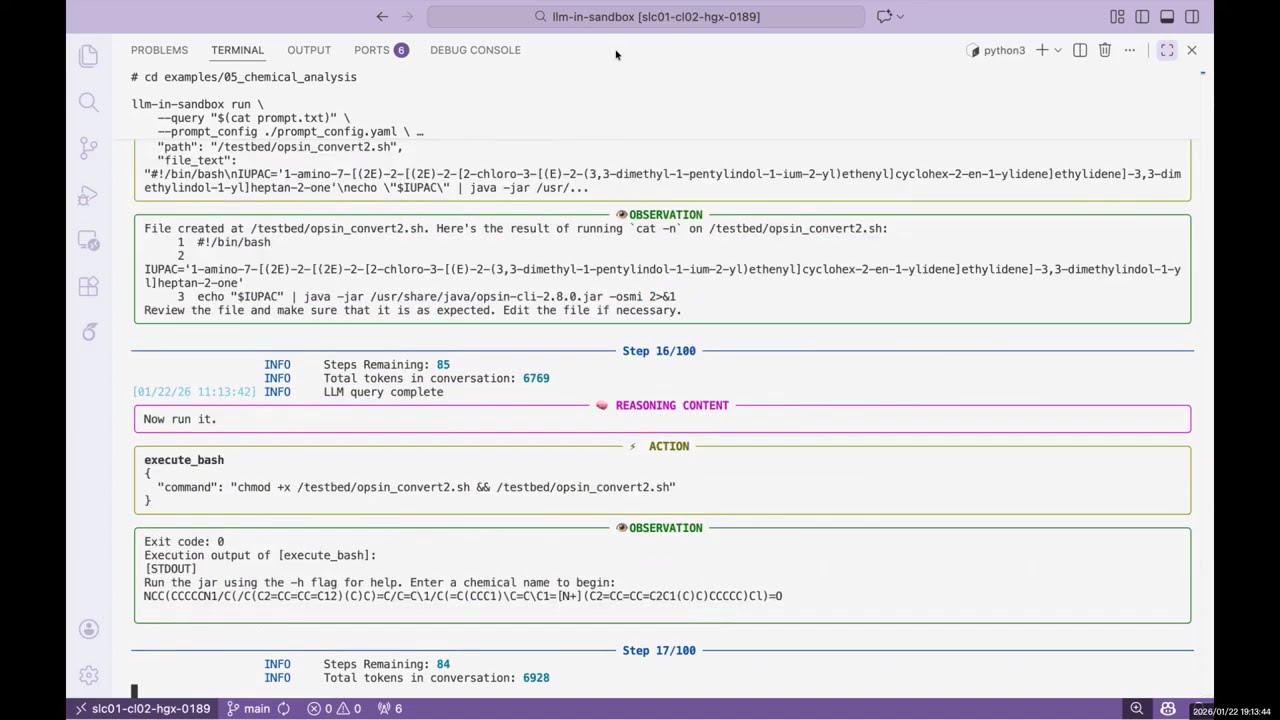
▶️ Click to watch the demo video
Features:
- 🌍 General-purpose: works beyond coding—scientific reasoning, long-context understanding, video production, travel planning, and more
- 🐳 Isolated execution environment via Docker containers
- 🔌 Compatible with OpenAI, Anthropic, and self-hosted servers (vLLM, SGLang, etc.)
- 📁 Flexible I/O: mount any input files, export any output files
Table of Contents
Installation
Requirements: Python 3.10+, Docker
pip install llm-in-sandbox
Or install from source:
git clone https://github.com/llm-in-sandbox/llm-in-sandbox.git
cd llm-in-sandbox
pip install -e .
Docker Image
The default Docker image (cdx123/llm-in-sandbox:v0.1) will be automatically pulled when you first run the agent. The first run may take a minute to download the image (~400MB), but subsequent runs will start instantly.
Quick Start
LLM-in-Sandbox works with various LLM providers including OpenAI, Anthropic, and self-hosted servers (vLLM, SGLang, etc.).
Option 1: Cloud / API Services
llm-in-sandbox run \
    --query "write a hello world in python" \
    --llm_name "openai/gpt-5" \
    --llm_base_url "http://your-api-server/v1" \
    --api_key "your-api-key"
Option 2: Self-Hosted Models
Using local vLLM server for Qwen3-Coder-30B-A3B-Instruct
1. Start vLLM server:
vllm serve Qwen/Qwen3-Coder-30B-A3B-Instruct \
    --served-model-name qwen3_coder \
    --enable-auto-tool-choice \
    --tool-call-parser qwen3_coder \
    --tensor-parallel-size 8  \
    --enable-prefix-caching
2. Run agent (in a new terminal once server is ready):
llm-in-sandbox run \
    --query "write a hello world in python" \
    --llm_name qwen3_coder \
    --llm_base_url "http://localhost:8000/v1"  \
    --temperature 0.7
Using local SGLang server for DeepSeek-V3.2-Thinking
1. Start sgLang server:
python3 -m sglang.launch_server \
    --model-path "deepseek-ai/DeepSeek-V3.2" \
    --served-model-name "DeepSeek-V3.2" \
    --trust-remote-code \
    --tp-size 8 \
    --tool-call-parser deepseekv32 \
    --reasoning-parser deepseek-v3 \
    --host 0.0.0.0 \
    --port 5678
2. Run agent (in a new terminal once server is ready):
llm-in-sandbox run \
    --query "write a hello world in python" \
    --llm_name DeepSeek-V3.2 \
    --llm_base_url "http://0.0.0.0:5678/v1" \
    --extra_body '{"chat_template_kwargs": {"thinking": True}}'
Parameters (Common)
| Parameter | Description | Default |
|---|---|---|
--query |
Task for the agent | required |
--llm_name |
Model name | required |
--llm_base_url |
API endpoint URL | from LLM_BASE_URL env var |
--api_key |
API key (not needed for local server) | from OPENAI_API_KEY env var |
--input_dir |
Input files folder to mount (Optional) | None |
--output_dir |
Output folder for results | ./output |
--docker_image |
Docker image to use | cdx123/llm-in-sandbox:v0.1 |
--prompt_config |
Path to prompt template | ./config/general.yaml |
--temperature |
Sampling temperature | 1.0 |
--max_steps |
Max conversation turns | 100 |
--extra_body |
Extra JSON body for LLM API calls | None |
Run llm-in-sandbox run --help for all available parameters.
Output
Each run creates a timestamped folder:
output/2026-01-16_14-30-00/
├── files/
│   ├── answer.txt      # Final answer
│   └── hello_world.py  # Output file
└── trajectory.json     # Execution history
More Examples
We provide examples across diverse non-coding domains: scientific reasoning, long-context understanding, instruction following, travel planning, video production, music composition, poster design, and more.
👉 See examples/README.md for the full list.
Benchmark and Reproduction
Reproduce our paper results, evaluate any LLM in the sandbox, or add your own tasks.
👉 See llm_in_sandbox/benchmark/README.md
Contact Us
Daixuan Cheng: daixuancheng6@gmail.com
Shaohan Huang: shaohanh@microsoft.com
Acknowledgment
We learned the design and reused code from R2E-Gym. Thanks for the great work!
Citation
If you find our work helpful, please cite us:
@article{cheng2026llm,
  title={LLM-in-Sandbox Elicits General Agentic Intelligence},
  author={Cheng, Daixuan and Huang, Shaohan and Gu, Yuxian and Song, Huatong and Chen, Guoxin and Dong, Li and Zhao, Wayne Xin and Wen, Ji-Rong and Wei, Furu},
  journal={arXiv preprint arXiv:2601.16206},
  year={2026}
}
1 maintainer

Release files for llm-in-sandbox 0.2.0
For a detailed explanation of source distributions (sdists) and built distributions (wheels), please see the package formats documentation.
Source distribution (sdist)
| File | Size | Uploaded | |
|---|---|---|---|
| llm_in_sandbox-0.2.0.tar.gz | 51.2 kB | Details |
Built distribution (wheel)
| File | Interpreter | ABI | Platform | Reset |
|---|---|---|---|---|
| llm_in_sandbox-0.2.0-py3-none-any.whl | Python 3 | none | any | Details |
Total release size: 132.9 kB
Release files / llm_in_sandbox-0.2.0.tar.gz
| Download URL | llm_in_sandbox-0.2.0.tar.gz |
|---|---|
| Size | 51.2 kB |
| Tags | Source |
|
SHA-256 checksum How to use checksums |
16608cbb1d2cc9b676d61355d3f272e203df16c29a894ba9d9d82e4b89b38fd4
|
|
BLAKE2b-256 checksum How to use checksums |
82da3a8e96e440726beb359a9bd2cb477a52b123175bce46b3b1ae70c4505302
|
| Upload date | |
|
Uploaded using Trusted Publishing? What is trusted publishing? |
No |
| Uploaded via |
twine/6.2.0 CPython/3.10.12
|
Release files / llm_in_sandbox-0.2.0-py3-none-any.whl
| Download URL | llm_in_sandbox-0.2.0-py3-none-any.whl |
|---|---|
| Size | 81.8 kB |
| Tags | Python 3 |
|
SHA-256 checksum How to use checksums |
baee13e97262e64d06656d02f447ad1035b0ed3ff44abef626ef83b0e454de5c
|
|
BLAKE2b-256 checksum How to use checksums |
3c88e1271537e9fb1ad0048d777d980277658d1bf6882cedc258c9a0b8c1c12b
|
| Upload date | |
|
Uploaded using Trusted Publishing? What is trusted publishing? |
No |
| Uploaded via |
twine/6.2.0 CPython/3.10.12
|














