
A lightweight framework that connects LLMs to a virtual computer (Docker-based sandbox) to build general-purpose agents

Project description
LLM-in-Sandbox
🌐 Project Page • 📄 Paper • 🤗 Huggingface
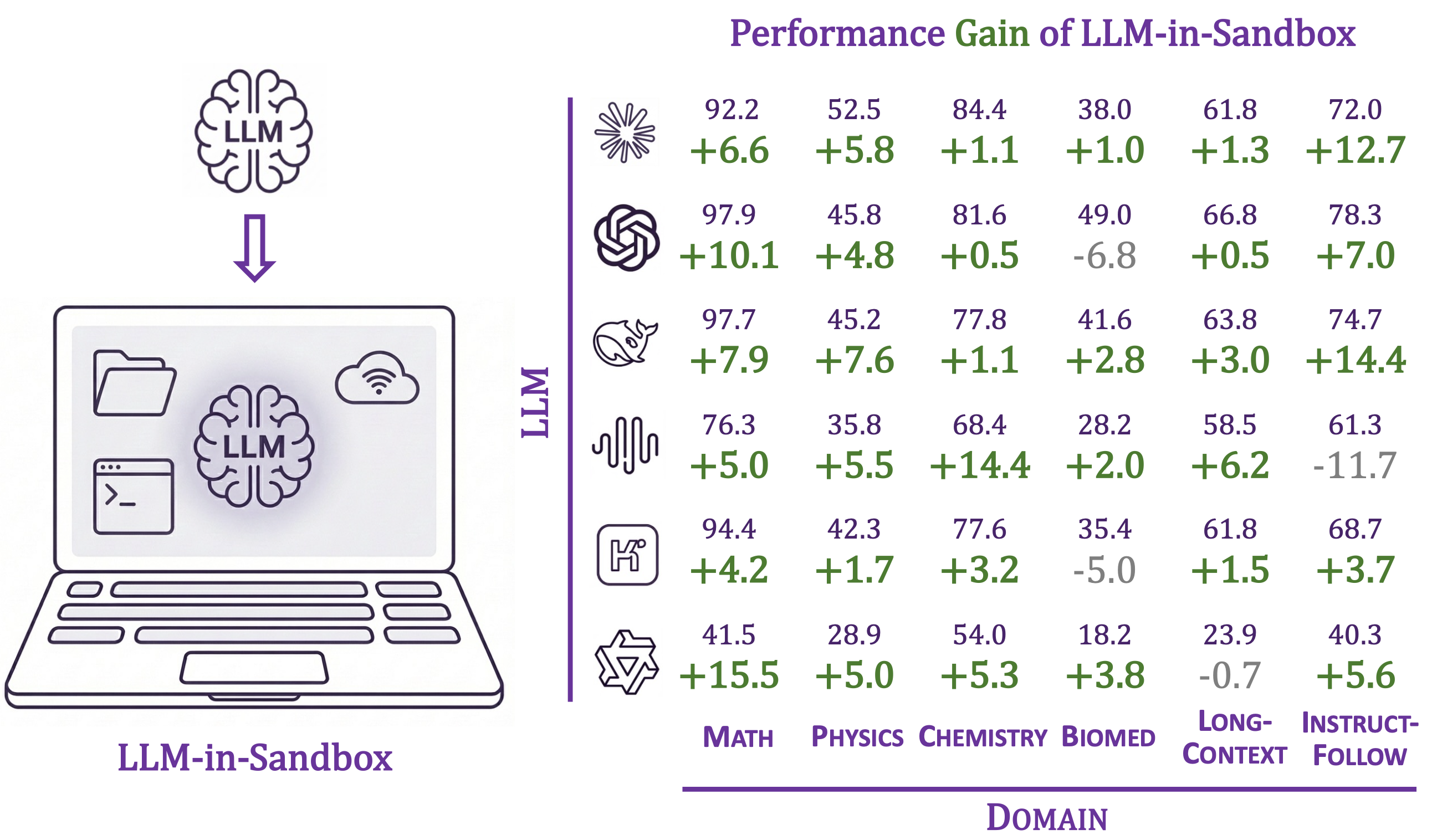
Enabling LLMs to explore within a code sandbox (i.e., a virtual computer) to elicit general agentic intelligence.
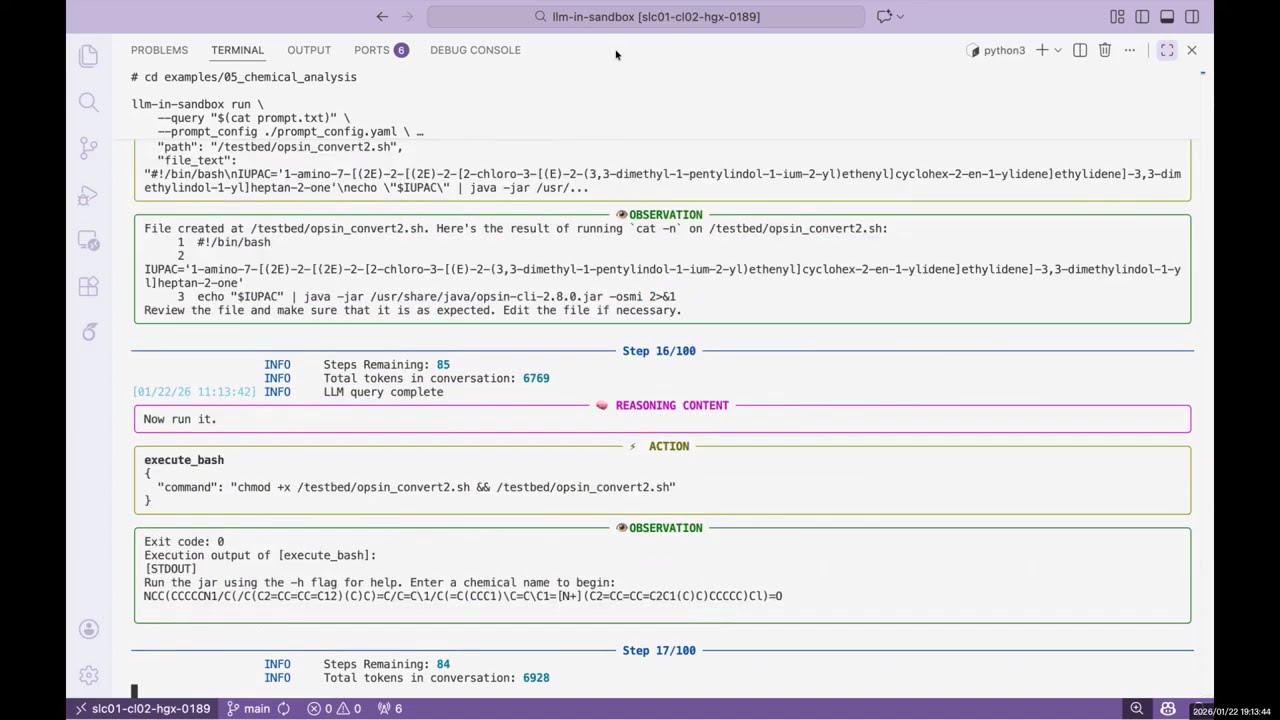
▶️ Click to watch the demo video
Features:
- 🌍 General-purpose: works beyond coding—scientific reasoning, long-context understanding, video production, travel planning, and more
- 🐳 Isolated execution environment via Docker containers
- 🔌 Compatible with OpenAI, Anthropic, and self-hosted servers (vLLM, SGLang, etc.)
- 📁 Flexible I/O: mount any input files, export any output files
Table of Contents
Installation
Requirements: Python 3.10+, Docker
pip install llm-in-sandbox
Or install from source:
git clone https://github.com/llm-in-sandbox/llm-in-sandbox.git
cd llm-in-sandbox
pip install -e .
Docker Image
The default Docker image (cdx123/llm-in-sandbox:v0.1) will be automatically pulled when you first run the agent. The first run may take a minute to download the image (~400MB), but subsequent runs will start instantly.
Quick Start
LLM-in-Sandbox works with various LLM providers including OpenAI, Anthropic, and self-hosted servers (vLLM, SGLang, etc.).
Option 1: Cloud / API Services
llm-in-sandbox run \
    --query "write a hello world in python" \
    --llm_name "openai/gpt-5" \
    --llm_base_url "http://your-api-server/v1" \
    --api_key "your-api-key"
Option 2: Self-Hosted Models
Using local vLLM server for Qwen3-Coder-30B-A3B-Instruct
1. Start vLLM server:
vllm serve Qwen/Qwen3-Coder-30B-A3B-Instruct \
    --served-model-name qwen3_coder \
    --enable-auto-tool-choice \
    --tool-call-parser qwen3_coder \
    --tensor-parallel-size 8  \
    --enable-prefix-caching
2. Run agent (in a new terminal once server is ready):
llm-in-sandbox run \
    --query "write a hello world in python" \
    --llm_name qwen3_coder \
    --llm_base_url "http://localhost:8000/v1"  \
    --temperature 0.7
Using local SGLang server for DeepSeek-V3.2-Thinking
1. Start sgLang server:
python3 -m sglang.launch_server \
    --model-path "deepseek-ai/DeepSeek-V3.2" \
    --served-model-name "DeepSeek-V3.2" \
    --trust-remote-code \
    --tp-size 8 \
    --tool-call-parser deepseekv32 \
    --reasoning-parser deepseek-v3 \
    --host 0.0.0.0 \
    --port 5678
2. Run agent (in a new terminal once server is ready):
llm-in-sandbox run \
    --query "write a hello world in python" \
    --llm_name DeepSeek-V3.2 \
    --llm_base_url "http://0.0.0.0:5678/v1" \
    --extra_body '{"chat_template_kwargs": {"thinking": True}}'
Parameters (Common)
| Parameter | Description | Default |
|---|---|---|
--query |
Task for the agent | required |
--llm_name |
Model name | required |
--llm_base_url |
API endpoint URL | from LLM_BASE_URL env var |
--api_key |
API key (not needed for local server) | from OPENAI_API_KEY env var |
--input_dir |
Input files folder to mount (Optional) | None |
--output_dir |
Output folder for results | ./output |
--docker_image |
Docker image to use | cdx123/llm-in-sandbox:v0.1 |
--prompt_config |
Path to prompt template | ./config/general.yaml |
--temperature |
Sampling temperature | 1.0 |
--max_steps |
Max conversation turns | 100 |
--extra_body |
Extra JSON body for LLM API calls | None |
Run llm-in-sandbox run --help for all available parameters.
Output
Each run creates a timestamped folder:
output/2026-01-16_14-30-00/
├── files/
│   ├── answer.txt      # Final answer
│   └── hello_world.py  # Output file
└── trajectory.json     # Execution history
More Examples
We provide examples across diverse non-coding domains: scientific reasoning, long-context understanding, instruction following, travel planning, video production, music composition, poster design, and more.
👉 See examples/README.md for the full list.
Benchmark and Reproduction
Reproduce our paper results, evaluate any LLM in the sandbox, or add your own tasks.
👉 See llm_in_sandbox/benchmark/README.md
Contact Us
Daixuan Cheng: daixuancheng6@gmail.com
Shaohan Huang: shaohanh@microsoft.com
Acknowledgment
We learned the design and reused code from R2E-Gym. Thanks for the great work!
Citation
If you find our work helpful, please cite us:
@article{cheng2026llm,
  title={LLM-in-Sandbox Elicits General Agentic Intelligence},
  author={Cheng, Daixuan and Huang, Shaohan and Gu, Yuxian and Song, Huatong and Chen, Guoxin and Dong, Li and Zhao, Wayne Xin and Wen, Ji-Rong and Wei, Furu},
  journal={arXiv preprint arXiv:2601.16206},
  year={2026}
}
Release history Release notifications | RSS feed


Download files
Download the file for your platform. If you're not sure which to choose, learn more about installing packages.
Source Distribution
Built Distribution
Filter files by name, interpreter, ABI, and platform.
If you're not sure about the file name format, learn more about wheel file names.
Copy a direct link to the current filters
File details
Details for the file llm_in_sandbox-0.2.0.tar.gz.
File metadata
- Download URL: llm_in_sandbox-0.2.0.tar.gz
- Upload date:
- Size: 51.2 kB
- Tags: Source
- Uploaded using Trusted Publishing? No
- Uploaded via: twine/6.2.0 CPython/3.10.12
File hashes
| Algorithm | Hash digest | |
|---|---|---|
| SHA256 |
16608cbb1d2cc9b676d61355d3f272e203df16c29a894ba9d9d82e4b89b38fd4
|
|
| MD5 |
c2f2d51985a5f5ee3994e140cb75ca5a
|
|
| BLAKE2b-256 |
82da3a8e96e440726beb359a9bd2cb477a52b123175bce46b3b1ae70c4505302
|
File details
Details for the file llm_in_sandbox-0.2.0-py3-none-any.whl.
File metadata
- Download URL: llm_in_sandbox-0.2.0-py3-none-any.whl
- Upload date:
- Size: 81.8 kB
- Tags: Python 3
- Uploaded using Trusted Publishing? No
- Uploaded via: twine/6.2.0 CPython/3.10.12
File hashes
| Algorithm | Hash digest | |
|---|---|---|
| SHA256 |
baee13e97262e64d06656d02f447ad1035b0ed3ff44abef626ef83b0e454de5c
|
|
| MD5 |
2fdd6f0f09574bf7cba462de37f68417
|
|
| BLAKE2b-256 |
3c88e1271537e9fb1ad0048d777d980277658d1bf6882cedc258c9a0b8c1c12b
|






