



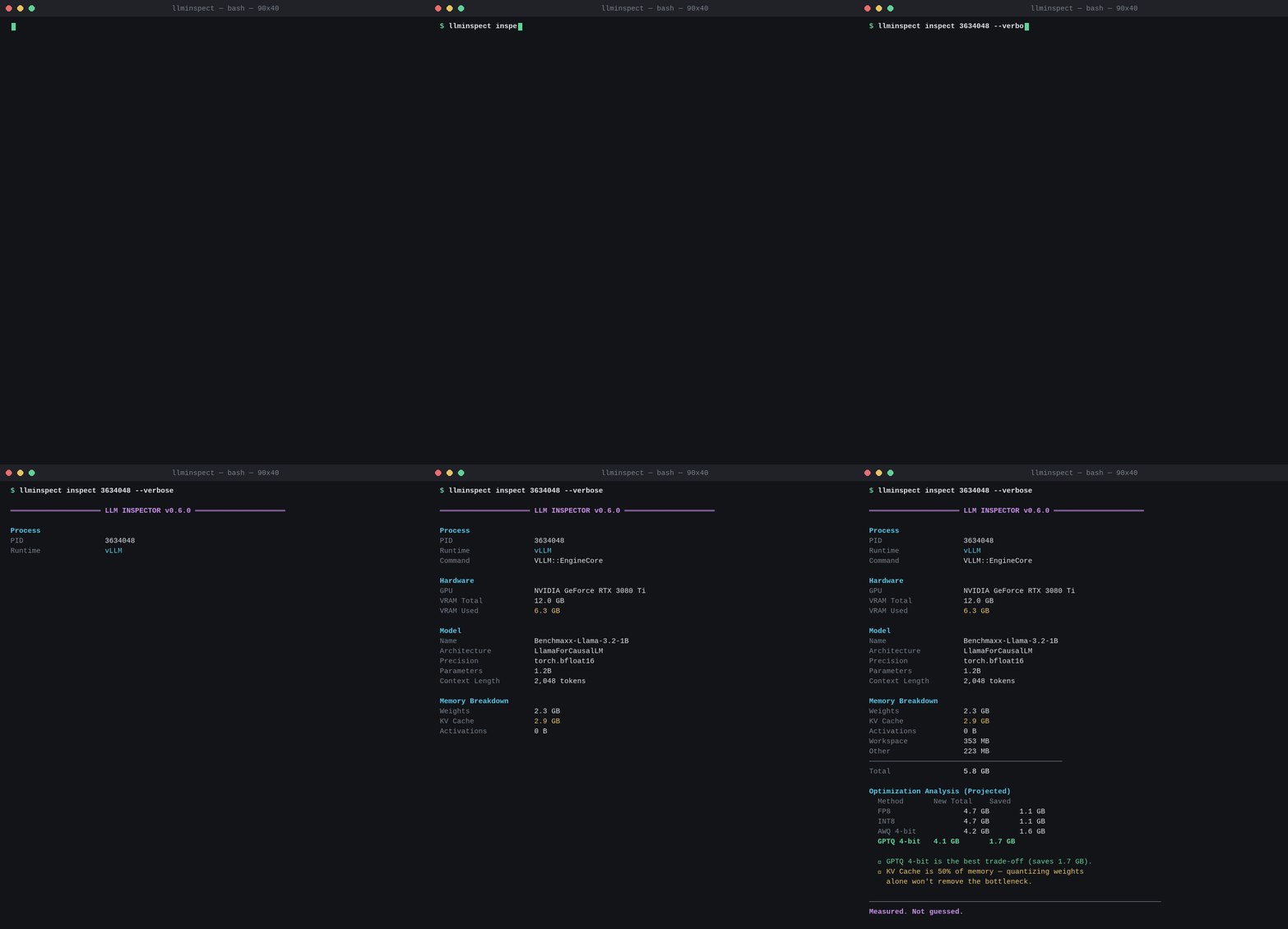
LLM Inspector inspects live inference processes and shows exactly how GPU memory is being used, what model is running, how the runtime is configured, and where every reported value comes from.
Unlike traditional monitoring tools, it doesn't stop at inspection. It also analyzes the running workload and projects optimization opportunities starting with quantization to help you understand how different strategies would impact GPU memory before making any changes.
Example
Why?
Existing tools tell you that your GPU is using 18 GB.
LLM Inspector tells you why:
Weights       7 GB
KV Cache      8 GB
Workspace     1 GB
Other         2 GB
Then it tells you what would happen if you optimized:
FP8 would save ~3 GB of weights.
AWQ would save ~5 GB of weights.
Weight quantization won't fix an 8 GB KV Cache bottleneck.
That is the difference between a GPU monitor and an inference advisor.
Embedded goes deeper
Most tools stop here:
GPU
└── Process A
    └── 17.3 GB
LLM Inspector goes one level deeper:
GPU
└── Process A
    ├── Weights
    ├── KV Cache
    ├── Workspace
    ├── Activations
    └── Optimization Analysis (Projected)
That bridge—system observability + model internals, with an htop-style CLI—is the innovation. Deep metrics come from optional embedded attach() inside the inference process (see the install guide).
Measured vs Projected
| Section | Kind |
|---|---|
| Process, Hardware, Model, Memory, Runtime | Measured from live sources (or Unavailable with a reason) |
| Optimization Analysis | Projected from measured inputs — never mutates the model |
llminspect inspect <pid> --verbose # show provenance for every field
Install
Works on any NVIDIA GPU machine — laptop, workstation, cloud VM, bare-metal server, or DGX. Docker is optional.
pip install llm-inspector
For embedded deep metrics (Weights / KV / Activations) in the same Python env as the model:
pip install "llm-inspector[torch]"
From source (contributors):
git clone https://github.com/helasaoudi/llm-inspector
cd llm-inspector
python -m venv .venv && source .venv/bin/activate
pip install -e ".[torch]"
Try it
llminspect gpu
llminspect ps
llminspect inspect <pid> --verbose
Multi-GPU (vLLM tensor parallel)
# after: vllm serve <model> --tensor-parallel-size 2 --port 8000
llminspect gpu
llminspect ps
llminspect inspect $(pgrep -f 'VLLM::Worker_TP0' | head -1) --verbose
# inspects Worker_TP0 + Worker_TP1 (+ EngineCore) in one report
Multi-core / CPU (e.g. Ollama on macOS)
ollama run llama3
llminspect inspect $(pgrep -f "ollama serve" | head -1) --verbose
# Hardware shows CPU Cores / System RAM — not GPU ids
Multi-GPU ≠ multi-core. Details: Install guide.
Supports
Ollama · vLLM · HuggingFace Transformers · FastAPI · custom PyTorch
macOS · Linux · any NVIDIA GPU server (including DGX)
Documentation
| Guide | When to read it |
|---|---|
| Install & Integration | PyPI install, multi-GPU / multi-core commands, Docker, attach(), troubleshooting |
| DGX notes | DGX + Docker TP inspect examples |
License
MIT
1 maintainer

Metadata
1 maintainer
Release files for llm-inspector 0.7.0
For a detailed explanation of source distributions (sdists) and built distributions (wheels), please see the package formats documentation.
Source distribution (sdist)
| File | Size | Uploaded | |
|---|---|---|---|
| llm_inspector-0.7.0.tar.gz | 357.9 kB | Details |
Built distribution (wheel)
| File | Interpreter | ABI | Platform | Reset |
|---|---|---|---|---|
| llm_inspector-0.7.0-py3-none-any.whl | Python 3 | none | any | Details |
Total release size: 468.4 kB
Release files / llm_inspector-0.7.0.tar.gz
| Download URL | llm_inspector-0.7.0.tar.gz |
|---|---|
| Size | 357.9 kB |
| Tags | Source |
|
SHA-256 checksum How to use checksums |
03a6553f0507fcf6f8e49582ddb44f5f17cb54298e303c160c0feb77a079ae9f
|
|
BLAKE2b-256 checksum How to use checksums |
71b6857606998d7f53cf78c9589bbe06e4780f3433914add1065aeab823ce363
|
| Upload date | |
|
Uploaded using Trusted Publishing? What is trusted publishing? |
Yes |
| Uploaded via |
twine/7.0.0 CPython/3.13.14
|
Provenance
Provenance describes where a file came from. On PyPI, provenance is shared via attestations, which provide a verifiable record of the build or publishing details. View details, limitations and caveats.


PyPI Publish Attestation
PyPI verified that this artifact, at this checksum, originated from the publisher listed below.
Signed by GitHub Actions, verified by PyPI on Sep 28, 2026.
Transparency logRelease files / llm_inspector-0.7.0-py3-none-any.whl
| Download URL | llm_inspector-0.7.0-py3-none-any.whl |
|---|---|
| Size | 110.5 kB |
| Tags | Python 3 |
|
SHA-256 checksum How to use checksums |
e875c327a80ee9598bdb7014b57c13ef56c177ddc9afad499edf86c8fbaf76f7
|
|
BLAKE2b-256 checksum How to use checksums |
f20b02a04f85aed8db5aff025a3423f2d024e3c7079880ddd592e5f1ae26b1db
|
| Upload date | |
|
Uploaded using Trusted Publishing? What is trusted publishing? |
Yes |
| Uploaded via |
twine/7.0.0 CPython/3.13.14
|
Provenance
Provenance describes where a file came from. On PyPI, provenance is shared via attestations, which provide a verifiable record of the build or publishing details. View details, limitations and caveats.
PyPI Publish Attestation
PyPI verified that this artifact, at this checksum, originated from the publisher listed below.
Signed by GitHub Actions, verified by PyPI on Sep 28, 2026.
Transparency log













