
llm-lens
Automatic observability for OpenAI and Anthropic API calls.
Tracks latency, token usage, cost, and errors — with a live web dashboard.
What it does
Add one import to your project. llm-lens silently intercepts every OpenAI and Anthropic API call and logs:
- Latency (ms)
- Input and output tokens
- Cost in USD
- Model used
- Errors and status
No SDK changes. No account setup. No config files.
Installation
pip install llm-lens-py
Usage
import llm_lens        # patches OpenAI and Anthropic automatically
import openai

client = openai.OpenAI()
response = client.chat.completions.create(
    model="gpt-4o-mini",
    messages=[{"role": "user", "content": "hello"}]
)
# this call was silently tracked
CLI
# show a table of all tracked calls
llm-lens

# show aggregated stats: total calls, error rate, avg latency, total cost
llm-lens stats

# start the live dashboard at http://localhost:8000
llm-lens serve

# set a cost alert threshold
llm-lens config set cost_alert_usd 0.10
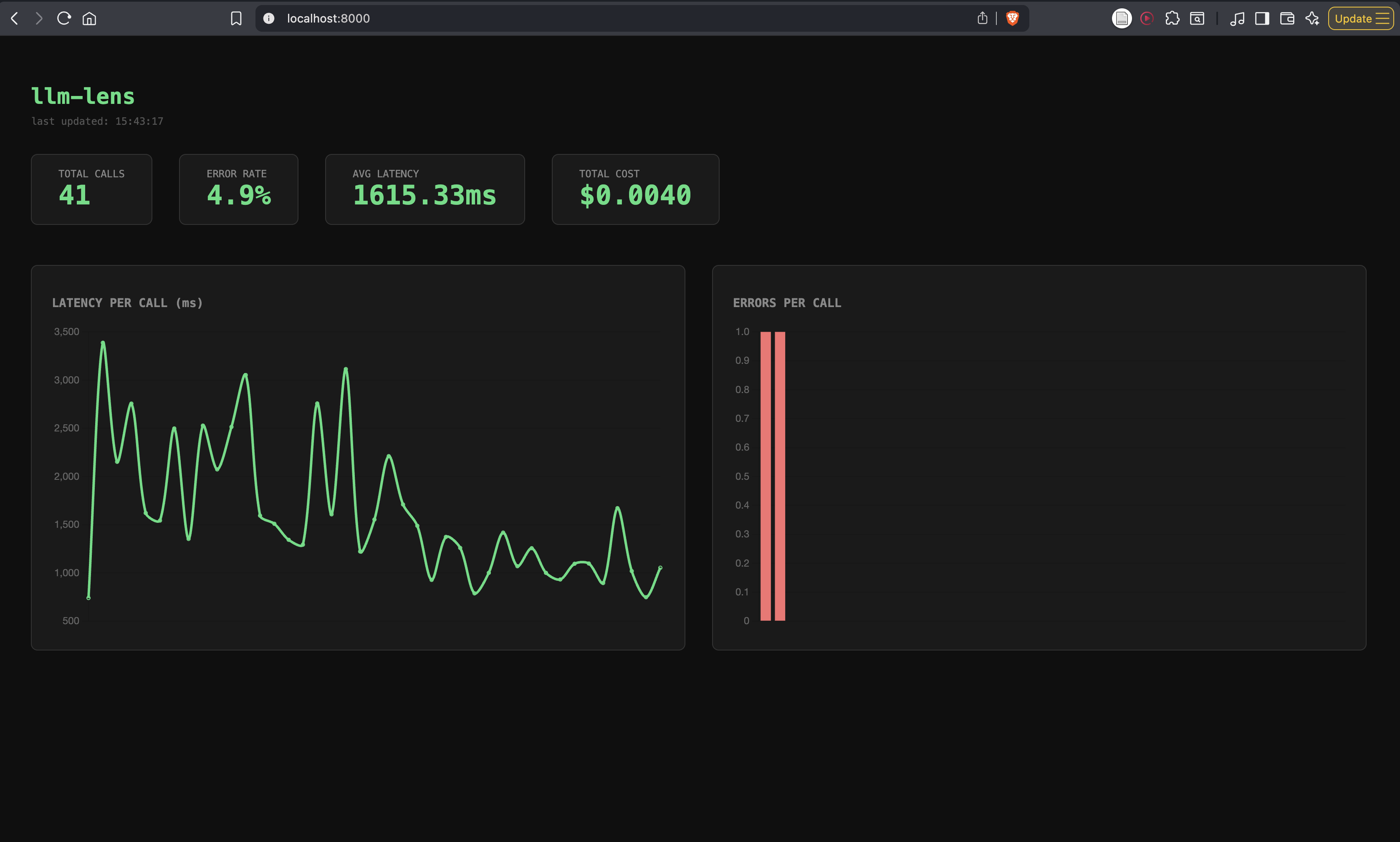
Dashboard
Run llm-lens serve and open http://localhost:8000.
- Live stats: total calls, error rate, avg latency, total cost
- Latency per call chart
- Error per call chart
- Red alert banner when cost threshold is breached
- Auto-refreshes every 5 seconds
Docker
docker build -t llm-lens .
docker run -p 8000:8000 llm-lens
Supported models
| Provider | Models |
|---|---|
| OpenAI | gpt-4o, gpt-4o-mini, gpt-4-turbo |
| Anthropic | claude-3-5-sonnet, claude-3-5-haiku, claude-3-opus |
Data storage
All data is stored locally at ~/.llm_lens/calls.db (SQLite). Nothing leaves your machine unless you deploy the server yourself.
Stack
Python · FastAPI · SQLite · Vanilla JS · Chart.js · Docker · Render
Status
Active development. Feedback and PRs welcome.
1 maintainer

Metadata
1 maintainer
Release files for llm-lens-py 0.1.6
For a detailed explanation of source distributions (sdists) and built distributions (wheels), please see the package formats documentation.
Source distribution (sdist)
| File | Size | Uploaded | Provenance | |
|---|---|---|---|---|
| llm_lens_py-0.1.6.tar.gz | 191.1 kB | Without provenance | Details |
Built distribution (wheel)
| File | Interpreter | ABI | Platform | Reset |
|---|---|---|---|---|
| llm_lens_py-0.1.6-py3-none-any.whl | Python 3 | none | any | Details |
Total release size: 199.3 kB
Release files / llm_lens_py-0.1.6.tar.gz
| Download URL | llm_lens_py-0.1.6.tar.gz |
|---|---|
| Size | 191.1 kB |
| Tags | Source |
|
SHA-256 checksum How to use checksums |
b641be9cfbe96b48fec597081f6af87d7e32e8f47cfa4d72adc1c69b93deac6e
|
|
BLAKE2b-256 checksum How to use checksums |
1f24feb3d62a5429769451e123914722ad4073560eeb01500cd5e8722633326e
|
| Upload date | |
|
Uploaded using Trusted Publishing? What is trusted publishing? |
No |
| Uploaded via |
twine/6.2.0 CPython/3.14.2
|
Release files / llm_lens_py-0.1.6-py3-none-any.whl
| Download URL | llm_lens_py-0.1.6-py3-none-any.whl |
|---|---|
| Size | 8.2 kB |
| Tags | Python 3 |
|
SHA-256 checksum How to use checksums |
e6583bea65160a799377e737ec0a6fd7039276520a03ec655a84177b59eed735
|
|
BLAKE2b-256 checksum How to use checksums |
952a3e4e2b2173ea7638495b7e2fc62f5b8e88c68697a0205cfe358274ec838e
|
| Upload date | |
|
Uploaded using Trusted Publishing? What is trusted publishing? |
No |
| Uploaded via |
twine/6.2.0 CPython/3.14.2
|
Security for llm-lens-py 0.1.6
Provenance
Provenance describes where a file came from. On PyPI, provenance is shared via attestations, which provide a verifiable record of the build or publishing details. View details, limitations and caveats.
No provenance found
None of the files in this release were uploaded with provenance metadata.
A note on package security
PyPI is a repository for distributing packages, not a service for auditing them. While third-party security researchers and our staff do their best to detect and remove malicious packages, PyPI cannot guarantee the quality, security or suitability of any given package.
To learn more about protecting yourself from malicious actors, visit our package security documentation.














