




🧼 LLM Sanitizer PRO
Your AI is only as clean as the data you feed it.
Point it at a messy dataset → it scrubs out personal info, leaked passwords, duplicates and junk → you get training data you're not embarrassed to use.
🤔 What is this?
So you want to train or fine-tune an AI on your own data: support chats, documents, scraped web pages, old forum posts. Great idea! Tiny problem: real-world data is filthy.
It's full of people's email addresses and phone numbers. Someone pasted an API key into a support ticket back in 2019. Half the rows are copy-pastes of the other half. And a good chunk of it is just… garbage.
Feed that to a model and it learns all of it, including your customers' phone numbers. 😬
LLM Sanitizer PRO is the washing machine for training data. One command, and out comes a dataset that is:
- 🕵️ Private. Emails, phone numbers, credit cards, bank accounts (IBAN), US social security numbers and IP addresses are swapped for safe placeholders.
- 🔑 Secret-free. Leaked API keys, tokens, passwords and private keys (AWS, GitHub, OpenAI, Stripe, Slack and many more) get scrubbed.
- 👯 Duplicate-free. Exact copies, near-copies, and even reworded copies get thrown out.
- 🗑️ Junk-free. Too-short, gibberish, ALL-CAPS-SCREAMING and low-quality text is filtered out.
- 🎓 Cheat-proof. Questions from famous AI tests (MMLU, GSM8K, HumanEval and friends) are removed, so your model can't just memorize the answers.
- 🍽️ Ready to serve. Exported in the formats training tools expect (ChatML, Alpaca), split into train/validation/test if you like.
No PhD required. If you can copy-paste one command, you can do this.
🖼️ How it works
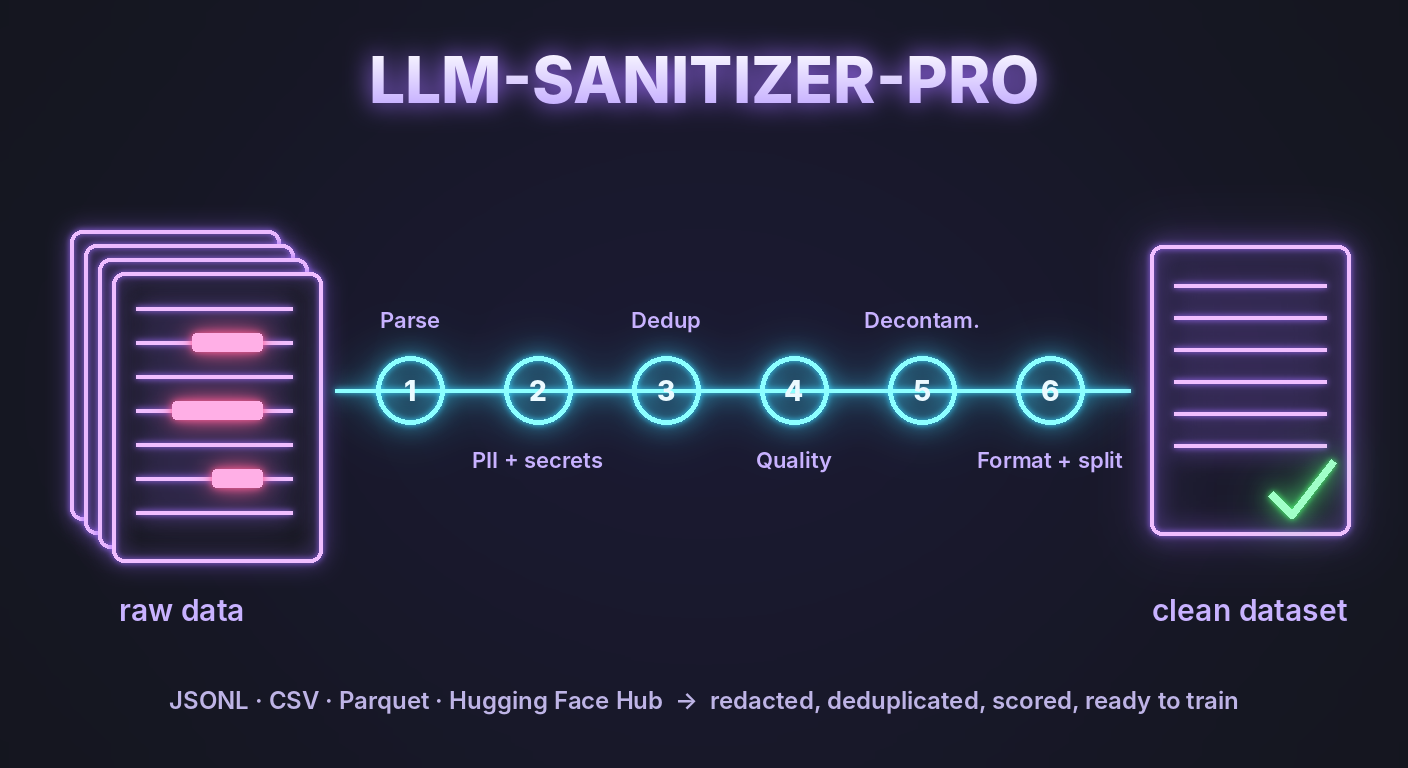
Dirty data goes in the left, clean data comes out the right. Every record takes the same trip through the machine.
🔍 See it in action
Here's one record before and after. This is real output, not a mock-up.
Before:
Hi, I'm Jane. Email me at jane.doe@example.com or call +1 415-555-0132. My card is 4111 1111 1111 1111. The deploy key is ghp_A1b2C3d4E5f6G7h8I9j0K1l2M3n4O5p6Q7r8 so please keep it safe.
After:
Hi, I'm Jane. Email me at [PII_EMAIL] or call [PII_PHONE]. My card is [PII_CARD]. The deploy key is [SECRET_GITHUB_TOKEN] so please keep it safe.
And the identical copy of that record further down the file? Gone. Duplicates removed. ✨
Not a fan of placeholders? Pick your style:
| Style | Add this | Jane's email becomes |
|---|---|---|
| Placeholder (default) | (nothing) | [PII_EMAIL] |
| Partially hidden | --pii-mask |
j***e@example.com |
| Fake but consistent | --pii-pseudonymize |
email_0001@redacted.local |
💡 Did you notice "Jane" survived? Names, places and company names need a smarter, AI-based detector. Switch it on with
--pii-ner(one extra install, explained here).
🚀 Get started in 2 minutes
1. Install it
pip install "llm-sanitizer-pro[all]"
You need Python 3.10 or newer. Don't want to install anything? Use the container instead (it already has everything inside). Put your data in the current folder and run (the --user part lets it save the result into your folder):
docker run --rm --user "$(id -u):$(id -g)" -v "$PWD:/data" ghcr.io/yog-sotho/llm-sanitizer-pro \
    --input my_data.jsonl --output clean.jsonl --profile fine-tune --report audit.html
2. Clean your data
sanitize --input my_data.jsonl --output clean.jsonl --profile fine-tune --report audit.html
That's it. clean.jsonl is your sparkling new dataset.
3. Check what happened
Open audit.html in your browser. It shows what got removed and why, what kind of personal info was hidden, and before/after samples. It's a single file, so you can email it to your boss or your privacy team. 📎
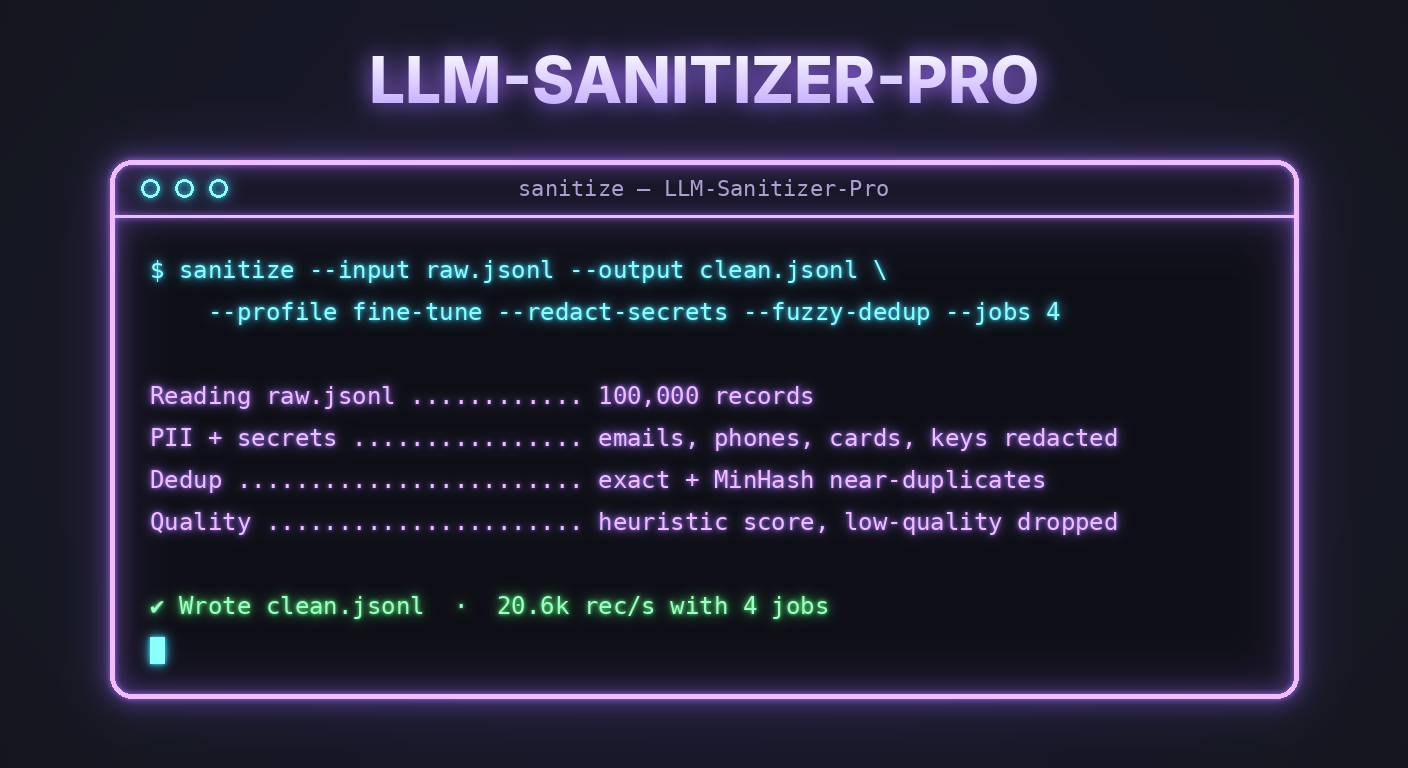
🎛️ Not sure which settings? Pick a profile
Tell it what the data is for, and it picks sensible settings for you:
| Profile | Use it for | What it does |
|---|---|---|
--profile fine-tune |
Chat or question/answer data for fine-tuning a model | Hides personal info and secrets, removes duplicates, strips HTML, drops very short rows |
--profile pretrain |
Big piles of text and documents | Removes secrets and duplicates, strips HTML, keeps only long, decent-quality text |
--profile rag |
Text chunks for a chatbot's knowledge base | Hides personal info and secrets, removes duplicates, strips HTML, drops tiny chunks |
Anything you add yourself always wins over the profile. Run sanitize --profile list to see exactly what each one switches on.
🧰 "I want to…" cheat sheet
| I want to… | Add this |
|---|---|
| hide personal info (emails, phones, cards…) | --remove-pii |
| …and also names, places and companies | --pii-ner (one extra install) |
| remove leaked passwords and API keys | --redact-secrets |
| remove exact duplicates | --deduplicate |
| remove near-duplicates | --fuzzy-dedup |
| remove reworded duplicates | --semantic-dedup (needs pip install "llm-sanitizer-pro[semantic]") |
| keep only good-quality text | --quality-min-score 0.5 |
| keep only one language | --lang-filter en |
| stop my model cheating on AI tests | --decontaminate all |
| get ChatML or Alpaca format for training | --format-chatml or --format-instruct |
| check chat conversations aren't broken | --validate-chat |
| split into train / validation / test | --split train=0.9,val=0.05,test=0.05 |
| go faster | --jobs 4 |
| see what would happen without writing anything | --dry-run |
| pick up where a huge job left off after a crash | --resume |
Mix and match freely. More copy-paste examples live in the recipes.
📂 What can I feed it?
JSONL, JSON, CSV/TSV, plain text, Parquet and Excel, zipped (.gz) or not. Give it a single file, a whole folder, or a dataset straight from the Hugging Face Hub (--input hf://owner/dataset).
🛡️ Your data stays yours
Everything runs on your own computer. Your data is never uploaded anywhere. The only downloads are optional extras that you switch on yourself: AI models for name detection or quality scoring, and the public test sets used for --decontaminate.
🤓 For the nerds
The full technical story lives in the documentation:
- 📖 Features in detail: every feature, its flag, and its measured accuracy
- 🍳 Recipes: 26 copy-paste commands for common jobs
- ⌨️ CLI reference: every option and its default
- 🐍 Python API: use it as a library, plus how to develop on it
- ⚡ Performance: about 20,000 records per second with 4 jobs
- 🧾 Provenance: run manifests and Hugging Face dataset cards
- 🔏 Verifying releases: signatures and build provenance
- 📜 Changelog
License
MIT
Author
Yogsotho

1 maintainer

Metadata
1 maintainer
Release files for llm-sanitizer-pro 4.1.1
For a detailed explanation of source distributions (sdists) and built distributions (wheels), please see the package formats documentation.
Source distribution (sdist)
| File | Size | Uploaded | Provenance | |
|---|---|---|---|---|
| llm_sanitizer_pro-4.1.1.tar.gz | 177.3 kB | With provenance | Details |
Built distribution (wheel)
| File | Interpreter | ABI | Platform | Reset |
|---|---|---|---|---|
| llm_sanitizer_pro-4.1.1-py3-none-any.whl | Python 3 | none | any | Details |
Total release size: 316.1 kB
Release files / llm_sanitizer_pro-4.1.1.tar.gz
| Download URL | llm_sanitizer_pro-4.1.1.tar.gz |
|---|---|
| Size | 177.3 kB |
| Tags | Source |
|
SHA-256 checksum How to use checksums |
9da4b602ff9c0a0d46051ef10c9722dafaf7d51028f46bc7cdfd0e3b6cf34fa5
|
|
BLAKE2b-256 checksum How to use checksums |
ced13aa926d1fc3d4ae52f8c3a3a0da7b09bac6da20badb1d90659e099e37816
|
| Upload date | |
|
Uploaded using Trusted Publishing? What is trusted publishing? |
Yes |
| Uploaded via |
twine/7.0.0 CPython/3.13.16
|
Provenance
Provenance describes where a file came from. On PyPI, provenance is shared via attestations, which provide a verifiable record of the build or publishing details. View details, limitations and caveats.


PyPI Publish Attestation
PyPI verified that this artifact, at this checksum, originated from the publisher listed below.
Signed by GitHub Actions, verified by PyPI on Oct 20, 2026.
Transparency logRelease files / llm_sanitizer_pro-4.1.1-py3-none-any.whl
| Download URL | llm_sanitizer_pro-4.1.1-py3-none-any.whl |
|---|---|
| Size | 138.8 kB |
| Tags | Python 3 |
|
SHA-256 checksum How to use checksums |
653a54dbb3461fc68d5d36cba8b2bbabee9336434836141f662542991b5a9581
|
|
BLAKE2b-256 checksum How to use checksums |
1f0d8428725c4c76999d88b146a52e4f54c608e13265c46704421c3a7f9c42a3
|
| Upload date | |
|
Uploaded using Trusted Publishing? What is trusted publishing? |
Yes |
| Uploaded via |
twine/7.0.0 CPython/3.13.16
|
Provenance
Provenance describes where a file came from. On PyPI, provenance is shared via attestations, which provide a verifiable record of the build or publishing details. View details, limitations and caveats.
PyPI Publish Attestation
PyPI verified that this artifact, at this checksum, originated from the publisher listed below.
Signed by GitHub Actions, verified by PyPI on Oct 20, 2026.
Transparency logSecurity for llm-sanitizer-pro 4.1.1
Provenance
Provenance describes where a file came from. On PyPI, provenance is shared via attestations, which provide a verifiable record of the build or publishing details. View details, limitations and caveats.
Full provenance
All 2 files in this release have been uploaded with provenance metadata.
Attestation for llm_sanitizer_pro-4.1.1.tar.gz
PyPI Publish Attestation
PyPI verified that this artifact, at this checksum, originated from the publisher listed below.
Signed by GitHub Actions, verified by PyPI on Oct 20, 2026.
Transparency logA note on package security
PyPI is a repository for distributing packages, not a service for auditing them. While third-party security researchers and our staff do their best to detect and remove malicious packages, PyPI cannot guarantee the quality, security or suitability of any given package.














