
Local debugger for LLM API calls — waterfall breakdown of TTFT, cost, and token speed

Project description
llm-scope 🔭
A local-first LLM Proxy that visualizes exactly where your calls are slow. No Node.js. No Docker. No account.
Like RelayPlane... but for Python devs. Zero data leaves your machine.
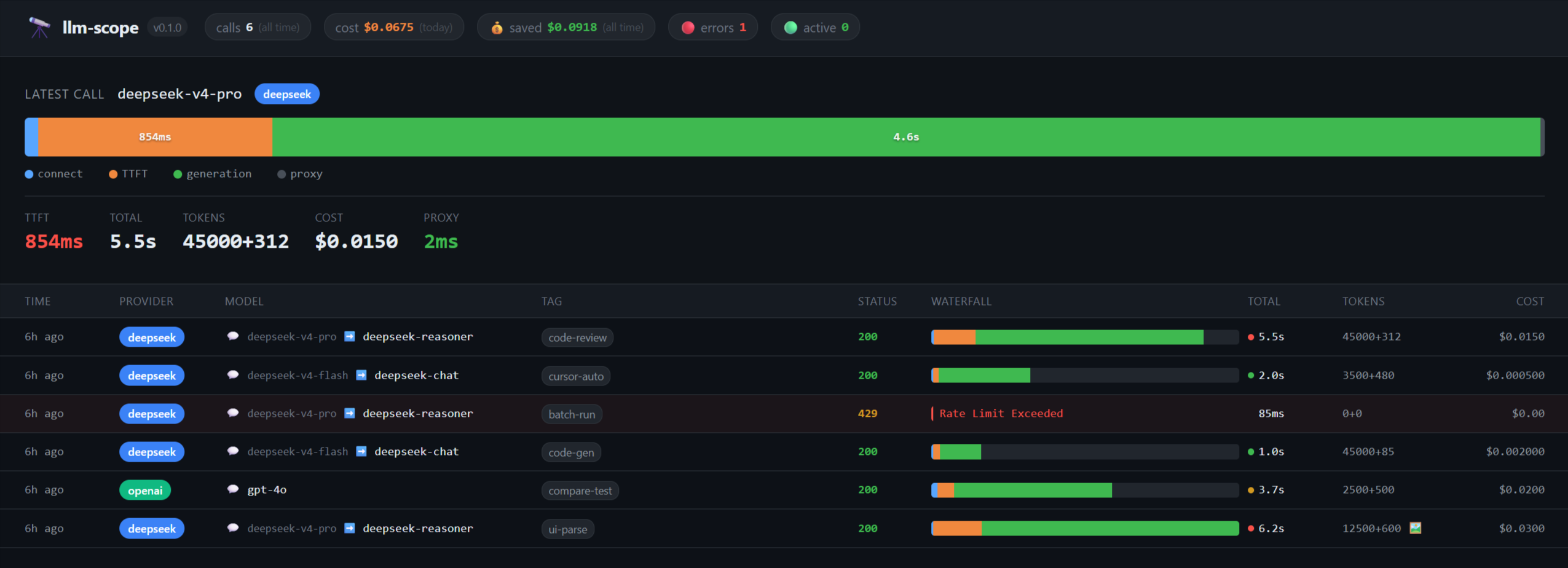
Are your API calls feeling sluggish, but you don't know if it's the DNS, TTFT, or just the generation? llm-scope intercepts your API requests and gives you a sub-millisecond accurate waterfall breakdown right in your browser.
Why llm-scope?
- Python Native & Zero Config:
pip install llm-scope-cli, change one line (base_url), and you're done. - Prompt Cache Analytics: Wondering if you should use
deepseek-v4-flashordeepseek-v4-pro?llm-scopevisualizes the TTFT difference and accurately calculates your Prompt Cache Hit Savings 💰. No more guesswork on your API bill. - Microsecond Precision Waterfall: Pinpoint precisely if latency is caused by TCP Handshake (
connect), Prompt Processing (TTFT), or Decoding (generation). - Physical Isolation: We never upload your prompts to a cloud service. Unlike cloud tools (Helicone is now in maintenance mode post-acquisition), all your data is stored in a plain SQLite file locally at
~/.local/share/llm-scope/calls.db.
Installation
pip install llm-scope-cli
Quick Start
- Start the proxy and local dashboard:
llm-scope start
The dashboard will automatically open at http://localhost:7070. Press Ctrl+C to stop.
- Route your Python code through the scope:
export OPENAI_BASE_URL=http://localhost:7070/v1
export DEEPSEEK_API_KEY=sk-...
python your_script.py
Popular Target Workflows
🏎️ DeepSeek V4 Prompt Cache Savings Tracking
DeepSeek V4 introduces massive price cuts for cached contexts, but it's hard to know exactly how much you're saving. llm-scope automatically parses the prompt_cache_hit_tokens from DeepSeek's payload and shows you exactly how much your System Prompt cache is saving you, in dollars.
The dashboard header displays your cumulative cache savings in real time — 💰 saved: $2.45 — the kind of number worth screenshotting.
💻 Track your Background Cursor Spend
Cursor is incredibly fast, but it sends huge background contexts you might not be aware of. Track exactly what tokens are being consumed and distinctly tag them to separate them from your main project codebase:
- Open Cursor Settings.
- Go to Models / Advanced.
- Set your OpenAI Base URL to
http://localhost:7070/tag/cursor/v1.
That's it! Watch the dashboard light up with every autocomplete and Chat request, all neatly labeled with the "cursor" badge.
🐍 OpenAI SDK Drop-in Replacement
Since llm-scope explicitly mirrors the OpenAI /v1/chat/completions specs, your existing code requires exactly zero changes other than injecting the base_url:
from openai import OpenAI

client = OpenAI(
    api_key="your-api-key",
    base_url="http://localhost:7070/v1"  # Or add /tag/project-name/v1
)

# Call as usual – your request will be tracked locally in the dashboard!
response = client.chat.completions.create(
    model="deepseek-v4-pro",
    messages=[{"role": "user", "content": "Benchmark my latency."}],
    stream=True
)
License
MIT License


Download files
Download the file for your platform. If you're not sure which to choose, learn more about installing packages.
Source Distribution
Built Distribution
Filter files by name, interpreter, ABI, and platform.
If you're not sure about the file name format, learn more about wheel file names.
Copy a direct link to the current filters
File details
Details for the file llm_scope_cli-0.1.3.tar.gz.
File metadata
- Download URL: llm_scope_cli-0.1.3.tar.gz
- Upload date:
- Size: 254.6 kB
- Tags: Source
- Uploaded using Trusted Publishing? No
- Uploaded via: twine/6.2.0 CPython/3.13.5
File hashes
| Algorithm | Hash digest | |
|---|---|---|
| SHA256 |
a9f947abe76ef79c28a4b8ba9cbad3a707829b7cc7ccd2b7c55b2e11f7e4941d
|
|
| MD5 |
00cc21178b13b7262bcc82cd37fba574
|
|
| BLAKE2b-256 |
630ad27d6d1e67b5d278fdf5ebf2ead3075318ebcff4116d3fe87836bbd7df9c
|
File details
Details for the file llm_scope_cli-0.1.3-py3-none-any.whl.
File metadata
- Download URL: llm_scope_cli-0.1.3-py3-none-any.whl
- Upload date:
- Size: 32.8 kB
- Tags: Python 3
- Uploaded using Trusted Publishing? No
- Uploaded via: twine/6.2.0 CPython/3.13.5
File hashes
| Algorithm | Hash digest | |
|---|---|---|
| SHA256 |
edc5196458719d34f1aa5df6ba3a91662f4250e11d65a0d4b5bb451f161b77d7
|
|
| MD5 |
1970d817607a33c7ef61d2fb83149ae4
|
|
| BLAKE2b-256 |
19c77db330bf9b72ed3bfc2a1ce6addd568141e74874098672c340ba89704a24
|






