
A Unified Command-Line Interface for Multiple LLMs

Project description
llm-cli: A Unified Terminal Interface for Multiple LLMs

llm-cli is a high-assurance command-line tool designed for interacting with Large Language Models (LLMs). It provides a unified, stable interface for Gemini, OpenAI, Claude, and local models via Ollama, prioritizing cognitive focus, secure execution, and extensible automation.
[English] | 日本語
Purpose & Positioning
Enterprise adoption of autonomous AI agents faces a fundamental, unsolved challenge: how do you grant an AI meaningful agency while maintaining the security and governance standards that organizations require? This project is one engineer's attempt to answer that question in working code.
llm-cli was built primarily as a personal daily-use tool and as a portfolio artifact — a concrete demonstration of how CISSP/CISA/CCSP-level security principles (Zero Trust, ABAC, non-repudiation, PQC resilience) can be applied to the novel threat surface introduced by autonomous LLM agents.
This tool is not certified or validated for enterprise production use. No formal third-party security audit has been conducted, and the PQC primitives rely on pure-Python reference implementations that have not undergone independent cryptographic review. Deploying this in a regulated or mission-critical environment without additional validation would be inappropriate.
Instead, its recommended uses are:
- As a reference architecture — for security engineers and architects exploring what a high-assurance agentic system could look like.
- As an evaluation platform — for studying the practical trade-offs between AI agent autonomy and hybrid high-assurance security controls.
- As a design provocation — a starting point for organizational discussions on agentic AI governance, not a finished answer.
The accompanying Technical Report details the threat model and architectural decisions behind this framework.
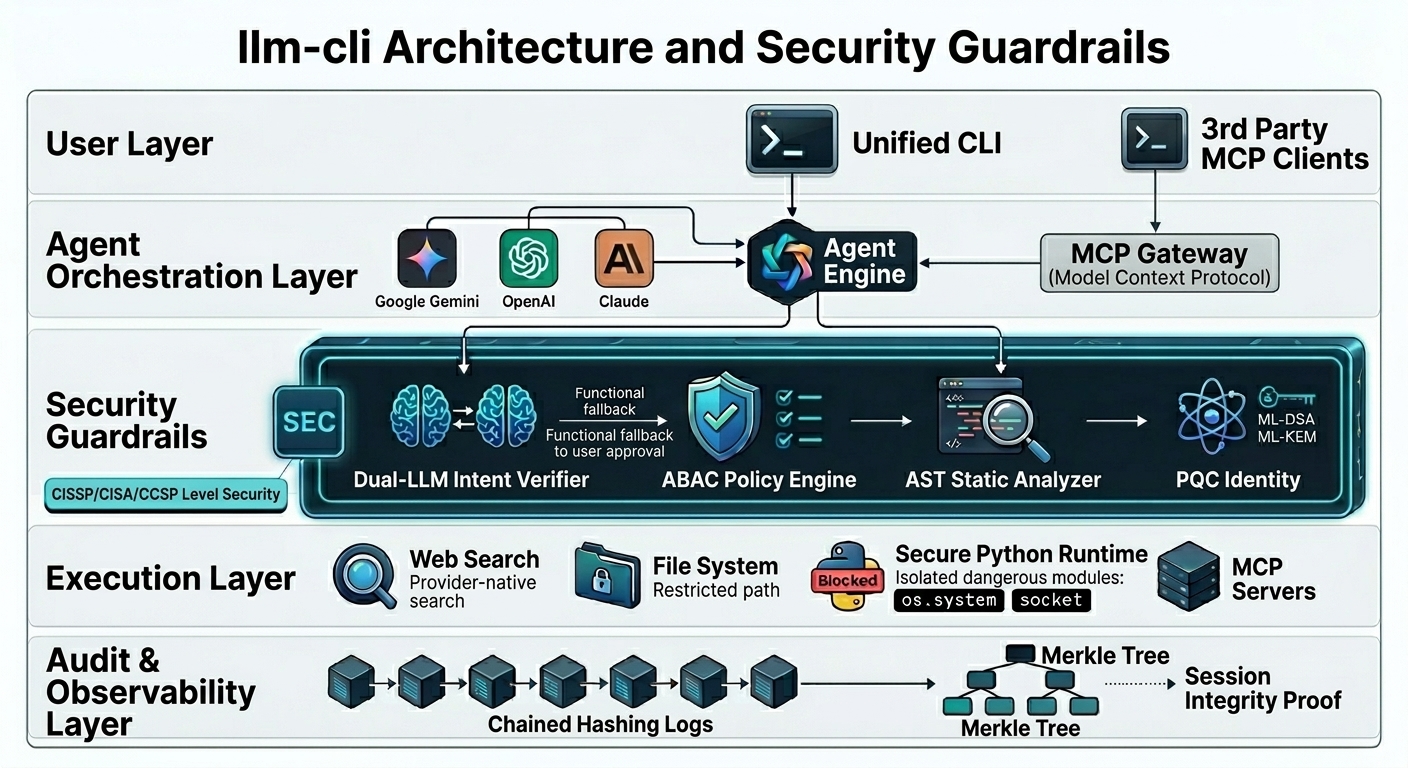

Simplified Architecture Flow (TikZ version)
Quick Start
- Install:
# Recommended: Install from PyPI
pip install llm-secure-cli

# Alternatively, install from source
git clone https://github.com/yosh95/llm-cli.git
cd llm-cli
pip install .
- Set API Keys:
llm-clirequires API keys to be set as environment variables.export GEMINI_API_KEY="your-api-key" # Supported: GEMINI_API_KEY, OPENAI_API_KEY, ANTHROPIC_API_KEY, OLLAMA_API_KEY
- Chat: Type
llm-clito start an interactive session.- Automatic Initialization: On the first run,
~/.llm_cli/config.tomlis automatically created. - Native Web Search: Gemini, OpenAI, and Claude support built-in web search automatically using your provider API key.
- Brave Search: Support for the Brave Search API is also available for comprehensive searching across all providers (requires
BRAVE_API_KEY).
- Automatic Initialization: On the first run,
- Configure (Optional): To customize behavior or add MCP servers, edit the configuration file:
# Edit ~/.llm_cli/config.toml to modify settings. - Help: Type
/helpinside the chat to see all commands.
One-Shot Examples
# Ask a question using the default provider (Gemini)
llm-cli "What is the capital of France?"

# Use a specific provider and model
llm-cli -p anthropic -m sonnet "Explain quantum computing"

# Analyze a local file or a URL
llm-cli "Summarize this PDF" ./document.pdf
llm-cli "Analyze this website" https://example.com
Core Features
- Unified Provider Access: Seamlessly switch between Google (Gemini), OpenAI, Anthropic (Claude), and Local LLMs (Ollama).
- Autonomous Agent: Let the AI manage files, execute Python code (replacing risky shell commands), and search the web using Provider-Native Search (Gemini Grounding, OpenAI/Claude Web Search) or Brave Search.
- Config-free Execution: Start using immediately by just providing an environment variable.
- MCP (Model Context Protocol) Support: Connect to remote resources or services via custom servers.
- Multimodal capabilities: Support for Images, PDFs, Audio, and Video.
- Operational Stability: A clean, flicker-free UI designed for long-term "Deep Work" sessions and SSH-based environments.
- Human-in-the-Loop: All critical actions (file edits, code execution) require explicit human approval by default.
Autonomous Agent & Tool Use
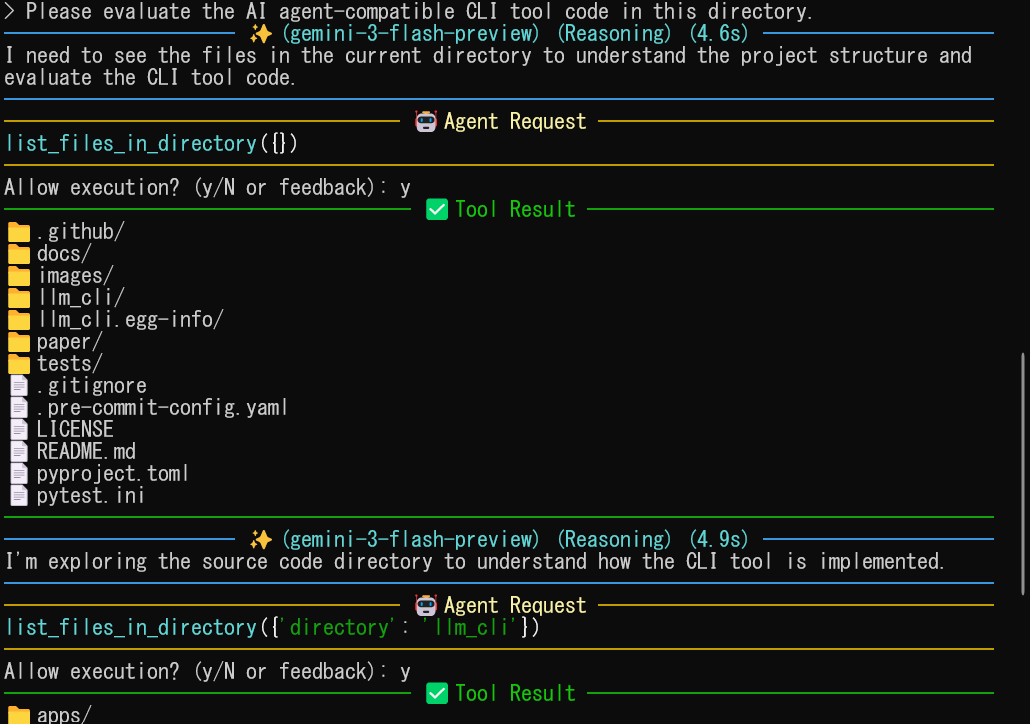
The AI agent autonomously uses tools to perform complex tasks, such as file management, web search, and Python execution. Web search is powered by the LLM provider's native capabilities (Gemini Grounding, OpenAI/Claude Web Search) or the Brave Search API, ensuring high-quality real-time information with citations.
Security & Governance (High-Assurance Framework)
As a tool designed with CISSP/CISA/CCSP principles and EU AI Act compliance in mind, llm-cli implements a multi-layered security architecture to mitigate the risks associated with autonomous AI agents.
1. Access Control (ABAC)
llm-cli implements Attribute-Based Access Control (ABAC), providing granular security based on execution context and resource attributes.
- Risk-based Scaling: Security requirements automatically scale based on the tool's risk level (HIGH/MEDIUM/LOW).
- Intent Verification (Dual LLM): High-risk actions are cross-verified by a separate, lightweight "Verifier" LLM (e.g., Gemini Flash Lite) to ensure the proposed tool call aligns with the user's original intent, mitigating sophisticated prompt injection.
- Asynchronous Execution: To minimize latency, verification runs in the background while the user reviews the tool's explanation. The result is synchronized at the moment of approval, providing a seamless high-assurance experience.
- In
highsecurity mode, a functional Dual LLM provider is required. - If the secondary LLM is misconfigured or unreachable (Soft Failure), the system will fallback to explicit manual user approval rather than failing open.
- If the intent check actively rejects the call (Hard Block), the execution is strictly denied.
- Identity Proof: High-risk actions (e.g., Python execution) require a valid PQC-signed identity token. In
highmode, execution is blocked if keys are missing. - Compatibility Mode: Use
LLM_CLI_SECURITY_LEVEL=standardor setsecurity_level = "standard"inconfig.tomlto enable interoperability with non-llm-cli clients or legacy MCP servers, downgrading PQC enforcement and integrity checks to warnings.[security] security_level = "standard"
- AST-based Static Analysis: Every Python script is inspected before execution to block dangerous modules (
os.system,base64,socket, etc.), reflection attacks, and obfuscated keyword construction (e.g.,"ex" + "ec"). - Path Guardrails: Tools are restricted by path attributes (defaulting to the current directory). The policy engine now inspects multiple argument names (
path,directory,file,src,dest, etc.) to prevent bypass. - Explanation Enforcement: Every tool mandates an
explanationparameter, forcing the LLM to justify its intent.
2. Identity & Non-Repudiation (Experimental Reference)
- Distributed Trust Model: Implements a decentralized identity model where clients and servers only exchange public keys. This is designed to explore how to prevent lateral movement if a single component is compromised; however, it requires thorough evaluation before use in production environments.
- Hybrid Identity Tokens: Uses COSE (RFC 9052) binary structures combining RS256 with Post-Quantum Cryptography (ML-DSA). This serves as a reference for how long-term non-repudiation might be handled in autonomous agent systems.
- Client Integrity Attestation: The client generates a signed manifest of its own source code state to demonstrate the integrity of the execution environment.
- Bi-directional Verification: Tool results can be signed by the responder, allowing the requester to verify that the observations are authentic and untampered within the protocol's scope.
3. Observability & Audit Compliance (Tier 3 Reference Implementation)
- Tamper-Evident Audit Logs: Audit trails are protected using Chained Hashing and optionally encrypted with ML-KEM (Kyber) for confidentiality.
- Merkle Tree Anchoring: The Tier 3 implementation uses Merkle Trees to anchor log batches, demonstrating an architecture to prevent historical revisionism and provide compact proofs of session integrity.
Advanced Commands & Power User Tips
Inside the llm-cli interactive session:
/help: Display all available commands./p <provider>//m <model>: Switch the AI engine on the fly./attach <path/URL>: Add a file or website content to the context./tools on|off: Enable/disable autonomous tool use./i: Show session integrity and security status./save//load: Manage conversation history./cp: Checkpoint (Summarize and clear history)./mcp: Toggle or manage MCP server integrations.
Logging & Troubleshooting
By default, llm-cli and its related tools suppress all informational logs and only show WARNING or ERROR messages. If you encounter issues:
- Enable Debug Mode: Add the
--debugflag to any tool to see detailed execution logs:llm-cli --debug "query" llm-cli-security --debug verify
- MCP Debugging: To troubleshoot the MCP server (which is often spawned by a third-party client), use the
MCP_DEBUGenvironment variable:export MCP_DEBUG=1 # Then start your MCP client (e.g., Claude Desktop)
- Log Location: Security and audit logs are stored in
~/.llm_cli/audit.jsonl.
Power User Tips
- Backgrounding (
Ctrl+Z): Suspend the session to perform shell operations, then usefgto return. - External Editor (
Ctrl+X, Ctrl+E): Open the current prompt in your default editor (vim,nano, etc.) for complex editing. - Templates: Define reusable prompts in
~/.llm_cli/config.tomland call them with/t <name>. - Model-specific Tool Disabling: For models that do not support tool use (e.g., image generation models), you can pre-configure them to disable tools automatically in
config.toml:[google.models] image = { model = "gemini-1.5-flash-image-preview", tools = false }
- Disabling Tools Manually: Use
/tools offto prevent errors when using a model that doesn't support function calling.
Security Management
Use the llm-cli-security tool to manage your cryptographic identity:
llm-cli-security keygen     # Generate RSA and PQC (ML-DSA/ML-KEM) keys
llm-cli-security manifest   # Rebuild integrity manifest for remote attestation
llm-cli-security decrypt-log ~/.llm_cli/audit.jsonl -o decrypted.jsonl
License
Licensed under Apache License 2.0.
For detailed architectural insights and the academic background of our security framework, please refer to the Technical Report (Pre-print).
llm-cli: 複数LLM対応 統合コマンドラインインターフェース
llm-cli は、Gemini, OpenAI, Claude、および Ollama を介したローカルLLMを一元的に操作できる、高い安全性を備えたCLIツールです。開発者の「深い集中(Deep Work)」を妨げない安定した対話環境と、プロフェッショナルな要求に応える高度なセキュリティ機能を両立しています。
位置づけと目的
企業における自律型 AI エージェントの活用には、根本的かつ未解決の課題があります。「AIに十分な自律性を与えながら、組織が求めるセキュリティ標準とガバナンスをどう両立させるか」――本プロジェクトは、その問いに対してエンジニアが動くコードで答えを試みたものです。
llm-cli は主に個人の日常利用ツールとして、またポートフォリオとして開発されました。Zero Trust・ABAC・非否認性・耐量子暗号といった CISSP/CISA/CCSP レベルのセキュリティ原則を、自律型 LLM エージェントがもたらす新しい脅威対象に適用すると、実装としてどのような形になるかを具体的に示すことを目的としています。
本ツールは、エンタープライズ本番環境への適用を保証・認定するものではありません。 第三者による正式なセキュリティ監査は実施されておらず、PQC プリミティブは独立した暗号学的レビューを受けていない純粋 Python 参照実装に依存しています。規制対象業務やミッションクリティカルな環境への追加検証なしでの展開は推奨しません。
本プロジェクトの推奨される活用方法は以下のとおりです。
- 参照アーキテクチャとして ― 高保証なエージェントシステムが「どのような設計になりえるか」を探求するセキュリティエンジニア・アーキテクト向け。
- 評価プラットフォームとして ― AI エージェントの自律性とハイブリッドな高保証セキュリティ制御の間にある実践的なトレードオフを検討するための実験基盤として。
- 設計上の問いかけとして ― 組織内における AI エージェントのガバナンス議論の起点として。完成した答えではなく、問いを深めるための素材として。
設計の背景にある脅威モデルとアーキテクチャ上の意思決定については、テクニカルレポートで詳述しています。
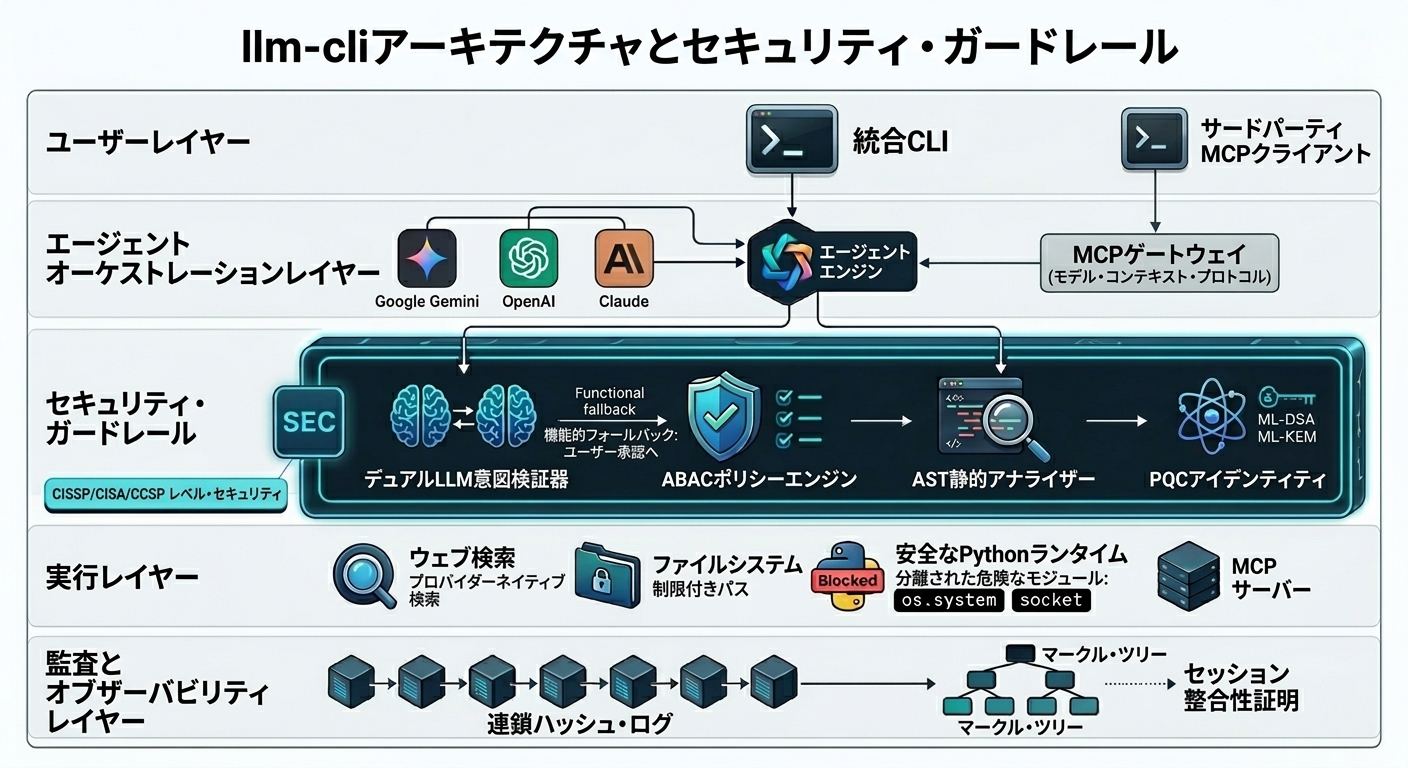
簡易アーキテクチャフロー (TikZ版)
クイックスタート
- インストール:
# 推奨: PyPIからインストール
pip install llm-secure-cli

# あるいはソースからインストール
git clone https://github.com/yosh95/llm-cli.git
cd llm-cli
pip install .
- APIキーの設定: APIキーを環境変数として設定します。
export GEMINI_API_KEY="your-api-key"
# 対応: GEMINI_API_KEY, OPENAI_API_KEY, ANTHROPIC_API_KEY, OLLAMA_API_KEY
- 対話開始:
llm-cliコマンドでスタート。- 設定の自動生成: 初回起動時に
~/.llm_cli/config.tomlが自動的に作成されます。 - ネイティブWeb検索: Gemini, OpenAI, Claude はプロバイダーのAPIキーのみで、組み込みのWeb検索(Grounding等)を自動的に利用可能です。別途検索APIキーを用意する必要はありません。
- Brave Search: すべてのプロバイダーで利用可能な共通のWeb検索ツールとして Brave Search API をサポートしています(
BRAVE_API_KEYが必要)。
- 設定の自動生成: 初回起動時に
- 詳細設定 (任意): MCPサーバーの追加や動作のカスタマイズを行いたい場合は、生成された設定ファイルを編集します。
# ~/.llm_cli/config.toml を編集して設定を調整してください。 - ヘルプ: チャット内で
/helpと入力するとコマンド一覧が表示されます。
主な機能 (実用ツールとして)
- 統合インターフェース:
llm-cliコマンド一つで主要なクラウドLLMと Ollama (Local) にアクセス。 - 自律型エージェント: ファイル操作、Python実行、Web検索、URL解析をAIが自律的に実行。Web検索はプロバイダー提供のネイティブ検索機能(Gemini Grounding, OpenAI/Claude Web Search等)または Brave Search を使用します。
- 設定不要の即時利用: 環境変数を設定するだけで、セットアップの手間なく利用可能。
- MCP (Model Context Protocol) 対応: リモートサーバーや外部サービスとの連携をサポート。
- マルチモーダル対応: 画像、PDF、音声、動画の入力をサポート。画像生成も可能。
- 集中力を削がないUI: 画面のちらつきを抑え、SSH越しでも安定して動作するクリーンなターミナル出力。
自律型エージェントのツール実行
AIがファイル操作、Web検索、Python実行などのツールを自律的に使用し、複雑なタスクを遂行します。Web検索はLLMプロバイダーの機能(Gemini Grounding, OpenAI/Claude Web Search)または Brave Search API を直接利用するため、精度の高い情報と出典(引用)の確認が可能です。
セキュリティとガバナンス (プロフェッショナル向け)
本ツールは CISSP/CISA/CCSP の各ドメインにおける管理策、および EU AI Act(欧州AI法) の技術的要件を意識して設計されています。
1. 属性ベースアクセス制御 (ABAC)
llm-cli は、実行コンテキストとリソース属性に基づいた 属性ベースアクセス制御 (ABAC) を採用し、高度に粒度の細かいセキュリティを実現しています。
- リスクベース・スケーリング: ツールのリスクレベル(HIGH/MEDIUM/LOW)に応じて、要求されるセキュリティ強度が自動的に変化します。
- 意図の検証 (Dual LLM): 高リスクな操作は、軽量な「検証用LLM」(例:Gemini Flash Lite)によって元のプロンプトと照合されます。これにより、高度なプロンプトインジェクションによる意図しない操作を動的に防止します。
- バックグラウンド実行: 検証はユーザーが説明文を確認して承認(HITL)を行う裏で非同期に実行されます。これにより、高度な検証に伴う待機時間を最小化し、ストレスのない操作感を実現しています。
- アイデンティティ証明: 高リスクな操作(Python実行など)には、耐量子暗号 (PQC) による署名付き証明が必要です。
- 互換モード:
LLM_CLI_SECURITY_LEVEL=standardを環境変数で設定するか、config.toml内でsecurity_level = "standard"を設定することで、PQC非対応のクライアントやサーバーとの相互運用を許可し、整合性チェックのエラーを警告表示のみにダウングレードします。[security] security_level = "standard"
- AST静的解析: 全てのPythonスクリプトは実行前に解析され、危険なモジュール(
os.system,base64,socket等)やリフレクション攻撃、さらに難読化されたキーワード構築(例:"ex" + "ec")を遮断します。 - パス・ガードレール: 操作可能な範囲を属性(ディレクトリ・パスなど)で制限します。
2. アイデンティティと非否認性 (実験的参照実装)
- 分散型トラストモデル: クライアントとサーバーが公開鍵のみを交換する分散型アイデンティティモデルを実装。特定のコンポーネントが侵害された際の横展開を防止する手法を探求していますが、エンタープライズ領域での利用には十分な評価が必要です。
- ハイブリッド署名: COSE (RFC 9052) を採用し、RS256 と 耐量子暗号 (ML-DSA) を組み合わせた署名を実装。将来的な非否認性の確保に向けた参照実装としての位置づけです。
- 完全性検証: クライアント自身のソースコードの状態を署名付きマニフェストで証明し、実行環境の健全性を担保します。
- 双方向検証: ツールの実行結果に署名を付与し、受信側がデータの正当性をプロトコルの範囲内で検証可能です。
3. 観測可能性と監査ログ (Tier 3 参照実装)
- 改ざん防止監査ログ: ハッシュ連鎖(Chained Hashing)によるログ保護と、ML-KEM (Kyber) による機密性保護を実装しています。
- Merkle Tree アンカリング: Tier 3 実装として Merkle Tree によるログバッチの固定を導入。履歴の改ざんを防止し、セッションの整合性を証明するアーキテクチャのプロトタイプです。
高度なコマンドとパワーユーザー向け機能
インタラクティブセッション内で利用可能なコマンド:
/help: 利用可能なすべてのコマンドを表示。/p <provider>//m <model>: プロバイダーやモデルを動的に切り替え。/attach <path/URL>: ファイルやウェブサイトのコンテンツをコンテキストに追加。/tools on|off: ツールの自律実行を有効化/無効化。/i: セッションの整合性とセキュリティステータスを表示。/save//load: 会話履歴を保存・読み込み。/cp: チェックポイント (会話の要約と履歴のクリア)。/mcp: MCP サーバー連携の切り替えと管理。
ログとトラブルシューティング
デフォルトでは、llm-cli およびその関連ツールは、WARNING または ERROR メッセージのみを表示し、情報のログは表示されません。
- デバッグモードの有効化: ツールの実行時に
--debugフラグを追加して、詳細なログを表示します。llm-cli --debug "query" llm-cli-security --debug verify
- MCP のデバッグ: 3rdパーティのクライアント(Claude Desktop 等)から起動される MCP サーバーのトラブルシューティングには、
MCP_DEBUG環境変数を使用します。export MCP_DEBUG=1 # その後、お使いの MCP クライアントを起動してください。
- ログの場所: セキュリティおよび監査ログは
~/.llm_cli/audit.jsonlに保存されています。
パワーユーザー向け機能
- 一時中断 (
Ctrl+Z): セッションをバックグラウンドに送り、シェルに戻る。fgで復帰可能。 - 外部エディタ編集 (
Ctrl+X, Ctrl+E): プロンプト入力をvimやnanoで編集。 - テンプレート: 頻繁に使うプロンプトを
~/.llm_cli/config.tomlに定義し、/t <名前>で呼び出し。 - モデルごとのツール自動無効化: 画像生成モデルなど、ツール利用に対応していないモデルに対して、
config.tomlで自動的にツール機能をオフに設定できます。[google.models] image = { model = "gemini-1.5-flash-image-preview", tools = false }
- ツール機能の手動無効化:
/tools offコマンドでツール送信を一時的に無効化できます。
ライセンス
Apache License 2.0 に基づき公開されています。技術的な詳細については テクニカルレポート を参照してください。
Release history Release notifications | RSS feed


Download files
Download the file for your platform. If you're not sure which to choose, learn more about installing packages.
Source Distribution
Built Distribution
Filter files by name, interpreter, ABI, and platform.
If you're not sure about the file name format, learn more about wheel file names.
Copy a direct link to the current filters
File details
Details for the file llm_secure_cli-1.6.0.tar.gz.
File metadata
- Download URL: llm_secure_cli-1.6.0.tar.gz
- Upload date:
- Size: 196.1 kB
- Tags: Source
- Uploaded using Trusted Publishing? Yes
- Uploaded via: twine/6.1.0 CPython/3.13.12
File hashes
| Algorithm | Hash digest | |
|---|---|---|
| SHA256 |
4871e1841f23d2f7813bdce8026813e269affd641220f4994d067f50988e9790
|
|
| MD5 |
68b56f9946eb153bcc93847e568210c7
|
|
| BLAKE2b-256 |
094553079aa67ce397d57310b24ed9ce3bd1833d646aea211dd4b1e72ecce426
|
Provenance
The following attestation bundles were made for llm_secure_cli-1.6.0.tar.gz:
Publisher:
publish.yml on yosh95/llm-cli
-
Statement:
-
Statement type:
https://in-toto.io/Statement/v1 -
Predicate type:
https://docs.pypi.org/attestations/publish/v1 -
Subject name:
llm_secure_cli-1.6.0.tar.gz -
Subject digest:
4871e1841f23d2f7813bdce8026813e269affd641220f4994d067f50988e9790 - Sigstore transparency entry: 1323245606
- Sigstore integration time:
-
Permalink:
yosh95/llm-cli@f3278d330b34fbb527c11f0e825cd885af9764b0 -
Branch / Tag:
refs/tags/v1.6.0 - Owner: https://github.com/yosh95
-
Access:
public
-
Token Issuer:
https://token.actions.githubusercontent.com -
Runner Environment:
github-hosted -
Publication workflow:
publish.yml@f3278d330b34fbb527c11f0e825cd885af9764b0 -
Trigger Event:
push
-
Statement type:
File details
Details for the file llm_secure_cli-1.6.0-py3-none-any.whl.
File metadata
- Download URL: llm_secure_cli-1.6.0-py3-none-any.whl
- Upload date:
- Size: 166.7 kB
- Tags: Python 3
- Uploaded using Trusted Publishing? Yes
- Uploaded via: twine/6.1.0 CPython/3.13.12
File hashes
| Algorithm | Hash digest | |
|---|---|---|
| SHA256 |
8088bb9f1fa0abe22a5e4005e5d4fa9623203d8867fe45c1338a1310d3501b6d
|
|
| MD5 |
26e0a9c85f8ffd19bbb09ca85c52346b
|
|
| BLAKE2b-256 |
ec72012d65c9de3231d7c8a0ff69b866974beefa323d5ec293868b8a9cf79444
|
Provenance
The following attestation bundles were made for llm_secure_cli-1.6.0-py3-none-any.whl:
Publisher:
publish.yml on yosh95/llm-cli
-
Statement:
-
Statement type:
https://in-toto.io/Statement/v1 -
Predicate type:
https://docs.pypi.org/attestations/publish/v1 -
Subject name:
llm_secure_cli-1.6.0-py3-none-any.whl -
Subject digest:
8088bb9f1fa0abe22a5e4005e5d4fa9623203d8867fe45c1338a1310d3501b6d - Sigstore transparency entry: 1323245671
- Sigstore integration time:
-
Permalink:
yosh95/llm-cli@f3278d330b34fbb527c11f0e825cd885af9764b0 -
Branch / Tag:
refs/tags/v1.6.0 - Owner: https://github.com/yosh95
-
Access:
public
-
Token Issuer:
https://token.actions.githubusercontent.com -
Runner Environment:
github-hosted -
Publication workflow:
publish.yml@f3278d330b34fbb527c11f0e825cd885af9764b0 -
Trigger Event:
push
-
Statement type:






