
LLM TAP (Trigger-Action Programs)
llm-tap is a lightweight and extensible library to generate workflows using Large Language Models (LLMs). llm-tap provides mechanisms and data structures to generate workflows and constraints for any existing workflow engine.
llm-tap is not a workflow library but a workflow generator.
Quickstart
Let's take an example to generate a workflow based on the following user query:
When the electricity price is below $0.4/ kWh and my Tesla is plugged, turn on charging.
To generate a workflow, llm-tap uses Colored Petri Nets to describe the different components.
from llm_tap import llm
from llm_tap.models import (
    Workflow,
    Place,
    TokenType,
    instructions,
    register_place,
    register_token_type,
    get_places,
)

remaining_range = TokenType(name="remaining_range", type="INT")
charger_enabled = TokenType(name="charger_enabled", type="BOOL")
car_plugged = TokenType(name="car_plugged", type="BOOL")
electricity_price = TokenType(name="electricity_price", type="FLOAT")


register_token_type(remaining_range)
register_token_type(charger_enabled)
register_token_type(car_plugged)
register_token_type(electricity_price)

register_place(
    Place(
        name="Power company",
        description="Provides current electricity price",
        type="source",
        token_type=electricity_price,
    )
)

register_place(
    Place(
        name="Power charger (plug sensor)",
        description="Provides the status of the plug",
        type="source",
        token_type=car_plugged,
    )
)

register_place(
    Place(
        name="Power charger",
        description="Charge electric vehicles",
        type="sink",
        token_type=charger_enabled,
    )
)

register_place(
    Place(
        name="EV monitoring system (range)",
        description="Provides the remaining range in miles",
        type="source",
        token_type=remaining_range,
    )
)

system_prompt = instructions
prompt = """When the electricity price is below $0.4/kWh and my Tesla
is plugged, turn on charging."""

model = "~/.cache/py-llm-core/models/llama-3.1-8b"

with llm.LLamaCPP(model=model, n_ctx=8_000) as parser:
    workflow = parser.parse(
        data_class=Workflow,
        prompt=prompt,
        system_prompt=system_prompt,
    )
    print(workflow)
This prints the following result:
Workflow(
    name="Workflow",
    query="When the electricity price is below $0.4/kWh and my Tesla is plugged, turn on charging.",
    transitions=[
        Transition(
            name="Turn on charging",
            state_change="Change",
            inputs=[
                InputArc(
                    place=Place(
                        name="Power company",
                        description="Provides current electricity price",
                        type="source",
                        token_type=TokenType(
                            name="electricity_price", type="FLOAT"
                        ),
                    ),
                    token_name="electricity_price",
                    transition="Turn on charging",
                ),
                InputArc(
                    place=Place(
                        name="Power charger (plug sensor)",
                        description="Provides the status of the plug",
                        type="source",
                        token_type=TokenType(name="car_plugged", type="BOOL"),
                    ),
                    token_name="car_plugged",
                    transition="Turn on charging",
                ),
            ],
            outputs=[
                OutputArc(
                    place=Place(
                        name="Power charger",
                        description="Charge electric vehicles",
                        type="sink",
                        token_type=TokenType(
                            name="charger_enabled", type="BOOL"
                        ),
                    ),
                    produce_token=TokenValue(
                        type=TokenType(name="charger_enabled", type="BOOL"),
                        value="True",
                    ),
                    transition="Turn on charging",
                )
            ],
            guard=[
                Guard(
                    name="Turn on charging",
                    conditions=[
                        Condition(
                            operator="LESS THAN",
                            value=TokenValue(
                                type=TokenType(
                                    name="electricity_price", type="FLOAT"
                                ),
                                value="0.4",
                            ),
                        ),
                        Condition(
                            operator="EQUAL",
                            value=TokenValue(
                                type=TokenType(
                                    name="car_plugged", type="BOOL"
                                ),
                                value="True",
                            ),
                        ),
                    ],
                    conditions_operator="AND",
                )
            ],
        )
    ],
)
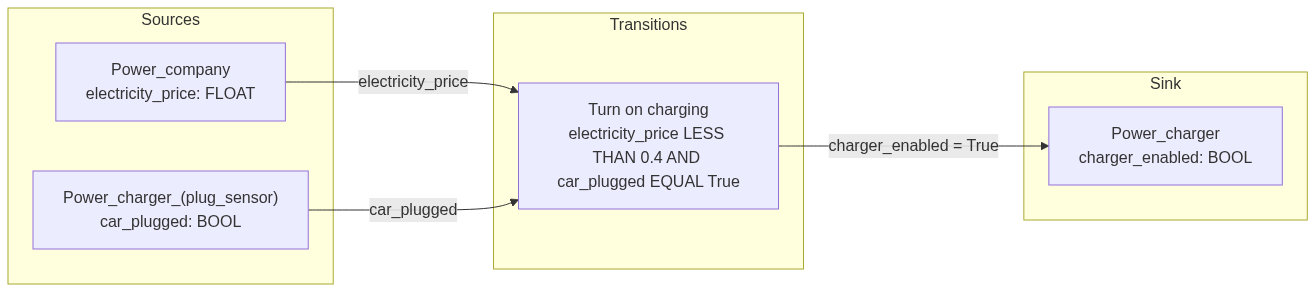
Then we can generate a mermaid graph:
from llm_tap.to_mermaid import workflow_to_mermaid

print(workflow_to_mermaid)
flowchart LR
    subgraph Sources
        Power_charger__plug_sensor_[Power_charger_#40;plug_sensor#41;<br/>car_plugged: BOOL]
        Power_company[Power_company<br/>electricity_price: FLOAT]
    end
    subgraph Sink
        Power_charger[Power_charger<br/>charger_enabled: BOOL]
    end
    subgraph Transitions
        Turn_on_charging[Turn on charging<br/>electricity_price LESS THAN 0.4 AND car_plugged EQUAL True]
    end
    Power_company -->|electricity_price| Turn_on_charging
    Power_charger__plug_sensor_ -->|car_plugged| Turn_on_charging
    Turn_on_charging -->|charger_enabled = True| Power_charger
Additional resources
Currently work in progress here: https://advanced-stack.com/resources/how-to-build-workflows-trigger-action-program-with-llms.html
1 maintainer

Release files for llm-tap 0.1.0
For a detailed explanation of source distributions (sdists) and built distributions (wheels), please see the package formats documentation.
Source distribution (sdist)
| File | Size | Uploaded | |
|---|---|---|---|
| llm_tap-0.1.0.tar.gz | 12.9 kB | Details |
Built distribution (wheel)
| File | Interpreter | ABI | Platform | Reset |
|---|---|---|---|---|
| llm_tap-0.1.0-py3-none-any.whl | Python 3 | none | any | Details |
Total release size: 24.1 kB
Release files / llm_tap-0.1.0.tar.gz
| Download URL | llm_tap-0.1.0.tar.gz |
|---|---|
| Size | 12.9 kB |
| Tags | Source |
|
SHA-256 checksum How to use checksums |
16ce78016369960b814b3e0eec872245dc306aa68b5c36fe58f4af7b582f624e
|
|
BLAKE2b-256 checksum How to use checksums |
e7027f915126a591fef40017d40ce82c33dec38f36f86553c177a50133b27f68
|
| Upload date | |
|
Uploaded using Trusted Publishing? What is trusted publishing? |
No |
| Uploaded via |
twine/6.1.0 CPython/3.13.1
|
Release files / llm_tap-0.1.0-py3-none-any.whl
| Download URL | llm_tap-0.1.0-py3-none-any.whl |
|---|---|
| Size | 11.2 kB |
| Tags | Python 3 |
|
SHA-256 checksum How to use checksums |
50b0e4efb9dd5d471034add6e4557e22adf78cc0707a5944e9bc1ff36a96aa69
|
|
BLAKE2b-256 checksum How to use checksums |
768fc3787658f095432e0c006ab2a032ad8d4d6e3b65b06884b4bd798d02d03f
|
| Upload date | |
|
Uploaded using Trusted Publishing? What is trusted publishing? |
No |
| Uploaded via |
twine/6.1.0 CPython/3.13.1
|














