
LLM Finetuning Toolkit
Overview
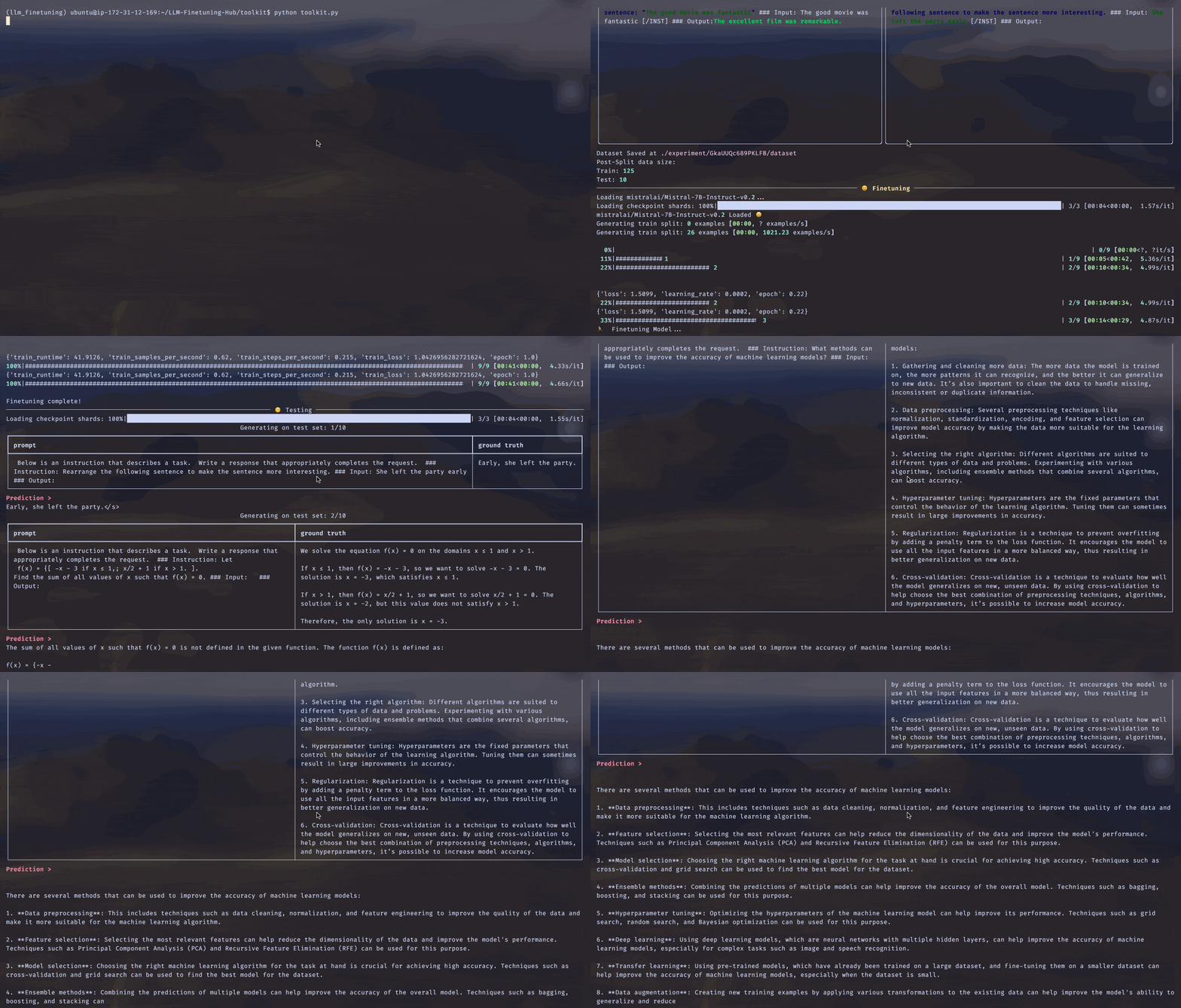
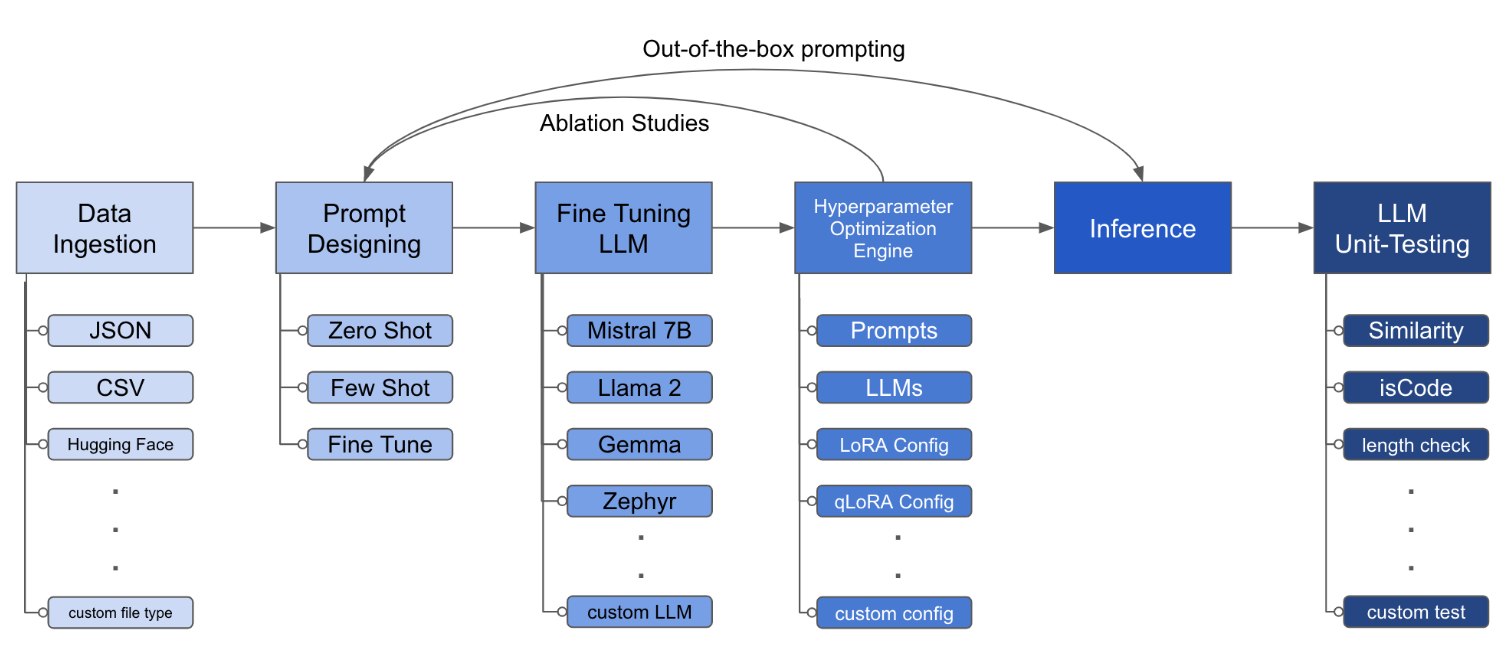
LLM Finetuning toolkit is a config-based CLI tool for launching a series of LLM fine-tuning experiments on your data and gathering their results. From one single yaml config file, control all elements of a typical experimentation pipeline - prompts, open-source LLMs, optimization strategy and LLM testing.
Installation
pipx (recommended)
pipx installs the package and dependencies in a separate virtual environment
pipx install llm-toolkit
pip
pip install llm-toolkit
Quick Start
This guide contains 3 stages that will enable you to get the most out of this toolkit!
- Basic: Run your first LLM fine-tuning experiment
- Intermediate: Run a custom experiment by changing the components of the YAML configuration file
- Advanced: Launch series of fine-tuning experiments across different prompt templates, LLMs, optimization techniques -- all through one YAML configuration file
Basic
llmtune generate config
llmtune run ./config.yml
The first command generates a helpful starter config.yml file and saves in the current working directory. This is provided to users to quickly get started and as a base for further modification.
Then the second command initiates the fine-tuning process using the settings specified in the default YAML configuration file config.yaml.
Intermediate
The configuration file is the central piece that defines the behavior of the toolkit. It is written in YAML format and consists of several sections that control different aspects of the process, such as data ingestion, model definition, training, inference, and quality assurance. We highlight some of the critical sections.
Flash Attention 2
To enable Flash-attention for supported models. First install flash-attn:
pipx
pipx inject llm-toolkit flash-attn --pip-args=--no-build-isolation
pip
pip install flash-attn --no-build-isolation
Then, add to config file.
model:
  torch_dtype: "bfloat16" # or "float16" if using older GPU
  attn_implementation: "flash_attention_2"
Data Ingestion
An example of what the data ingestion may look like:
data:
  file_type: "huggingface"
  path: "yahma/alpaca-cleaned"
  prompt:
    ### Instruction: {instruction}
    ### Input: {input}
    ### Output:
  prompt_stub: { output }
  test_size: 0.1 # Proportion of test as % of total; if integer then # of samples
  train_size: 0.9 # Proportion of train as % of total; if integer then # of samples
  train_test_split_seed: 42
- While the above example illustrates using a public dataset from Hugging Face, the config file can also ingest your own data.
   file_type: "json"
   path: "<path to your data file>
   file_type: "csv"
   path: "<path to your data file>
-
The prompt fields help create instructions to fine-tune the LLM on. It reads data from specific columns, mentioned in {} brackets, that are present in your dataset. In the example provided, it is expected for the data file to have column names:
instruction,inputandoutput. -
The prompt fields use both
promptandprompt_stubduring fine-tuning. However, during testing, only thepromptsection is used as input to the fine-tuned LLM.
LLM Definition
model:
  hf_model_ckpt: "NousResearch/Llama-2-7b-hf"
  quantize: true
  bitsandbytes:
    load_in_4bit: true
    bnb_4bit_compute_dtype: "bf16"
    bnb_4bit_quant_type: "nf4"

# LoRA Params -------------------
lora:
  task_type: "CAUSAL_LM"
  r: 32
  lora_dropout: 0.1
  target_modules:
    - q_proj
    - v_proj
    - k_proj
    - o_proj
    - up_proj
    - down_proj
    - gate_proj
- While the above example showcases using Llama2 7B, in theory, any open-source LLM supported by Hugging Face can be used in this toolkit.
hf_model_ckpt: "mistralai/Mistral-7B-v0.1"
hf_model_ckpt: "tiiuae/falcon-7b"
- The parameters for LoRA, such as the rank
rand dropout, can be altered.
lora:
  r: 64
  lora_dropout: 0.25
Quality Assurance
qa:
  llm_metrics:
    - length_test
    - word_overlap_test
- To ensure that the fine-tuned LLM behaves as expected, you can add tests that check if the desired behaviour is being attained. Example: for an LLM fine-tuned for a summarization task, we may want to check if the generated summary is indeed smaller in length than the input text. We would also like to learn the overlap between words in the original text and generated summary.
Artifact Outputs
This config will run fine-tuning and save the results under directory ./experiment/[unique_hash]. Each unique configuration will generate a unique hash, so that our tool can automatically pick up where it left off. For example, if you need to exit in the middle of the training, by relaunching the script, the program will automatically load the existing dataset that has been generated under the directory, instead of doing it all over again.
After the script finishes running you will see these distinct artifacts:
/dataset # generated pkl file in hf datasets format
/model # peft model weights in hf format
/results # csv of prompt, ground truth, and predicted values
/qa # csv of test results: e.g. vector similarity between ground truth and prediction
Once all the changes have been incorporated in the YAML file, you can simply use it to run a custom fine-tuning experiment!
python toolkit.py --config-path <path to custom YAML file>
Advanced
Fine-tuning workflows typically involve running ablation studies across various LLMs, prompt designs and optimization techniques. The configuration file can be altered to support running ablation studies.
- Specify different prompt templates to experiment with while fine-tuning.
data:
  file_type: "huggingface"
  path: "yahma/alpaca-cleaned"
  prompt:
    - >-
      This is the first prompt template to iterate over
      ### Input: {input}
      ### Output:
    - >-
      This is the second prompt template
      ### Instruction: {instruction}
      ### Input: {input}
      ### Output:
  prompt_stub: { output }
  test_size: 0.1 # Proportion of test as % of total; if integer then # of samples
  train_size: 0.9 # Proportion of train as % of total; if integer then # of samples
  train_test_split_seed: 42
- Specify various LLMs that you would like to experiment with.
model:
  hf_model_ckpt:
    [
      "NousResearch/Llama-2-7b-hf",
      mistralai/Mistral-7B-v0.1",
      "tiiuae/falcon-7b",
    ]
  quantize: true
  bitsandbytes:
    load_in_4bit: true
    bnb_4bit_compute_dtype: "bf16"
    bnb_4bit_quant_type: "nf4"
- Specify different configurations of LoRA that you would like to ablate over.
lora:
  r: [16, 32, 64]
  lora_dropout: [0.25, 0.50]
Extending
The toolkit provides a modular and extensible architecture that allows developers to customize and enhance its functionality to suit their specific needs. Each component of the toolkit, such as data ingestion, fine-tuning, inference, and quality assurance testing, is designed to be easily extendable.
Contributing
Open-source contributions to this toolkit are welcome and encouraged. If you would like to contribute, please see CONTRIBUTING.md.
2 maintainers


Release files for llm-toolkit 0.2.3
For a detailed explanation of source distributions (sdists) and built distributions (wheels), please see the package formats documentation.
Source distribution (sdist)
| File | Size | Uploaded | |
|---|---|---|---|
| llm_toolkit-0.2.3.tar.gz | 27.4 kB | Details |
Built distribution (wheel)
| File | Interpreter | ABI | Platform | Reset |
|---|---|---|---|---|
| llm_toolkit-0.2.3-py3-none-any.whl | Python 3 | none | any | Details |
Total release size: 59.0 kB
Release files / llm_toolkit-0.2.3.tar.gz
| Download URL | llm_toolkit-0.2.3.tar.gz |
|---|---|
| Size | 27.4 kB |
| Tags | Source |
|
SHA-256 checksum How to use checksums |
9e5e282db850cf10e4e5243de401705393450cb5f0abade9ec5acd4b798048fc
|
|
BLAKE2b-256 checksum How to use checksums |
f92aaca433e502628538c3189e45787c8a3afee32c11b5abd4f291347496972e
|
| Upload date | |
|
Uploaded using Trusted Publishing? What is trusted publishing? |
Yes |
| Uploaded via |
twine/5.1.0 CPython/3.12.4
|
Release files / llm_toolkit-0.2.3-py3-none-any.whl
| Download URL | llm_toolkit-0.2.3-py3-none-any.whl |
|---|---|
| Size | 31.6 kB |
| Tags | Python 3 |
|
SHA-256 checksum How to use checksums |
6207e27b097e64f954c86d2f0159cfdb46e56e702a14c31cd89cddd47b311326
|
|
BLAKE2b-256 checksum How to use checksums |
035f1765154ef62483b9c6fec6e8b9d447f750bdce157327f594d4c993a89827
|
| Upload date | |
|
Uploaded using Trusted Publishing? What is trusted publishing? |
Yes |
| Uploaded via |
twine/5.1.0 CPython/3.12.4
|














