





[!Note] Current focus: Authorization #4
Installation
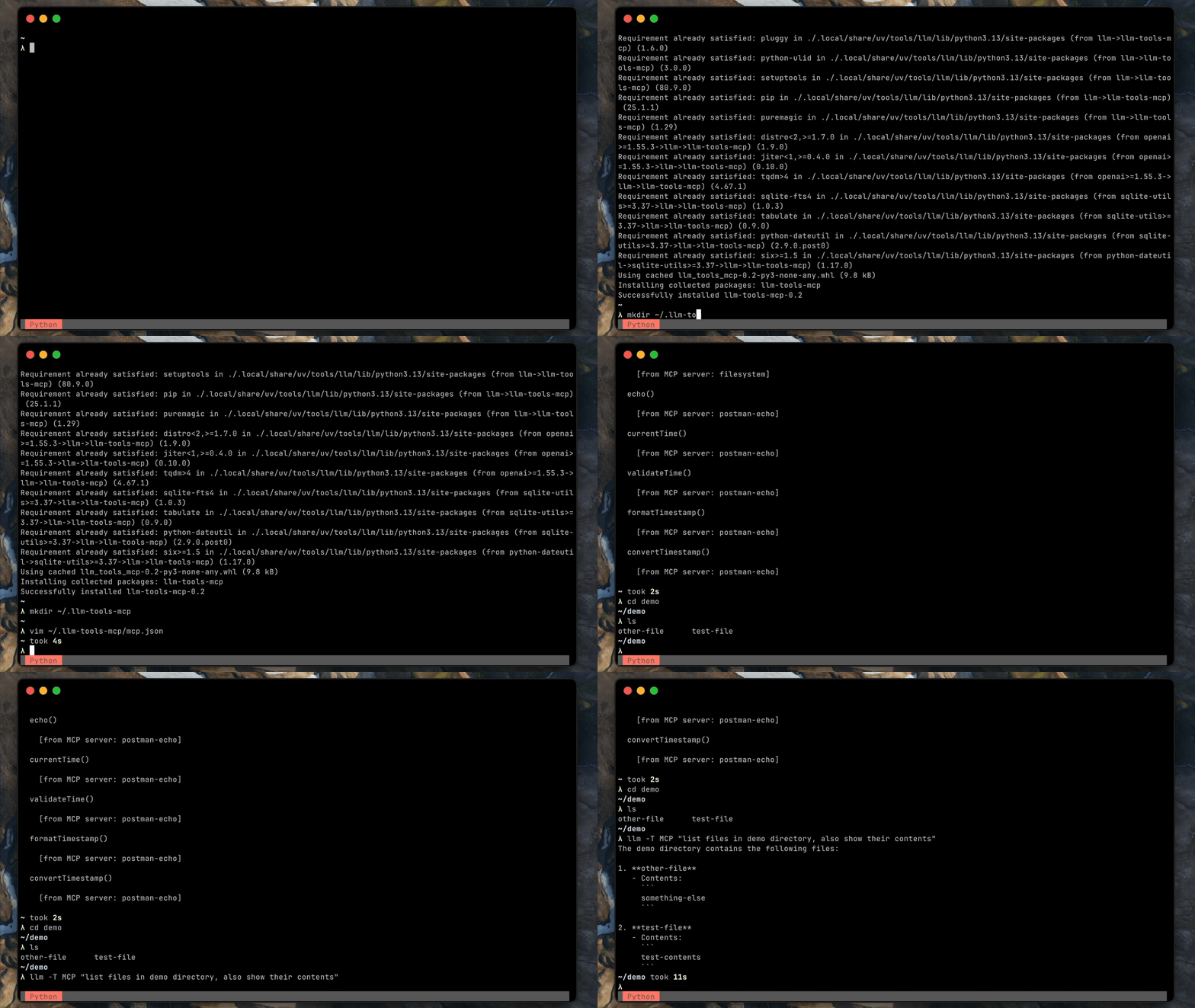
Install this plugin in the same environment as LLM:
llm install llm-tools-mcp
Usage
[!WARNING] It's recommended to use the
--taflag and approve each tool execution.
-
Create
mcp.jsonfile in~/.llm-tools-mcp.Example file:
{
  "mcpServers": {
    "filesystem": {
      "command": "npx",
      "args": [
        "-y",
        "@modelcontextprotocol/server-filesystem",
        "~/demo"
      ]
    }
  }
}
-
List available tools.
[!WARNING]
llm toolsis not implemented for dynamic toolboxes (see this), so tools loaded as part of MCP won't be visible.llm tools list
-
Run
llmwith tools.llm --ta -T MCP "what files are in the demo directory? show me contents of one of the files (any)"
Other examples
Dynamically change your MCP config:
llm --ta -T 'MCP("/path/to/custom/mcp.json")' "your prompt here"
Development
Now (to be verified)
- Sync dependencies:
uv sync --all-extras - Run linters / type checker:
./check.sh - Run tests:
./test.sh - Run end to end tests:
./e2e/e2e-docker.sh
To Do
- Release alpha version
- support all transports
- streamable http
- sse
- stdio
- Build a solid test suite
- test config file validation
- test sse with dummy server
- test stdio with dummy server
- test http streamable with dummy server (see #1)
- manual test for sse with real server
- manual test for stdio with real server
- manual test for http streamable with real server
- Redirect
stdout/stderrfrom the MCP SDK to a file or designated location - Reuse stdio connections
- Support non-stdio MCP servers
- Handle tool name conflicts (prefix with mcp server name?)
- Gather feedback on the
~/.llm-tools-mcpdirectory naming - Improve failure handling:
- When connecting to an MCP server fails
- When
mcp.jsonis malformed
- Improve this README:
- Add more detail in the Development section (mention
uv?)
- Add more detail in the Development section (mention
1 maintainer

Metadata
1 maintainer
Release files for llm-tools-mcp 0.4
For a detailed explanation of source distributions (sdists) and built distributions (wheels), please see the package formats documentation.
Source distribution (sdist)
| File | Size | Uploaded | |
|---|---|---|---|
| llm_tools_mcp-0.4.tar.gz | 13.2 kB | Details |
Built distribution (wheel)
| File | Interpreter | ABI | Platform | Reset |
|---|---|---|---|---|
| llm_tools_mcp-0.4-py3-none-any.whl | Python 3 | none | any | Details |
Total release size: 24.2 kB
Release files / llm_tools_mcp-0.4.tar.gz
| Download URL | llm_tools_mcp-0.4.tar.gz |
|---|---|
| Size | 13.2 kB |
| Tags | Source |
|
SHA-256 checksum How to use checksums |
a893144021c026ade06c878e3b273bcf18f67e46d172e71bf86e2ed42093561e
|
|
BLAKE2b-256 checksum How to use checksums |
5d4aabc038b896b9ee67b65305531820f2a3b9c499a21d76f5c277c45b7dfb32
|
| Upload date | |
|
Uploaded using Trusted Publishing? What is trusted publishing? |
Yes |
| Uploaded via |
twine/6.1.0 CPython/3.13.7
|
Provenance
Provenance describes where a file came from. On PyPI, provenance is shared via attestations, which provide a verifiable record of the build or publishing details. View details, limitations and caveats.


PyPI Publish Attestation
PyPI verified that this artifact, at this checksum, originated from the publisher listed below.
Signed by GitHub Actions, verified by PyPI on Oct 29, 2025.
Transparency logRelease files / llm_tools_mcp-0.4-py3-none-any.whl
| Download URL | llm_tools_mcp-0.4-py3-none-any.whl |
|---|---|
| Size | 11.0 kB |
| Tags | Python 3 |
|
SHA-256 checksum How to use checksums |
a3907ebb14fb9e7a431c360602e9bcf767b43f5bbff2f8f7cc395544195a32a2
|
|
BLAKE2b-256 checksum How to use checksums |
e3c3e136286bd0589ccd9b2cff56d7f8778dcf78aa3894b82a726434bbeac1db
|
| Upload date | |
|
Uploaded using Trusted Publishing? What is trusted publishing? |
Yes |
| Uploaded via |
twine/6.1.0 CPython/3.13.7
|
Provenance
Provenance describes where a file came from. On PyPI, provenance is shared via attestations, which provide a verifiable record of the build or publishing details. View details, limitations and caveats.
PyPI Publish Attestation
PyPI verified that this artifact, at this checksum, originated from the publisher listed below.
Signed by GitHub Actions, verified by PyPI on Oct 29, 2025.
Transparency log













