
📝 XS Module Documentation
The workflow of the XS module, with a tagline : xs makes you access
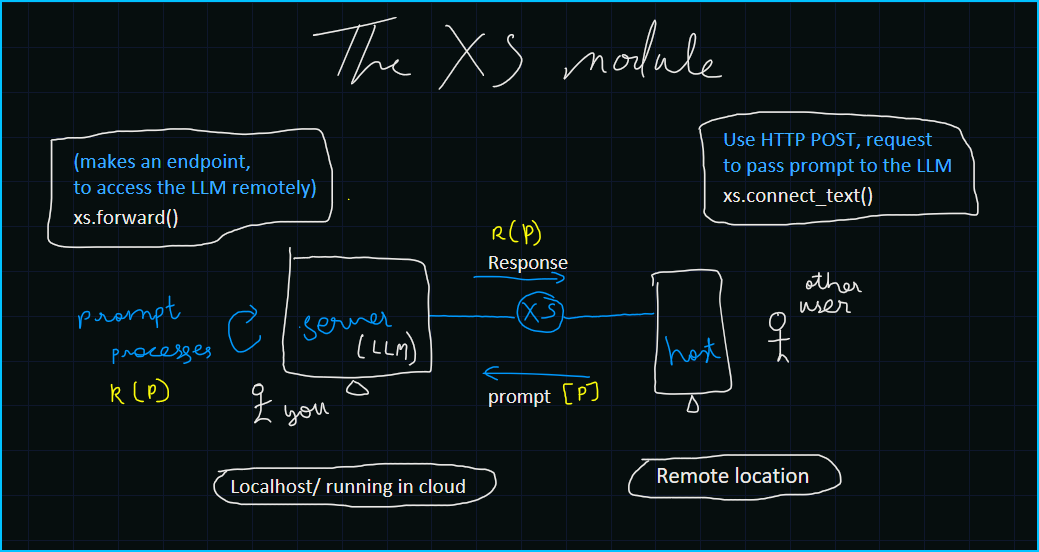
This module leverages Flask, Pyngrok, and Waitress to create a simple API endpoint for text generation of all Open Source LLMs.
🚀 Features
- 🌐 API Endpoint Creation: Easily create an API endpoint to access the text generation function.
- 🔀 Dynamic Port Allocation: Automatically find an available port to avoid conflicts.
- 🚧 Ngrok Tunneling: Expose your local server to the internet using Ngrok.
- 🔄 Flushing Tunnels: Clear previous Ngrok tunnels to avoid the max tunnel limit.
📦 Installation
To use this module, you need to install by the following command :
pip install 'git+https://github.com/xprabhudayal/xs.git'
📋 Tutorials and Usage
1 Watch these videos for better Understanding
|
|
2. Finding an Available Port
xs.find_port()
It dynamically finds an available port.
3. Forward Function
xs.forward(NGROK_API)
The xs.forward() function sets up the Ngrok tunnel and starts the server using Waitress. NGROK_API is required here.
4. Connect Text Function
xs.connect_text(url, prompt)
The connect_text function allows remote devices to access the API and use the text generation option. It sends a POST request to the API endpoint with the provided data and prints the generated text response.
5. Flushing Tunnels
xs.flush()
The flush function clears all previous Ngrok tunnels. In the free tier, you can have 3 tunnels only! This is useful if you encounter the maximum tunnel limit error from Ngrok.
🔧 Future Features
- Port Killing: Automatically kill processes using specific ports before starting the server.
- Enhanced Error Handling: Improve the robustness of error handling mechanisms.
🛠 Troubleshooting
- Ngrok Tunnel Error: If you encounter a max tunnel limit, use the
flushfunction to clear previous tunnels. - JSON Decode Error: Ensure the API response is correctly formatted JSON.
License 📄
This project is licensed under the MIT License.
Contact 📧
For any inquiries, please reach me at : MAIL
Made with 💖 by Prabhudayal
Enjoy using the xs.py module! 🚀
1 maintainer

Release files for llm-xs 1.0.0
For a detailed explanation of source distributions (sdists) and built distributions (wheels), please see the package formats documentation.
Source distribution (sdist)
| File | Size | Uploaded | |
|---|---|---|---|
| llm_xs-1.0.0.tar.gz | 5.5 kB | Details |
Built distribution (wheel)
| File | Interpreter | ABI | Platform | Reset |
|---|---|---|---|---|
| llm_xs-1.0.0-py3-none-any.whl | Python 3 | none | any | Details |
Total release size:11.2 kB
Release files / llm_xs-1.0.0.tar.gz
| Download URL | llm_xs-1.0.0.tar.gz |
|---|---|
| Size | 5.5 kB |
| Tags | Source |
|
SHA-256 checksum How to use checksums |
4d9a75db07aea19505376fc9347bdcb3a93f4da4d69867e4681c9606bb029572
|
|
BLAKE2b-256 checksum How to use checksums |
2e097fb21c24fe5862cfcbcbd2527b9bb9dc42a67e8d8c9a36a6f13db7c3d648
|
| Upload date | |
|
Uploaded using Trusted Publishing? What is trusted publishing? |
No |
| Uploaded via |
twine/5.1.1 CPython/3.11.4
|
Release files / llm_xs-1.0.0-py3-none-any.whl
| Download URL | llm_xs-1.0.0-py3-none-any.whl |
|---|---|
| Size | 5.7 kB |
| Tags | Python 3 |
|
SHA-256 checksum How to use checksums |
2bf612fd81e2169bfb585804591ec1bb5d9fc17e9b45accc8191fbca288966af
|
|
BLAKE2b-256 checksum How to use checksums |
8daacbf84b1c93a7a90ee65b65d9a069092e133a2a447764fb2b6a78ab6d3fea
|
| Upload date | |
|
Uploaded using Trusted Publishing? What is trusted publishing? |
No |
| Uploaded via |
twine/5.1.1 CPython/3.11.4
|













