
llmatic
No BS utilities for developing with LLMs
Why?
LLMs are basically API calls that need:
- Swappability
- Rate limit handling
- Visibility on costs, latency and performance
- Response handling
So we are solving those problems exactly without any crazy vendor lock or abstractions ;)
Examples
Calling an LLM (notice how you can call whatever LLM API you want, you're really free to do as you please).
import openai
from llmatic import track, get_response

# Start tracking an LLM call
t = track(project_id="test", id="story") # start tacking an llm call, saved as json files.

# Make the LLM call, note you can use whatever API or LLM you want.
response = openai.Completion.create(
    engine="gpt-4",
    prompt="Write a short story about a robot learning to garden, 300-400 words, be creative.",
    max_tokens=max_tokens,
    n=1,
    stop=None,
    temperature=0.7
)

# End tracking and save call results
t.end(model=model, prompt=prompt, response=response) # Save the cost (inputs/outputs), latency (execution time)

# Evaluation
#  Notice that this acts like the built in `assert`,
#  if you don't want it to affect your runtime in production just use
#  `log_only` (will only track the result) or dev_mode=True (won't run - useful for production).

t.eval("Is the story engaging?", scale=(0,10), model="claude-sonnet")
t.eval("Does the story contain the words ['water', 'flowers', 'soil']", scale=(0,10)) # This will use function calling to check "flowers" in story_text_response.
t.eval("Did the response complete in less than 0.5s?", scale=(0,1), log_only=True) # This will not trigger a conditional_retry, just log/track the eval
t.eval("Was the story between 300-400 words?", scale=(0,1))

# Extract and print the generated text
generated_text = get_response(response) # equivallent to response.choices[0].text.strip()
print(generated_text)
Retries?
Well, we will need to take our relationship to the next level :)
To get the most benefit from llmatic, we need to wrap all of the relevant LLM calls with a context (with llm(...)):
import openai
from llmatic import track, get_response, llm, condition

# Make the API call
t = track(id="story") # start tacking an llm call, saved as json files.
with llm(retries=3, tracker=t): # This will also retry any rate limit errors
  response = openai.Completion.create(
      engine="gpt-4",
      prompt="Write a short story about a robot learning to garden, 300-400 words, be creative.",
      max_tokens=max_tokens,
      n=1,
      stop=None,
      temperature=0.7
  )
t.end(model=model, prompt=prompt, response=response) # Save the cost (inputs/outputs), latency (execution time)

# Eval
t.eval("Was the story between 300-400 words?", scale=(0,1))
t.eval("Is the story creative?", scale=(0,10), "claude-sonnet")
t.conditional_retry(lambda score: score > 7, scale=(0,10), max_retry=3) # If our condition isn't met, retry the llm again
Results (e.g. LangSmith killer)
We use a CLI tool to check them out. By default, tracking results will be saved in an SQLite database located at $HOME/.llmatic/llmatic.db.
-
List all trackings:
llmatic list -
Output the last track:
llmatic show <project_id> <tracking_id>(for example,llmatic show example_project story)This command will produce output like:
LLM Tracking Results for: story
------------------------------------------------------------
Tracking ID: story
Model: gpt-4
File and Function: examples_basic_main
Prompt: "Write a short story about a robot learning to garden, 300-400 words, be creative." (Cost: $0.000135)
Execution Time: 564 ms
Total Cost: $0.000150
Tokens: 30 (Prompt: 10, Completion: 20)
Created At: 2024-05-26 15:50:00

Evaluation Results:
------------------------------------------------------------
Is the story engaging? (Model: claude-sonnet): 8.00
Does the story contain the words ['water', 'flowers', 'soil'] (Model: claude-sonnet): 10.00

Generated Text:
------------------------------------------------------------
Once upon a time in a robotic garden... (Cost: $0.000015)
-Summarize all trackings for a project: llmatic summary <project_id> (for example, llmatic summary example_project)
This command will produce output like:
Run summary for project: example_project
------------------------------------------------------------
story - [gpt-4], 0.56s, $0.000150, examples_basic_main
another_story - [gpt-4], 0.60s, $0.000160, examples_another_function
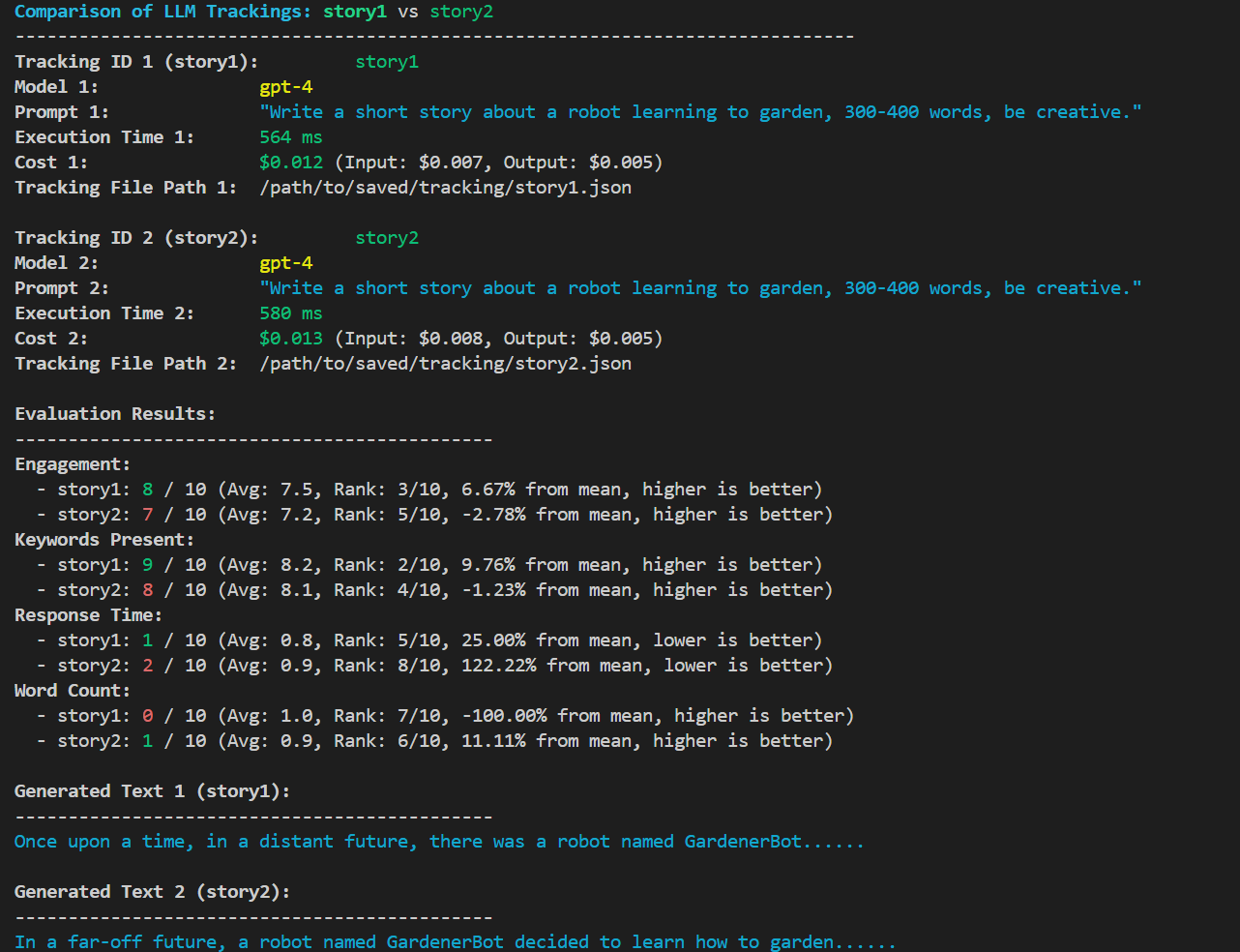
- Compare trackings:
llmatic compare <id> <id2>TBD
CLI Usage
List all trackings:
poetry run llmatic list
Output the last track:
poetry run llmatic show <project_id> <tracking_id>
Summarize all trackings for a project:
poetry run llmatic summary <project_id>
Remove all trackings for a project:
poetry run llmatic remove <project_id>
TODO:
- Write the actual code :)
- TS version?
- Think about cli utitilies for improveing prompts from the trackings.
- Think of ways to compare different models and prompts in a matrix style for best results using the eval values.
- Github action for eval and results.
More why?
Most LLM frameworks try to lock you into their ecosystem, which is problematic for several reasons:
- Complexity: Many LLM frameworks are just wrappers around API calls. Why complicate things and add a learning curve?
- Instability: The LLM space changes often, leading to frequent syntax and functionality updates. This is not a solid foundation.
- Inflexibility: Integrating other libraries or frameworks becomes difficult due to hidden dependencies and incompatibilities. You need an agnostic way to use LLMs regardless of the underlying implementation.
- TDD-first: When working with LLMs, it's essential to ensure the results are adequate. This means adopting a defensive coding approach. However, no existing framework treats this as a core value.
- Evaluation: Comparing different runs after modifying your model, prompt, or interaction method is crucial. Current frameworks fall short here (yes, langsmith), often pushing vendor lock-in with their SaaS products.
1 maintainer

Metadata
1 maintainer
Release files for llmatic 0.0.1
For a detailed explanation of source distributions (sdists) and built distributions (wheels), please see the package formats documentation.
Source distribution (sdist)
| File | Size | Uploaded | |
|---|---|---|---|
| llmatic-0.0.1.tar.gz | 6.8 kB | Details |
Built distribution (wheel)
| File | Interpreter | ABI | Platform | Reset |
|---|---|---|---|---|
| llmatic-0.0.1-py3-none-any.whl | Python 3 | none | any | Details |
Total release size: 15.2 kB
Release files / llmatic-0.0.1.tar.gz
| Download URL | llmatic-0.0.1.tar.gz |
|---|---|
| Size | 6.8 kB |
| Tags | Source |
|
SHA-256 checksum How to use checksums |
57c0e737094c9a62be04ffb245ce2a569a85188dd4860a7d666da3ed9b7169b6
|
|
BLAKE2b-256 checksum How to use checksums |
b93353103b3769f1ce377be7fbbb555f23058e18e370447cf058240c3b13dddf
|
| Upload date | |
|
Uploaded using Trusted Publishing? What is trusted publishing? |
No |
| Uploaded via |
poetry/1.8.2 CPython/3.10.6 Linux/5.15.146.1-microsoft-standard-WSL2
|
Release files / llmatic-0.0.1-py3-none-any.whl
| Download URL | llmatic-0.0.1-py3-none-any.whl |
|---|---|
| Size | 8.4 kB |
| Tags | Python 3 |
|
SHA-256 checksum How to use checksums |
12db1049b74a3529b0d8f8c1971813ad125d9d5ae030d46f2f0fcd0aa577b7c1
|
|
BLAKE2b-256 checksum How to use checksums |
dd60986bd6c2617536fd4f7dc438c6b38d552f27e921cd6e84a5311461182726
|
| Upload date | |
|
Uploaded using Trusted Publishing? What is trusted publishing? |
No |
| Uploaded via |
poetry/1.8.2 CPython/3.10.6 Linux/5.15.146.1-microsoft-standard-WSL2
|













