
LLMDocParser
A package for parsing PDFs and analyzing their content using LLMs.
This package is an improvement based on the concept of gptpdf.
Method
gptpdf uses PyMuPDF to parse PDFs, identifying both text and non-text regions. It then merges or filters the text regions based on certain rules, and inputs the final results into a multimodal model for parsing. This method is particularly effective.
Based on this concept, I made some minor improvements.
Main Process
Using a layout analysis model, each page of the PDF is parsed to identify the type of each region, which includes Text, Title, Figure, Figure caption, Table, Table caption, Header, Footer, Reference, and Equation. The coordinates of each region are also obtained.
Layout Analysis Result Example:
[{'header': ((101, 66, 436, 102), 0)},
 {'header': ((1038, 81, 1088, 95), 1)},
 {'title': ((106, 215, 947, 284), 2)},
 {'text': ((101, 319, 835, 390), 3)},
 {'text': ((100, 565, 579, 933), 4)},
 {'text': ((100, 967, 573, 1025), 5)},
 {'text': ((121, 1055, 276, 1091), 6)},
 {'reference': ((101, 1124, 562, 1429), 7)},
 {'text': ((610, 565, 1089, 930), 8)},
 {'text': ((613, 976, 1006, 1045), 9)},
 {'title': ((612, 1114, 726, 1129), 10)},
 {'text': ((611, 1165, 1089, 1431), 11)},
 {'title': ((1011, 1471, 1084, 1492), 12)}]
This result includes the type, coordinates, and reading order of each region. By using this result, more precise rules can be set to parse the PDF.
Finally, input the images of the corresponding regions into a multimodal model, such as GPT-4o or Qwen-VL, to directly obtain text blocks that are friendly to RAG solutions.
| img_path | type | page_no | filename | content | filepath |
|---|---|---|---|---|---|
| {absolute_path}/page_1_title.png | Title | 1 | attention is all you need | [Text Block 1] | {file_absolute_path} |
| {absolute_path}/page_1_text.png | Text | 1 | attention is all you need | [Text Block 2] | {file_absolute_path} |
| {absolute_path}/page_2_figure.png | Figure | 2 | attention is all you need | [Text Block 3] | {file_absolute_path} |
| {absolute_path}/page_2_figure_caption.png | Figure caption | 2 | attention is all you need | [Text Block 4] | {file_absolute_path} |
| {absolute_path}/page_3_table.png | Table | 3 | attention is all you need | [Text Block 5] | {file_absolute_path} |
| {absolute_path}/page_3_table_caption.png | Table caption | 3 | attention is all you need | [Text Block 6] | {file_absolute_path} |
| {absolute_path}/page_1_header.png | Header | 1 | attention is all you need | [Text Block 7] | {file_absolute_path} |
| {absolute_path}/page_2_footer.png | Footer | 2 | attention is all you need | [Text Block 8] | {file_absolute_path} |
| {absolute_path}/page_3_reference.png | Reference | 3 | attention is all you need | [Text Block 9] | {file_absolute_path} |
| {absolute_path}/page_1_equation.png | Equation | 1 | attention is all you need | [Text Block 10] | {file_absolute_path} |
See more in llm_parser.py main function.
Installation
pip install llmdocparser
Installation from Source
To install this project from source, follow these steps:
-
Clone the Repository:
First, clone the repository to your local machine. Open your terminal and run the following commands:
git clone https://github.com/lazyFrogLOL/llmdocparser.git
cd llmdocparser
-
Install Dependencies:
This project uses Poetry for dependency management. Make sure you have Poetry installed. If not, you can follow the instructions in the Poetry Installation Guide.
Once Poetry is installed, run the following command in the project's root directory to install the dependencies:
poetry installThis will read the
pyproject.tomlfile and install all the required dependencies for the project.
Usage
from llmdocparser.llm_parser import get_image_content

content, cost = get_image_content(
    llm_type="azure",
    pdf_path="path/to/your/pdf",
    output_dir="path/to/output/directory",
    max_concurrency=5,
    azure_deployment="azure-gpt-4o",
    azure_endpoint="your_azure_endpoint",
    api_key="your_api_key",
    api_version="your_api_version"
)
print(content)
print(cost)
Parameters
-
llm_type: str
The options are azure, openai, dashscope.
-
pdf_path: str
Path to the PDF file.
-
output_dir: str
Output directory to store all parsed images.
-
max_concurrency: int
Number of GPT parsing worker threads. Batch calling details: Batch Support
If using Azure, the azure_deployment and azure_endpoint parameters need to be passed; otherwise, only the API key needs to be provided.
-
base_url: str
OpenAI Compatible Server url. Detail: OpenAI-Compatible Server
Cost
Using the 'Attention Is All You Need' paper for analysis, the model chosen is GPT-4o, costing as follows:
Total Tokens: 44063
Prompt Tokens: 33812
Completion Tokens: 10251
Total Cost (USD): $0.322825
Average cost per page: $0.0215
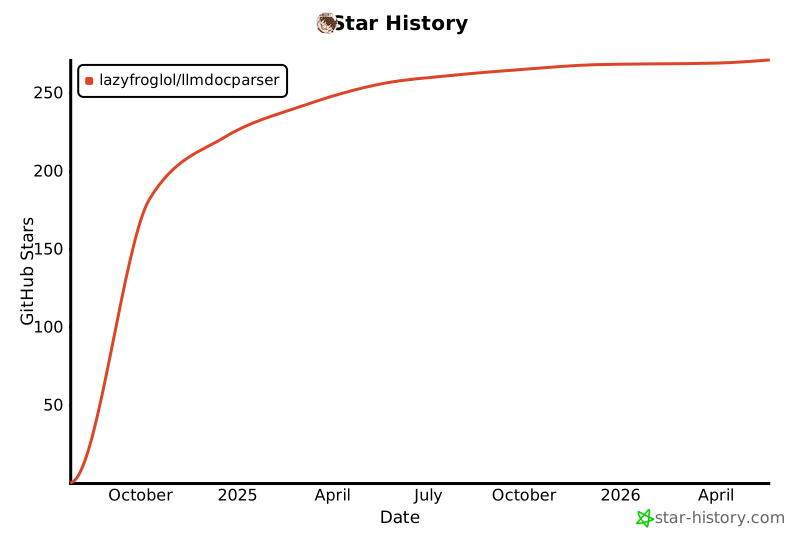
Star History
1 maintainer

Metadata
1 maintainer
Release files for llmdocparser 0.1.6.1
For a detailed explanation of source distributions (sdists) and built distributions (wheels), please see the package formats documentation.
Source distribution (sdist)
| File | Size | Uploaded | |
|---|---|---|---|
| llmdocparser-0.1.6.1.tar.gz | 1.1 MB | Details |
Built distribution (wheel)
| File | Interpreter | ABI | Platform | Reset |
|---|---|---|---|---|
| llmdocparser-0.1.6.1-py3-none-any.whl | Python 3 | none | any | Details |
Total release size: 2.3 MB
Release files / llmdocparser-0.1.6.1.tar.gz
| Download URL | llmdocparser-0.1.6.1.tar.gz |
|---|---|
| Size | 1.1 MB |
| Tags | Source |
|
SHA-256 checksum How to use checksums |
4420c967e6142538f7b4038f08416dd70e5dd4cd541c0940c92ea9a443186c8a
|
|
BLAKE2b-256 checksum How to use checksums |
f914b6b531323ac4deb821f64d93b889fdd32dd59b4b9cf25443ea4c82b80f0d
|
| Upload date | |
|
Uploaded using Trusted Publishing? What is trusted publishing? |
No |
| Uploaded via |
twine/5.1.1 CPython/3.9.19
|
Release files / llmdocparser-0.1.6.1-py3-none-any.whl
| Download URL | llmdocparser-0.1.6.1-py3-none-any.whl |
|---|---|
| Size | 1.2 MB |
| Tags | Python 3 |
|
SHA-256 checksum How to use checksums |
0ec524faf4153f90fc77692819a6011abfac769ed5e9b13d96f618e96f2a5b9b
|
|
BLAKE2b-256 checksum How to use checksums |
c067481457d12993e43b634347968111ed8fb95c503c4b80261611e5bd82a3af
|
| Upload date | |
|
Uploaded using Trusted Publishing? What is trusted publishing? |
No |
| Uploaded via |
twine/5.1.1 CPython/3.9.19
|














