






LLMDyno
LLMDyno is an open-source benchmark for running local and cloud LLMs as coding agents. You pick models (GGUF files
through llama.cpp on your own GPU, or APIs such as OpenAI, Anthropic, Gemini, DeepSeek, Kimi and Qwen), pick an agent
harness (Pi, OpenCode, Codex CLI, Qwen Code, Crush, Aider, mini-SWE-agent), and LLMDyno runs real multi-file coding
tasks in offline Docker sandboxes. Hidden tests grade the result, LLM judges review the code blind, and a dashboard
compares correctness, code quality, speed, VRAM and cost.
You can drive it from the web dashboard, from Python (pip install llmdyno), from the command line, or from
JavaScript and TypeScript (npx llmdyno, npm install llmdyno).
Besides its own tasks it runs SWE-bench (Verified, Lite or the 50-task Verified mini, graded by the official harness) and the Aider polyglot benchmark, and shows Artificial Analysis reference numbers next to your own measurements. It works on Windows, Linux and macOS, on x86-64, ARM64 and Apple Silicon.
It's a dyno for models: it measures what a model actually does on your machine, with your settings, rather than what a leaderboard says it does on someone else's.
Contents
- Why LLMDyno
- Features
- Quick start · Use it from Python · Use it from JavaScript
- Round 1 results: 15 configurations on an RTX 5080
- Public benchmarks: SWE-bench, Aider polyglot, Artificial Analysis
- How it works
- Supported harnesses, providers and hardware
- FAQ
- Contributing · Releases and versioning · License
Why LLMDyno
Public leaderboards answer "which model is best on a datacenter GPU at full precision". If you run models locally, the questions that matter are different:
- Does it fit? A 27B model at 3 bits with a 48k context either fits in 16 GB of VRAM or it doesn't. On Windows, "doesn't" often means the driver quietly spills into system RAM and runs 5-20x slower without an error.
- Which quant, which context, which KV cache type? Q2 vs Q3 vs IQ3, f16 vs q8_0 cache, experts on the CPU or not.
- Does it work as an agent? Tool calling, multi-step edits and running tests matter more than one-shot answers.
- How does it compare with the API I'd otherwise pay for, per task, in dollars and minutes?
LLMDyno answers those with your hardware, your models and your settings, and keeps every transcript so you can see why a model failed.
Features
Hardware-aware setup
- Detects CPU features (AVX2/AVX-512 on x86-64; NEON, dot product, i8mm and SVE on ARM), RAM, NVIDIA/AMD/Intel/Apple GPUs, driver, CUDA version, disks and Docker on Windows, Linux and macOS.
- Installs a matching prebuilt llama.cpp build for your OS and CPU architecture (CUDA 12/13, Metal, Vulkan, ROCm, SYCL, OpenCL for Adreno, or CPU), or uses yours.
- On Apple Silicon it plans memory around the GPU's share of unified memory (the Metal working-set limit), not the whole RAM, and tells you how to raise that limit.
Models and memory fit
- Search Hugging Face, check the fit before you download, then download with resume and SHA-256 verification.
- A VRAM projection from the GGUF header alone: weights per layer, KV cache (sliding-window, shared-KV, hybrid
recurrent and MLA layers), compute buffers and CUDA overhead. Checked against
llama-fit-params: mean error -4 MiB, worst case 66 MiB across 84 configurations. - Warnings before you run: out of memory, VRAM spilling into shared memory, CPU offload, context shorter than the task needs, risky KV quantization, missing tool-calling support. Most come with a one-click fix.
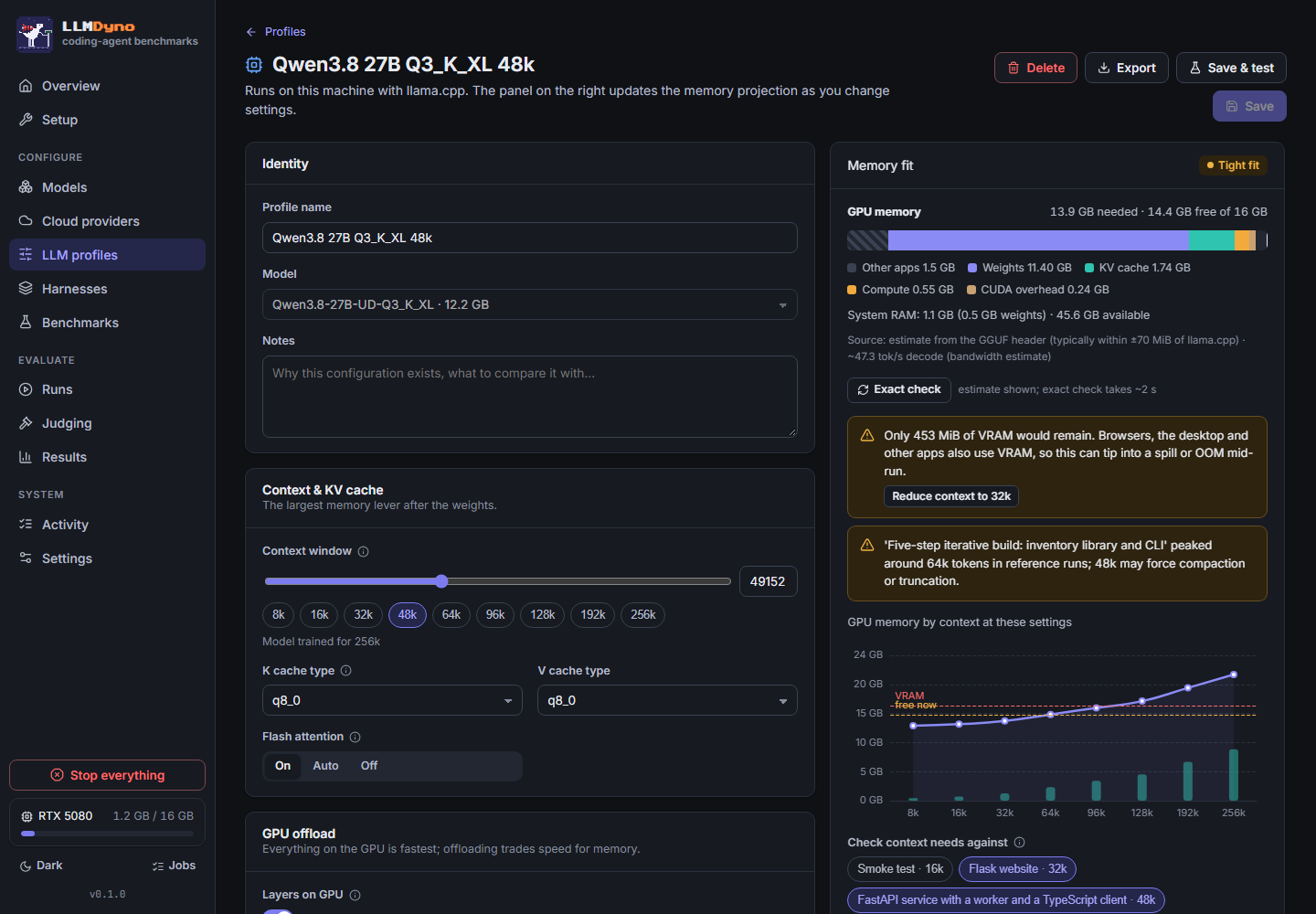
LLM profiles: a model plus its exact settings (context, KV cache, offload, MoE experts on CPU, sampling, reasoning). A quick test loads the model and measures real VRAM, decode speed and tool calling in about 20 seconds.
Cloud providers: OpenAI, Anthropic, Google Gemini, DeepSeek, Moonshot (Kimi), Z.ai, Qwen, MiniMax, xAI, Mistral, OpenRouter, Groq, Together, Fireworks, Cerebras, or any OpenAI-compatible endpoint. Keys are encrypted at rest and never enter a sandbox. Spend caps per provider and per plan are enforced by a proxy, so a looping agent can't run up a bill.
Agent harnesses: seven open-source harnesses in offline Docker sandboxes, each run against the same tasks, plus custom harnesses from a JSON manifest. A proxy records every request, so transcripts (thinking, tool calls, results) look the same whichever harness ran.
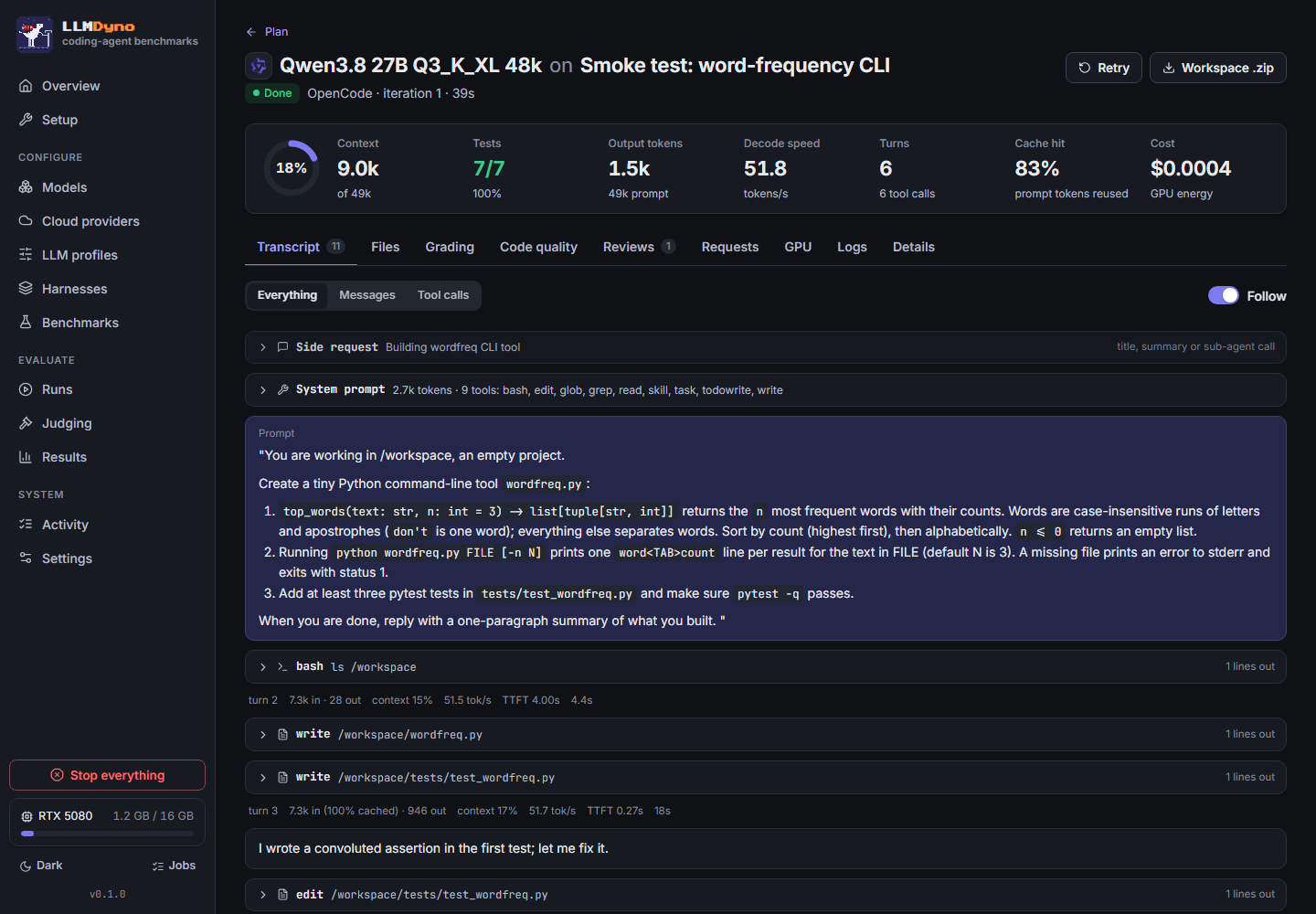
Benchmarks: six built-in tasks with hidden tests (a CLI smoke test, a Flask site, a FastAPI service with a TypeScript client, a five-stage iterative build, a data pipeline with a churn model, and a bug-fix task). Write your own in the editor; a validator checks that the starter fails and the reference passes. Import SWE-bench and the Aider polyglot benchmark from the Benchmarks page (see below).
Plans: profiles × harnesses × benchmarks × iterations. Preflight checks compatibility, memory and budget; local runs share the GPU one model at a time while cloud runs go in parallel. Pause, resume, retry and cancel at any point.
Judging: blind, shuffled LLM code review with an editable rubric and as many judges as you like, local or cloud. LLMDyno reports how much the judges agree and whether a judge favours its own vendor's models.
Python API: import llmdyno and do all of the above from a script or notebook: cloud_model(), local_model(),
bench(), Results.to_pandas(). Same engine and data folder as the app.
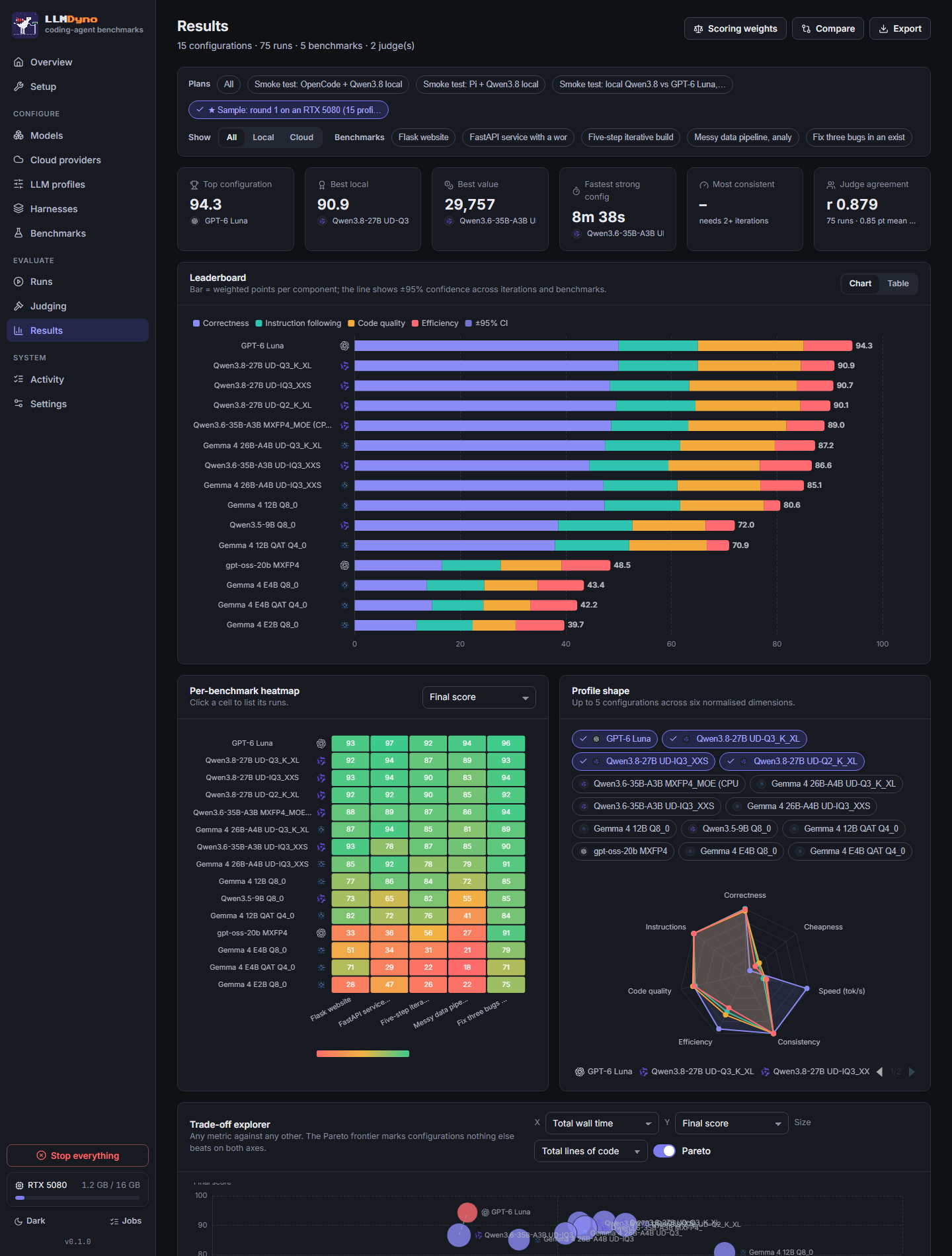
Results dashboard: weighted leaderboard with 95% confidence intervals, per-benchmark heatmap, radar profiles, a cost/speed/quality scatter with the Pareto front, consistency (pass@k, pass^k), token use, harness comparison, rubric heatmap, side-by-side compare, and CSV/JSON export. Vendor and model-family logos everywhere.
Panic stop: one red button (or Ctrl+Shift+X) cancels every run and job, removes every sandbox and proxy container and kills llama-server, after a confirmation.
A mascot with a job: the pixel dino sprints on its treadmill while a benchmark runs, sits on the podium while judges deliberate, and freezes red on a panic stop. The browser tab icon and title follow along, so you can see progress from another tab.


Quick start
Requirements: Windows 10/11, Linux or macOS 13+, on x86-64 or ARM64 (Apple Silicon included), Python 3.11+, and Docker (Docker Desktop on Windows and macOS). A GPU is recommended for local models (NVIDIA, AMD, Intel, or any Apple Silicon Mac); cloud-only use works without one.
From PyPI:
pip install llmdyno
llmdyno serve --open        # the web app; or use it from Python (below)
Or from a clone, with a setup script that creates a virtual environment for you:
git clone https://github.com/speak2jerome/llmdyno.git
cd llmdyno
Windows (PowerShell):
powershell -ExecutionPolicy Bypass -File setup.ps1
Linux and macOS:
./setup.sh
The setup script creates a virtual environment, installs LLMDyno and starts it at http://127.0.0.1:8777. The first-run wizard checks your system, installs llama.cpp and builds the sandbox images. To start it again later:
.venv/bin/llmdyno serve --open # Windows: .venv\Scripts\llmdyno serve --open
Want to look around first? Settings → Sample results loads the round-1 study below, so the dashboard has data before you run anything.
Other commands: llmdyno doctor (check dependencies), llmdyno specs (print the detected hardware),
llmdyno --version, and every library call as a command (llmdyno list-models, llmdyno bench ...,
llmdyno run transcript RUN_ID, --json for scripts); llmdyno --help lists them. Data lives in ./data inside the checkout (or %LOCALAPPDATA%\LLMDyno,
~/Library/Application Support/LLMDyno or ~/.local/share/llmdyno for a pip install), or wherever LLMDYNO_DATA
points.
Use it from Python
Everything the app does is also a library. Describe the models, call bench(), get scored results:
import llmdyno

gpt = llmdyno.cloud_model("openai", "gpt-6-luna", reasoning_effort="low", budget_usd=2)   # key from OPENAI_API_KEY
qwen = llmdyno.local_model("unsloth/Qwen3.8-27B-GGUF", quant="UD-Q3_K_XL", ctx=49152)    # downloads once

results = llmdyno.bench([gpt, qwen], benchmarks="suite_quick", harnesses="pi")
print(results)                      # leaderboard; results.to_pandas(), .to_csv(), .open() for the dashboard
llmdyno.setup() installs what is missing (images, llama.cpp). bench() checks the plan before it starts and raises
PreflightError with the reasons, and Ctrl+C cancels cleanly. The library shares the app's data folder, so plans
started from Python appear in the dashboard.
The library can do everything the dashboard does, and every call is also a command
(llmdyno run transcript RUN_ID --view tool-calls). It also connects to the tools you already use:
- pandas, polars and notebooks;
- charts like the dashboard's;
- MLflow, Weights & Biases, Langfuse and OpenTelemetry;
- LiteLLM and Ollama, and the Hugging Face Hub;
- your own LangGraph, OpenAI Agents SDK, smolagents or PydanticAI agent;
- Inspect AI, and pytest and CI regression checks.
With llmdyno.connect(), it drives LLMDyno on another machine.
The documentation site has the guides and an API reference generated from the code:
Runnable examples and notebooks are in examples/.
Use it from JavaScript and TypeScript
npx llmdyno starts LLMDyno. It uses an installed copy, or runs it through uv or pipx. The llmdyno npm package
is a typed client with the same calls as the Python library:
import { connect } from "llmdyno";

const dyno = await connect();                     // http://127.0.0.1:8777, or another machine with a token
const results = await dyno.bench("Qwen3.8 27B Q3_K_XL 32k", { benchmarks: "suite_quick", harnesses: "pi" });
console.table(results.leaderboard());
Your own TypeScript agent can be benchmarked too. Templates for the Vercel AI SDK, Mastra, LangGraph.js and the OpenAI Agents SDK are in examples/agents/ts. See the JavaScript and TypeScript guide.
Round 1 results: 15 configurations on an RTX 5080
Five agentic tasks, the Pi harness, one iteration per task, judged blind by two models. Local models ran fully on an RTX 5080 (16 GB) with llama.cpp; nothing spilled into system memory. Scores are out of 100: 50% hidden-test correctness, 15% instruction following, 25% code quality (static analysis, behaviour probes and judge reviews) and 10% efficiency. The full data ships with LLMDyno as the sample results.
| # | Configuration | Score | Correct | Quality | Decode tok/s | Wall time (5 tasks) | Peak VRAM |
|---|---|---|---|---|---|---|---|
| 1 | GPT-6 Luna (API) | 94.3 | 100% | 80 | 181 | 9 min | cloud |
| 2 | Qwen3.8 27B UD-Q3_K_XL | 90.9 | 100% | 78 | 53 | 23 min | 14.9 GB |
| 3 | Qwen3.8 27B UD-IQ3_XXS | 90.7 | 97% | 82 | 60 | 19 min | 14.6 GB |
| 4 | Qwen3.8 27B UD-Q2_K_XL | 90.1 | 99% | 80 | 63 | 26 min | 13.3 GB |
| 5 | Qwen3.6 35B-A3B MXFP4 (experts on CPU) | 89.0 | 97% | 74 | 75 | 20 min | 14.7 GB |
| 6 | Gemma 4 26B-A4B UD-Q3_K_XL | 87.2 | 95% | 72 | 143 | 18 min | 14.8 GB |
| 7 | Qwen3.6 35B-A3B UD-IQ3_XXS | 86.6 | 89% | 69 | 163 | 9 min | 14.6 GB |
| 8 | Gemma 4 26B-A4B UD-IQ3_XXS | 85.1 | 94% | 63 | 157 | 13 min | 14.6 GB |
| 9 | Gemma 4 12B Q8_0 | 80.6 | 95% | 64 | 55 | 51 min | 15.2 GB |
| 10 | Qwen3.5 9B Q8_0 | 72.0 | 77% | 55 | 81 | 25 min | 12.7 GB |
| 11 | Gemma 4 12B QAT Q4_0 | 70.9 | 76% | 59 | 86 | 36 min | 9.8 GB |
| 12 | gpt-oss-20b MXFP4 | 48.5 | 33% | 46 | 178 | 10 min | 14.5 GB |
| 13 | Gemma 4 E4B Q8_0 | 43.4 | 27% | 40 | 110 | 11 min | 8.5 GB |
| 14 | Gemma 4 E4B QAT Q4_0 | 42.2 | 29% | 36 | 132 | 12 min | 6.3 GB |
| 15 | Gemma 4 E2B Q8_0 | 39.7 | 23% | 33 | 187 | 9 min | 5.1 GB |
What stood out:
- A 16 GB card got within 3.4 points of a frontier API. Qwen3.8 27B at 3 bits passed every hidden test on all five tasks. It took 23 minutes against the API's 9, for about a cent of electricity.
- For the 27B dense model, the quant barely mattered. Q3_K_XL, IQ3_XXS and even Q2_K_XL landed within 0.8 points of each other. At 12B it mattered a lot: Gemma 4 12B dropped from 80.6 (Q8_0) to 70.9 (QAT Q4_0).
- Speed and quality are separate axes. gpt-oss-20b and Gemma 4 E2B decode at 178-187 tok/s and fail most tasks. The fastest strong local option was the Qwen3.6 35B-A3B MoE: nine minutes for 86.6.
- For the MoE, a bigger quant with experts in system RAM beat a smaller quant on the GPU. Qwen3.6 35B-A3B in MXFP4 with the experts on the CPU: 97% correct at 75 tok/s. The same model in IQ3_XXS, fully on the GPU: 89% at 163 tok/s.
- Small models fall apart on agentic work. Gemma 4 E2B and E4B passed about a quarter of the hidden tests; the 9B Qwen managed 77%.
- The judges agreed. Claude and GPT-6 Luna scored the same 75 runs with a correlation of 0.879 (mean gap 0.85 on a 10-point scale). Luna showed no self-preference: relative to Claude it was, if anything, 0.5 points harder on its own model's runs.
These are five tasks with one iteration each, so treat single-digit gaps as noise. LLMDyno reports confidence intervals once you run more iterations.
Public benchmarks: SWE-bench, Aider polyglot, Artificial Analysis
LLMDyno's own tasks tell you how a setup does on work like yours. Public benchmarks tell you how it compares with everyone else's numbers. Benchmarks → Import SWE-bench / polyglot brings them in as ordinary benchmarks, so they go into suites and plans like any other task and every harness can run them.
SWE-bench (swebench.com). Pick Verified (500 tasks), Lite (300) or Verified mini (50,
a good first run). Each task is a real GitHub issue. The agent works inside the task's official Docker image, with the
repository at /testbed and its Python environment ready, and never sees the tests. When it finishes, LLMDyno takes
its changes as a git diff against the task's base commit and grades them with the official swebench harness
(installed into its own virtual environment from the Setup page). A task counts as resolved only if every
FAIL_TO_PASS and PASS_TO_PASS test passes, exactly as on the public leaderboard. SWE-bench predictions on a plan
exports the patches in the standard JSONL format, so you can re-grade or submit them elsewhere.
Aider polyglot (leaderboard). 225 hard Exercism exercises in C++, Go, Java, JavaScript, Python and Rust. They run in a toolchain image LLMDyno builds once (about 4 GB) with every test enabled, the way Aider runs them; an exercise is solved when all of its tests pass. One difference: Aider gives the model two tries with the test output in between, while LLMDyno's agents run the tests themselves as often as they like, so solved rates are close to Aider's numbers but not identical.
Artificial Analysis (artificialanalysis.ai). Add a free API key in Settings and the Results page shows each profile's model with its public Intelligence Index, output speed, time to first token and 3:1 blended price, next to the speed and correctness LLMDyno measured on your machine. Matching is automatic by model name and you can correct it per profile. Data is cached and refreshed at most twice a day, well inside the free tier's 100 requests per day, and always shown with a link back to the source.
How harnesses run inside someone else's image: each harness is also built once as a small portable runtime (Node, the agent CLI and ripgrep, or a standalone Python for Aider and mini-SWE-agent) and mounted into the task image, so nothing is rebuilt per task.
How it works
flowchart LR
  UI[Web UI<br/>React + ECharts] <-->|REST + WebSocket| API[LLMDyno server<br/>FastAPI, SQLite, job runner]
  API -->|starts| LS[llama-server<br/>your GPU]
  API -->|per run| PX[Logging proxy<br/>keys, budgets, transcript]
  API -->|per stage| SB[Agent sandbox<br/>Docker, no internet]
  SB -->|OpenAI / Anthropic API calls| PX
  PX --> LS
  PX --> CL[Cloud APIs]
  API -->|after the run| GR[Grader sandbox<br/>hidden tests, static analysis]
  API -->|blind review| JD[LLM judges]
- The agent's sandbox has no network except a private Docker network to its own proxy. The proxy holds the real API key, enforces spend caps, fixes chat-template quirks for local models and writes a harness-neutral transcript.
- Hidden tests and code-quality probes run in a separate sandbox after the agent finishes, so the agent never sees them.
- Everything runs as one Python process with SQLite; Docker is only used for the sandboxes.
More detail: docs/ARCHITECTURE.md. Adding things: harnesses, benchmarks.
Supported harnesses, providers and hardware
| Harness | Version | APIs | Notes |
|---|---|---|---|
| Pi | 1.4.0 | OpenAI Chat, Responses, Anthropic | minimal coding agent |
| OpenCode | 1.19.4 | OpenAI Chat, Responses, Anthropic | terminal agent with sessions |
| Codex CLI | 0.164.0 | Responses | OpenAI's agent |
| Qwen Code | 0.26.1 | OpenAI Chat | Gemini CLI fork for Qwen |
| Crush | 0.98.2 | OpenAI Chat, Anthropic | Charm's Go agent |
| Aider | 0.86.2 | OpenAI Chat | edits from replies, works without tool calls |
| mini-SWE-agent | 2.4.6 | OpenAI Chat | one bash tool |
| Custom | any | any | JSON manifest: image, config files, command |
Providers: OpenAI, Anthropic, Google Gemini, DeepSeek, Moonshot (Kimi), Z.ai (GLM), Qwen (DashScope), MiniMax, xAI, Mistral, OpenRouter, Groq, Together, Fireworks, Cerebras, and any OpenAI-compatible URL (vLLM, LM Studio, Ollama).
Hardware and platforms:
| Platform | llama.cpp build | GPU telemetry | Notes |
|---|---|---|---|
| Windows 10/11, x86-64 | CUDA 12/13, Vulkan, SYCL, CPU | VRAM, power, temperature, shared-memory spill | tested most |
| Linux, x86-64 | CUDA 12/13, Vulkan, ROCm, SYCL, OpenVINO, CPU | VRAM, power, temperature | |
| macOS 13+, Apple Silicon | Metal | GPU memory in use, utilisation | unified memory: plans against the Metal working-set limit; power needs root, so local runs have no energy cost |
| Linux, ARM64 (Graviton, Ampere, Grace, Raspberry Pi 5) | CPU, Vulkan, CUDA 13 (Grace) | NVIDIA if present | |
| Windows on ARM (Snapdragon X) | CPU, OpenCL for Adreno, Vulkan | – | experimental |
SWE-bench's task images are x86-64 only. On ARM64 machines they run under emulation (Rosetta in Docker Desktop on Apple Silicon, QEMU binfmt on Linux), which works but makes the test runs two to five times slower; LLMDyno warns you in the plan preflight. Everything else, including the sandbox, harness and polyglot images, builds natively for ARM64.
FAQ
What is LLMDyno?
A local web app that benchmarks LLMs as coding agents. It runs open-source agent harnesses against coding tasks with hidden tests, on local models (llama.cpp) or cloud APIs, and compares correctness, code quality, speed, VRAM and cost.
How is it different from SWE-bench or Aider's leaderboard?
Those publish fixed results for fixed setups. LLMDyno is a tool you run yourself, so you can test the exact quant, context size, KV cache and harness you'd actually use, on your own GPU, and compare them with cloud models on equal terms. It can also run SWE-bench and the Aider polyglot benchmark themselves, graded the official way, so your numbers line up with the public ones.
Does it run on a Mac or on ARM?
Yes. On Apple Silicon it installs the Metal build of llama.cpp and treats the GPU's share of unified memory as its budget, which by default is about two thirds of RAM on Macs up to 36 GB and three quarters above that. Linux on ARM64 and Windows on ARM work too; see the platform table above.
Will my model fit in VRAM?
LLMDyno estimates it from the GGUF header before you download, and checks it exactly with llama-fit-params once the
file is on disk. It warns about out-of-memory, spilling into shared memory, CPU offload and context limits, and
re-checks free VRAM right before each model loads, because browsers and games use VRAM too.
What is "VRAM spilling" and why does it matter?
On Windows, NVIDIA drivers move GPU memory into system RAM when VRAM runs out (Sysmem Fallback) instead of failing. The model keeps working, 5-20x slower, so benchmark numbers quietly become wrong. LLMDyno watches the shared-memory counters during runs and flags affected results.
Can a runaway agent run up my API bill?
Each provider and each plan has a hard budget. The proxy between the agent and the API refuses requests once the budget is reached, and it counts spend even for requests that are cut off mid-stream. The panic stop halts everything.
Are my API keys safe?
Keys are encrypted at rest (Windows DPAPI; file permissions on Linux and macOS) and only the per-run proxy container receives one. Agents get a placeholder key and have no internet access.
Which harness should I use?
Run the same models through several and compare; the dashboard has a harness comparison chart. In our smoke tests Pi, OpenCode, Qwen Code, Aider and mini-SWE-agent each passed 7/7 hidden tests with Qwen3.8 27B, and Crush and Codex CLI passed 6/7.
Can I add my own benchmark?
Yes. Use the editor in the app, or write a folder with a prompt, starter files, hidden tests and an optional reference solution. See docs/BENCHMARKS.md.
Does it work without a GPU?
Yes, for cloud models. Local models also run on the CPU, but agentic tasks with long contexts will be very slow, and LLMDyno tells you so up front.
Contributing
Bug reports, new benchmarks, harness adapters and provider presets are welcome. See CONTRIBUTING.md. Please report security issues privately as described in SECURITY.md.
Releases and versioning
LLMDyno follows Semantic Versioning. It is in the 0.x series: minor releases may change the API, data layout or database schema (with automatic migrations), and patch releases only fix bugs. Every run records the LLMDyno version that produced it, and exports carry it in the file name. See CHANGELOG.md and docs/RELEASING.md.
License
MIT, see LICENSE. Third-party components and trademarks are listed in NOTICE.md. If you use LLMDyno in research, please cite it (CITATION.cff).
1 maintainer

Metadata
1 maintainer
Release files for llmdyno 0.6.1
For a detailed explanation of source distributions (sdists) and built distributions (wheels), please see the package formats documentation.
Source distribution (sdist)
| File | Size | Uploaded | Provenance | Actions |
|---|---|---|---|---|
| llmdyno-0.6.1.tar.gz | 5.1 MB | With provenance | Details for llmdyno-0.6.1.tar.gz |
Built distribution (wheel)
| File | Interpreter | ABI | Platform | Actions Reset |
|---|---|---|---|---|
| llmdyno-0.6.1-py3-none-any.whl | Python 3 | none | any | Details for llmdyno-0.6.1-py3-none-any.whl |
Total release size: 8.2 MB
Release files / llmdyno-0.6.1.tar.gz
| Download URL | llmdyno-0.6.1.tar.gz |
|---|---|
| Size | 5.1 MB |
| Tags | Source |
|
SHA-256 checksum How to use checksums |
a57776e7dceecc5563905e82e75e75c1145eb9292903d059d19d0d9664a5262b
|
|
BLAKE2b-256 checksum How to use checksums |
0a3d373b00de6d987cb98f3b7753ddc5e3c385cd1f61c9ac8c6f3aa128a057c3
|
| Upload date | |
|
Uploaded using Trusted Publishing? What is trusted publishing? |
Yes |
| Uploaded via |
twine/7.0.0 CPython/3.13.16
|
Provenance
Provenance describes where a file came from. On PyPI, provenance is shared via attestations, which provide a verifiable record of the build or publishing details. View details, limitations and caveats.


PyPI Publish Attestation
PyPI verified that this artifact, at this checksum, originated from the publisher listed below.
Signed by GitHub Actions, verified by PyPI on Nov 22, 2026.
Transparency logRelease files / llmdyno-0.6.1-py3-none-any.whl
| Download URL | llmdyno-0.6.1-py3-none-any.whl |
|---|---|
| Size | 3.1 MB |
| Tags | Python 3 |
|
SHA-256 checksum How to use checksums |
777c0b2f41751346a15f9298ea4eba8ae7c42667844eb1841c52af90519cd255
|
|
BLAKE2b-256 checksum How to use checksums |
832f7a2d663cfd882d540e1dd015a8508841523e3cfd1010a4d25088e7a74507
|
| Upload date | |
|
Uploaded using Trusted Publishing? What is trusted publishing? |
Yes |
| Uploaded via |
twine/7.0.0 CPython/3.13.16
|
Provenance
Provenance describes where a file came from. On PyPI, provenance is shared via attestations, which provide a verifiable record of the build or publishing details. View details, limitations and caveats.
PyPI Publish Attestation
PyPI verified that this artifact, at this checksum, originated from the publisher listed below.
Signed by GitHub Actions, verified by PyPI on Nov 22, 2026.
Transparency logSecurity for llmdyno 0.6.1
Provenance
Provenance describes where a file came from. On PyPI, provenance is shared via attestations, which provide a verifiable record of the build or publishing details. View details, limitations and caveats.
Full provenance
Both files in this release have been uploaded with provenance metadata.
Attestation for llmdyno-0.6.1.tar.gz
PyPI Publish Attestation
PyPI verified that this artifact, at this checksum, originated from the publisher listed below.
Signed by GitHub Actions, verified by PyPI on Nov 22, 2026.
Transparency logA note on package security
PyPI is a repository for distributing packages, not a service for auditing them. While third-party security researchers and our staff do their best to detect and remove malicious packages, PyPI cannot guarantee the quality, security or suitability of any given package.
To learn more about protecting yourself from malicious actors, visit our package security documentation.














