

llming-stage


AI-native frontend development where AI builds, inspects, and operates.
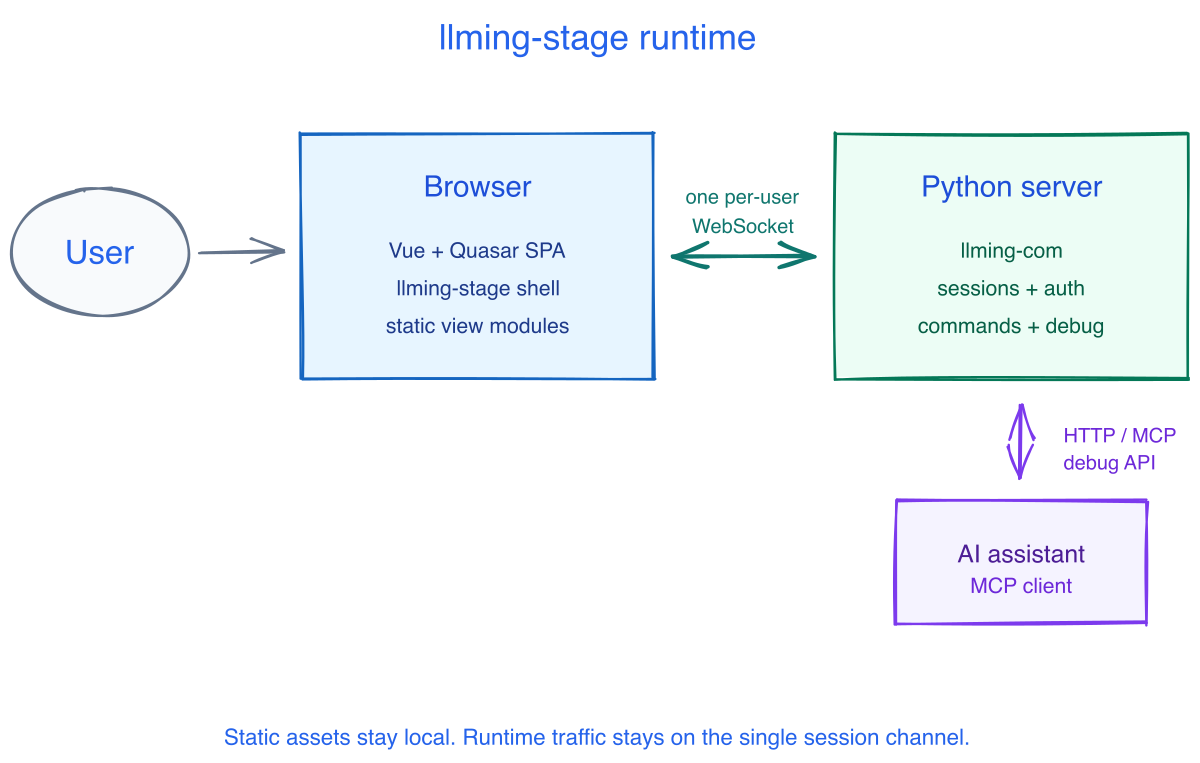
Build real apps, dashboards, and internal tools as browser UIs your AI can understand and control. llming-stage gives an AI assistant a live stage to work on: it can inspect the running browser, call server commands, react to session state, and push updates into the page through the same channel your app uses.

Build the app as a real browser UI, then let AI operate it while it runs. Under the hood, llming-stage ships the app shell, bundled frontend libraries, local assets, routing, lazy loading, and the llming-com session wire.
What you get
- AI-operable apps - every session, command, and server-pushed event can be inspected and invoked through the debug surface.
- One live channel per user - reactive traffic runs over the per-session
llming-comWebSocket; no duplicate app sockets. - Real frontend code - write normal view files and components instead of Python pretending to be UI.
- Fast local iteration - run a sample, edit a view, and keep the browser shell, sessions, and debug tools alive.
- Vendored assets - no runtime calls to Google Fonts, jsDelivr, unpkg, cdnjs, analytics beacons, or other third-party hosts.
- Static exit path - when an app no longer needs server reactivity, the same shell and view modules can be shipped as static files.
Try it
poetry install
poetry run python samples/gallery.py
Open http://127.0.0.1:8000 and switch between the polished samples: Three.js, analytics dashboards, Plotly charts, command-driven sessions, uploads, and the extension workbench.
To inspect an already-running debug-enabled app without changing its UI:
LLMING_STAGE_DEBUG_TOKEN=s3cret llming-stage inspect http://127.0.0.1:8765
Open http://127.0.0.1:8000/. The inspector attaches from the outside; your app keeps rendering exactly its own UI.
Minimal App
from llming_stage import Stage

if __name__ == "__main__":
    Stage(title="Hello world").add_view("/", "hello.vue").run()
<template>
  <main class="min-h-screen grid place-items-center p-8">
    <h1 class="text-5xl font-bold">Hello llming-stage</h1>
  </main>
</template>
For a static view without a Python app:
llming-stage serve hello.vue
Reactive App
from fastapi import FastAPI
from llming_stage import Stage

app = FastAPI()
stage = Stage(app)
sessions = stage.session()
counter = sessions.add_router("counter")

@counter.handler("inc")
async def inc(session, by: int = 1):
    value = int(session.state.get("count", 0)) + by
    session.state["count"] = value
    await session.call("home.setCounter", value)
    return {"ok": True}

stage.add_view("/", "home.vue")
llming-stage mounts the browser shell and asset routes. llming-com carries the authenticated session, command dispatch, and AI-debug surface.
Learn More
- Quick start
- Stage apps
- Communication model
- llming-com integration
- Assets and lazy loading
- Security
- API reference
MIT licensed. Bundled third-party files are listed in THIRD_PARTY.md; no AGPL/GPL/LGPL is permitted.
1 maintainer

Metadata
1 maintainer
Release files for llming-stage 0.1.5
For a detailed explanation of source distributions (sdists) and built distributions (wheels), please see the package formats documentation.
Source distribution (sdist)
| File | Size | Uploaded | Provenance | |
|---|---|---|---|---|
| llming_stage-0.1.5.tar.gz | 21.5 MB | Without provenance | Details |
Built distribution (wheel)
| File | Interpreter | ABI | Platform | Reset |
|---|---|---|---|---|
| llming_stage-0.1.5-py3-none-any.whl | Python 3 | none | any | Details |
Total release size: 43.1 MB
Release files / llming_stage-0.1.5.tar.gz
| Download URL | llming_stage-0.1.5.tar.gz |
|---|---|
| Size | 21.5 MB |
| Tags | Source |
|
SHA-256 checksum How to use checksums |
19b3fed044bb2d7fd8b2870c47c9612fe17f26079df9647383721793dcf90652
|
|
BLAKE2b-256 checksum How to use checksums |
59c90571a86cf780ae05ed1b90df35dba2c80ad8de81cc94f1abf66ecec2fe11
|
| Upload date | |
|
Uploaded using Trusted Publishing? What is trusted publishing? |
No |
| Uploaded via |
poetry/2.1.1 CPython/3.13.11 Darwin/25.2.0
|
Release files / llming_stage-0.1.5-py3-none-any.whl
| Download URL | llming_stage-0.1.5-py3-none-any.whl |
|---|---|
| Size | 21.6 MB |
| Tags | Python 3 |
|
SHA-256 checksum How to use checksums |
c3cd8848580c141c7c89fa7a79f67d2a7919111bee671056f33257d30ceac62f
|
|
BLAKE2b-256 checksum How to use checksums |
b30d78a49e9994fcb2e86babaa529a26d3791478370332fc07e82ef4c47942e6
|
| Upload date | |
|
Uploaded using Trusted Publishing? What is trusted publishing? |
No |
| Uploaded via |
poetry/2.1.1 CPython/3.13.11 Darwin/25.2.0
|
Security for llming-stage 0.1.5
Provenance
Provenance describes where a file came from. On PyPI, provenance is shared via attestations, which provide a verifiable record of the build or publishing details. View details, limitations and caveats.
No provenance found
None of the files in this release were uploaded with provenance metadata.
A note on package security
PyPI is a repository for distributing packages, not a service for auditing them. While third-party security researchers and our staff do their best to detect and remove malicious packages, PyPI cannot guarantee the quality, security or suitability of any given package.
To learn more about protecting yourself from malicious actors, visit our package security documentation.














