






LLMPipeline
Introduction
LLMPipeline is a Python package designed to optimize the performance of tasks related to Large Language Models (LLMs). It ensures efficient parallel execution of tasks while maintaining dependency constraints, significantly enhancing the overall performance.
LLMPipeline 是一个 Python 包,旨在优化与大语言模型 (LLM) 相关任务的性能。在满足依赖关系的前提下,确保任务的高效并行执行,从而显著提高整体性能。
Features
-
Dependency Management: Handles task dependencies efficiently, ensuring correct execution order.
依赖管理:高效处理任务依赖关系,确保正确的执行顺序。
-
Parallel Execution: Maximizes parallelism to improve performance.
并行执行:最大化并行性以提高性能。
-
Loop Handling: Supports tasks with loop structures.
循环处理:支持带有循环结构的任务。
-
Easy Integration: Simple and intuitive API for easy integration with existing projects.
易于集成:简单直观的 API,便于与现有项目集成。
Installation
You can install LLMPipeline via pip:
你可以通过 pip 安装 LLMPipeline:
pip install llmpipeline
Usage
Here is a basic example to get you started:
下面是一个基本示例,帮助你快速入门:
from llmpipeline import LLMPipeline, Prompt

# set custom prompt
example_prompt = Prompt("""
...
{inp1}
xxx
""", keys=['{inp1}'])

# set api
def llm_api(inp):
    ...
    return out

def rag_api(inp):
    ...
    return out

# set input data
data = {
    'inp': 'test input text ...',
}

# set pipeline
demo_pipe = {
    'process_input': {
        'prompt': example_prompt,
        'format': {'out1': list, 'out2': str}, # check return json format
        'inp': ['inp'],
        'out': ['out1', 'out2'],
        'next': ['rag1', 'loop_A'], # specify the next pipeline
    },
    'rag1': {
        'rag_backend': rag_api2, # specific api can be set for the current pipe via 'rag_backend' or 'llm_backend'.
        'inp': ['out2'],
        'out': 'out8',
    },
    'loop_A': { # here is iterating over a list 'out1'
        'inp': 'out1',
        'pipe_in_loop': ['rag2', 'llm_process', 'rag3', 'rag4', 'llm_process2', 'llm_process3'],
        'next': ['exit'], # 'exit' is specific pipe mean to end
    },
    'rag2': {
        'inp': ['out1'],
        'out': 'out3',
    },
    'llm_process2': {
        'prompt': llm_process2_prompt,
        'format': {'xxx': str, "xxx": str},
        'inp': ['inp', 'out4', 'out8'],
        'out': 'final_out1',
    },
    ...
}

# running pipeline
pipeline = LLMPipeline(demo_pipe, llm_api, rag_api)
result, info = pipeline.run(data, core_num=4, save_pref=True)
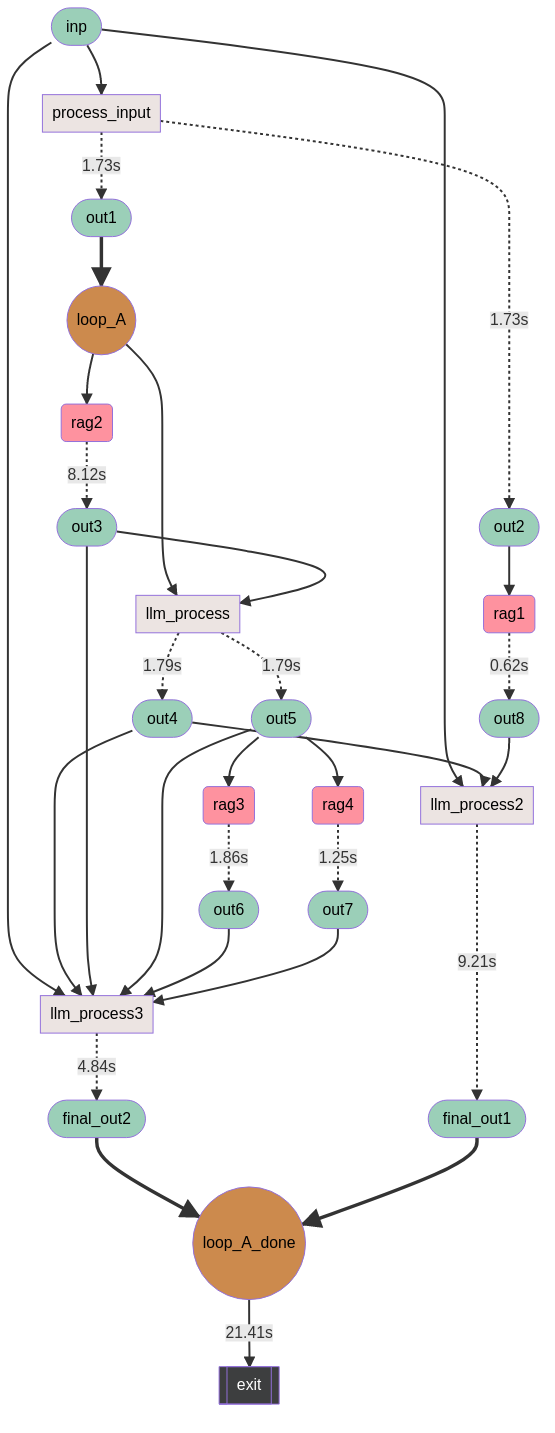
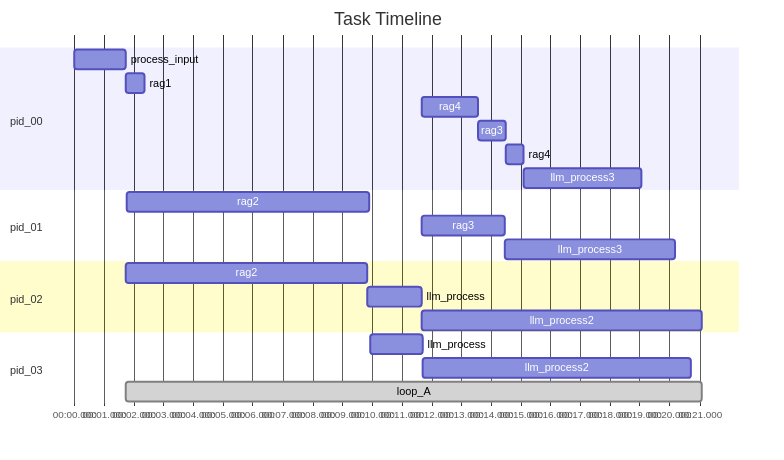
Logs are stored in the logs folder. If save_pref is true, you can see the relevant performance report.
日志存储在logs文件夹下,如果save_pref为true,你可以看到相关的性能报告。
Documentation
For detailed documentation, please visit our official documentation page.
有关详细文档,请访问我们的官方文档页面。
Contributing
We welcome contributions from the community. Please read our contributing guide to get started.
我们欢迎来自社区的贡献。请阅读我们的贡献指南开始。
License
LLMPipeline is licensed under the Apache License Version 2.0. See the LICENSE file for more details.
LLMPipeline 采用 Apache License Version 2.0 许可证。有关详细信息,请参阅许可证文件。
Acknowledgements
Special thanks to all contributors and the open-source community for their support.
特别感谢所有贡献者和开源社区的支持。
Contact
For any questions or issues, please open an issue on our GitHub repository.
如有任何问题或意见,请在我们的GitHub 仓库提交 issue。
1 maintainer

Metadata
1 maintainer
Release files for llmpipeline 0.0.6
For a detailed explanation of source distributions (sdists) and built distributions (wheels), please see the package formats documentation.
Source distribution (sdist)
| File | Size | Uploaded | Provenance | |
|---|---|---|---|---|
| llmpipeline-0.0.6.tar.gz | 17.3 kB | Without provenance | Details |
Built distribution (wheel)
| File | Interpreter | ABI | Platform | Reset |
|---|---|---|---|---|
| llmpipeline-0.0.6-py3-none-any.whl | Python 3 | none | any | Details |
Total release size: 33.0 kB
Release files / llmpipeline-0.0.6.tar.gz
| Download URL | llmpipeline-0.0.6.tar.gz |
|---|---|
| Size | 17.3 kB |
| Tags | Source |
|
SHA-256 checksum How to use checksums |
718dc4ead84e9c96bb8c2e548fce69901a66b34ba9c11b8ba6c453c777c0aa57
|
|
BLAKE2b-256 checksum How to use checksums |
3a22fdc4175fe5b1c727230f7dfe9742e22b94e0dbdf9891912228772db082b5
|
| Upload date | |
|
Uploaded using Trusted Publishing? What is trusted publishing? |
No |
| Uploaded via |
twine/3.8.0 pkginfo/1.11.1 readme-renderer/43.0 requests/2.32.3 requests-toolbelt/1.0.0 urllib3/2.2.2 tqdm/4.66.4 importlib-metadata/8.0.0 keyring/25.2.1 rfc3986/1.5.0 colorama/0.4.6 CPython/3.10.13
|
Release files / llmpipeline-0.0.6-py3-none-any.whl
| Download URL | llmpipeline-0.0.6-py3-none-any.whl |
|---|---|
| Size | 15.6 kB |
| Tags | Python 3 |
|
SHA-256 checksum How to use checksums |
d215beeb8acc84d0e7817e605de4e6fb00e659d29a569caec31d7cf60b532581
|
|
BLAKE2b-256 checksum How to use checksums |
ed1affefefba12c7abc55ced31d04c43d92c4b589bc395df16b2a9ebc1b848f0
|
| Upload date | |
|
Uploaded using Trusted Publishing? What is trusted publishing? |
No |
| Uploaded via |
twine/3.8.0 pkginfo/1.11.1 readme-renderer/43.0 requests/2.32.3 requests-toolbelt/1.0.0 urllib3/2.2.2 tqdm/4.66.4 importlib-metadata/8.0.0 keyring/25.2.1 rfc3986/1.5.0 colorama/0.4.6 CPython/3.10.13
|
Security for llmpipeline 0.0.6
Provenance
Provenance describes where a file came from. On PyPI, provenance is shared via attestations, which provide a verifiable record of the build or publishing details. View details, limitations and caveats.
No provenance found
None of the files in this release were uploaded with provenance metadata.
A note on package security
PyPI is a repository for distributing packages, not a service for auditing them. While third-party security researchers and our staff do their best to detect and remove malicious packages, PyPI cannot guarantee the quality, security or suitability of any given package.
To learn more about protecting yourself from malicious actors, visit our package security documentation.














