
LLM Package Manager — download, run, and share AI models from the command line

Project description
llmpm — LLM Package Manager
Command-line package manager for open-sourced large language models. Download and run 10,000+ models, and share LLMs with a single command.
llmpm is a CLI package manager for large language models, inspired by pip and npm. Your command line hub for open-source LLMs. We’ve done the heavy lifting so you can discover, install, and run models instantly.
Models are sourced from HuggingFace Hub, Ollama & Mistral AI.
Explore a Suite of Models at llmpm.co →
Supports:
- Text generation (GGUF via llama.cpp and Transformer checkpoints)
- Image generation (Diffusion models)
- Vision models
- Speech-to-text (ASR)
- Text-to-speech (TTS)
Installation
via pip (recommended)
pip install llmpm
The pip install is intentionally lightweight — it only installs the CLI tools needed to bootstrap. On first run, llmpm automatically creates an isolated environment at ~/.llmpm/venv and installs all ML backends into it, keeping your system Python untouched.
via npm
npm install -g llmpm
The npm package finds Python on your PATH, creates ~/.llmpm/venv, and installs all backends into it during postinstall.
via Homebrew
brew tap llmpm/llmpm
brew install llmpm
Environment isolation
All llmpm commands always run inside ~/.llmpm/venv.
Set LLPM_NO_VENV=1 to bypass this (useful in CI or Docker where isolation is already provided).
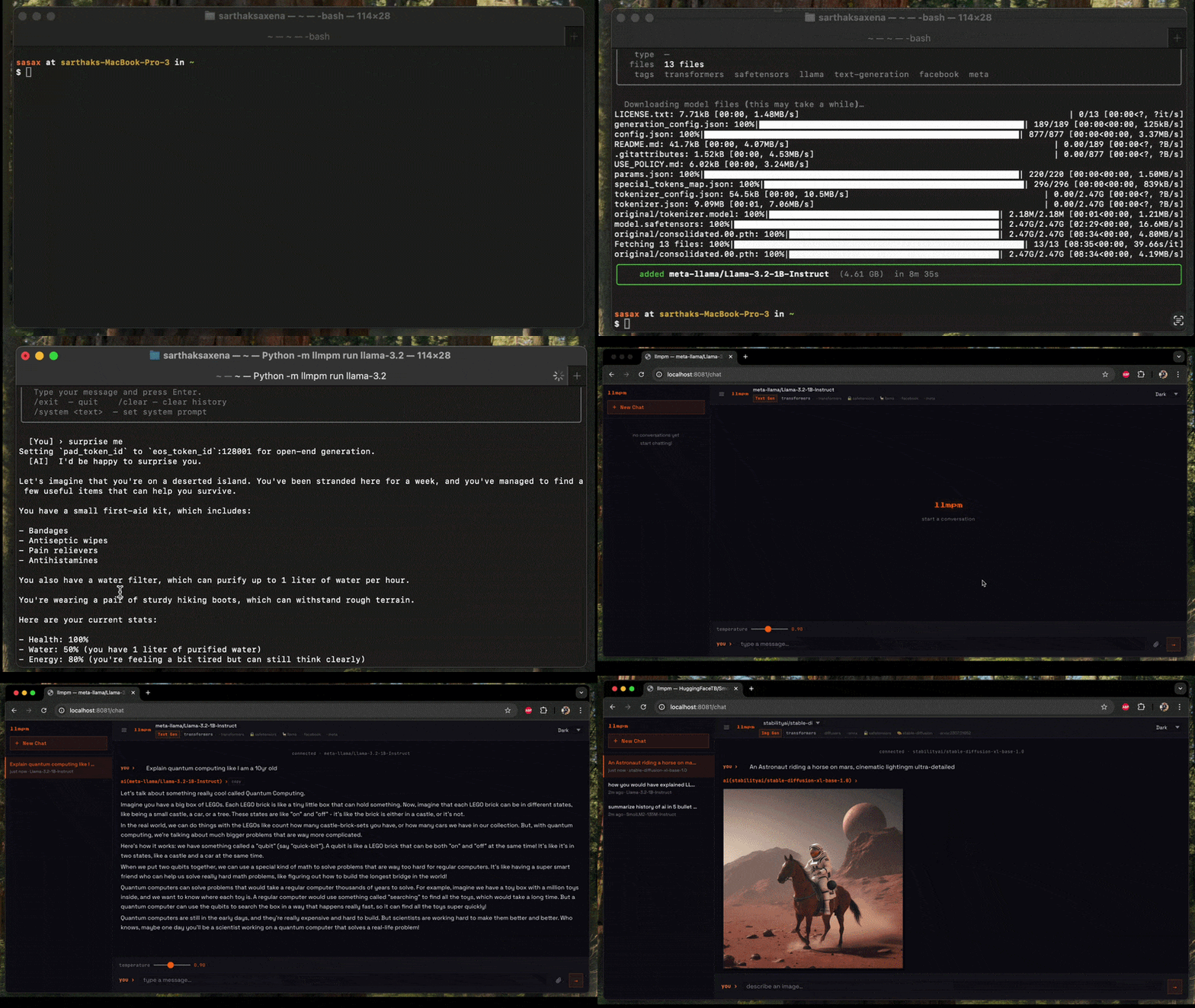
Quick start
# Install a model
llmpm install meta-llama/Llama-3.2-3B-Instruct

# Run it
llmpm run meta-llama/Llama-3.2-3B-Instruct
llmpm serve meta-llama/Llama-3.2-3B-Instruct
Commands
| Command | Description |
|---|---|
llmpm init |
Initialise a llmpm.json in the current directory |
llmpm install |
Install all models listed in llmpm.json |
llmpm install <repo> |
Download and install a model from HuggingFace, Ollama & Mistral |
llmpm run <repo> |
Run an installed model (interactive chat) |
llmpm serve [repo] [repo] ... |
Serve one or more models as an OpenAI-compatible API |
llmpm serve |
Serve every installed model on a single HTTP server |
llmpm benchmark <repo> |
Run evaluation benchmarks against an installed model |
llmpm push <repo> |
Upload a model to HuggingFace Hub |
llmpm search <query> |
Search HuggingFace Hub for models |
llmpm trending |
Show top trending models by likes (text-gen & text-to-image) |
llmpm list |
Show all installed models |
llmpm info <repo> |
Show details about a model |
llmpm uninstall <repo> |
Uninstall a model |
llmpm clean |
Remove the managed environment (~/.llmpm/venv) |
llmpm clean --all |
Remove environment + all downloaded models and registry |
Local vs global mode
llmpm works in two modes depending on whether a llmpm.json file is present.
Global mode (default)
All models are stored in ~/.llmpm/models/ and the registry lives at
~/.llmpm/registry.json. This is the default when no llmpm.json is found.
Local mode
When a llmpm.json exists in the current directory (or any parent), llmpm
switches to local mode: models are stored in .llmpm/models/ next to the
manifest file. This keeps project models isolated from your global environment.
my-project/
├── llmpm.json        ← manifest
└── .llmpm/           ← local model store (auto-created)
    ├── registry.json
    └── models/
All commands (install, run, serve, list, info, uninstall) automatically
detect the mode and operate on the correct store — no flags required.
llmpm init
Initialise a new project manifest in the current directory.
llmpm init              # interactive prompts for name & description
llmpm init --yes        # skip prompts, use directory name as package name
This creates a llmpm.json:
{
  "name": "my-project",
  "description": "",
  "dependencies": {}
}
Models are listed under dependencies without version pins — llmpm models
don't use semver. The value is always "*".
llmpm install
# Install a Transformer model
llmpm install meta-llama/Llama-3.2-3B-Instruct

# Install a GGUF model (interactive quantisation picker)
llmpm install unsloth/Llama-3.2-3B-Instruct-GGUF

# Install a specific GGUF quantisation
llmpm install unsloth/Llama-3.2-3B-Instruct-GGUF --quant Q4_K_M

# Install a single specific file
llmpm install unsloth/Llama-3.2-3B-Instruct-GGUF --file Llama-3.2-3B-Instruct-Q4_K_M.gguf

# Skip prompts (pick best default)
llmpm install meta-llama/Llama-3.2-3B-Instruct --no-interactive

# Install and record in llmpm.json (local projects)
llmpm install meta-llama/Llama-3.2-3B-Instruct --save

# Install all models listed in llmpm.json (like npm install)
llmpm install
In global mode models are stored in ~/.llmpm/models/.
In local mode (when llmpm.json is present) they go into .llmpm/models/.
llmpm install options
| Option | Description |
|---|---|
--quant / -q |
GGUF quantisation to download (e.g. Q4_K_M) |
--file / -f |
Download a specific file from the repo |
--no-interactive |
Never prompt; pick the best default quantisation automatically |
--save |
Add the model to llmpm.json dependencies after installing |
llmpm run
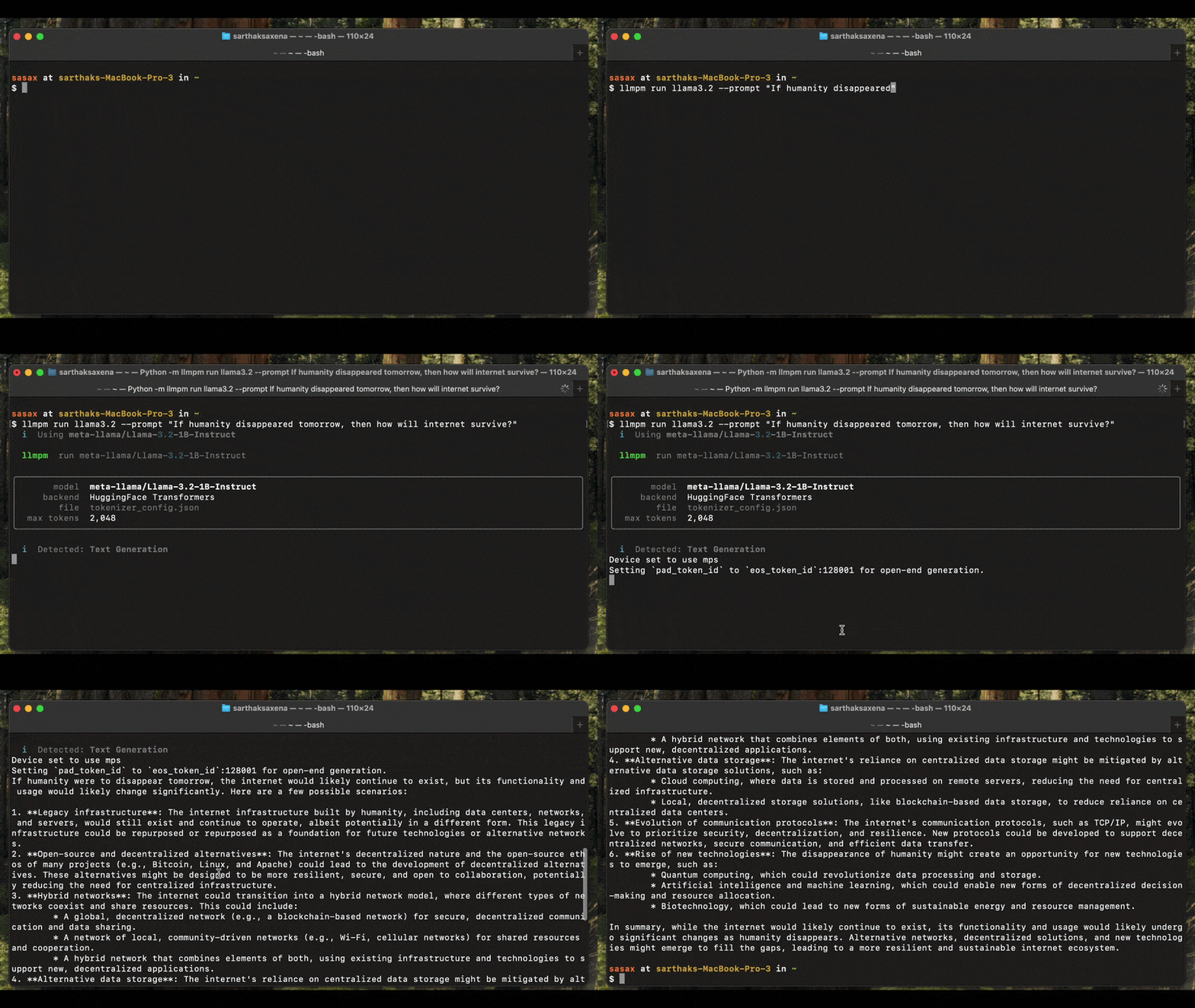
llmpm run auto-detects the model type and launches the appropriate interactive session. It supports text generation, image generation, vision, speech-to-text (ASR), and text-to-speech (TTS) models.
Text generation (GGUF & Transformers)
# Interactive chat
llmpm run meta-llama/Llama-3.2-3B-Instruct

# Single-turn inference
llmpm run meta-llama/Llama-3.2-3B-Instruct --prompt "Explain quantum computing"

# With a system prompt
llmpm run meta-llama/Llama-3.2-3B-Instruct --system "You are a helpful pirate."

# Limit response length
llmpm run meta-llama/Llama-3.2-3B-Instruct --max-tokens 512

# GGUF model — tune context window and GPU layers
llmpm run unsloth/Llama-3.2-3B-Instruct-GGUF --ctx 8192 --gpu-layers 32
Image generation (Diffusion)
Generates an image from a text prompt and saves it as a PNG on your Desktop.
# Single prompt → saves llmpm_<timestamp>.png to ~/Desktop
llmpm run amused/amused-256 --prompt "a cyberpunk city at sunset"

# Interactive session (type a prompt, get an image each time)
llmpm run amused/amused-256
In interactive mode type your prompt and press Enter. The output path is printed after each generation. Type /exit to quit.
Requires:
pip install diffusers torch accelerate
Vision (image-to-text)
Describe or answer questions about an image. Pass the image file path via --prompt.
# Single image description
llmpm run Salesforce/blip-image-captioning-base --prompt /path/to/photo.jpg

# Interactive session: type an image path at each prompt
llmpm run Salesforce/blip-image-captioning-base
Requires:
pip install transformers torch Pillow
Speech-to-text / ASR
Transcribe an audio file. Pass the audio file path via --prompt.
# Transcribe a single file
llmpm run openai/whisper-base --prompt recording.wav

# Interactive: enter an audio file path at each prompt
llmpm run openai/whisper-base
Supported formats depend on your installed audio libraries (wav, flac, mp3, …).
Requires:
pip install transformers torch
Text-to-speech / TTS
Convert text to speech. The output WAV file is saved to your Desktop.
# Single utterance → saves llmpm_<timestamp>.wav to ~/Desktop
llmpm run suno/bark-small --prompt "Hello, how are you today?"

# Interactive session
llmpm run suno/bark-small
Requires:
pip install transformers torch
Running a model from a local path
Use --path to run a model that was not installed via llmpm install — for
example, a model you downloaded manually or trained yourself.
# Run a GGUF file directly
llmpm run --path ~/Downloads/mistral-7b-q4.gguf

# Run a HuggingFace-style model directory
llmpm run --path ~/models/whisper-base --prompt recording.wav

# Optional: give the model a display label
llmpm run my-llama --path /data/models/llama-3
--path accepts either a .gguf file or a directory. The model type is
auto-detected (GGUF if the path contains .gguf files, otherwise the
transformers/diffusion/audio backend is chosen from config.json).
llmpm run options
| Option | Default | Description |
|---|---|---|
--prompt / -p |
— | Single-turn prompt or input file path (non-interactive) |
--system / -s |
— | System prompt (text generation only) |
--max-tokens |
128000 |
Maximum tokens to generate per response |
--ctx |
128000 |
Context window size (GGUF only) |
--gpu-layers |
-1 |
GPU layers to offload, -1 = all (GGUF only) |
--verbose |
off | Show model loading output |
--path |
— | Path to a local model dir or .gguf file (bypasses registry) |
Interactive session commands
These commands work in any interactive session:
| Command | Action |
|---|---|
/exit |
End the session |
/clear |
Clear conversation history (text gen only) |
/system <text> |
Update the system prompt (text gen only) |
Model type detection
llmpm run reads config.json / model_index.json from the installed model to determine the pipeline type before loading any weights. The detected type is printed at startup:
  Detected: Image Generation (Diffusion)
  Loading model…  ✓
If detection is ambiguous the model falls back to the text-generation backend.
llmpm serve
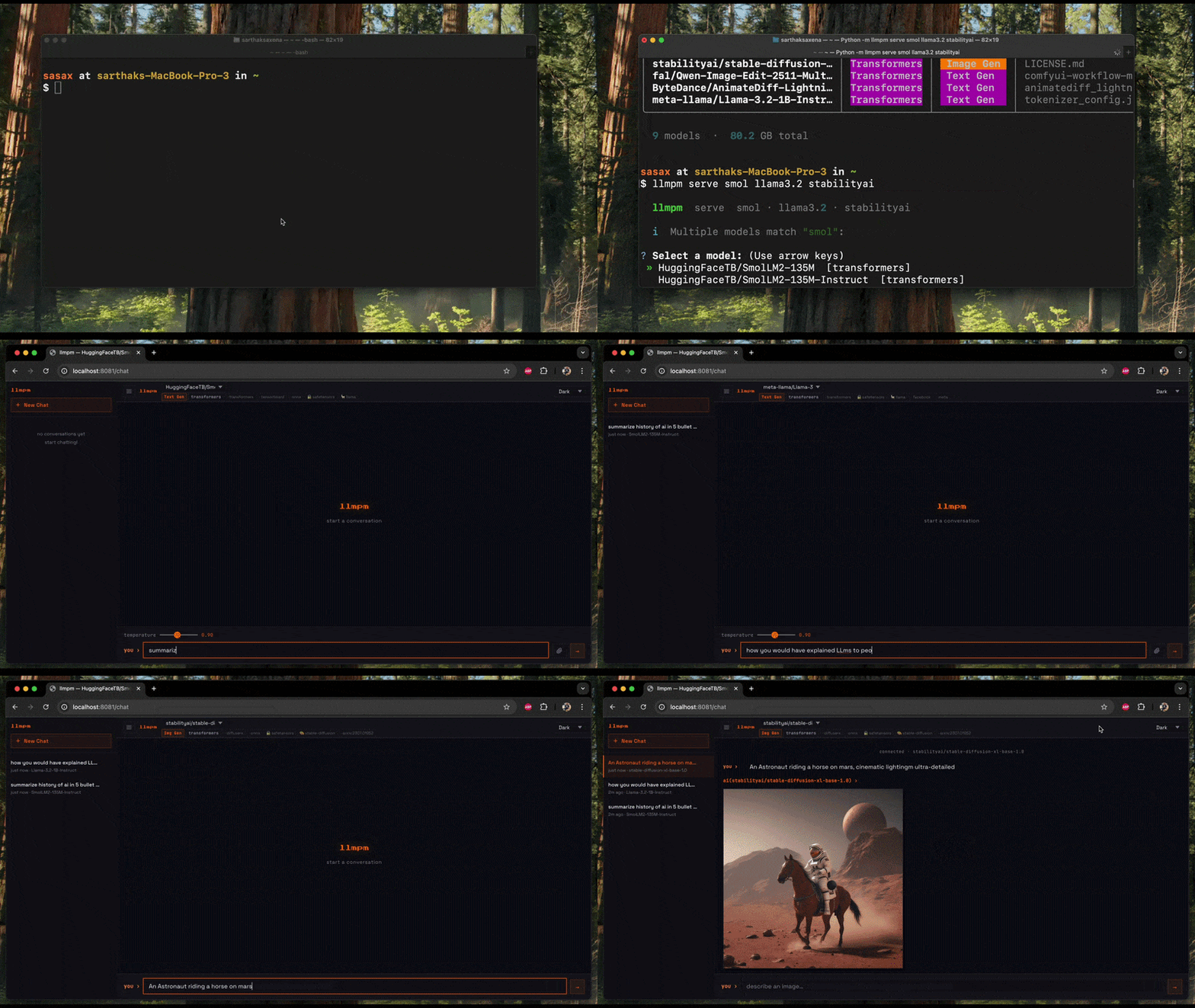
Start a single local HTTP server exposing one or more models as an OpenAI-compatible REST API.
A browser-based chat UI is available at /chat.
# Serve a single model on the default port (8080)
llmpm serve meta-llama/Llama-3.2-3B-Instruct

# Serve multiple models on one server
llmpm serve meta-llama/Llama-3.2-3B-Instruct amused/amused-256

# Serve ALL installed models automatically
llmpm serve

# Custom port and host
llmpm serve meta-llama/Llama-3.2-3B-Instruct --port 9000 --host 0.0.0.0

# Set the default max tokens (clients may override per-request)
llmpm serve meta-llama/Llama-3.2-3B-Instruct --max-tokens 2048

# GGUF model — tune context window and GPU layers
llmpm serve unsloth/Llama-3.2-3B-Instruct-GGUF --ctx 8192 --gpu-layers 32

# Serve a model from a local path (bypasses registry)
llmpm serve --path ~/models/mistral-7b-q4.gguf
llmpm serve --path ~/models/llama-3

# Mix registry models and local paths
llmpm serve meta-llama/Llama-3.2-3B-Instruct --path ~/models/custom-model

# Serve multiple local-path models
llmpm serve --path ~/models/llama --path ~/models/whisper
Fuzzy model-name matching is applied to each argument — if multiple installed models match you will be prompted to pick one.
llmpm serve options
| Option | Default | Description |
|---|---|---|
--port / -p |
8080 |
Port to listen on (auto-increments if busy) |
--host / -H |
localhost |
Host/address to bind to |
--max-tokens |
128000 |
Default max tokens per response (overridable per-request) |
--ctx |
128000 |
Context window size (GGUF only) |
--gpu-layers |
-1 |
GPU layers to offload, -1 = all (GGUF only) |
--path |
— | Path to a local model dir or .gguf file (repeatable, bypasses registry) |
Multi-model routing
When multiple models are loaded, POST endpoints accept an optional "model" field in the JSON body.
If omitted, the first loaded model is used.
# Target a specific model when multiple are loaded
curl -X POST http://localhost:8080/v1/chat/completions \
  -H "Content-Type: application/json" \
  -d '{"model": "meta-llama/Llama-3.2-3B-Instruct",
       "messages": [{"role": "user", "content": "Hello!"}]}'
The chat UI at /chat shows a model dropdown when more than one model is loaded.
Switching models resets the conversation and adapts the UI to the new model's category.
Endpoints
| Method | Path | Description |
|---|---|---|
GET |
/chat |
Browser chat / image-gen UI (model dropdown for multi-model serving) |
GET |
/health |
{"status":"ok","models":["id1","id2",…]} |
GET |
/v1/models |
List all loaded models with id, category, created |
GET |
/v1/models/<id> |
Info for a specific loaded model |
POST |
/v1/chat/completions |
OpenAI-compatible chat inference (SSE streaming supported) |
POST |
/v1/completions |
Legacy text completion |
POST |
/v1/embeddings |
Text embeddings |
POST |
/v1/images/generations |
Text-to-image; pass "image" (base64) for image-to-image |
POST |
/v1/audio/transcriptions |
Speech-to-text |
POST |
/v1/audio/speech |
Text-to-speech |
All POST endpoints accept "model": "<id>" to target a specific loaded model.
Example API calls
# Text generation (streaming)
curl -X POST http://localhost:8080/v1/chat/completions \
  -H "Content-Type: application/json" \
  -d '{"messages": [{"role": "user", "content": "Hello!"}],
       "max_tokens": 256, "stream": true}'

# Target a specific model when multiple are loaded
curl -X POST http://localhost:8080/v1/chat/completions \
  -H "Content-Type: application/json" \
  -d '{"model": "meta-llama/Llama-3.2-1B-Instruct",
       "messages": [{"role": "user", "content": "Hello!"}]}'

# List all loaded models
curl http://localhost:8080/v1/models

# Text-to-image
curl -X POST http://localhost:8080/v1/images/generations \
  -H "Content-Type: application/json" \
  -d '{"prompt": "a cat in a forest", "n": 1}'

# Image-to-image (include the source image as base64 in the same endpoint)
IMAGE_B64=$(base64 -i input.png)
curl -X POST http://localhost:8080/v1/images/generations \
  -H "Content-Type: application/json" \
  -d "{\"prompt\": \"turn it into a painting\", \"image\": \"$IMAGE_B64\"}"

# Speech-to-text
curl -X POST http://localhost:8080/v1/audio/transcriptions \
  -H "Content-Type: application/octet-stream" \
  --data-binary @recording.wav

# Text-to-speech
curl -X POST http://localhost:8080/v1/audio/speech \
  -H "Content-Type: application/json" \
  -d '{"input": "Hello world"}' \
  --output speech.wav
Response shape for chat completions (non-streaming):
{
  "object": "chat.completion",
  "model": "<model-id>",
  "choices": [
    {
      "index": 0,
      "message": { "role": "assistant", "content": "<text>" },
      "finish_reason": "stop"
    }
  ],
  "usage": { "prompt_tokens": 0, "completion_tokens": 0, "total_tokens": 0 }
}
Response shape for chat completions (streaming SSE):
Each chunk:
{
  "object": "chat.completion.chunk",
  "model": "<model-id>",
  "choices": [
    {
      "index": 0,
      "delta": { "content": "<token>" },
      "finish_reason": null
    }
  ]
}
Followed by a final data: [DONE] sentinel.
Response shape for image generation:
{
  "created": 1234567890,
  "data": [{ "b64_json": "<base64-png>" }]
}
llmpm search
Search HuggingFace Hub for models matching a keyword or phrase.
llmpm search <query>
Results are displayed in a table with model ID, task, download count, like count, and tags.
# Basic search
llmpm search llama

# Filter by pipeline task
llmpm search mistral --task text-generation

# Filter by library
llmpm search whisper --library transformers

# Sort results (downloads, likes, lastModified, trending)
llmpm search stable-diffusion --sort likes

# Limit number of results (default: 20)
llmpm search gemma --limit 10

# View detailed info for a result interactively
llmpm search llama --info
llmpm search options
| Option | Default | Description |
|---|---|---|
--task / -t |
— | Filter by pipeline task (e.g. text-generation, text-to-image, automatic-speech-recognition) |
--library / -l |
— | Filter by library (e.g. transformers, gguf, diffusers) |
--sort / -s |
downloads |
Sort by downloads, likes, lastModified, or trending |
--limit / -n |
20 |
Maximum number of results to display |
--info |
off | Immediately prompt to view detailed info for a result |
After results are shown you will be asked if you want to view details for a specific model. Selecting one fetches the full model card from HuggingFace and shows author, task, license, languages, file list, tags, and a link to llmpm.co.
llmpm trending
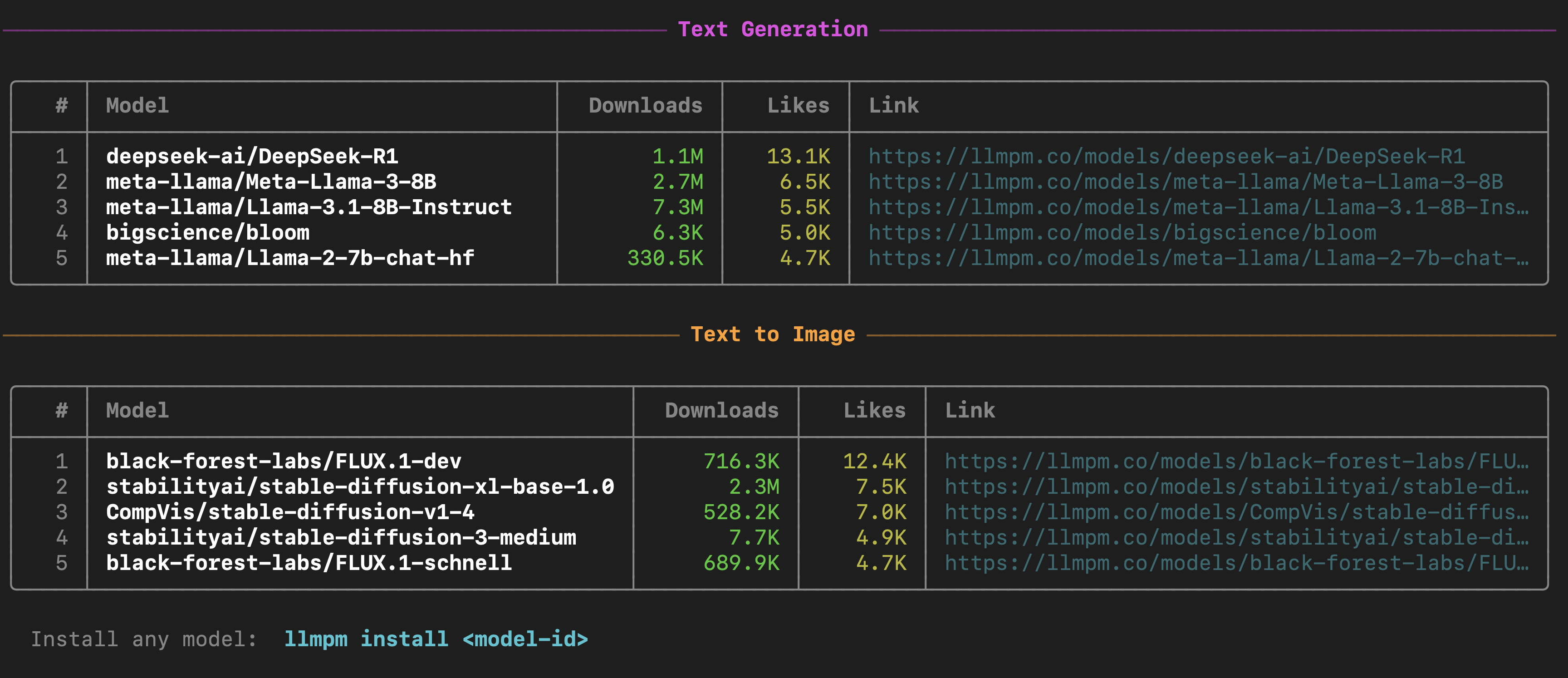
Show the top trending models by likes & downloads, grouped by category.
llmpm trending
Displays two sections — Text Generation and Text to Image — each listing the top 5 models with download counts, like counts, and a link to the model page on llmpm.co.
llmpm benchmark
Run standard evaluation benchmarks against an installed mode.
Installation
The benchmark backend is an optional dependency — install it separately to keep the base llmpm footprint small:
pip install llmpm[benchmark]
Usage
# Run a single benchmark
llmpm benchmark meta-llama/Llama-3.2-3B-Instruct --tasks ifeval

# Run multiple benchmarks in one pass
llmpm benchmark meta-llama/Llama-3.2-3B-Instruct --tasks ifeval,hellaswag,mmlu

# Run the full Open LLM Leaderboard v1 suite
llmpm benchmark meta-llama/Llama-3.2-3B-Instruct --tasks openllm

# Run the full Open LLM Leaderboard v2 (open datasets, no gated data)
llmpm benchmark meta-llama/Llama-3.2-3B-Instruct --tasks leaderboard

# Benchmark GPT-2 on HellaSwag (no install needed — pulled directly from HuggingFace)
llmpm benchmark pretrained=gpt2 --tasks hellaswag

# With 10-shot prompting
llmpm benchmark pretrained=gpt2 --tasks hellaswag --num-fewshot 10

# Limit to 200 examples for a quick test
llmpm benchmark pretrained=gpt2 --tasks hellaswag --limit 200

# Save a full HTML report to ./results/
llmpm benchmark pretrained=gpt2 --tasks hellaswag --output ./results/

# Limit examples for a quick smoke test
llmpm benchmark meta-llama/Llama-3.2-3B-Instruct --tasks mmlu --limit 100

# Save results + HTML report to a directory
llmpm benchmark meta-llama/Llama-3.2-3B-Instruct --tasks ifeval --output ./results/
# → writes ./results/report.html with a full breakdown of metrics and run config

# Run Humanity's Last Exam (bundled open dataset)
llmpm benchmark meta-llama/Llama-3.2-3B-Instruct --tasks hle

# List all supported benchmarks
llmpm benchmark --list-tasks
llmpm benchmark options
| Option | Default | Description |
|---|---|---|
--tasks / -t |
required | Comma-separated task or group names (e.g. ifeval,hellaswag) |
--num-fewshot / -n |
task default | Override few-shot count for all tasks |
--limit / -l |
— | Limit examples per task (integer = count, <1.0 = fraction) |
--batch-size / -b |
auto |
Inference batch size |
--device |
auto | PyTorch device override (e.g. cpu, cuda:0) |
--output / -o |
— | Directory to write results; generates report.html inside it |
--list-tasks |
— | Print all supported benchmark tasks and exit |
Supported benchmarks
| Category | Tasks |
|---|---|
| Leaderboard suites | openllm (ARC · HellaSwag · TruthfulQA · MMLU · Winogrande · GSM8K), leaderboard (IFEval · BBH · MATH Hard · GPQA · MuSR · MMLU-Pro — all open datasets), tinyBenchmarks, metabench |
| Commonsense | hellaswag, winogrande, wsc273, piqa, siqa, openbookqa, commonsense_qa, logiqa, logiqa2, babi, swag |
| Knowledge | mmlu, mmlu_pro, truthfulqa, triviaqa, nq_open, webqs, sciq, agieval, ceval, cmmlu, kmmlu |
| Reading comprehension | race, squadv2, drop, coqa, super_glue, glue |
| Math & reasoning | arc_easy, arc_challenge, gsm8k, gsm_plus, hendrycks_math, minerva_math, mathqa, arithmetic, asdiv, bbh, bigbench, anli |
| Code | humaneval, mbpp |
| Instruction following | ifeval |
| Long context | longbench |
| Language modeling | wikitext, lambada |
| Medical & science | medqa, medmcqa, pubmedqa |
| Safety & bias | wmdp, bbq, crows_pairs, hendrycks_ethics, realtoxicityprompts |
| Multilingual | xnli, xcopa, xwinograd, belebele, mgsm, global_mmlu, okapi |
| Summarization | cnn_dailymail |
| Bundled (custom) | gpqa, hle |
Report: After every successful run,
llmpm benchmarkwrites areport.htmlto the--outputdirectory (or the current directory if omitted). The report includes a results table with per-metric scores and ± stderr, plus the full run configuration.
Run llmpm benchmark --list-tasks for the full list with descriptions.
llmpm push
# Push an already-installed model
llmpm push my-org/my-fine-tune

# Push a local directory
llmpm push my-org/my-fine-tune --path ./my-model-dir

# Push as private repository
llmpm push my-org/my-fine-tune --private

# Custom commit message
llmpm push my-org/my-fine-tune -m "Add Q4_K_M quantisation"
Requires a HuggingFace token (run huggingface-cli login or set HF_TOKEN).
Backends
All backends (torch, transformers, diffusers, llama-cpp-python, …) are included in pip install llmpm by default and are installed into the managed ~/.llmpm/venv.
| Model type | Pipeline | Backend |
|---|---|---|
.gguf files |
Text generation | llama.cpp via llama-cpp-python |
.safetensors / .bin |
Text generation | HuggingFace Transformers |
| Diffusion models | Image generation | HuggingFace Diffusers |
| Vision models | Image-to-text | HuggingFace Transformers |
| Whisper / ASR models | Speech-to-text | HuggingFace Transformers |
| TTS models | Text-to-speech | HuggingFace Transformers |
Selective backend install
If you only need one backend (e.g. on a headless server), install without defaults and add just what you need:
pip install llmpm --no-deps              # CLI only (no ML backends)
pip install llmpm[gguf]                  # + GGUF / llama.cpp
pip install llmpm[transformers]          # + text generation
pip install llmpm[diffusion]             # + image generation
pip install llmpm[vision]                # + vision / image-to-text
pip install llmpm[audio]                 # + ASR + TTS
Configuration
| Variable | Default | Description |
|---|---|---|
LLMPM_HOME |
~/.llmpm |
Root directory for models and registry |
HF_TOKEN |
— | HuggingFace API token for gated models |
LLPM_PYTHON |
python3 |
Python binary used by the npm shim (fallback only) |
LLPM_NO_VENV |
— | Set to 1 to skip venv isolation (CI / Docker / containers) |
Configuration examples
Use a HuggingFace token for gated models:
HF_TOKEN=hf_your_token llmpm install meta-llama/Llama-3.2-3B-Instruct
# or export for the session
export HF_TOKEN=hf_your_token
llmpm install meta-llama/Llama-3.2-3B-Instruct
Skip venv isolation (CI / Docker):
# Inline — single command
LLPM_NO_VENV=1 llmpm serve meta-llama/Llama-3.2-3B-Instruct

# Exported — all subsequent commands skip the venv
export LLPM_NO_VENV=1
llmpm install meta-llama/Llama-3.2-3B-Instruct
llmpm serve meta-llama/Llama-3.2-3B-Instruct
When using
LLPM_NO_VENV=1, install all backends first:pip install llmpm[all]
Custom model storage location:
LLMPM_HOME=/mnt/models llmpm install meta-llama/Llama-3.2-3B-Instruct
LLMPM_HOME=/mnt/models llmpm serve meta-llama/Llama-3.2-3B-Instruct
Use a specific Python binary (npm installs):
LLPM_PYTHON=/usr/bin/python3.11 llmpm run meta-llama/Llama-3.2-3B-Instruct
Combining variables:
HF_TOKEN=hf_your_token LLMPM_HOME=/data/models LLPM_NO_VENV=1 \
  llmpm install meta-llama/Llama-3.2-3B-Instruct
Docker / CI example:
ENV LLPM_NO_VENV=1
ENV HF_TOKEN=hf_your_token
RUN pip install llmpm[all]
RUN llmpm install meta-llama/Llama-3.2-3B-Instruct
CMD ["llmpm", "serve", "meta-llama/Llama-3.2-3B-Instruct", "--host", "0.0.0.0"]
License
MIT
Release history Release notifications | RSS feed


Download files
Download the file for your platform. If you're not sure which to choose, learn more about installing packages.
Source Distribution
Built Distribution
Filter files by name, interpreter, ABI, and platform.
If you're not sure about the file name format, learn more about wheel file names.
Copy a direct link to the current filters
File details
Details for the file llmpm-3.1.1.tar.gz.
File metadata
- Download URL: llmpm-3.1.1.tar.gz
- Upload date:
- Size: 465.7 kB
- Tags: Source
- Uploaded using Trusted Publishing? No
- Uploaded via: twine/6.2.0 CPython/3.9.6
File hashes
| Algorithm | Hash digest | |
|---|---|---|
| SHA256 |
de6220f5de93d00cc539cfdc684f0a1832da0b8d61067c4ae64b24792ad13890
|
|
| MD5 |
927ceacf5d649e91589589ddef937916
|
|
| BLAKE2b-256 |
c982abaf587bd332c27ed8ee47ead02071a6877e27b15622882b2438b29bca0f
|
File details
Details for the file llmpm-3.1.1-py3-none-any.whl.
File metadata
- Download URL: llmpm-3.1.1-py3-none-any.whl
- Upload date:
- Size: 474.0 kB
- Tags: Python 3
- Uploaded using Trusted Publishing? No
- Uploaded via: twine/6.2.0 CPython/3.9.6
File hashes
| Algorithm | Hash digest | |
|---|---|---|
| SHA256 |
81620b7bb694ff51961ff43053cdaccc164cb70834da8a12e1add4e31f3ca2d1
|
|
| MD5 |
b1ef43815d69c68dbe02ff3d05bde01a
|
|
| BLAKE2b-256 |
7ae2a527804d5ad5734cf138a8c29fd69f26ee24fec517b4b5654a7364b187e1
|






