
A package for querying various LLM providers

Project description

🌐 llmquery: Scaling GenAI automation 🌐
Powerful LLM Query Framework with YAML Prompt Templates
Read the release blog post
🚀 What is llmquery?
llmquery is a comprehensive framework for interacting with Language Model APIs, such as OpenAI, Anthropic, DeepSeek, Google Gemini, AWS Bedrock, Mistral, Github AI Models, and Ollama. It leverages standard YAML templates for prompt management, validation, and dynamic generation. Designed to streamline complex workflows, it allows developers to integrate, query, and test LLMs with ease.
Whether you’re building a chatbot, generating creative content, or analyzing data, llmquery provides the tools to standardize and optimize LLM interactions.
🎬 llmquery in Action
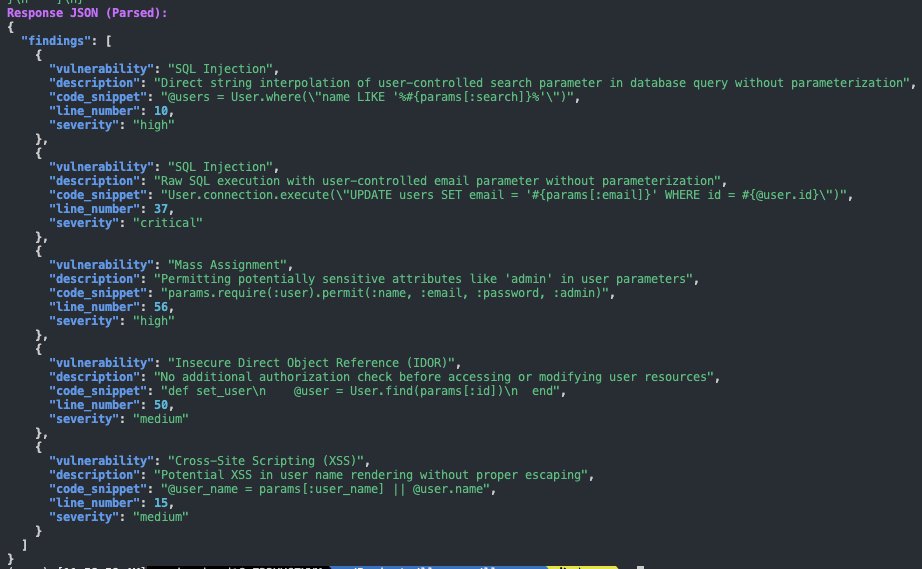
This is an example where llmquery runs with detect-security-vulnerabilities template to scan application code.
Why llmquery?
Language models have become integral to modern applications, but efficiently managing and interacting with several providers can be challenging. llmquery solves this by offering:
- Provider-Agnostic Queries: Support for several providers, including OpenAI, DeepSeek, Anthropic, Google Gemini, AWS Bedrock, Mistral, GitHub AI Models, and Ollama.
- Templated Workflows: Use YAML-based templates to define dynamic prompts and system configurations.
- Validation and Error Handling: Ensure templates are validated, token limits are checked, and errors are surfaced with actionable messages.
- Extensibility: Easily extend to support new providers or integrate with custom workflows.
💡 Key Features
- Multi-Provider Support: Interact seamlessly with OpenAI, DeepSeek, Anthropic, Google Gemini, AWS Bedrock, Mistral, GitHub AI Models, and Ollama.
- YAML-Based Prompt Management: Define, validate, and render prompts dynamically.
- Token & Length Validation: Prevent token limit errors with built-in checks.
- Error Handling: Comprehensive handling of common API and template issues.
- CLI & Programmatic Access: Use as a Python library or command-line tool.
📖 Usage
View the full documentation at the llmquery documentation.
Installation
$ pip install llmquery
or manually:
$ git clone https://github.com/mazen160/llmquery.git
$ cd llmquery
$ python setup.py install
Basic Example
from llmquery import LLMQuery

diff = """diff --git a/example.py b/example.py
+ def insecure_function(password):
+     print(f"Your password is {password}")
+     # TODO: Replace with secure logging
+
+ user_password = "12345"
+ insecure_function(user_password)
"""

query = LLMQuery(
    provider="ANTHROPIC",
    templates_path="templates/",
    template_id="pr-reviews"
    variables={"diff": diff},
    anthropic_api_key="your-api-key",
    model="claude-3-5-sonnet-latest"
)

response = query.Query()
print(response)
Query OpenAI with a Template
from llmquery import LLMQuery

variables = {"user_input": "Hello, how are you?"}

query = LLMQuery(
    provider="OPENAI",
    template_inline="""
    system_prompt: "You are a helpful assistant."
    prompt: "User says: {{ user_input }}"
    """,
    variables=variables,
    openai_api_key="your-api-key",
    model="gpt-4o-mini",
)

response = query.Query()
print(response)
CLI Usage
$ llmquery -h
Welcome to llmquery CLI!
Scaling GenAI automation 🚀🌐


██      ██      ███    ███  ██████  ██    ██ ███████ ██████  ██    ██
██      ██      ████  ████ ██    ██ ██    ██ ██      ██   ██  ██  ██
██      ██      ██ ████ ██ ██    ██ ██    ██ █████   ██████    ████
██      ██      ██  ██  ██ ██ ▄▄ ██ ██    ██ ██      ██   ██    ██
███████ ███████ ██      ██  ██████   ██████  ███████ ██   ██    ██
                               ▀▀


usage: llmquery [-h] [--provider {OPENAI,ANTHROPIC,GOOGLE_GEMINI,AWS_BEDROCK,OLLAMA,DEEPSEEK,MISTRAL,GITHUB_AI}] [--templates-path TEMPLATES_PATH] [--template-id TEMPLATE_ID] [--variables VARIABLES]
                [--variables-file VARIABLES_FILE] [--model MODEL] [--max-tokens MAX_TOKENS] [--max-length MAX_LENGTH] [--api-key API_KEY]

[bold cyan]A CLI for querying LLMs using YAML templates with llmquery.[/bold cyan]

options:
  -h, --help            show this help message and exit
  --provider {OPENAI,ANTHROPIC,GOOGLE_GEMINI,AWS_BEDROCK,OLLAMA,DEEPSEEK,MISTRAL,GITHUB_AI}
                        Specify the LLM provider to use (e.g. OPENAI, ANTHROPIC, GOOGLE_GEMINI, AWS_BEDROCK, OLLAMA, DEEPSEEK, MISTRAL, GITHUB_AI).
  --templates-path TEMPLATES_PATH
                        Path to the YAML templates directory defining the query.
  --template-id TEMPLATE_ID
                        Template ID to use when multiple templates exist in the file.
  --variables VARIABLES
                        JSON string of variables to pass to the template.
  --variables-file VARIABLES_FILE
                        JSON file of variables to pass to the template.
  --model MODEL         The model to use for the query (e.g., gpt-4).
  --max-tokens MAX_TOKENS
                        Maximum number of tokens for the response (default: 8192).
  --max-length MAX_LENGTH
                        Maximum character length for the prompt (default: 2048).
  --api-key API_KEY     API key for the selected provider. If not provided, the environment variable for the provider will be used.
$ llmquery --provider OPENAI --template ./llmquery-templates/chat-template.yaml \
  --variables '{"user_input": "What is AI?"}' --api-key your-api-key --model gpt-4
The llmquery CLI provides a command-line interface for interacting with Language Model APIs. The tool simplifies querying large language models by using YAML templates. This can used for various applications such as automation, testing, and scripting.
Running the CLI
The llmquery binary is executed from the command line and supports various options for customization and configuration. Below is a detailed breakdown of its options and usage patterns.
Command-Line Options
General Options
-
--provider- Description: Specifies the LLM provider to use.
- Accepted Values:
OPENAI,ANTHROPIC,GOOGLE_GEMINI,AWS_BEDROCK,OLLAMA,DEEPSEEK,MISTRAL,GITHUB_AI - Example:
--provider OPENAI
-
--templates-path- Description: Path to the directory containing YAML templates.
- Default: Set by the
llmqueryframework. - Example:
--templates-path ./llmquery-templates
-
--template-id- Description: Specifies a template ID for cases with multiple templates.
- Example:
--template-id general-query
-
--variables- Description: JSON string defining variables to pass to the selected template.
- Example:
--variables '{"user_input": "Hello"}'
-
--variables-file- Description: Path to a JSON file containing variables for the template.
- Example:
--variables-file ./variables.json
Model and API Options
-
--model- Description: Specifies the model to query.
- Default: Set by the
LLMQUERY_MODELenvironment variable. - Example:
--model gpt-4
-
--max-tokens- Description: Maximum number of tokens for the response.
- Default:
8192 - Example:
--max-tokens 2048
-
--max-length- Description: Maximum character length for the prompt.
- Default:
2048 - Example:
--max-length 1024
-
--api-key- Description: API key for the specified provider.
- Note: If omitted, the relevant environment variable will be used.
Examples
llmquery --provider OPENAI --templates-path ./llmquery-templates \
  --template-id basic-query --variables '{"user_input": "What is AI?"}' \
  --api-key YOUR_API_KEY --model gpt-4
Using Variables from a File
llmquery --provider ANTHROPIC --templates-path ./llmquery-templates \
  --template-id basic-query --variables-file ./vars.json \
  --api-key YOUR_API_KEY --model claude-3-5-sonnet-latest
Setting Maximum Tokens
llmquery --provider GOOGLE_GEMINI --templates-path ./llmquery-templates \
  --template-id translate-task --variables '{"text": "Hello", "language": "French"}' \
  --api-key YOUR_API_KEY --model gemini-latest --max-tokens 1000
🧩 Integration Examples
Use Case: Static Code Analysis with LLMs
code = """
def index
  @users = User.where("name LIKE '%#{params[:search]}%'") if params[:search].present?
  @users ||= User.all
end
"""
query = LLMQuery(
    provider="ANTHROPIC",
    templates_path=llmquery.TEMPLATES_PATH,
    template_id="detect-security-vulnerabilities"
    variables={"code": code},
    anthropic_api_key="your-api-key",
    model="claude-3-5-sonnet-latest"
)

print(query.Query())
Use Case: PR Summary
diff = """diff --git a/example.py b/example.py
+ def secure_function(password):
+     hashed_password = hash_password(password)
+     log("Password successfully hashed")
+
+ user_password = get_password_from_user()
+ secure_function(user_password)
"""
query = LLMQuery(
    provider="GOOGLE_GEMINI",
    templates_path=llmquery.templates_path,
    template_id="pr-summary-generator",
    variables={"diff": diff},
    google_gemini_api_key="your-api-key",
    model="gemini-1.5-flash"
)

print(query.Query())
⚙️ Environment Variables
-
OPENAI_API_KEY- Description: API key for the OpenAI provider.
- Example:
export OPENAI_API_KEY="API_KEY"
-
ANTHROPIC_API_KEY- Description: API key for the Anthropic provider.
- Example:
export ANTHROPIC_API_KEY="API_KEY"
-
GOOGLE_GEMINI_API_KEY- Description: API key for the Google Gemini provider.
- Example:
export GOOGLE_GEMINI_API_KEY="API_KEY"
-
AWS_ACCESS_KEY_ID- Description: AWS access key ID for AWS Bedrock provider.
- Example:
export AWS_ACCESS_KEY_ID="ACCESS_KEY"
-
AWS_SECRET_ACCESS_KEY- Description: AWS secret access key for AWS Bedrock provider.
- Example:
export AWS_SECRET_ACCESS_KEY="SECRET_KEY"
-
AWS_SESSION_TOKEN- Description: AWS session token for temporary credentials with AWS Bedrock provider.
- Example:
export AWS_SESSION_TOKEN="SESSION_TOKEN"
-
AWS_DEFAULT_REGION- Description: Default AWS region for AWS Bedrock provider.
- Example:
export AWS_DEFAULT_REGION="us-east-1"
-
Check the full list of environment variables at
example.env. -
DEEPSEEK_API_KEY- Description: API key for the DeepSeek provider.
- Example:
export DEEPSEEK_API_KEY="API_KEY"
-
MISTRAL_API_KEY- Description: API key for Mistral AI provider
- Example:
export MISTRAL_API_KEY="API_KEY"
-
GITHUB_TOKEN- Description: Github access token for GitHub AI Models
- Example:
export GITHUB_TOKEN="GITHUB_TOKEN"
📝 Templates
llmquery has a collection of well-tested LLM Prompts Templates for various use-cases, including Application Security, AI Security, Code Reviews, Developer Velocity, and general cases. You can check the templates at the ./llmquery-templates directory. All templates are bundled within llmquery, and can be accessed directly when refrencing the template ID.
Templates are powered by Jinja2, a Turing-complete template engine. This allows for the creation of dynamic and flexible templates through the use of conditional statements, loops, functions, and other advanced constructs.
View the full templates documentation at the llmquery templates documentation.
✨ Want to Contribute?
We're always looking for contributions! Here are some ideas to get started:
- Add support for new LLM providers.
- Develop new YAML templates for common use cases.
- Improve error handling and validation logic.
- Build additional examples and documentation.
- Design a web interface for managing queries and responses.
Feel free to create issues, submit pull requests, or suggest enhancements on GitHub.
📄 License
This project is licensed under the MIT License.
💚 Author
Mazin Ahmed
- Website: https://mazinahmed.net
- Email: mazin@mazinahmed.net
- Twitter: https://twitter.com/mazen160
- LinkedIn: http://linkedin.com/in/infosecmazinahmed


Download files
Download the file for your platform. If you're not sure which to choose, learn more about installing packages.
Source Distribution
Built Distribution
Filter files by name, interpreter, ABI, and platform.
If you're not sure about the file name format, learn more about wheel file names.
Copy a direct link to the current filters
File details
Details for the file llmquery-0.1.16.tar.gz.
File metadata
- Download URL: llmquery-0.1.16.tar.gz
- Upload date:
- Size: 26.3 kB
- Tags: Source
- Uploaded using Trusted Publishing? No
- Uploaded via: twine/6.0.1 CPython/3.8.10
File hashes
| Algorithm | Hash digest | |
|---|---|---|
| SHA256 |
5dfbdd72679bdc369aa189ee6338fdb994a19506d1e171b708b17bbd87a26f0d
|
|
| MD5 |
c53ba98704389022e77261faf12b6ce4
|
|
| BLAKE2b-256 |
58cf952dca06ab969fb22820dfacca085d0674a6b0edd0e5bd1fb813c658ce2d
|
File details
Details for the file llmquery-0.1.16-py3-none-any.whl.
File metadata
- Download URL: llmquery-0.1.16-py3-none-any.whl
- Upload date:
- Size: 35.4 kB
- Tags: Python 3
- Uploaded using Trusted Publishing? No
- Uploaded via: twine/6.0.1 CPython/3.8.10
File hashes
| Algorithm | Hash digest | |
|---|---|---|
| SHA256 |
5ef098ac0a442f02bdafa55f72fe2b7c620ad0bfc2a752cac3e47f40eea57c9a
|
|
| MD5 |
db0ac399eb214032a0cfa738cf291980
|
|
| BLAKE2b-256 |
6c888b5c76457e69ed84db41a399a38c00b6e27c37c1d33ab45cb5bd7fb2324d
|






