
A lightweight CLI tool and OpenAI-compatible server for querying multiple Large Language Model (LLM) providers
Verified details
These details have been verified by PyPIProject links
GitHub Statistics
Maintainers

Project description
llms.py
Lightweight CLI, API and ChatGPT-like alternative to Open WebUI for accessing multiple LLMs, entirely offline, with all data kept private in browser storage.
Configure additional providers and models in llms.json
- Mix and match local models with models from different API providers
- Requests automatically routed to available providers that supports the requested model (in defined order)
- Define free/cheapest/local providers first to save on costs
- Any failures are automatically retried on the next available provider
Features
- Lightweight: Single llms.py Python file with single
aiohttpdependency (Pillow optional) - Multi-Provider Support: OpenRouter, Ollama, Anthropic, Google, OpenAI, Grok, Groq, Qwen, Z.ai, Mistral
- OpenAI-Compatible API: Works with any client that supports OpenAI's chat completion API
- Built-in Analytics: Built-in analytics UI to visualize costs, requests, and token usage
- GitHub OAuth: Optionally Secure your web UI and restrict access to specified GitHub Users
- Configuration Management: Easy provider enable/disable and configuration management
- CLI Interface: Simple command-line interface for quick interactions
- Server Mode: Run an OpenAI-compatible HTTP server at
http://localhost:{PORT}/v1/chat/completions - Image Support: Process images through vision-capable models
- Auto resizes and converts to webp if exceeds configured limits
- Audio Support: Process audio through audio-capable models
- Custom Chat Templates: Configurable chat completion request templates for different modalities
- Auto-Discovery: Automatically discover available Ollama models
- Unified Models: Define custom model names that map to different provider-specific names
- Multi-Model Support: Support for over 160+ different LLMs
llms.py UI
Access all your local all remote LLMs with a single ChatGPT-like UI:
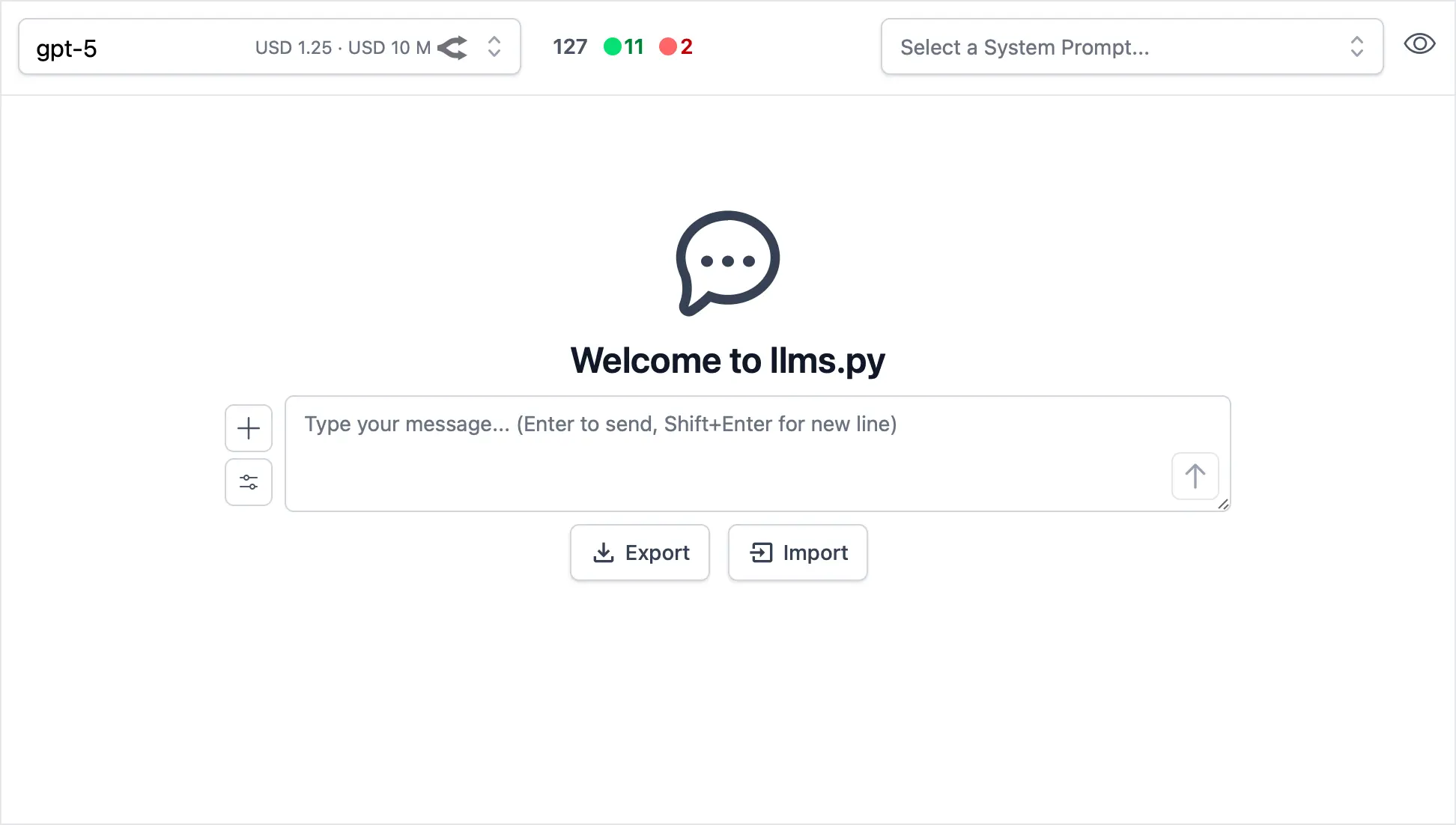
Dark Mode Support
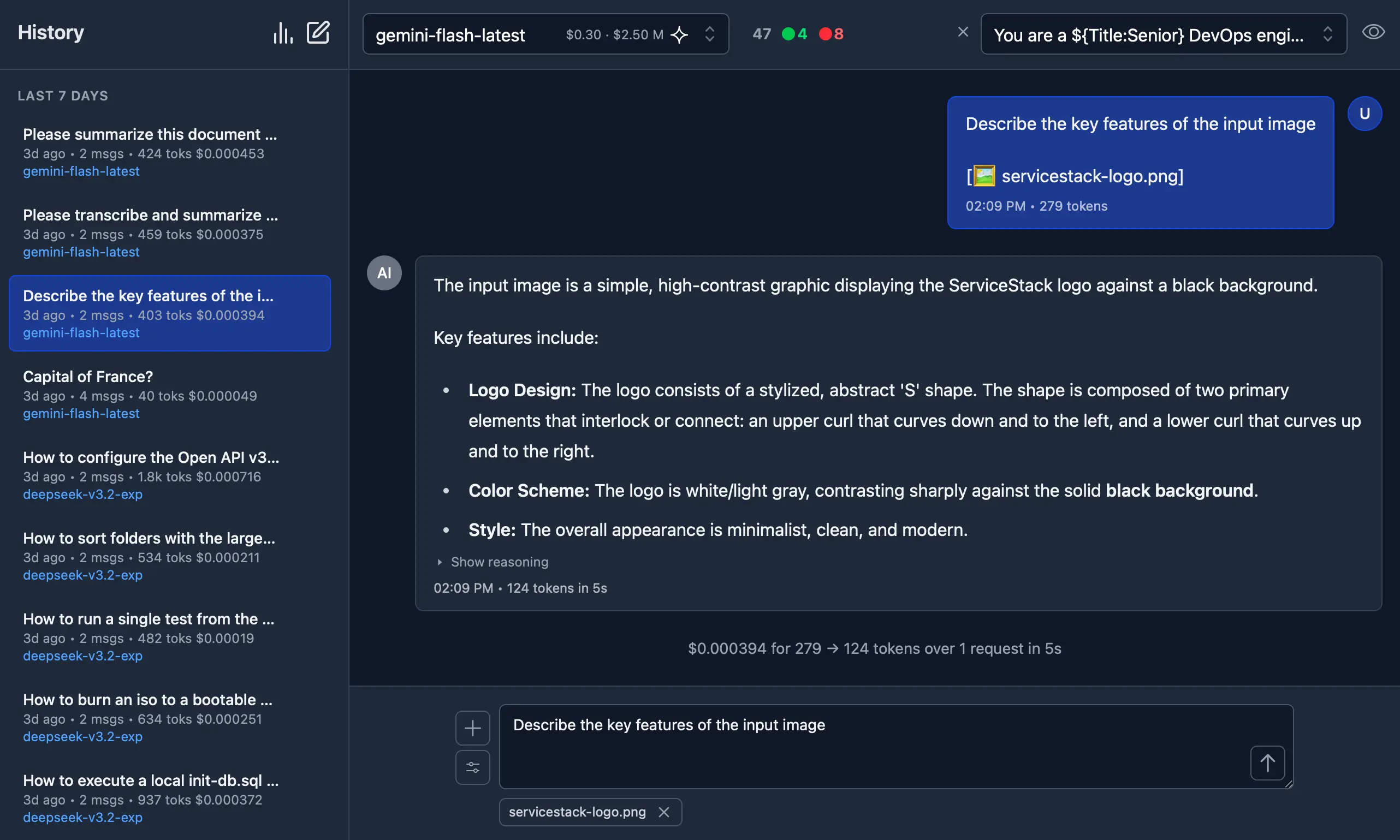
Monthly Costs Analysis
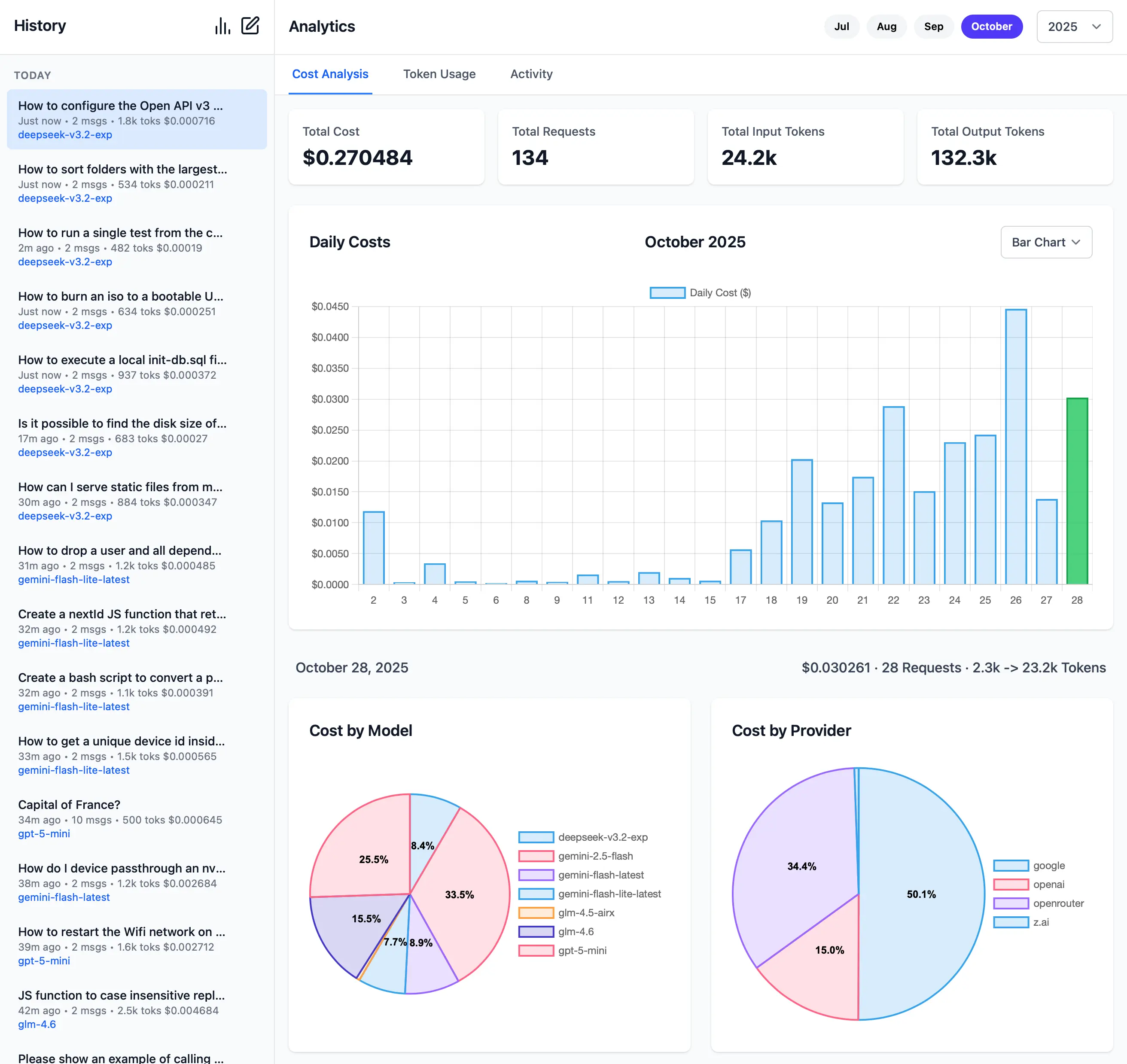
Monthly Token Usage (Dark Mode)
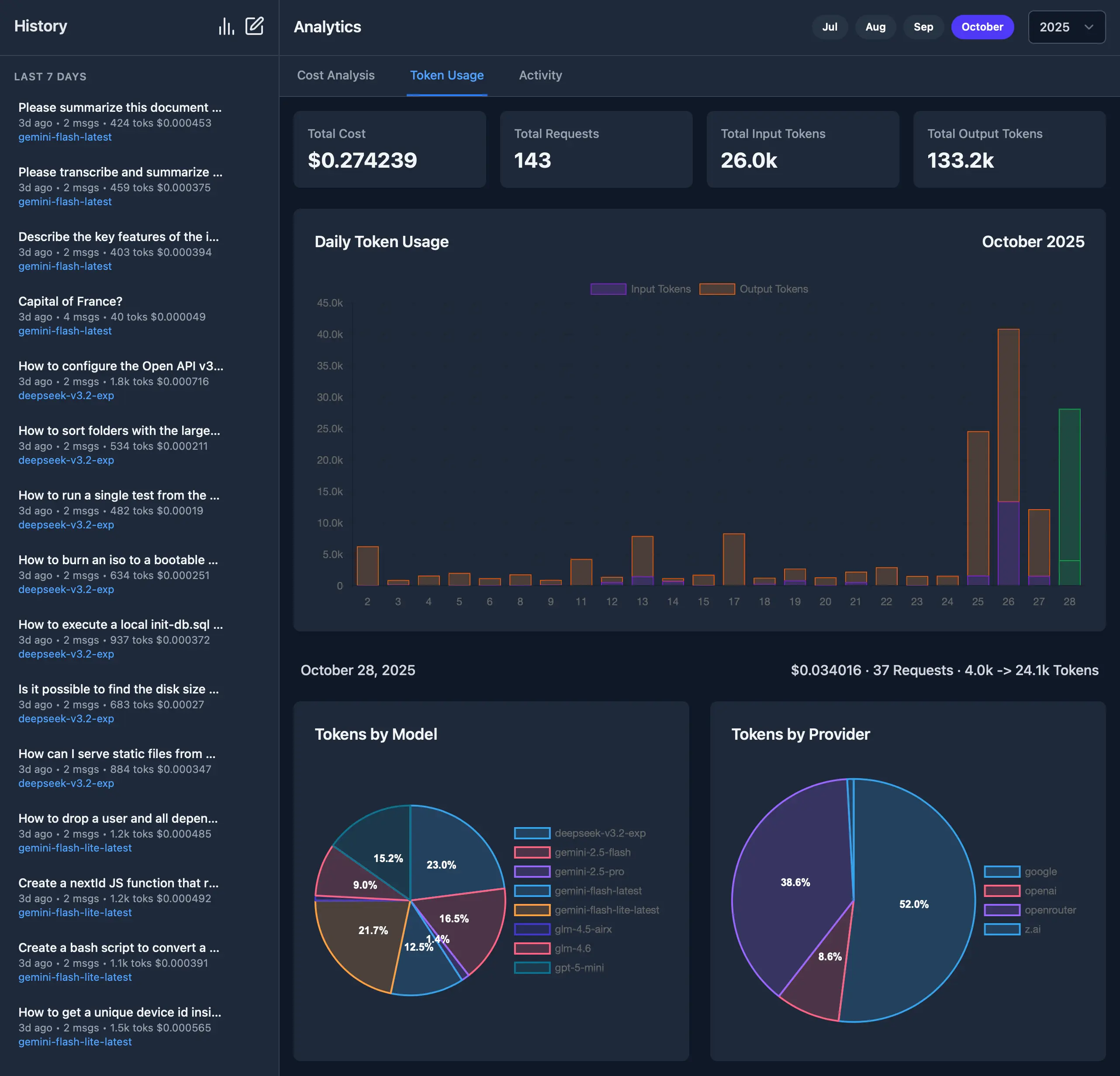
Monthly Activity Log
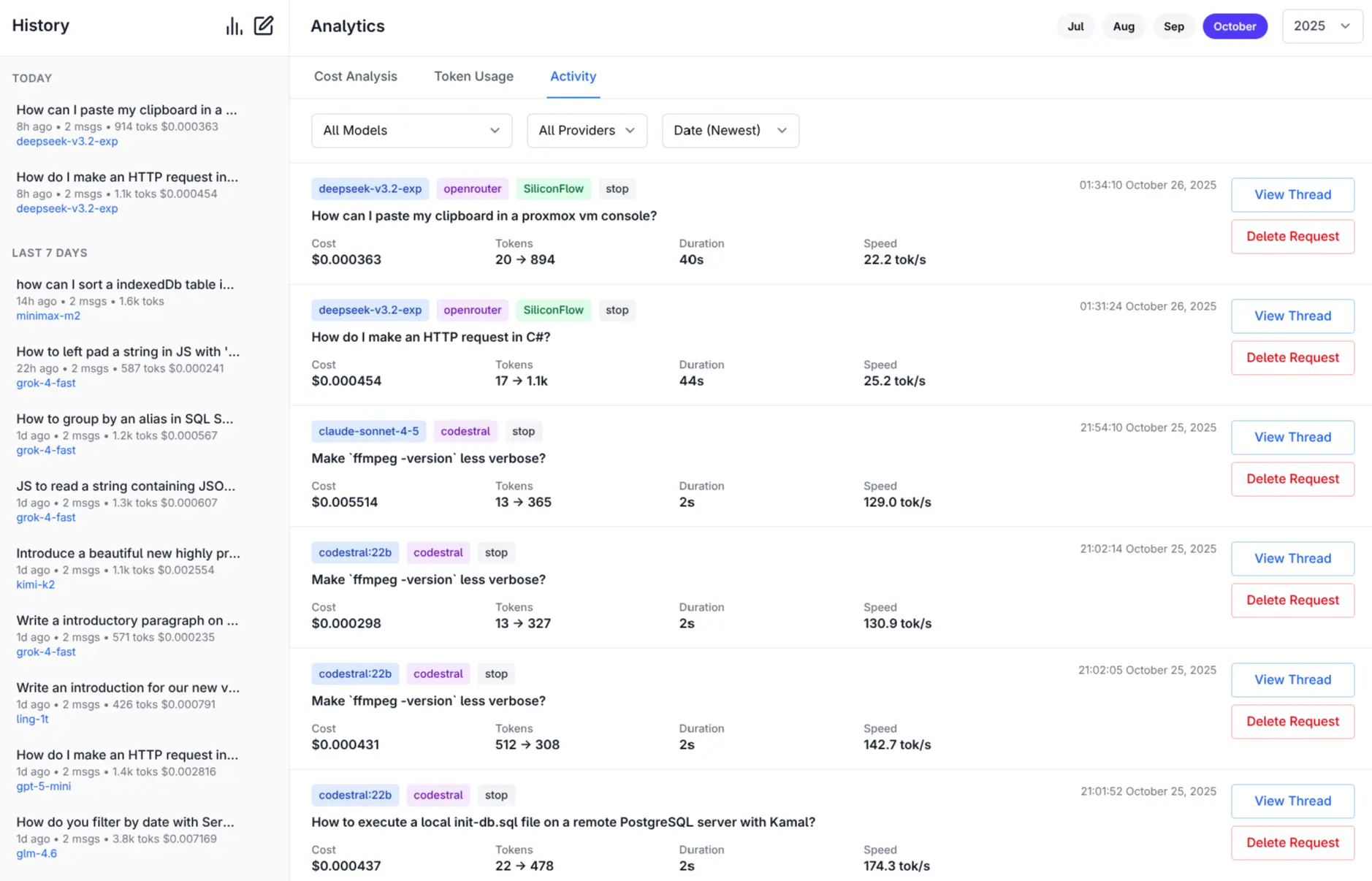
More Features and Screenshots.
Check Provider Reliability and Response Times
Check the status of configured providers to test if they're configured correctly, reachable and what their response times is for the simplest 1+1= request:
# Check all models for a provider:
llms --check groq

# Check specific models for a provider:
llms --check groq kimi-k2 llama4:400b gpt-oss:120b
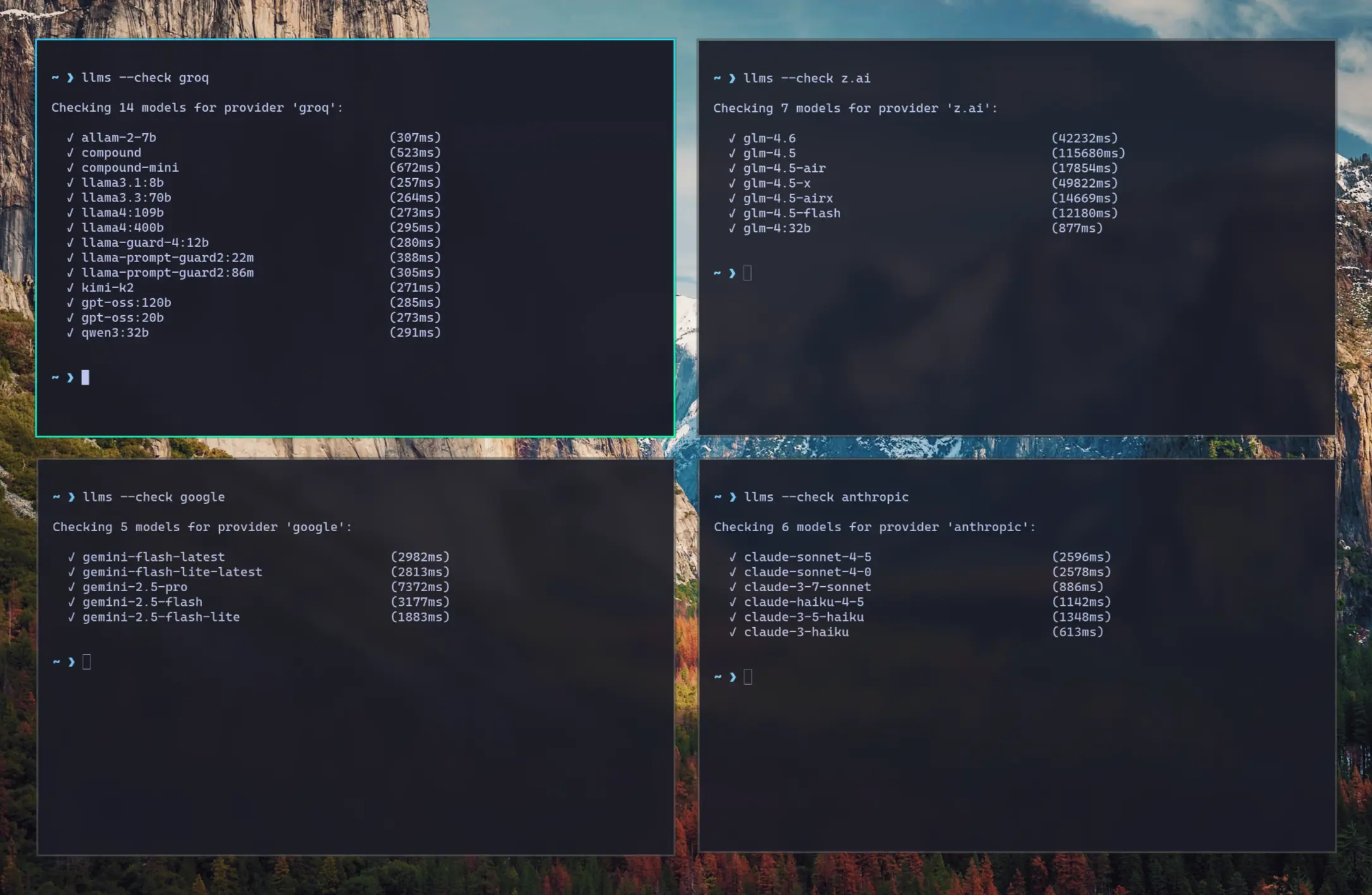
As they're a good indicator for the reliability and speed you can expect from different providers we've created a test-providers.yml GitHub Action to test the response times for all configured providers and models, the results of which will be frequently published to /checks/latest.txt
Change Log
v2.0.30 (2025-11-01)
- Improved Responsive Layout with collapsible Sidebar
- Watching config files for changes and auto-reloading
- Add cancel button to cancel pending request
- Return focus to textarea after request completes
- Clicking outside model or system prompt selector will collapse it
- Clicking on selected item no longer deselects it
- Support
VERBOSE=1for enabling--verbosemode (useful in Docker)
v2.0.28 (2025-10-31)
- Dark Mode
- Drag n' Drop files in Message prompt
- Copy & Paste files in Message prompt
- Support for GitHub OAuth and optional restrict access to specified Users
- Support for Docker and Docker Compose
Installation
Using pip
pip install llms-py
Quick Start
1. Set API Keys
Set environment variables for the providers you want to use:
export OPENROUTER_API_KEY="..."
| Provider | Variable | Description | Example |
|---|---|---|---|
| openrouter_free | OPENROUTER_API_KEY |
OpenRouter FREE models API key | sk-or-... |
| groq | GROQ_API_KEY |
Groq API key | gsk_... |
| google_free | GOOGLE_FREE_API_KEY |
Google FREE API key | AIza... |
| codestral | CODESTRAL_API_KEY |
Codestral API key | ... |
| ollama | N/A | No API key required | |
| openrouter | OPENROUTER_API_KEY |
OpenRouter API key | sk-or-... |
GOOGLE_API_KEY |
Google API key | AIza... |
|
| anthropic | ANTHROPIC_API_KEY |
Anthropic API key | sk-ant-... |
| openai | OPENAI_API_KEY |
OpenAI API key | sk-... |
| grok | GROK_API_KEY |
Grok (X.AI) API key | xai-... |
| qwen | DASHSCOPE_API_KEY |
Qwen (Alibaba) API key | sk-... |
| z.ai | ZAI_API_KEY |
Z.ai API key | sk-... |
| mistral | MISTRAL_API_KEY |
Mistral API key | ... |
2. Run Server
Start the UI and an OpenAI compatible API on port 8000:
llms --serve 8000
Launches UI at http://localhost:8000 and OpenAI Endpoint at http://localhost:8000/v1/chat/completions.
To see detailed request/response logging, add --verbose:
llms --serve 8000 --verbose
Use llms.py CLI
llms "What is the capital of France?"
Enable Providers
Any providers that have their API Keys set and enabled in llms.json are automatically made available.
Providers can be enabled or disabled in the UI at runtime next to the model selector, or on the command line:
# Disable free providers with free models and free tiers
llms --disable openrouter_free codestral google_free groq

# Enable paid providers
llms --enable openrouter anthropic google openai grok z.ai qwen mistral
Using Docker
a) Simple - Run in a Docker container:
Run the server on port 8000:
docker run -p 8000:8000 -e GROQ_API_KEY=$GROQ_API_KEY ghcr.io/servicestack/llms:latest
Get the latest version:
docker pull ghcr.io/servicestack/llms:latest
Use custom llms.json and ui.json config files outside of the container (auto created if they don't exist):
docker run -p 8000:8000 -e GROQ_API_KEY=$GROQ_API_KEY \
  -v ~/.llms:/home/llms/.llms \
  ghcr.io/servicestack/llms:latest
b) Recommended - Use Docker Compose:
Download and use docker-compose.yml:
curl -O https://raw.githubusercontent.com/ServiceStack/llms/refs/heads/main/docker-compose.yml
Update API Keys in docker-compose.yml then start the server:
docker-compose up -d
c) Build and run local Docker image from source:
git clone https://github.com/ServiceStack/llms

docker-compose -f docker-compose.local.yml up -d --build
After the container starts, you can access the UI and API at http://localhost:8000.
See DOCKER.md for detailed instructions on customizing configuration files.
GitHub OAuth Authentication
llms.py supports optional GitHub OAuth authentication to secure your web UI and API endpoints. When enabled, users must sign in with their GitHub account before accessing the application.
{
    "auth": {
        "enabled": true,
        "github": {
            "client_id": "$GITHUB_CLIENT_ID",
            "client_secret": "$GITHUB_CLIENT_SECRET",
            "redirect_uri": "http://localhost:8000/auth/github/callback",
            "restrict_to": "$GITHUB_USERS"
        }
    }
}
GITHUB_USERS is optional but if set will only allow access to the specified users.
See GITHUB_OAUTH_SETUP.md for detailed setup instructions.
Configuration
The configuration file llms.json is saved to ~/.llms/llms.json and defines available providers, models, and default settings. If it doesn't exist, llms.json is auto created with the latest
configuration, so you can re-create it by deleting your local config (e.g. rm -rf ~/.llms).
Key sections:
Defaults
headers: Common HTTP headers for all requeststext: Default chat completion request template for text promptsimage: Default chat completion request template for image promptsaudio: Default chat completion request template for audio promptsfile: Default chat completion request template for file promptscheck: Check request template for testing provider connectivitylimits: Override Request size limitsconvert: Max image size and length limits and auto conversion settings
Providers
Each provider configuration includes:
enabled: Whether the provider is activetype: Provider class (OpenAiProvider, GoogleProvider, etc.)api_key: API key (supports environment variables with$VAR_NAME)base_url: API endpoint URLmodels: Model name mappings (local name → provider name)pricing: Pricing per token (input/output) for each modeldefault_pricing: Default pricing if not specified inpricingcheck: Check request template for testing provider connectivity
Command Line Usage
Basic Chat
# Simple question
llms "Explain quantum computing"

# With specific model
llms -m gemini-2.5-pro "Write a Python function to sort a list"
llms -m grok-4 "Explain this code with humor"
llms -m qwen3-max "Translate this to Chinese"

# With system prompt
llms -s "You are a helpful coding assistant" "How do I reverse a string in Python?"

# With image (vision models)
llms --image image.jpg "What's in this image?"
llms --image https://example.com/photo.png "Describe this photo"

# Display full JSON Response
llms "Explain quantum computing" --raw
Using a Chat Template
By default llms uses the defaults/text chat completion request defined in llms.json.
You can instead use a custom chat completion request with --chat, e.g:
# Load chat completion request from JSON file
llms --chat request.json

# Override user message
llms --chat request.json "New user message"

# Override model
llms -m kimi-k2 --chat request.json
Example request.json:
{
  "model": "kimi-k2",
  "messages": [
    {"role": "system", "content": "You are a helpful assistant."},
    {"role": "user",   "content": ""}
  ],
  "temperature": 0.7,
  "max_tokens": 150
}
Image Requests
Send images to vision-capable models using the --image option:
# Use defaults/image Chat Template (Describe the key features of the input image)
llms --image ./screenshot.png

# Local image file
llms --image ./screenshot.png "What's in this image?"

# Remote image URL
llms --image https://example.org/photo.jpg "Describe this photo"

# Data URI
llms --image "data:image/png;base64,$(base64 -w 0 image.png)" "Describe this image"

# With a specific vision model
llms -m gemini-2.5-flash --image chart.png "Analyze this chart"
llms -m qwen2.5vl --image document.jpg "Extract text from this document"

# Combined with system prompt
llms -s "You are a data analyst" --image graph.png "What trends do you see?"

# With custom chat template
llms --chat image-request.json --image photo.jpg
Example of image-request.json:
{
    "model": "qwen2.5vl",
    "messages": [
        {
            "role": "user",
            "content": [
                {
                    "type": "image_url",
                    "image_url": {
                        "url": ""
                    }
                },
                {
                    "type": "text",
                    "text": "Caption this image"
                }
            ]
        }
    ]
}
Supported image formats: PNG, WEBP, JPG, JPEG, GIF, BMP, TIFF, ICO
Image sources:
- Local files: Absolute paths (
/path/to/image.jpg) or relative paths (./image.png,../image.jpg) - Remote URLs: HTTP/HTTPS URLs are automatically downloaded
- Data URIs: Base64-encoded images (
data:image/png;base64,...)
Images are automatically processed and converted to base64 data URIs before being sent to the model.
Vision-Capable Models
Popular models that support image analysis:
- OpenAI: GPT-4o, GPT-4o-mini, GPT-4.1
- Anthropic: Claude Sonnet 4.0, Claude Opus 4.1
- Google: Gemini 2.5 Pro, Gemini Flash
- Qwen: Qwen2.5-VL, Qwen3-VL, QVQ-max
- Ollama: qwen2.5vl, llava
Images are automatically downloaded and converted to base64 data URIs.
Audio Requests
Send audio files to audio-capable models using the --audio option:
# Use defaults/audio Chat Template (Transcribe the audio)
llms --audio ./recording.mp3

# Local audio file
llms --audio ./meeting.wav "Summarize this meeting recording"

# Remote audio URL
llms --audio https://example.org/podcast.mp3 "What are the key points discussed?"

# With a specific audio model
llms -m gpt-4o-audio-preview --audio interview.mp3 "Extract the main topics"
llms -m gemini-2.5-flash --audio interview.mp3 "Extract the main topics"

# Combined with system prompt
llms -s "You're a transcription specialist" --audio talk.mp3 "Provide a detailed transcript"

# With custom chat template
llms --chat audio-request.json --audio speech.wav
Example of audio-request.json:
{
    "model": "gpt-4o-audio-preview",
    "messages": [
        {
            "role": "user",
            "content": [
                {
                    "type": "input_audio",
                    "input_audio": {
                        "data": "",
                        "format": "mp3"
                    }
                },
                {
                    "type": "text",
                    "text": "Please transcribe this audio"
                }
            ]
        }
    ]
}
Supported audio formats: MP3, WAV
Audio sources:
- Local files: Absolute paths (
/path/to/audio.mp3) or relative paths (./audio.wav,../recording.m4a) - Remote URLs: HTTP/HTTPS URLs are automatically downloaded
- Base64 Data: Base64-encoded audio
Audio files are automatically processed and converted to base64 data before being sent to the model.
Audio-Capable Models
Popular models that support audio processing:
- OpenAI: gpt-4o-audio-preview
- Google: gemini-2.5-pro, gemini-2.5-flash, gemini-2.5-flash-lite
Audio files are automatically downloaded and converted to base64 data URIs with appropriate format detection.
File Requests
Send documents (e.g. PDFs) to file-capable models using the --file option:
# Use defaults/file Chat Template (Summarize the document)
llms --file ./docs/handbook.pdf

# Local PDF file
llms --file ./docs/policy.pdf "Summarize the key changes"

# Remote PDF URL
llms --file https://example.org/whitepaper.pdf "What are the main findings?"

# With specific file-capable models
llms -m gpt-5               --file ./policy.pdf   "Summarize the key changes"
llms -m gemini-flash-latest --file ./report.pdf   "Extract action items"
llms -m qwen2.5vl           --file ./manual.pdf   "List key sections and their purpose"

# Combined with system prompt
llms -s "You're a compliance analyst" --file ./policy.pdf "Identify compliance risks"

# With custom chat template
llms --chat file-request.json --file ./docs/handbook.pdf
Example of file-request.json:
{
  "model": "gpt-5",
  "messages": [
    {
      "role": "user",
      "content": [
        {
          "type": "file",
          "file": {
            "filename": "",
            "file_data": ""
          }
        },
        {
          "type": "text",
          "text": "Please summarize this document"
        }
      ]
    }
  ]
}
Supported file formats: PDF
Other document types may work depending on the model/provider.
File sources:
- Local files: Absolute paths (
/path/to/file.pdf) or relative paths (./file.pdf,../file.pdf) - Remote URLs: HTTP/HTTPS URLs are automatically downloaded
- Base64/Data URIs: Inline
data:application/pdf;base64,...is supported
Files are automatically downloaded (for URLs) and converted to base64 data URIs before being sent to the model.
File-Capable Models
Popular multi-modal models that support file (PDF) inputs:
- OpenAI: gpt-5, gpt-5-mini, gpt-4o, gpt-4o-mini
- Google: gemini-flash-latest, gemini-2.5-flash-lite
- Grok: grok-4-fast (OpenRouter)
- Qwen: qwen2.5vl, qwen3-max, qwen3-vl:235b, qwen3-coder, qwen3-coder-flash (OpenRouter)
- Others: kimi-k2, glm-4.5-air, deepseek-v3.1:671b, llama4:400b, llama3.3:70b, mai-ds-r1, nemotron-nano:9b
Server Mode
Run as an OpenAI-compatible HTTP server:
# Start server on port 8000
llms --serve 8000
The server exposes a single endpoint:
POST /v1/chat/completions- OpenAI-compatible chat completions
Example client usage:
curl -X POST http://localhost:8000/v1/chat/completions \
  -H "Content-Type: application/json" \
  -d '{
    "model": "kimi-k2",
    "messages": [
      {"role": "user", "content": "Hello!"}
    ]
  }'
Configuration Management
# List enabled providers and models
llms --list
llms ls

# List specific providers
llms ls ollama
llms ls google anthropic

# Enable providers
llms --enable openrouter
llms --enable anthropic google_free groq

# Disable providers
llms --disable ollama
llms --disable openai anthropic

# Set default model
llms --default grok-4
Update
pip install llms-py --upgrade
Advanced Options
# Use custom config file
llms --config /path/to/config.json "Hello"

# Get raw JSON response
llms --raw "What is 2+2?"

# Enable verbose logging
llms --verbose "Tell me a joke"

# Custom log prefix
llms --verbose --logprefix "[DEBUG] " "Hello world"

# Set default model (updates config file)
llms --default grok-4

# Pass custom parameters to chat request (URL-encoded)
llms --args "temperature=0.7&seed=111" "What is 2+2?"

# Multiple parameters with different types
llms --args "temperature=0.5&max_completion_tokens=50" "Tell me a joke"

# URL-encoded special characters (stop sequences)
llms --args "stop=Two,Words" "Count to 5"

# Combine with other options
llms --system "You are helpful" --args "temperature=0.3" --raw "Hello"
Custom Parameters with --args
The --args option allows you to pass URL-encoded parameters to customize the chat request sent to LLM providers:
Parameter Types:
- Floats:
temperature=0.7,frequency_penalty=0.2 - Integers:
max_completion_tokens=100 - Booleans:
store=true,verbose=false,logprobs=true - Strings:
stop=one - Lists:
stop=two,words
Common Parameters:
temperature: Controls randomness (0.0 to 2.0)max_completion_tokens: Maximum tokens in responseseed: For reproducible outputstop_p: Nucleus sampling parameterstop: Stop sequences (URL-encode special chars)store: Whether or not to store the outputfrequency_penalty: Penalize new tokens based on frequencypresence_penalty: Penalize new tokens based on presencelogprobs: Include log probabilities in responseparallel_tool_calls: Enable parallel tool callsprompt_cache_key: Cache key for promptreasoning_effort: Reasoning effort (low, medium, high, *minimal, *none, *default)safety_identifier: A string that uniquely identifies each userseed: For reproducible outputsservice_tier: Service tier (free, standard, premium, *default)top_logprobs: Number of top logprobs to returntop_p: Nucleus sampling parameterverbosity: Verbosity level (0, 1, 2, 3, *default)enable_thinking: Enable thinking mode (Qwen)stream: Enable streaming responses
Default Model Configuration
The --default MODEL option allows you to set the default model used for all chat completions. This updates the defaults.text.model field in your configuration file:
# Set default model to gpt-oss
llms --default gpt-oss:120b

# Set default model to Claude Sonnet
llms --default claude-sonnet-4-0

# The model must be available in your enabled providers
llms --default gemini-2.5-pro
When you set a default model:
- The configuration file (
~/.llms/llms.json) is automatically updated - The specified model becomes the default for all future chat requests
- The model must exist in your currently enabled providers
- You can still override the default using
-m MODELfor individual requests
Updating llms.py
pip install llms-py --upgrade
Beautiful rendered Markdown
Pipe Markdown output to glow to beautifully render it in the terminal:
llms "Explain quantum computing" | glow
Supported Providers
Any OpenAI-compatible providers and their models can be added by configuring them in llms.json. By default only AI Providers with free tiers are enabled which will only be "available" if their API Key is set.
You can list the available providers, their models and which are enabled or disabled with:
llms ls
They can be enabled/disabled in your llms.json file or with:
llms --enable <provider>
llms --disable <provider>
For a provider to be available, they also require their API Key configured in either your Environment Variables
or directly in your llms.json.
Environment Variables
| Provider | Variable | Description | Example |
|---|---|---|---|
| openrouter_free | OPENROUTER_API_KEY |
OpenRouter FREE models API key | sk-or-... |
| groq | GROQ_API_KEY |
Groq API key | gsk_... |
| google_free | GOOGLE_FREE_API_KEY |
Google FREE API key | AIza... |
| codestral | CODESTRAL_API_KEY |
Codestral API key | ... |
| ollama | N/A | No API key required | |
| openrouter | OPENROUTER_API_KEY |
OpenRouter API key | sk-or-... |
GOOGLE_API_KEY |
Google API key | AIza... |
|
| anthropic | ANTHROPIC_API_KEY |
Anthropic API key | sk-ant-... |
| openai | OPENAI_API_KEY |
OpenAI API key | sk-... |
| grok | GROK_API_KEY |
Grok (X.AI) API key | xai-... |
| qwen | DASHSCOPE_API_KEY |
Qwen (Alibaba) API key | sk-... |
| z.ai | ZAI_API_KEY |
Z.ai API key | sk-... |
| mistral | MISTRAL_API_KEY |
Mistral API key | ... |
OpenAI
- Type:
OpenAiProvider - Models: GPT-5, GPT-5 Codex, GPT-4o, GPT-4o-mini, o3, etc.
- Features: Text, images, function calling
export OPENAI_API_KEY="your-key"
llms --enable openai
Anthropic (Claude)
- Type:
OpenAiProvider - Models: Claude Opus 4.1, Sonnet 4.0, Haiku 3.5, etc.
- Features: Text, images, large context windows
export ANTHROPIC_API_KEY="your-key"
llms --enable anthropic
Google Gemini
- Type:
GoogleProvider - Models: Gemini 2.5 Pro, Flash, Flash-Lite
- Features: Text, images, safety settings
export GOOGLE_API_KEY="your-key"
llms --enable google_free
OpenRouter
- Type:
OpenAiProvider - Models: 100+ models from various providers
- Features: Access to latest models, free tier available
export OPENROUTER_API_KEY="your-key"
llms --enable openrouter
Grok (X.AI)
- Type:
OpenAiProvider - Models: Grok-4, Grok-3, Grok-3-mini, Grok-code-fast-1, etc.
- Features: Real-time information, humor, uncensored responses
export GROK_API_KEY="your-key"
llms --enable grok
Groq
- Type:
OpenAiProvider - Models: Llama 3.3, Gemma 2, Kimi K2, etc.
- Features: Fast inference, competitive pricing
export GROQ_API_KEY="your-key"
llms --enable groq
Ollama (Local)
- Type:
OllamaProvider - Models: Auto-discovered from local Ollama installation
- Features: Local inference, privacy, no API costs
# Ollama must be running locally
llms --enable ollama
Qwen (Alibaba Cloud)
- Type:
OpenAiProvider - Models: Qwen3-max, Qwen-max, Qwen-plus, Qwen2.5-VL, QwQ-plus, etc.
- Features: Multilingual, vision models, coding, reasoning, audio processing
export DASHSCOPE_API_KEY="your-key"
llms --enable qwen
Z.ai
- Type:
OpenAiProvider - Models: GLM-4.6, GLM-4.5, GLM-4.5-air, GLM-4.5-x, GLM-4.5-airx, GLM-4.5-flash, GLM-4:32b
- Features: Advanced language models with strong reasoning capabilities
export ZAI_API_KEY="your-key"
llms --enable z.ai
Mistral
- Type:
OpenAiProvider - Models: Mistral Large, Codestral, Pixtral, etc.
- Features: Code generation, multilingual
export MISTRAL_API_KEY="your-key"
llms --enable mistral
Codestral
- Type:
OpenAiProvider - Models: Codestral
- Features: Code generation
export CODESTRAL_API_KEY="your-key"
llms --enable codestral
Model Routing
The tool automatically routes requests to the first available provider that supports the requested model. If a provider fails, it tries the next available provider with that model.
Example: If both OpenAI and OpenRouter support kimi-k2, the request will first try OpenRouter (free), then fall back to Groq than OpenRouter (Paid) if requests fails.
Configuration Examples
Minimal Configuration
{
  "defaults": {
    "headers": {"Content-Type": "application/json"},
    "text": {
      "model": "kimi-k2",
      "messages": [{"role": "user", "content": ""}]
    }
  },
  "providers": {
    "groq": {
      "enabled": true,
      "type": "OpenAiProvider",
      "base_url": "https://api.groq.com/openai",
      "api_key": "$GROQ_API_KEY",
      "models": {
        "llama3.3:70b": "llama-3.3-70b-versatile",
        "llama4:109b": "meta-llama/llama-4-scout-17b-16e-instruct",
        "llama4:400b": "meta-llama/llama-4-maverick-17b-128e-instruct",
        "kimi-k2": "moonshotai/kimi-k2-instruct-0905",
        "gpt-oss:120b": "openai/gpt-oss-120b",
        "gpt-oss:20b": "openai/gpt-oss-20b",
        "qwen3:32b": "qwen/qwen3-32b"
      }
    }
  }
}
Multi-Provider Setup
{
  "providers": {
    "openrouter": {
      "enabled": false,
      "type": "OpenAiProvider",
      "base_url": "https://openrouter.ai/api",
      "api_key": "$OPENROUTER_API_KEY",
      "models": {
        "grok-4": "x-ai/grok-4",
        "glm-4.5-air": "z-ai/glm-4.5-air",
        "kimi-k2": "moonshotai/kimi-k2",
        "deepseek-v3.1:671b": "deepseek/deepseek-chat",
        "llama4:400b": "meta-llama/llama-4-maverick"
      }
    },
    "anthropic": {
      "enabled": false,
      "type": "OpenAiProvider",
      "base_url": "https://api.anthropic.com",
      "api_key": "$ANTHROPIC_API_KEY",
      "models": {
        "claude-sonnet-4-0": "claude-sonnet-4-0"
      }
    },
    "ollama": {
      "enabled": false,
      "type": "OllamaProvider",
      "base_url": "http://localhost:11434",
      "models": {},
      "all_models": true
    }
  }
}
Usage
usage: llms [-h] [--config FILE] [-m MODEL] [--chat REQUEST] [-s PROMPT] [--image IMAGE] [--audio AUDIO] [--file FILE]
            [--args PARAMS] [--raw] [--list] [--check PROVIDER] [--serve PORT] [--enable PROVIDER] [--disable PROVIDER]
            [--default MODEL] [--init] [--root PATH] [--logprefix PREFIX] [--verbose]

llms v2.0.24

options:
  -h, --help            show this help message and exit
  --config FILE         Path to config file
  -m, --model MODEL     Model to use
  --chat REQUEST        OpenAI Chat Completion Request to send
  -s, --system PROMPT   System prompt to use for chat completion
  --image IMAGE         Image input to use in chat completion
  --audio AUDIO         Audio input to use in chat completion
  --file FILE           File input to use in chat completion
  --args PARAMS         URL-encoded parameters to add to chat request (e.g. "temperature=0.7&seed=111")
  --raw                 Return raw AI JSON response
  --list                Show list of enabled providers and their models (alias ls provider?)
  --check PROVIDER      Check validity of models for a provider
  --serve PORT          Port to start an OpenAI Chat compatible server on
  --enable PROVIDER     Enable a provider
  --disable PROVIDER    Disable a provider
  --default MODEL       Configure the default model to use
  --init                Create a default llms.json
  --root PATH           Change root directory for UI files
  --logprefix PREFIX    Prefix used in log messages
  --verbose             Verbose output
Docker Deployment
Quick Start with Docker
The easiest way to run llms-py is using Docker:
# Using docker-compose (recommended)
docker-compose up -d

# Or pull and run directly
docker run -p 8000:8000 \
  -e OPENROUTER_API_KEY="your-key" \
  ghcr.io/servicestack/llms:latest
Docker Images
Pre-built Docker images are automatically published to GitHub Container Registry:
- Latest stable:
ghcr.io/servicestack/llms:latest - Specific version:
ghcr.io/servicestack/llms:v2.0.24 - Main branch:
ghcr.io/servicestack/llms:main
Environment Variables
Pass API keys as environment variables:
docker run -p 8000:8000 \
  -e OPENROUTER_API_KEY="sk-or-..." \
  -e GROQ_API_KEY="gsk_..." \
  -e GOOGLE_FREE_API_KEY="AIza..." \
  -e ANTHROPIC_API_KEY="sk-ant-..." \
  -e OPENAI_API_KEY="sk-..." \
  ghcr.io/servicestack/llms:latest
Using docker-compose
Create a docker-compose.yml file (or use the one in the repository):
version: '3.8'

services:
  llms:
    image: ghcr.io/servicestack/llms:latest
    ports:
      - "8000:8000"
    environment:
      - OPENROUTER_API_KEY=${OPENROUTER_API_KEY}
      - GROQ_API_KEY=${GROQ_API_KEY}
      - GOOGLE_FREE_API_KEY=${GOOGLE_FREE_API_KEY}
    volumes:
      - llms-data:/home/llms/.llms
    restart: unless-stopped

volumes:
  llms-data:
Create a .env file with your API keys:
OPENROUTER_API_KEY=sk-or-...
GROQ_API_KEY=gsk_...
GOOGLE_FREE_API_KEY=AIza...
Start the service:
docker-compose up -d
Building Locally
Build the Docker image from source:
# Using the build script
./docker-build.sh

# Or manually
docker build -t llms-py:latest .

# Run your local build
docker run -p 8000:8000 \
  -e OPENROUTER_API_KEY="your-key" \
  llms-py:latest
Volume Mounting
To persist configuration and analytics data between container restarts:
# Using a named volume (recommended)
docker run -p 8000:8000 \
  -v llms-data:/home/llms/.llms \
  -e OPENROUTER_API_KEY="your-key" \
  ghcr.io/servicestack/llms:latest

# Or mount a local directory
docker run -p 8000:8000 \
  -v $(pwd)/llms-config:/home/llms/.llms \
  -e OPENROUTER_API_KEY="your-key" \
  ghcr.io/servicestack/llms:latest
Custom Configuration Files
Customize llms-py behavior by providing your own llms.json and ui.json files:
Option 1: Mount a directory with custom configs
# Create config directory with your custom files
mkdir -p config
# Add your custom llms.json and ui.json to config/

# Mount the directory
docker run -p 8000:8000 \
  -v $(pwd)/config:/home/llms/.llms \
  -e OPENROUTER_API_KEY="your-key" \
  ghcr.io/servicestack/llms:latest
Option 2: Mount individual config files
docker run -p 8000:8000 \
  -v $(pwd)/my-llms.json:/home/llms/.llms/llms.json:ro \
  -v $(pwd)/my-ui.json:/home/llms/.llms/ui.json:ro \
  -e OPENROUTER_API_KEY="your-key" \
  ghcr.io/servicestack/llms:latest
With docker-compose:
volumes:
  # Use local directory
  - ./config:/home/llms/.llms

  # Or mount individual files
  # - ./my-llms.json:/home/llms/.llms/llms.json:ro
  # - ./my-ui.json:/home/llms/.llms/ui.json:ro
The container will auto-create default config files on first run if they don't exist. You can customize these to:
- Enable/disable specific providers
- Add or remove models
- Configure API endpoints
- Set custom pricing
- Customize chat templates
- Configure UI settings
See DOCKER.md for detailed configuration examples.
Custom Port
Change the port mapping to run on a different port:
# Run on port 3000 instead of 8000
docker run -p 3000:8000 \
  -e OPENROUTER_API_KEY="your-key" \
  ghcr.io/servicestack/llms:latest
Docker CLI Usage
You can also use the Docker container for CLI commands:
# Run a single query
docker run --rm \
  -e OPENROUTER_API_KEY="your-key" \
  ghcr.io/servicestack/llms:latest \
  llms "What is the capital of France?"

# List available models
docker run --rm \
  -e OPENROUTER_API_KEY="your-key" \
  ghcr.io/servicestack/llms:latest \
  llms --list

# Check provider status
docker run --rm \
  -e GROQ_API_KEY="your-key" \
  ghcr.io/servicestack/llms:latest \
  llms --check groq
Health Checks
The Docker image includes a health check that verifies the server is responding:
# Check container health
docker ps

# View health check logs
docker inspect --format='{{json .State.Health}}' llms-server
Multi-Architecture Support
The Docker images support multiple architectures:
linux/amd64(x86_64)linux/arm64(ARM64/Apple Silicon)
Docker will automatically pull the correct image for your platform.
Troubleshooting
Common Issues
Config file not found
# Initialize default config
llms --init

# Or specify custom path
llms --config ./my-config.json
No providers enabled
# Check status
llms --list

# Enable providers
llms --enable google anthropic
API key issues
# Check environment variables
echo $ANTHROPIC_API_KEY

# Enable verbose logging
llms --verbose "test"
Model not found
# List available models
llms --list

# Check provider configuration
llms ls openrouter
Debug Mode
Enable verbose logging to see detailed request/response information:
llms --verbose --logprefix "[DEBUG] " "Hello"
This shows:
- Enabled providers
- Model routing decisions
- HTTP request details
- Error messages with stack traces
Development
Project Structure
llms/main.py- Main script with CLI and server functionalityllms/llms.json- Default configuration filellms/ui.json- UI configuration filerequirements.txt- Python dependencies, required:aiohttp, optional:Pillow
Provider Classes
OpenAiProvider- Generic OpenAI-compatible providerOllamaProvider- Ollama-specific provider with model auto-discoveryGoogleProvider- Google Gemini with native API formatGoogleOpenAiProvider- Google Gemini via OpenAI-compatible endpoint
Adding New Providers
- Create a provider class inheriting from
OpenAiProvider - Implement provider-specific authentication and formatting
- Add provider configuration to
llms.json - Update initialization logic in
init_llms()
Contributing
Contributions are welcome! Please submit a PR to add support for any missing OpenAI-compatible providers.
Project details
Verified details
These details have been verified by PyPIProject links
GitHub Statistics
Maintainers
Release history Release notifications | RSS feed


Download files
Download the file for your platform. If you're not sure which to choose, learn more about installing packages.
Source Distribution
Built Distribution
Filter files by name, interpreter, ABI, and platform.
If you're not sure about the file name format, learn more about wheel file names.
Copy a direct link to the current filters
File details
Details for the file llms_py-2.0.33.tar.gz.
File metadata
- Download URL: llms_py-2.0.33.tar.gz
- Upload date:
- Size: 575.2 kB
- Tags: Source
- Uploaded using Trusted Publishing? Yes
- Uploaded via: twine/6.1.0 CPython/3.13.7
File hashes
| Algorithm | Hash digest | |
|---|---|---|
| SHA256 |
31f6b9b0a62ace77f3d668c4f12d91b2ecb4c293ea0afa0997e5b1202fb681fa
|
|
| MD5 |
3dd69208a9365f9c9e5144d15a2488e1
|
|
| BLAKE2b-256 |
5d11ce31722da1cf360ea209a17aa25e8e588e69a3b32b79f915c17473427fe9
|
Provenance
The following attestation bundles were made for llms_py-2.0.33.tar.gz:
Publisher:
python-publish.yml on ServiceStack/llms
-
Statement:
-
Statement type:
https://in-toto.io/Statement/v1 -
Predicate type:
https://docs.pypi.org/attestations/publish/v1 -
Subject name:
llms_py-2.0.33.tar.gz -
Subject digest:
31f6b9b0a62ace77f3d668c4f12d91b2ecb4c293ea0afa0997e5b1202fb681fa - Sigstore transparency entry: 665150062
- Sigstore integration time:
-
Permalink:
ServiceStack/llms@7e31e3c71927727b322f4c9ce8418a3ec07740fb -
Branch / Tag:
refs/tags/v2.0.33 - Owner: https://github.com/ServiceStack
-
Access:
public
-
Token Issuer:
https://token.actions.githubusercontent.com -
Runner Environment:
github-hosted -
Publication workflow:
python-publish.yml@7e31e3c71927727b322f4c9ce8418a3ec07740fb -
Trigger Event:
release
-
Statement type:
File details
Details for the file llms_py-2.0.33-py3-none-any.whl.
File metadata
- Download URL: llms_py-2.0.33-py3-none-any.whl
- Upload date:
- Size: 570.5 kB
- Tags: Python 3
- Uploaded using Trusted Publishing? Yes
- Uploaded via: twine/6.1.0 CPython/3.13.7
File hashes
| Algorithm | Hash digest | |
|---|---|---|
| SHA256 |
8e36f483b5251ca2ba8c7004691b2c216670b46fc5a36c5a0eebe0e05bca308f
|
|
| MD5 |
27a83839e4870c0615cb9d97886f0b33
|
|
| BLAKE2b-256 |
2fc30082ccf118016fda420ee09d73191f6c2a74030372a630b1c17816cd9b10
|
Provenance
The following attestation bundles were made for llms_py-2.0.33-py3-none-any.whl:
Publisher:
python-publish.yml on ServiceStack/llms
-
Statement:
-
Statement type:
https://in-toto.io/Statement/v1 -
Predicate type:
https://docs.pypi.org/attestations/publish/v1 -
Subject name:
llms_py-2.0.33-py3-none-any.whl -
Subject digest:
8e36f483b5251ca2ba8c7004691b2c216670b46fc5a36c5a0eebe0e05bca308f - Sigstore transparency entry: 665150071
- Sigstore integration time:
-
Permalink:
ServiceStack/llms@7e31e3c71927727b322f4c9ce8418a3ec07740fb -
Branch / Tag:
refs/tags/v2.0.33 - Owner: https://github.com/ServiceStack
-
Access:
public
-
Token Issuer:
https://token.actions.githubusercontent.com -
Runner Environment:
github-hosted -
Publication workflow:
python-publish.yml@7e31e3c71927727b322f4c9ce8418a3ec07740fb -
Trigger Event:
release
-
Statement type:






