
LLMTracer






A simple (opinionated) library to trace calls to an LLM model (and more) with some batteries included:
- simple
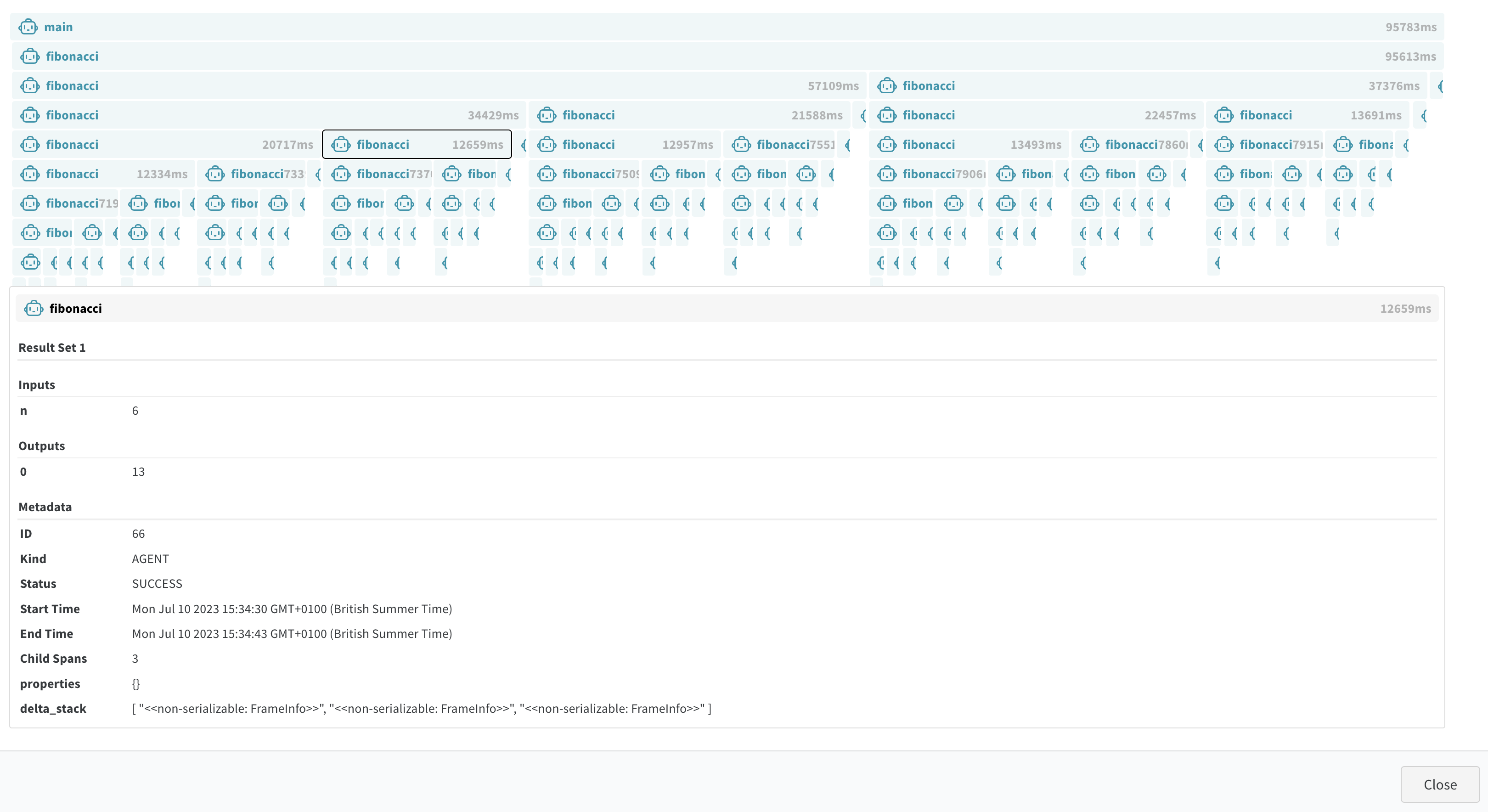
@trace_callsdecorator; - FlameCharts;
- Pynecone web app (local) to stream the output to a web browser at runtime and/or explore saved JSON files
- JSON output;
- interactive SVG output;
- WandB integration (public example here);
The big difference to just using WandB is that the app supports live-streaming while WandB waits for the full calls to finish before making them available. Useful for the impatient among us.
Motivation
WandB only supports showing finished traces but I wanted to be able to view them in real-time (at finer granularity).
Further, I want to make it easier to explore nested and complex calls and display properties of the calls.
Installation
Node.JS
To be able to run the web app, first, make sure you have Node.js installed. You can use conda to install Node.js as follows:
conda install -c conda-forge nodejs
Or, to install a specific version of Node.js (this one worked for me on my MacBook---so this will not work on Linux):
conda install -c conda-forge nodejs=18.15.0=h26a3f6d_0
LLMTracer & race Viewer
Once Node.js is installed, you can install LLMTracer using pip (if you have nodejs available in your base environment):
pip install llmtracer
To run the trace viewer which can load both saved JSON traces and live-streamed traces, run:
llmtraceviewer
Usage:
A simple example:
from time import sleep

import wandb

from llmtracer import (
    JsonFileWriter,
    TraceViewerIntegration,
    trace_calls,
    wandb_tracer,
)
from llmtracer.handlers.svg_writer import SvgFileWriter


@trace_calls(capture_args=True, capture_return=True)
def add_values(a: int, b: int):
    # sleep 1 second
    sleep(1)

    return a + b


@trace_calls(capture_args=True, capture_return=True)
def fibonacci(n: int):
    if n <= 1:
        return 1
    return add_values(fibonacci(n - 1), fibonacci(n - 2))


wandb.init(project="llmtracer", name="simple_example")

event_handlers = [
    JsonFileWriter("simple_example.json"),
    SvgFileWriter("simple_example.svg"),
    TraceViewerIntegration(),
]

with wandb_tracer(
    "main", stack_frame_context=0, event_handlers=event_handlers
) as trace_builder:
    print(fibonacci(10))
Screenshots

https://github.com/BlackHC/llmtracer/assets/729312/c77faa7d-a831-496c-b791-8822577391e5
Documentation
- License: LGPL-3.0
- Source Code: https://github.com/blackhc/llmtracer
- PyPI Package: https://pypi.org/project/llmtracer/
- Official Documentation: https://blackhc.github.io/llmtracer
Contributing
Bug fixes, feature requests, and pull requests are welcome! If you have any questions or suggestions, please open an issue on GitHub.
License
LLMTracer is licensed under AGPL3.0. If you require a commercial license for any part of the project, please contact the author.
Credits
This package was created using PyneCone with Cookiecutter and the waynerv/cookiecutter-pypackage project template.
1 maintainer

Metadata
1 maintainer
Release files for llmtracer 2.0.0
For a detailed explanation of source distributions (sdists) and built distributions (wheels), please see the package formats documentation.
Source distribution (sdist)
| File | Size | Uploaded | Provenance | |
|---|---|---|---|---|
| llmtracer-2.0.0.tar.gz | 91.0 kB | Without provenance | Details |
Built distribution (wheel)
| File | Interpreter | ABI | Platform | Reset |
|---|---|---|---|---|
| llmtracer-2.0.0-py3-none-any.whl | Python 3 | none | any | Details |
Total release size: 166.9 kB
Release files / llmtracer-2.0.0.tar.gz
| Download URL | llmtracer-2.0.0.tar.gz |
|---|---|
| Size | 91.0 kB |
| Tags | Source |
|
SHA-256 checksum How to use checksums |
cf7ec4c73634d5f294175540d0862fbba6023678f11f48f555d434181e04d669
|
|
BLAKE2b-256 checksum How to use checksums |
83e8b9740114104a5436b02508e4e28995523321ff061be87b1f30845e6d7cd7
|
| Upload date | |
|
Uploaded using Trusted Publishing? What is trusted publishing? |
No |
| Uploaded via |
poetry/1.7.1 CPython/3.12.4 Darwin/23.1.0
|
Release files / llmtracer-2.0.0-py3-none-any.whl
| Download URL | llmtracer-2.0.0-py3-none-any.whl |
|---|---|
| Size | 76.0 kB |
| Tags | Python 3 |
|
SHA-256 checksum How to use checksums |
e78b7f9034c09dccf7d6b43c549f76ca6af2d2373c562b889994d98fe2783a1b
|
|
BLAKE2b-256 checksum How to use checksums |
218e986c5b223c25ebc5a62fb819cdd6d568302aa9228a08f30d55118db628b5
|
| Upload date | |
|
Uploaded using Trusted Publishing? What is trusted publishing? |
No |
| Uploaded via |
poetry/1.7.1 CPython/3.12.4 Darwin/23.1.0
|
Security for llmtracer 2.0.0
Provenance
Provenance describes where a file came from. On PyPI, provenance is shared via attestations, which provide a verifiable record of the build or publishing details. View details, limitations and caveats.
No provenance found
None of the files in this release were uploaded with provenance metadata.
A note on package security
PyPI is a repository for distributing packages, not a service for auditing them. While third-party security researchers and our staff do their best to detect and remove malicious packages, PyPI cannot guarantee the quality, security or suitability of any given package.















