
LLM Wiki v2
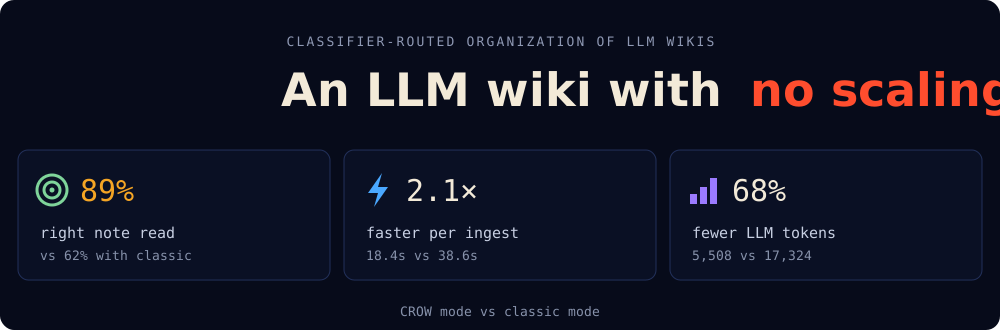
Give it your documents. It files them into a tidy wiki of Markdown notes and answers your questions, citing the notes it used. It runs on your computer, with any AI provider: OpenRouter, OpenAI, Gemini, Ollama (free and local) or any OpenAI-compatible server. It works in CROW mode by default: a small classifier decides where things go, so the wiki stays fast and cheap as it grows.
Start in 3 steps
1. Install uv, the tool that installs Python apps (other ways):
curl -LsSf https://astral.sh/uv/install.sh | sh
2. Install the wiki:
uv tool install "llmwiki2[server]"
Or with pip: pip install "llmwiki2[server]". As a Python library, pip install llmwiki2
is enough (the [server] extra adds the web page and the HTTP API), then from llmw2 import Wiki:
see the library guide.
3. Start it:
llmwiki2
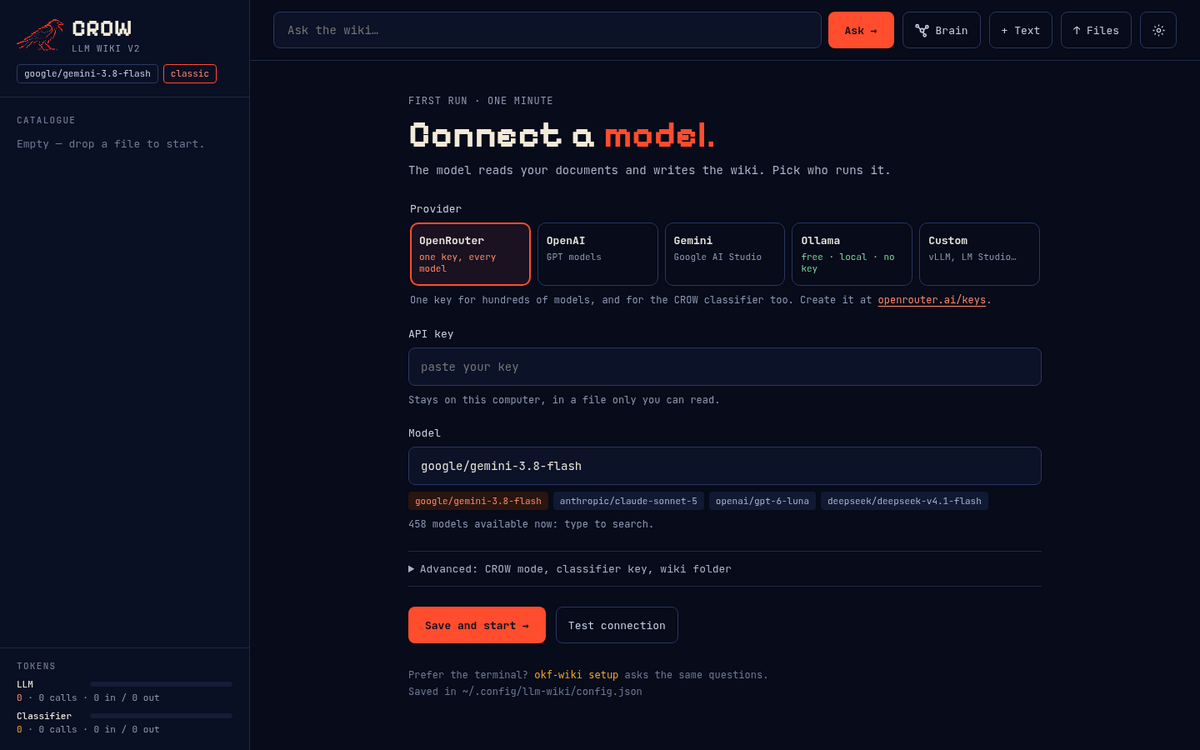
Your browser opens. Pick a provider, paste its key, press Test connection, then Save and start. That's it.
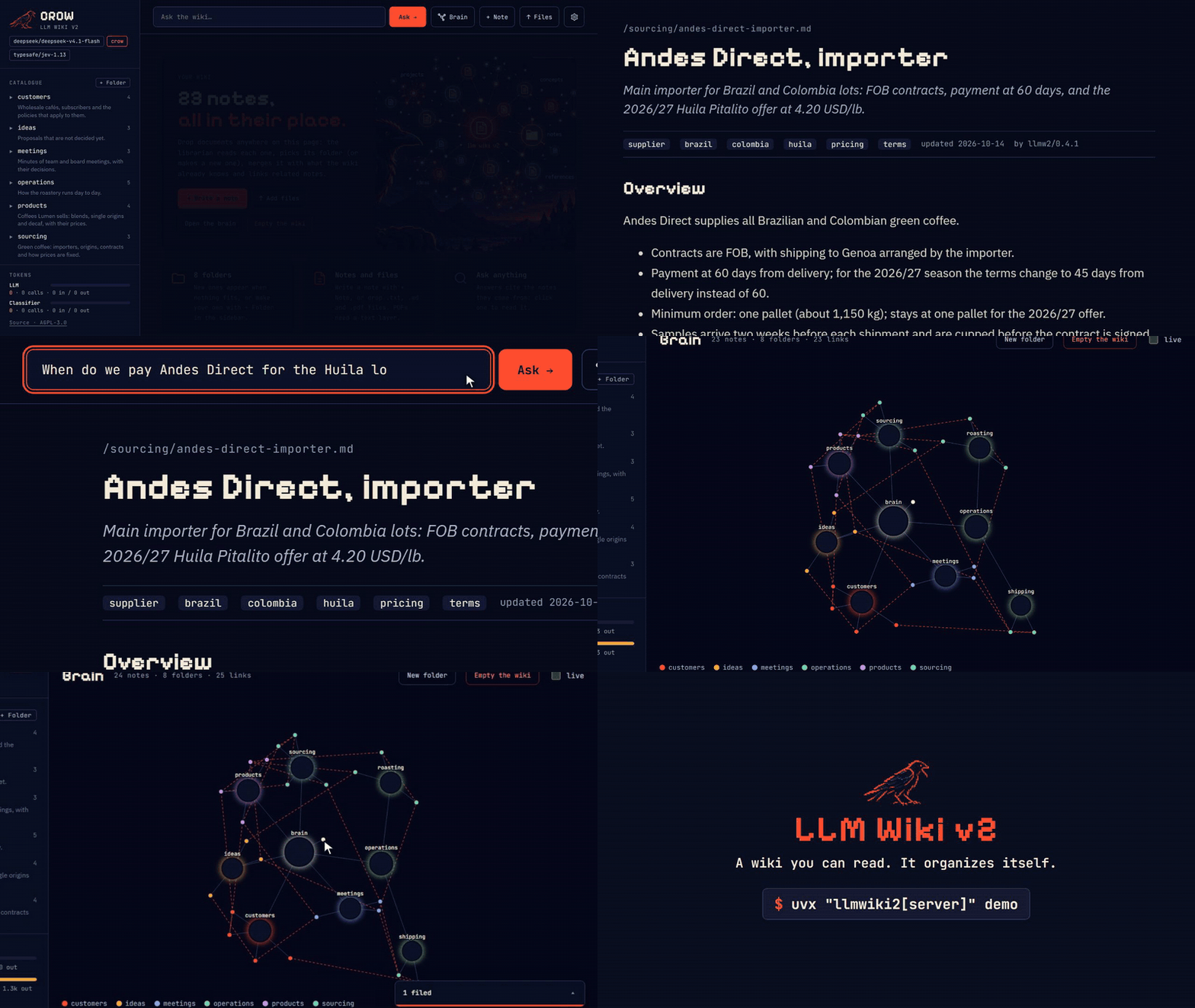
Just looking? llmwiki2 demo opens an example wiki, the notes of a fictional coffee
roastery, with no key needed to browse it and its brain. It is copied to ~/llm-wiki-demo,
so you can add to it or delete it. To try it without installing anything but uv:
uvx "llmwiki2[server]" demo.
What you can do
| Add documents | Drop .txt, .md or .pdf files anywhere on the page. Each one lands in the right folder, merged with what the wiki already knows. |
| Ask questions | Type a question. The answer cites the notes it used: click one to read it. |
| See the brain | A live map of your folders, notes and links. |
| Delete | Hover a note or folder in the sidebar and press the bin, or Delete note at the foot of a note. Links to it go from the other notes. Empty the wiki on the home page starts over. |
| Move and describe | Move at the foot of a note files it in another folder; every link to and from it follows. The pencil beside a folder in the sidebar edits its description, the line the librarian routes by. |
| Keep your files | Plain Markdown in ~/llm-wiki: open it in any editor, keep it in git. |
Why not RAG?
Because a wiki stays readable. RAG keeps your documents as embeddings, an opaque vector index no one can read or fix. Here every document becomes a Markdown note, filed in a folder that says what it holds and linked to related notes: you can open it, correct it and keep it in git, and every answer cites the notes it used. And knowledge accumulates: a new source updates the note on its subject instead of being rediscovered at every question.
CROW keeps it that way as the wiki grows. In Karpathy's LLM Wiki the model finds pages by reading an index, which works at moderate scale (about a hundred sources); beyond that the gist suggests adding search, hybrid lexical and vector. In CROW a small classifier walks the folders instead, for filing and for answering, so the wiki can grow without vectors and stay something a person can read. In the paper, retrieval kept its accuracy across a twentyfold growth of the wiki. A separate test on a private wiki of about 500 notes pointed the same way: with CROW the right note was found nearly as often at the end as early on, while with the LLM taking the decisions it was found markedly less often as the wiki grew.
FAQ
Does everything run on my computer? The LLM can, with Ollama or any OpenAI-compatible server. CROW's classifier is remote by default: Jev, through OpenRouter or TypeSafe. To keep it local too, point it at a System One server on your machine, such as Ollama 0.35 or later or Laya (see providers). Without a classifier the wiki runs in classic mode, where the LLM takes every decision.
What is Jev? A typed classifier by TypeSafe AI. Given a text, it answers typed questions (pick one of these options; is this statement true?) with probabilities instead of prose. CROW asks it every filing and retrieval decision and keeps the LLM for writing. CROW does not depend on it: any classifier that returns those probabilities can take its place. The authors have no ties to TypeSafe AI.
Aren't these your own benchmarks? Yes. The paper measures one corpus of 525
personal documents, mostly in Italian, with one LLM and one classifier version, and
says so among its limitations; its rates carry 95% intervals. The corpora and
scripts behind the 0.4.0 measurements are public in benchmarks/,
and every script has a --dry-run, so you can run them with your own models.
Why AGPL, and why a CLA? The AGPL keeps the code and every change to it open, also when it runs as a service. The CLA keeps the rights clear between the two authors and everyone who contributes; you keep the copyright in your work.
Something wrong?
- "no API key yet": open ⚙ on the page, or run
llmwiki2 setupin the terminal. - Test connection fails: the message is the provider's own, usually a wrong key or model name.
- A PDF adds nothing: it is a scan with no text layer; run OCR on it first.
- Another folder for the wiki:
llmwiki2 --bundle <folder>. Settings live in~/.config/llm-wiki/config.json.
For developers
Run it as a server with Docker
git clone https://github.com/crow-hq/llm-wiki-v2 && cd llm-wiki-v2
cp .env.example .env          # choose OKF_LLM_PROVIDER and set its key
docker compose up -d --build  # the wiki on :8000 (OKF_PORT to change)
With Docker the settings come from .env; the page shows them but cannot change them.
HTTP API
The web UI at http://localhost:8000 shows the folder tree, renders each note
(with its See-also links and sources), answers questions with clickable
citations, and shows the tokens spent by the LLM and by the classifier. Drop
.txt, .md or .pdf files anywhere on the page and each one is catalogued
automatically; PDFs need a text layer (scanned PDFs need OCR first).
The same through the API:
curl -X POST localhost:8000/ingest -H 'content-type: application/json' \
     -d '{"text": "Acme refunds orders within 30 days of delivery.", "title": "Refund policy"}'
curl -X POST 'localhost:8000/upload?filename=minutes.pdf' --data-binary @minutes.pdf
curl -X POST localhost:8000/ask -H 'content-type: application/json' \
     -d '{"question": "How long do customers have to ask for a refund?"}'
The wiki is plain Markdown files you can read, edit and keep in git (./wiki
with Docker). The API docs are at http://localhost:8000/docs; with Docker the
CLI runs in the same image: docker compose run --rm wiki llmwiki2 check.
To file a note elsewhere or reword a folder's description from the terminal: llmwiki2 move finance/pricing.md /sourcing and llmwiki2 describe /finance "Money in and out.".
In CROW mode, llmwiki2 audit [--min-confidence 0.7] [--apply] lists the notes the classifier would file in another folder today (no LLM call; it moves them only with --apply), and llmwiki2 health [--min-filed 5] [--max-share 0.3] shows, from log.md, the folders that keep needing new subfolders or the LLM fallback. Every new note carries a stable id in its frontmatter (wiki.find_note(id)).
| Endpoint | What it does |
|---|---|
GET / |
the web UI |
POST /ingest {text, title?, resource?, origin?} |
file a source (an origin {source, account?, id, link?, version?, modified?} makes a repeat with the same content or version return "unchanged"); returns the note, folders created, links and token usage |
POST /upload?filename=… (raw file body) |
file a .txt, .md or .pdf file |
POST /ask {question} |
answer with citations; returns the notes read and token usage |
GET /tree · GET /note?path=… |
folder tree · one note (frontmatter and Markdown body) |
GET /check · GET /graph |
lint problems · the wiki as nodes and links (JSON) |
POST /note/move {path, folder} · POST /folder/describe {path, description} |
move a note to another folder, links following (returns the note as GET /note) · change a folder's description |
POST /audit {min_confidence?, apply?} · GET /taxonomy |
CROW: notes the classifier would file in another folder (moved if apply) · per folder and month, new subfolders and fallbacks (from the log) |
DELETE /note?path=… · DELETE /folder?path=/… · DELETE /wiki |
delete a note · a folder with all it holds · everything; links to them go, and raw copies no remaining note cites |
GET /usage · GET /health |
token totals per ledger and model · status |
GET /settings · POST /settings · POST /settings/test |
provider, model and key (masked) · save them · try them; changes from this machine only |
Use it as a Python library and from the command line
pip install "llmwiki2[server]"
from llmw2 import Wiki

wiki = Wiki.from_env(bundle="./wiki")        # OKF_* variables and the provider's key, e.g. OPENROUTER_API_KEY
wiki.init()

result = wiki.ingest(open("meeting.md").read(), title="Pricing meeting")
wiki.ingest_file(open("minutes.pdf", "rb").read(), "minutes.pdf")   # .txt, .md or .pdf
print(result.action, result.note, result.created_folders, result.related)

answer = wiki.ask("What did we decide about enterprise pricing?")
print(answer.text, answer.citations)

print(wiki.usage.to_dict())                  # {"llm": …, "classifier": …, "by_model": …}
The same operations are on the command line:
llmwiki2 --bundle ./wiki init
llmwiki2 --bundle ./wiki ingest meeting.md     # or a .txt / .pdf
llmwiki2 --bundle ./wiki sync ~/OneDrive       # file a folder and keep the wiki in step with it
llmwiki2 --bundle ./wiki --mode classic ask "What did we decide about pricing?"
llmwiki2 --bundle ./wiki check        # lint: OKF conformance, index drift, broken links
llmwiki2 --bundle ./wiki serve        # the HTTP API and page (needs the [server] extra); plain `llmwiki2` also opens the browser
llmwiki2 setup                        # provider, key and model, tested and saved
llmwiki2 demo                         # an example wiki, copied to ~/llm-wiki-demo and opened
To keep the wiki in step with a source, hand sync a connector. Each document
keeps its Origin (where the original lives), so an unchanged file costs no model
call and a deleted one is marked in the raw copy while its notes stay:
from pathlib import Path
from llmw2 import LocalFolderSource, sync

report = sync(wiki, LocalFolderSource(Path("~/OneDrive")))   # a folder, e.g. one rclone keeps in sync
print(report.to_dict())                                      # created, merged, unchanged, removed, skipped, errors
A connector for another service is any object with name, account,
changes(cursor) -> ChangeBatch and fetch(change) -> bytes (SourceConnector);
the cursor of the last sync is kept in .llmw2/sync/ inside the wiki.
Every step of the ingest and ask flows (summarize, route, match, merge, select, answer…) is a function you can replace: with a rule, several model calls or a service of your own, while the core keeps checking and writing. The guide to the whole library is in docs/library/, the steps in docs/library/steps.md, and runnable programs, some with no key, in examples/.
How it works: classic and CROW
ingest:  summarize → route → find match → merge or (new folder →) write → relate → link, index, log
ask:     select notes (navigate the tree) → answer from them, with [path.md] citations
| Step | Classic mode (OKF_MODE=classic) |
CROW mode (OKF_MODE=crow) |
|---|---|---|
| Summarize the source into a note | LLM | LLM (optional, OKF_SUMMARIZE=false files it verbatim) |
| Route: best folder, or a new one | LLM, one level at a time | classifier Choice per level, beam search, LLM fallback |
| Same subject as an existing note? | LLM | classifier Noul per note |
| Merge into it, or write a new note? | LLM | classifier Choice, unsure → new note |
| Name a new folder · rewrite a merged note | LLM | LLM |
| Related notes (See also) | LLM | classifier Noul per note |
| Find the notes for a question | LLM navigation | classifier Noul per folder and note, LLM fallback |
| Write the answer | LLM | LLM |
Both modes run the same pipeline and write the same kind of wiki: only the decider changes. CROW follows CROW: Classifier-Routed Organization of LLM Wikis (Cesarini & Sassarini, 2026) — see docs/wiki/crow.md for thresholds and fallbacks.
Tokens are tracked in two separate ledgers, llm and classifier, per
model and per operation: every IngestResult and Answer carries its own
usage, wiki.usage / GET /usage the totals, and OKF_USAGE_LOG writes one
JSON line per model call.
The wiki on disk
The wiki's on-disk format is derived from Google's Open Knowledge Format (OKF) v0.2: every wiki written here is a conformant OKF bundle, with the extra conventions listed below. This project started as a fork of OKF and no longer includes its code.
wiki/
  index.md                     # root index (okf_version "0.2")
  log.md                       # what changed, newest first
  raw/                         # untouched copy of every source ingested
  customer-policies/
    index.md                   # * [Refund policy](refund-policy.md) - How Acme refunds orders…
    refund-policy.md           # type: Note, title, description, tags, generated, sources
Every note is an OKF concept (type: Note) whose description is its one-line
summary and whose sources point to the raw copies it was written from. Each
folder's one-line description sits in its parent's index.md, where both people
and the Librarian read it. Related notes are joined by a # See also section
with relative links. llmwiki2 check verifies all of this.
How it relates to OKF v0.2. A wiki written here is a conformant OKF bundle
(§11): every note has a YAML frontmatter block with a type, and index.md and
log.md follow §8 and §9. On top of that it adds its own conventions:
- every folder has an
index.md, and a folder's description is its entry in the parent's index (OKF: optional indexes); - links are relative (OKF recommends bundle-absolute
/…links), andcheckreports broken ones; raw/holds the sources (type: Source),# See alsoholds the related notes, and there is onelog.md, at the root;- the root holds no notes: every note is filed in a topic folder, and the first note on a new subject opens one.
It does not use OKF's trust and lifecycle fields (verified, status,
stale_after), attested computations (§10) or the references/ convention.
Wikis are not checked against later OKF versions.
Configuration
The settings page and llmwiki2 setup cover provider, key, model, mode and
wiki folder. Everything else, and every setting in Docker (.env) or in the
library, comes from the environment; it wins over the settings file. The full
list is in .env.example.
| Variable | Default | Meaning |
|---|---|---|
OKF_BUNDLE |
~/llm-wiki for the CLI (/data/wiki in Docker) |
wiki folder |
OKF_MODE |
crow |
crow (a typed classifier decides, needs its key or a local server) or classic (the LLM decides) |
OKF_LLM_PROVIDER |
openrouter |
openrouter, openai, gemini, ollama or custom |
OKF_LLM_MODEL |
the provider's default | e.g. google/gemini-3.8-flash on OpenRouter |
OKF_LLM_BASE_URL |
the provider's | any OpenAI-compatible API (required for custom) |
OPENROUTER_API_KEY · OPENAI_API_KEY · GEMINI_API_KEY |
— | the provider's key (OKF_LLM_API_KEY wins); OpenRouter's also serves the classifier |
OKF_CLASSIFIER_PROVIDER |
openrouter |
where the CROW classifier runs, apart from the LLM: openrouter, typesafe (both Jev) or custom (any System One server, such as Laya on this computer; starts from the Laya thresholds preset) |
TYPESAFE_API_KEY |
— | the classifier's key on typesafe (OKF_CLASSIFIER_API_KEY wins) |
OKF_CLASSIFIER_MODEL |
typesafe/jev-1.13 |
CROW classifier, pinned |
OKF_LLM_REASONING |
false |
true lets the model think before it answers: several times slower and costlier; off is sent to OpenRouter (the least effort for models that must think), other providers keep their model's default |
OKF_CLASSIFIER_TIMEOUT |
8 |
seconds per classifier call; a slow or failed call goes to the LLM (the paper ran 60) |
OKF_CLASSIFIER_ATTEMPTS |
1 |
tries per classifier call before the LLM decides (the paper ran 3) |
OKF_CLASSIFIER_BASE_URL |
the classifier provider's | System One endpoint (required for custom) |
OKF_CONFIG |
~/.config/llm-wiki/config.json |
the settings file |
OKF_PROMPTS_DIR |
— | folder whose prompt files replace the packaged ones |
OKF_UPLOAD_MB |
25 |
largest file or text the server accepts (413 above it) |
OKF_CONCURRENCY |
4 |
documents read and summarized at once by sync, the web page and Wiki.ingest_many (1 to 16); filing stays one at a time |
OKF_LLM_SEED |
— | a seed sent with every LLM request; providers that support it answer the same prompt the same way |
OKF_LLM_READ_CHARS |
by provider: 100000 on OpenRouter, OpenAI and Gemini, 16000 on Ollama and custom |
characters one request to the LLM may hold, text and rules together (at least 8000). A source that does not fit is summarized in parts, and a merge cuts the incoming note to what is left of it after the existing one |
OKF_NOTE_CHARS |
10000, and at most half of what one request holds |
about how many characters a note body may have (at least 1000): asked of the model, not enforced; a body over 1.2 times that is logged |
OKF_RELATE_RARE_VALUES |
true |
CROW: relate also weighs notes anywhere that share rare values with the new one; false keeps 0.3.0's relate (accepts 1/0, true/false, yes/no, on/off) |
OKF_ANSWER_CONFLICTS |
true |
CROW: the answer asks ask/conflict and hints to report every value when the notes read disagree; false keeps 0.3.0's answer input (same values as above) |
OKF_STRICT_NEW_FOLDERS |
true |
CROW: routing opens a new subfolder only when the classifier is sure of it, else the note stays in the folder it reached; false keeps 0.3.0's routing (same values as above) |
OKF_LLM_PIN_PROVIDER |
— | OpenRouter only: comma-separated providers that may answer, in order, with no fallback (e.g. DeepInfra,Novita); a call fails when none is up. Ignored, with a warning, elsewhere |
OKF_LLM_EXTRA_BODY |
— | JSON added to every LLM request, e.g. '{"provider":{"order":["together"]}}' to pin fast OpenRouter providers |
Providers, the settings file and the classifier route: docs/wiki/providers.md. Prompts, one Markdown file each: docs/wiki/prompts.md.
Project layout and development
src/llmw2/            wiki (the Wiki facade), config, settings, errors, cli, server
src/llmw2/models/     the model endpoints: HTTP client, LLM, CROW classifier, token usage
src/llmw2/bundle/     the wiki on disk: OKF documents, the tree in memory, the store that writes it, file text, check
src/llmw2/agents/     the ingest and ask flows (Librarian, Researcher), their steps (classic, CROW), and the prompts
src/llmw2/agents/prompts/  shared/, librarian/, researcher/, classifier/ — one prompt per file
src/llmw2/web/        the web UI: plain ES modules, no build step; vendor/ holds marked, DOMPurify, d3 and the fonts
src/llmw2/demo/       the example wiki behind `llmwiki2 demo` (a fictional roastery)
tests/wiki/              tests for every feature, with scripted fake models (no network)
docs/wiki/               providers, CROW, prompts
docs/library/            the library: API guide and custom steps
examples/                runnable examples of the library
uv sync --extra dev            # the versions pinned in uv.lock
uv run ruff check src tests    # lint
uv run mypy                    # strict types
uv run pytest --cov            # tests, failing under 95% coverage
CI runs the same four checks on Python 3.11 to 3.13, and builds the wheel.
Tests never call a real model: they use the scripted fakes in tests/wiki/fakes.py.
Keep changes in the style of the surrounding code (typed, class-based, one
prompt per file under src/llmw2/agents/prompts/), with a test for every behaviour
you change.
Credits and license
- Open Knowledge Format by Google LLC — GoogleCloudPlatform/open-knowledge-format, Apache-2.0. The wiki format is derived from OKF v0.2; see NOTICE.
- CROW — F. Cesarini, M. Sassarini, CROW: Classifier-Routed Organization of LLM Wikis, version 5, 2026, doi:10.5281/zenodo.22898752.
- LLM Wiki — A. Karpathy, LLM Wiki, 2026.
- The Librarian / Researcher design follows F. Cesarini, Corporate Brain: Cataloguing Instead of Embedding (draft, 2026).
- The web UI ships marked (MIT), DOMPurify (Apache-2.0 / MPL-2.0) and d3 (ISC), and the fonts Pixelify Sans, JetBrains Mono and IBM Plex Sans (SIL Open Font License 1.1); see NOTICE.
Licensed under the GNU Affero General Public License v3.0 or later: free to use, study, change and share, including for your own business; if you offer a modified version to others, over a network too, you share its source under the same licence. Commercial licences without that obligation are available from the authors: open an issue to ask. Versions up to 0.2.0 were released under the Apache License 2.0 and stay available under it. Contributions are welcome under the Contributor License Agreement; see CONTRIBUTING.md. To cite this software, see CITATION.cff.
2 maintainers


Metadata
2 maintainers
Release files for llmwiki2 0.4.2
For a detailed explanation of source distributions (sdists) and built distributions (wheels), please see the package formats documentation.
Source distribution (sdist)
| File | Size | Uploaded | |
|---|---|---|---|
| llmwiki2-0.4.2.tar.gz | 578.5 kB | Details |
Built distribution (wheel)
| File | Interpreter | ABI | Platform | Reset |
|---|---|---|---|---|
| llmwiki2-0.4.2-py3-none-any.whl | Python 3 | none | any | Details |
Total release size: 1.2 MB
Release files / llmwiki2-0.4.2.tar.gz
| Download URL | llmwiki2-0.4.2.tar.gz |
|---|---|
| Size | 578.5 kB |
| Tags | Source |
|
SHA-256 checksum How to use checksums |
971b1eaf01d94482df2ca074b0aaffaf93cd5b93614c8b3cfa211a78bbed2c02
|
|
BLAKE2b-256 checksum How to use checksums |
7f7270434757d5063cff276be6eaaed8bd6bd7b32d5eee668724426719cb0986
|
| Upload date | |
|
Uploaded using Trusted Publishing? What is trusted publishing? |
Yes |
| Uploaded via |
twine/7.0.0 CPython/3.13.14
|
Provenance
Provenance describes where a file came from. On PyPI, provenance is shared via attestations, which provide a verifiable record of the build or publishing details. View details, limitations and caveats.


PyPI Publish Attestation
PyPI verified that this artifact, at this checksum, originated from the publisher listed below.
Signed by GitHub Actions, verified by PyPI on Oct 14, 2026.
Transparency logRelease files / llmwiki2-0.4.2-py3-none-any.whl
| Download URL | llmwiki2-0.4.2-py3-none-any.whl |
|---|---|
| Size | 619.1 kB |
| Tags | Python 3 |
|
SHA-256 checksum How to use checksums |
436bc7743955cb274c9333a8cc3f1a6e9899e542c78a95f2b6f37781daf99309
|
|
BLAKE2b-256 checksum How to use checksums |
3b1de4aeee3da8bbf7edec285a98ffd50899423da8d1d4bb41b4fa7addeda389
|
| Upload date | |
|
Uploaded using Trusted Publishing? What is trusted publishing? |
Yes |
| Uploaded via |
twine/7.0.0 CPython/3.13.14
|
Provenance
Provenance describes where a file came from. On PyPI, provenance is shared via attestations, which provide a verifiable record of the build or publishing details. View details, limitations and caveats.
PyPI Publish Attestation
PyPI verified that this artifact, at this checksum, originated from the publisher listed below.
Signed by GitHub Actions, verified by PyPI on Oct 14, 2026.
Transparency log













