
Linkedin Learning Video Downloader CLI Tool

Project description
Table of Contents
- Linkedin Learning Video Downloader (LLVD) download links
- Features
- Prerequisites
- Installation
- Common questions
- Examples
- Screenshots
- Author
Linkedin Learning Video Downloader (LLVD) download links



Features
| Status | Feature |
|---|---|
| ✅ | cookie-based authentication |
| ✅ | download by learning path |
| ✅ | download a course and all its exercises |
| ✅ | group videos by chapters |
| ✅ | subtitles |
| ✅ | nice progress bar |
| ✅ | resume failed downloads |
| ✅ | skip already downloaded videos |
| ✅ | set video format (360p, 540p, 720p) |
| ✅ | all platforms |
Prerequisites
Installation
$ pip --no-cache-dir install llvd
If you have multiple versions of python installed in your system, use pip3 instead.
$ pip3 --no-cache-dir install llvd
Running from local installation
llvd --help
llvd -c "course-slug" -r 720
Running from docker container
# You will need to either use `docker cp` to get the course or mount it when running.
docker run ghcr.io/knowbee/llvd:master -c "course-slug" -r 720
Windows Users
When you get 'llvd' is not recognized as an internal or external command after successfully installing llvd, run python3 -m llvd <flags>
Common Questions
How do I find the course slug?
- Click on the desired course
- Your URl will look something like,
https://www.linkedin.com/learning/l-essentiel-d-asp-dot-net-core-pour-dot-net-5- The course slug is:
l-essentiel-d-asp-dot-net-core-pour-dot-net-5
- The course slug is:
How do I setup cookie-based authentication?
- Click on the options in Google Chrome (top right with 3 vertical dots).
- Click on
More tools->Developer tools- You can also reach here by using the keyboard combination:
ctrl+shift+I).
- You can also reach here by using the keyboard combination:
- Now once you’ve gained access to the developer tools, navigate to the Application tab, and copy the value of two cookies named
li_atandJSESSIONID - Create a file named
cookies.txtand place it in the folder you want to download your courses to - Open the
cookies.txtfile and paste in the values ofli_atandJSESSIONID
li_at=xxxxx
JSESSIONID="ajax:xxxxxx"
How do I setup header-based corporate account access?
If you have a corporate connected account you can fix the download issue by using a headers.txt as per below.
- Create a file named
headers.txtand place it in the folder you want to download your courses to - Right click on the page and select view source
- You can also reach here by using the keyboard combination:
ctrl+U.
- You can also reach here by using the keyboard combination:
- Search for
enterpriseProfileHashusingctrl+F enterpriseProfileHash":"XXXXXXXXXXXXXXXXXXXXXXXXXXXXXXXXXXXXXXXXXXXXXXXXXXXXXXXXXXXXXX","copy the code between the double"
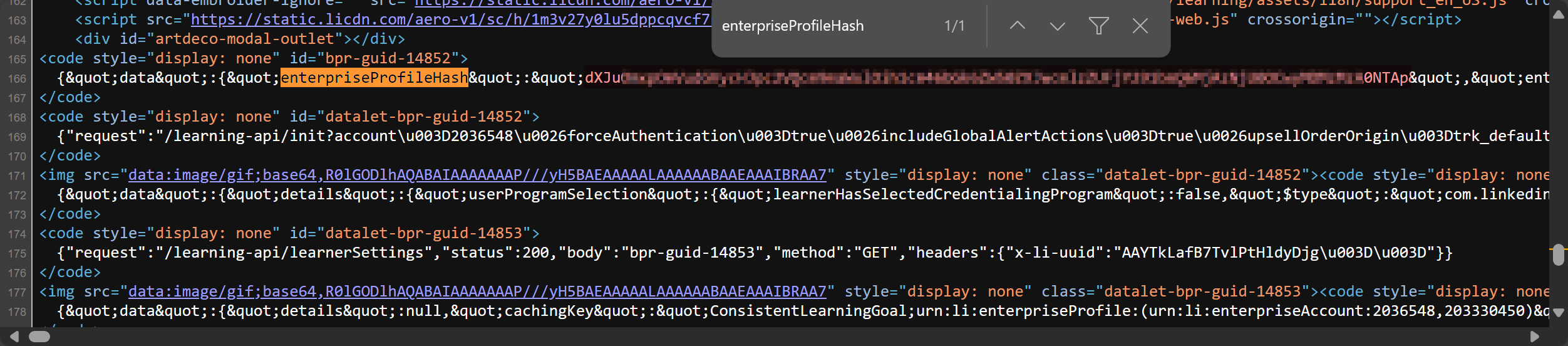 5. Open the `headers.txt` file and paste in the values of `x-li-identity` from the above.
x-li-identity=XXXXXXXXXXXXXXXXXXXXXXXXXXXXXXXXXXXXXXXXXXXXXXXXXXXXXXXXXXXXXX
User-Agent=Mozilla/5.0 (Windows NT 10.0; Win64; x64) AppleWebKit/537.36 (KHTML, like Gecko) Chrome/124.0.0.0 Safari/537.36
Examples
Accessing llvd documentation
$ llvd --help
Using cookie-based authentication
$ llvd -c "course-slug" --cookies
Using header-based authentication
Has to use cookies in conjection with headers
$ llvd -c "course-slug" --cookies --headers
Download a course at a specific resolution
$ llvd -c "course-slug" -r 720
Note: The default is set to 720.
Download a course with subtitles
$ llvd -c "course-slug" --caption
or
$ llvd -c "course-slug" -ca
Download a course path with throttling between 10 to 30 seconds
To avoid rate limits because of downloading a lot of videos, use the following:
$ llvd -p "path-slug" -t 10,30
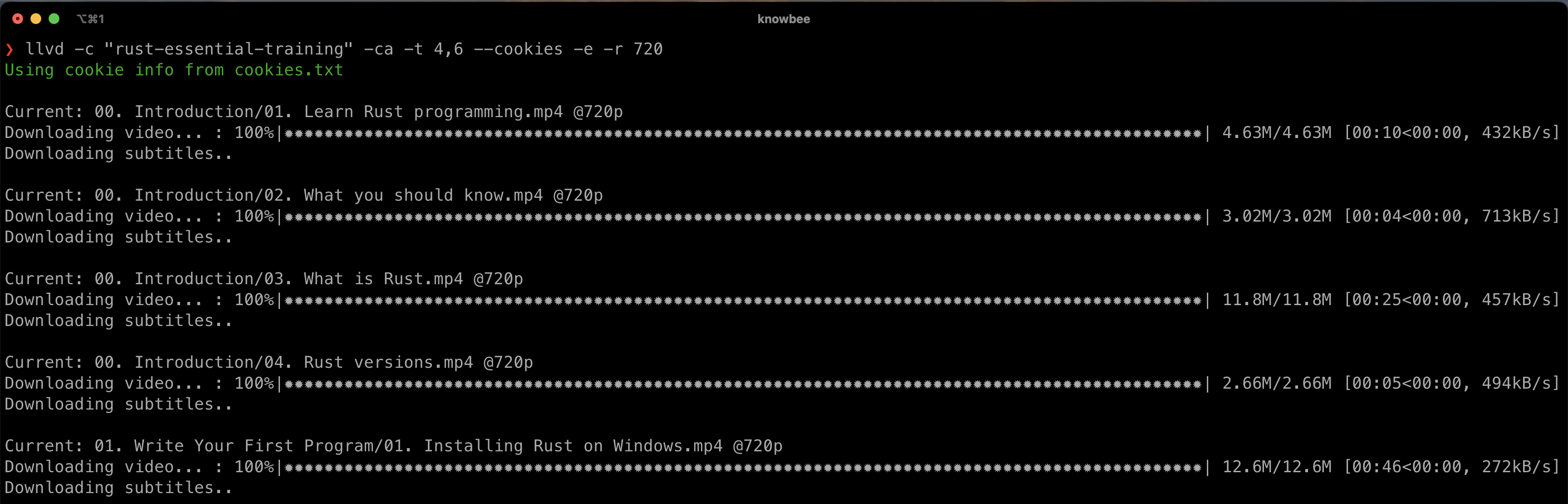
Screenshots
Author
Igwaneza Bruce
Release history Release notifications | RSS feed


Download files
Download the file for your platform. If you're not sure which to choose, learn more about installing packages.
Source Distribution
Built Distribution
Filter files by name, interpreter, ABI, and platform.
If you're not sure about the file name format, learn more about wheel file names.
Copy a direct link to the current filters
File details
Details for the file llvd-3.1.0.tar.gz.
File metadata
- Download URL: llvd-3.1.0.tar.gz
- Upload date:
- Size: 19.7 kB
- Tags: Source
- Uploaded using Trusted Publishing? No
- Uploaded via: twine/6.1.0 CPython/3.12.7
File hashes
| Algorithm | Hash digest | |
|---|---|---|
| SHA256 |
03e667769f59ed0dc633854208b81f9a37a4677ca97b4643d96099997effe6a4
|
|
| MD5 |
207e5932018c6197c412a269c41f7a5c
|
|
| BLAKE2b-256 |
7101c0ec17b5b29a85efc0da1f34e0cfbe4b2acaf34f22be743cf5d8d7ddf2af
|
File details
Details for the file llvd-3.1.0-py3-none-any.whl.
File metadata
- Download URL: llvd-3.1.0-py3-none-any.whl
- Upload date:
- Size: 19.3 kB
- Tags: Python 3
- Uploaded using Trusted Publishing? No
- Uploaded via: twine/6.1.0 CPython/3.12.7
File hashes
| Algorithm | Hash digest | |
|---|---|---|
| SHA256 |
a3a7ce526b98ae1e7d21b0523a00620ba30090acbfbf977436b1be46e7125b69
|
|
| MD5 |
f6edd04d115bb2f14d60de796f6eb3bf
|
|
| BLAKE2b-256 |
36027e12273f8c8e4cecd5315a44eaa5c6d65b8921533604c246e3028bde79c9
|






