
Table of Contents
- Linkedin Learning Video Downloader (LLVD) download links
- Features
- Prerequisites
- Installation
- Common questions
- Examples
- Screenshots
- Author
Linkedin Learning Video Downloader (LLVD) download links



Features
| Status | Feature |
|---|---|
| ✅ | cookie-based authentication |
| ✅ | download by learning path |
| ✅ | download a course and all its exercises |
| ✅ | group videos by chapters |
| ✅ | subtitles |
| ✅ | nice progress bar |
| ✅ | resume failed downloads |
| ✅ | skip already downloaded videos |
| ✅ | set video format (360p, 540p, 720p) |
| ✅ | all platforms |
Prerequisites
Installation
$ pip --no-cache-dir install llvd
If you have multiple versions of python installed in your system, use pip3 instead.
$ pip3 --no-cache-dir install llvd
Running from local installation
llvd --help
llvd -c "course-slug" -r 720
Running from docker container
# You will need to either use `docker cp` to get the course or mount it when running.
docker run ghcr.io/knowbee/llvd:master -c "course-slug" -r 720
Windows Users
When you get 'llvd' is not recognized as an internal or external command after successfully installing llvd, run python3 -m llvd <flags>
Common Questions
How do I find the course slug?
- Click on the desired course
- Your URl will look something like,
https://www.linkedin.com/learning/l-essentiel-d-asp-dot-net-core-pour-dot-net-5- The course slug is:
l-essentiel-d-asp-dot-net-core-pour-dot-net-5
- The course slug is:
How do I setup cookie-based authentication?
- Click on the options in Google Chrome (top right with 3 vertical dots).
- Click on
More tools->Developer tools- You can also reach here by using the keyboard combination:
ctrl+shift+I).
- You can also reach here by using the keyboard combination:
- Now once you’ve gained access to the developer tools, navigate to the Application tab, and copy the value of two cookies named
li_atandJSESSIONID - Create a file named
cookies.txtand place it in the folder you want to download your courses to - Open the
cookies.txtfile and paste in the values ofli_atandJSESSIONID
li_at=xxxxx
JSESSIONID="ajax:xxxxxx"
How do I setup header-based corporate account access?
If you have a corporate connected account you can fix the download issue (where only frist 2 videos download successfully while others fail with "No video URL found" errors) by using a headers.txt as per below.
Method 1: Using Developer Tools (Recommended)
- Create a file named
headers.txtand place it in the folder you want to download your courses to. - Open the Developer Tools in your browser:
- Chrome: Press
Ctrl+Shift+I(Windows/Linux) orCmd+Option+I(macOS) - Firefox: Press
F12orCtrl+Shift+I(Windows/Linux) orCmd+Option+I(macOS)
- Chrome: Press
- Go to the Network tab and refresh the page.
- Filter requests by typing
linkedin.com/learning-apiin the filter box to find relevant API requests. - Click on any of the filtered requests and go to the Headers section.
- In the Request Headers section, you can filter headers by typing
x-li-identityto quickly find the header value. - Copy the
x-li-identityheader value. - Open the
headers.txtfile and paste in the values ofx-li-identityandUser-Agentas shown below:
Method 2: Using Page Source (Alternative)
- Create a file named
headers.txtand place it in the folder you want to download your courses to - Right click on the page and select view source
- You can also reach here by using the keyboard combination:
ctrl+U.
- You can also reach here by using the keyboard combination:
- Search for
enterpriseProfileHashusingctrl+F enterpriseProfileHash":"XXXXXXXXXXXXXXXXXXXXXXXXXXXXXXXXXXXXXXXXXXXXXXXXXXXXXXXXXXXXXX","copy the code between the double"
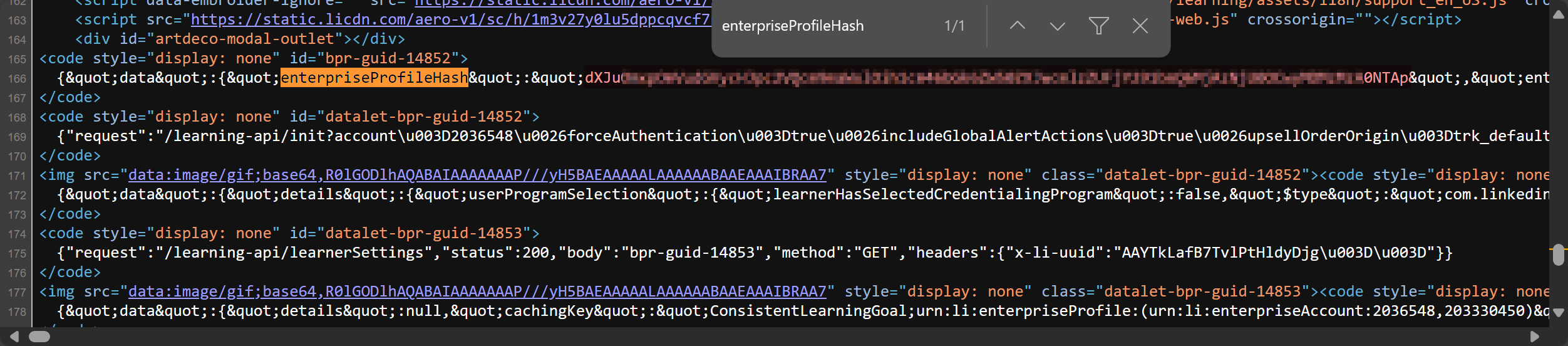 5. Open the `headers.txt` file and paste in the values of `x-li-identity` from the above.
[!NOTE]
Page source may show HTML-encoded characters like=which should be=:❌ x-li-identity=MTU2NDI0NjQ5LDIxNzM4MTk1Nik= ✅ x-li-identity=MTU2NDI0NjQ5LDIxNzM4MTk1Nik=
Headers File Format
x-li-identity=XXXXXXXXXXXXXXXXXXXXXXXXXXXXXXXXXXXXXXXXXXXXXXXXXXXXXXXXXXXXXX
User-Agent=Mozilla/5.0 (Windows NT 10.0; Win64; x64) AppleWebKit/537.36 (KHTML, like Gecko) Chrome/124.0.0.0 Safari/537.36
Examples
Accessing llvd documentation
$ llvd --help
Using cookie-based authentication
$ llvd -c "course-slug" --cookies
Using header-based authentication
Has to use cookies in conjection with headers
$ llvd -c "course-slug" --cookies --headers
Download a course at a specific resolution
$ llvd -c "course-slug" -r 720
Note: The default is set to 720.
Download a course with subtitles
$ llvd -c "course-slug" --caption
or
$ llvd -c "course-slug" -ca
Download a course path with throttling between 10 to 30 seconds
To avoid rate limits because of downloading a lot of videos, use the following:
$ llvd -p "path-slug" -t 10,30
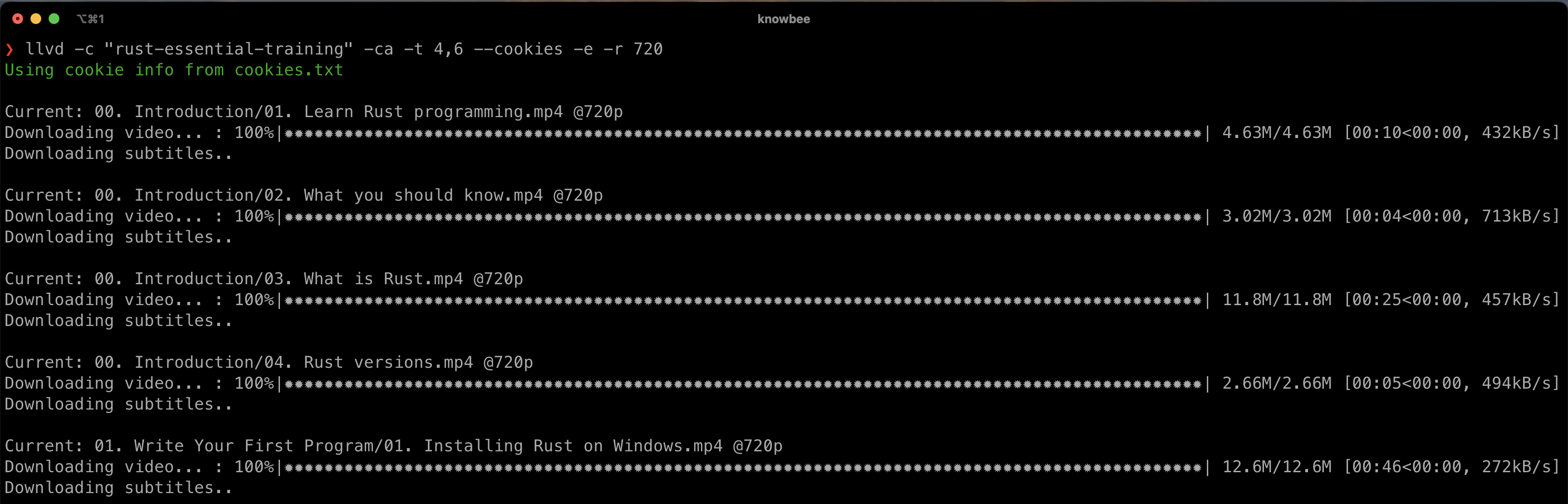
Screenshots
Author
Igwaneza Bruce
1 maintainer

Metadata
1 maintainer
Release files for llvd 3.1.1
For a detailed explanation of source distributions (sdists) and built distributions (wheels), please see the package formats documentation.
Source distribution (sdist)
| File | Size | Uploaded | |
|---|---|---|---|
| llvd-3.1.1.tar.gz | 20.9 kB | Details |
Built distribution (wheel)
| File | Interpreter | ABI | Platform | Reset |
|---|---|---|---|---|
| llvd-3.1.1-py3-none-any.whl | Python 3 | none | any | Details |
Total release size: 40.8 kB
Release files / llvd-3.1.1.tar.gz
| Download URL | llvd-3.1.1.tar.gz |
|---|---|
| Size | 20.9 kB |
| Tags | Source |
|
SHA-256 checksum How to use checksums |
480cf19cf581b496af348d6d05de33cae7bb07117ed3daf40b252904dbb3a77f
|
|
BLAKE2b-256 checksum How to use checksums |
c5fd1d4f2cf522b6519d926591ccdcbdb6f184285c42b98ff351af3183dd0a04
|
| Upload date | |
|
Uploaded using Trusted Publishing? What is trusted publishing? |
No |
| Uploaded via |
twine/6.2.0 CPython/3.9.6
|
Release files / llvd-3.1.1-py3-none-any.whl
| Download URL | llvd-3.1.1-py3-none-any.whl |
|---|---|
| Size | 19.8 kB |
| Tags | Python 3 |
|
SHA-256 checksum How to use checksums |
0e6079ffa8f7355965348bbb48dd1ea1babddd9e91ba3f7339bd8edc3d18aa75
|
|
BLAKE2b-256 checksum How to use checksums |
ac34cef6ddc4674ea16e8e549cd92003f75387c2f3cad6314622f6e31dc49d35
|
| Upload date | |
|
Uploaded using Trusted Publishing? What is trusted publishing? |
No |
| Uploaded via |
twine/6.2.0 CPython/3.9.6
|














