
lm-scorer












📃 Language Model based sentences scoring library
Synopsis
This package provides a simple programming interface to score sentences using different ML language models.
A simple CLI is also available for quick prototyping.
You can run it locally or on directly on Colab using this notebook.
Do you believe that this is useful?
Has it saved you time?
Or maybe you simply like it?
If so, support this work with a Star ⭐️.
Install
pip install lm-scorer
Usage
import torch
from lm_scorer.models.auto import AutoLMScorer as LMScorer

# Available models
list(LMScorer.supported_model_names())
# => ["gpt2", "gpt2-medium", "gpt2-large", "gpt2-xl", distilgpt2"]

# Load model to cpu or cuda
device = "cuda:0" if torch.cuda.is_available() else "cpu"
batch_size = 1
scorer = LMScorer.from_pretrained("gpt2", device=device, batch_size=batch_size, eos=True)

# Return token probabilities (provide log=True to return log probabilities)
scorer.tokens_score("I like this package.")
# => (scores, ids, tokens)
# scores = [0.018321, 0.0066431, 0.080633, 0.00060745, 0.27772, 0.0036381]
# ids    = [40,       588,       428,      5301,       13,      50256]
# tokens = ["I",      "Ġlike",   "Ġthis",  "Ġpackage", ".",     "<|endoftext|>"]

# Compute sentence score as the product of tokens' probabilities
scorer.sentence_score("I like this package.", reduce="prod")
# => 6.0231e-12

# Compute sentence score as the mean of tokens' probabilities
scorer.sentence_score("I like this package.", reduce="mean")
# => 0.064593

# Compute sentence score as the geometric mean of tokens' probabilities
scorer.sentence_score("I like this package.", reduce="gmean")
# => 0.013489

# Compute sentence score as the harmonic mean of tokens' probabilities
scorer.sentence_score("I like this package.", reduce="hmean")
# => 0.0028008

# Get the log of the sentence score.
scorer.sentence_score("I like this package.", log=True)
# => -25.835

# Score multiple sentences.
scorer.sentence_score(["Sentence 1", "Sentence 2"])
# => [1.1508e-11, 5.6645e-12]

# NB: Computations are done in log space so they should be numerically stable.
CLI
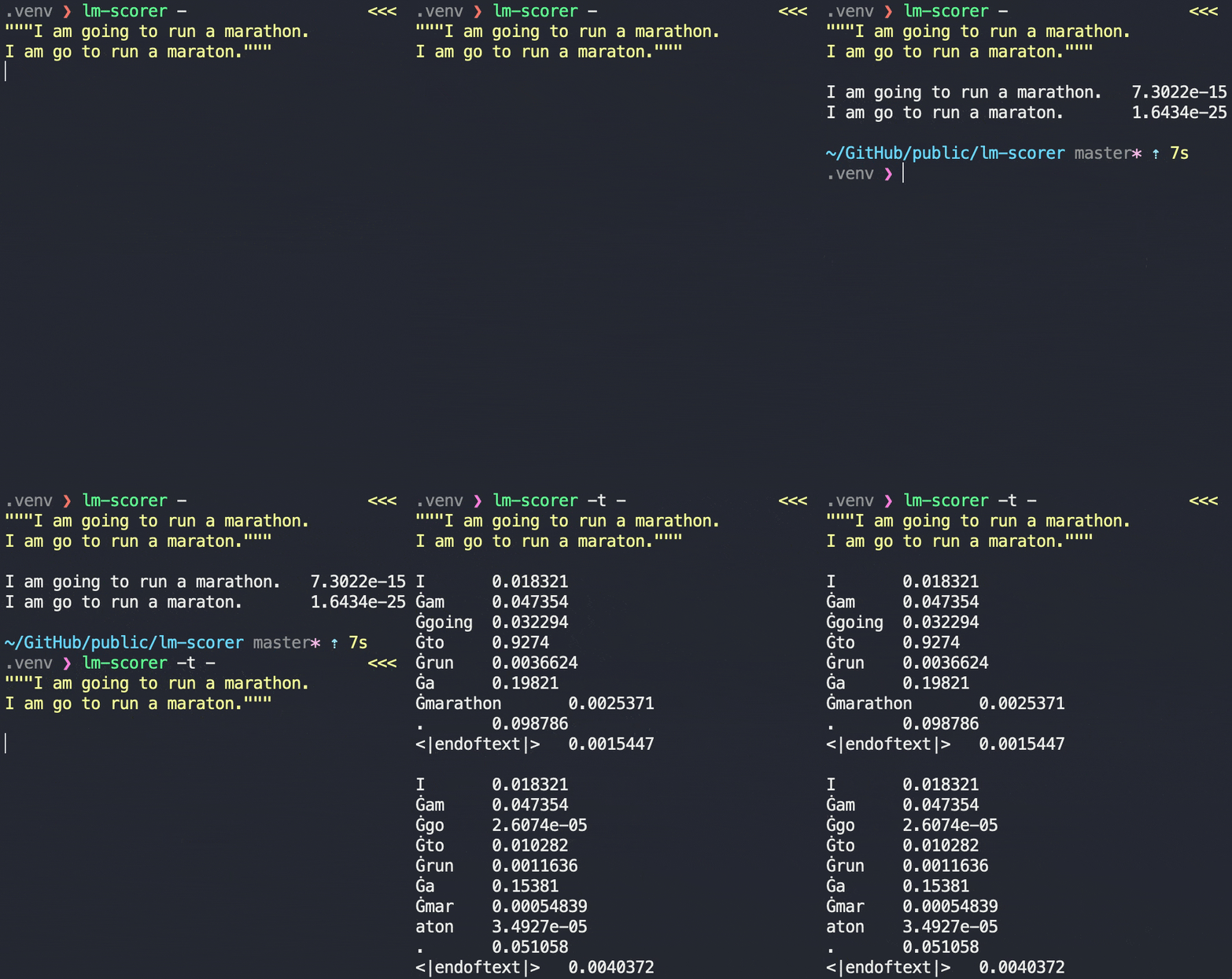
The pip package includes a CLI that you can use to score sentences.
usage: lm-scorer [-h] [--model-name MODEL_NAME] [--tokens] [--log-prob]
                 [--reduce REDUCE] [--batch-size BATCH_SIZE]
                 [--significant-figures SIGNIFICANT_FIGURES] [--cuda CUDA]
                 [--debug]
                 sentences-file-path

Get sentences probability using a language model.

positional arguments:
  sentences-file-path   A file containing sentences to score, one per line. If
                        - is given as filename it reads from stdin instead.

optional arguments:
  -h, --help            show this help message and exit
  --model-name MODEL_NAME, -m MODEL_NAME
                        The pretrained language model to use. Can be one of:
                        gpt2, gpt2-medium, gpt2-large, gpt2-xl, distilgpt2.
  --tokens, -t          If provided it provides the probability of each token
                        of each sentence.
  --log-prob, -lp       If provided log probabilities are returned instead.
  --reduce REDUCE, -r REDUCE
                        Reduce strategy applied on token probabilities to get
                        the sentence score. Available strategies are: prod,
                        mean, gmean, hmean.
  --batch-size BATCH_SIZE, -b BATCH_SIZE
                        Number of sentences to process in parallel.
  --significant-figures SIGNIFICANT_FIGURES, -sf SIGNIFICANT_FIGURES
                        Number of significant figures to use when printing
                        numbers.
  --cuda CUDA           If provided it runs the model on the given cuda
                        device.
  --debug               If provided it provides additional logging in case of
                        errors.
Development
You can install this library locally for development using the commands below. If you don't have it already, you need to install poetry first.
# Clone the repo
git clone https://github.com/simonepri/lm-scorer
# CD into the created folder
cd lm-scorer
# Create a virtualenv and install the required dependencies using poetry
poetry install
You can then run commands inside the virtualenv by using poetry run COMMAND.
Alternatively, you can open a shell inside the virtualenv using poetry shell.
If you wish to contribute to this project, run the following commands locally before opening a PR and check that no error is reported (warnings are fine).
# Run the code formatter
poetry run task format
# Run the linter
poetry run task lint
# Run the static type checker
poetry run task types
# Run the tests
poetry run task test
Citation
If you use lm-scorer in your research, please cite it using the metadata in
CITATION.cff, or the following BibTeX entry:
@software{primarosa_lm_scorer,
  author    = {Primarosa, Simone},
  title     = {{lm-scorer}: Language Model based sentences scoring library},
  year      = {2020},
  publisher = {Zenodo},
  doi       = {10.5281/zenodo.20584992},
  url       = {https://github.com/simonepri/lm-scorer}
}
The concept DOI 10.5281/zenodo.20584992
always resolves to the latest release; each release also has its own version DOI on Zenodo.
Used in research
lm-scorer has been used in the following peer-reviewed publications:
- Schuster, S., & Linzen, T. (2022). When a sentence does not introduce a discourse entity, Transformer-based models still sometimes refer to it. NAACL 2022. https://doi.org/10.18653/v1/2022.naacl-main.71
- Gupta, P., Tsvetkov, Y., & Bigham, J. P. (2021). Synthesizing Adversarial Negative Responses for Robust Response Ranking and Evaluation. Findings of the ACL: ACL-IJCNLP 2021. https://doi.org/10.18653/v1/2021.findings-acl.338
- Kasner, Z., & Dušek, O. (2020). Data-to-Text Generation with Iterative Text Editing. INLG 2020. https://aclanthology.org/2020.inlg-1.9
- Don-Yehiya, S., Choshen, L., & Abend, O. (2022). PreQuEL: Quality Estimation of Machine Translation Outputs in Advance. EMNLP 2022. https://doi.org/10.18653/v1/2022.emnlp-main.767
- Alqahtani, A., Sarioglu Kayi, E., Hamidian, S., Compton, M., & Diab, M. (2022). A Quantitative and Qualitative Analysis of Schizophrenia Language. CLPsych @ NAACL 2022. https://arxiv.org/abs/2201.10430
- Zhang, Z., Mita, M., & Komachi, M. (2023). ClozEx: A Task toward Generation of English Cloze Explanation. Findings of EMNLP 2023. https://aclanthology.org/2023.findings-emnlp.347
- Krause, L., Sommerauer, P., & Vossen, P. (2022). Towards More Informative List Verbalisations. KGSum @ ISWC 2022. https://ceur-ws.org/Vol-3257/paper14.pdf
- Zhang, J., Mishra, A., Avinesh, P. V. S., Patwardhan, S., & Agarwal, S. (2022). Can Open Domain Question Answering Systems Answer Visual Knowledge Questions? arXiv:2202.04306. https://arxiv.org/abs/2202.04306
- Harel, R., Elboher, Y., & Pinter, Y. (2024). Protecting Privacy in Classifiers by Token Manipulation. PrivateNLP @ ACL 2024. https://arxiv.org/abs/2407.01334
- Rodrigues, R. C., Inuzuka, M. A., Gomes, J. R. S. A., et al. (2021). Zero-shot Hashtag Segmentation for Multilingual Sentiment Analysis. arXiv:2112.03213. https://arxiv.org/abs/2112.03213
- Li, J., Ren, M., Gao, Y., & Yang, Y. (2023). Ask to Understand: Question Generation for Multi-hop Question Answering. CCL 2023. https://arxiv.org/abs/2203.09073
Authors
- Simone Primarosa - simonepri
See also the list of contributors who participated in this project.
License
This project is licensed under the MIT License - see the license file for details.
1 maintainer

Metadata
1 maintainer
Release files for lm-scorer 0.6.1
For a detailed explanation of source distributions (sdists) and built distributions (wheels), please see the package formats documentation.
Source distribution (sdist)
| File | Size | Uploaded | Provenance | |
|---|---|---|---|---|
| lm_scorer-0.6.1.tar.gz | 16.8 kB | Without provenance | Details |
Built distribution (wheel)
| File | Interpreter | ABI | Platform | Reset |
|---|---|---|---|---|
| lm_scorer-0.6.1-py3-none-any.whl | Python 3 | none | any | Details |
Total release size: 28.7 kB
Release files / lm_scorer-0.6.1.tar.gz
| Download URL | lm_scorer-0.6.1.tar.gz |
|---|---|
| Size | 16.8 kB |
| Tags | Source |
|
SHA-256 checksum How to use checksums |
87ef8bc76a932f824fdebd61c318298bbdf64de76c0f7f16752042acd5f06edc
|
|
BLAKE2b-256 checksum How to use checksums |
935f086b5ec51c44cd267b5c453474e15480870734b6148e0ce6091c73c24018
|
| Upload date | |
|
Uploaded using Trusted Publishing? What is trusted publishing? |
No |
| Uploaded via |
poetry/2.4.1 CPython/3.13.13 Linux/6.17.0-1015-azure
|
Release files / lm_scorer-0.6.1-py3-none-any.whl
| Download URL | lm_scorer-0.6.1-py3-none-any.whl |
|---|---|
| Size | 11.9 kB |
| Tags | Python 3 |
|
SHA-256 checksum How to use checksums |
420dcb85e97d0d9e8fd5e239b225f30d60af6bfe81cf28c5e9eeefb664c8cfce
|
|
BLAKE2b-256 checksum How to use checksums |
f16bdc98251abd6fa500c46a628bd7a80ed0265ad1dc80bba0205f9e98d40b1e
|
| Upload date | |
|
Uploaded using Trusted Publishing? What is trusted publishing? |
No |
| Uploaded via |
poetry/2.4.1 CPython/3.13.13 Linux/6.17.0-1015-azure
|
Security for lm-scorer 0.6.1
Provenance
Provenance describes where a file came from. On PyPI, provenance is shared via attestations, which provide a verifiable record of the build or publishing details. View details, limitations and caveats.
No provenance found
None of the files in this release were uploaded with provenance metadata.
A note on package security
PyPI is a repository for distributing packages, not a service for auditing them. While third-party security researchers and our staff do their best to detect and remove malicious packages, PyPI cannot guarantee the quality, security or suitability of any given package.














