
lmrelay - a credentialed relay beside a local Ollama






If you work with Ollama, you run into this: by default it is reachable only from localhost,
and it has no built-in authentication. Connecting to Ollama from another machine usually means
changing its systemd configuration, or putting a reverse proxy in front of it. lmrelay solves
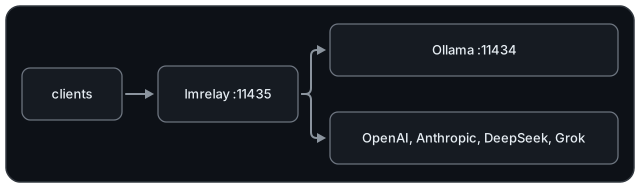
that. It installs with pip and runs as a daemon beside Ollama: it listens on a port of its own
and, when you want it to, requires a credential for access.
English | Español | Português | Français | Deutsch | Italiano | Русский | 中文 | 日本語 | हिन्दी | 한국어
Requirements
- Python 3.11 or higher, and four dependencies: FastAPI, starlette, uvicorn and httpx.
- Linux and macOS run every command, including
serve(detached) andenable: a systemd--userunit on Linux, a launchd agent on macOS, and a refusal where neither is installed. - Windows runs
runonly.servereports that the platform has noos.fork, andenablethat there is no systemd or launchd, rather than half-starting. - A local Ollama on 11434 is the default upstream, but it is not required. A relay with only
hosted providers configured is valid, as long as
default_upstreamnames one of them.
Installation
pip install lmrelay
Or the current main, which may be ahead of the release:
pip install git+https://github.com/wachawo/lmrelay.git
Quick start
lmrelay init     # writes ~/.lmrelay/lmrelay.toml
lmrelay run      # foreground, port 11435
Ollama keeps 11434 and its installation is left exactly as it is. Clients are repointed at 11435 instead. That is the trade: nothing about an existing Ollama has to change, and the relay is opt-in per client.
Auth is off in a fresh state, so on loopback this is a transparent proxy in front of Ollama. That is deliberate: a relay you have just installed should not lock you out of your own Ollama before you have a token. Point a client at 11435 and it works:
OLLAMA_HOST=127.0.0.1:11435 ollama list
Checking it works
Ask the relay for the model list. Either dialect will do; both reach the same Ollama:
curl http://127.0.0.1:11435/api/tags    # Ollama's shape
curl http://127.0.0.1:11435/v1/models   # OpenAI's shape
Then put a model to work. qwen3:8b here is whatever ollama list shows on your machine:
curl http://127.0.0.1:11435/api/generate -d '{
  "model": "qwen3:8b",
  "prompt": "Reply with exactly: it works",
  "stream": false,
  "think": false
}'
curl http://127.0.0.1:11435/v1/chat/completions \
  -H "Content-Type: application/json" \
  -d '{
  "model": "qwen3:8b",
  "messages": [{"role": "user", "content": "say ok"}]
}'
qwen3 reasons before it answers, and only Ollama's dialect has a switch for that: the "think": false above. Through /v1/chat/completions the reasoning arrives inside the content as a <think> block, because lmrelay forwards what the upstream produced and does not edit it.
With auth on, every one of these needs the credential:
curl http://127.0.0.1:11435/api/tags \
  -H "Authorization: Bearer $TOKEN"
Running it for real
lmrelay token gen --label laptop   # printed once, never again
lmrelay auth true                  # now start requiring it
lmrelay enable                     # start at login, and start now
lmrelay status
lmrelay      running (pid 40213), healthy
listening    127.0.0.1:11435
config       /home/u/.lmrelay/lmrelay.toml
state        /home/u/.lmrelay/state.json
upstreams    anthropic, ollama, openai (default: ollama)
auth         on, 2 tokens
limits       total 10/30m, 2 at once
autostart    systemd: enabled, active
enable registers a systemd --user unit on Linux or a launchd agent on macOS, then starts
it. From then on stop, restart and reload go through that manager instead of the
pidfile, so the two cannot disagree about who owns the process. On a POSIX box with neither
manager, lmrelay serve runs the relay detached.
Limiting what a caller may ask for
lmrelay limits set total 1              # one request at a time
lmrelay limits set total 1/60s          # one a minute, and still one at a time
lmrelay limits set per_address 2 10/30m # ten every half hour, two at a time
lmrelay limits set per_token 0          # off
Three scopes, two numbers each. concurrent is how many a caller may have in flight at
once, rate is how often it may start one, written count/period, and a request must pass
every scope you set. A rate on its own carries a cap of its own count, because "one a
minute" said with nothing about at-once means one at a time.
If you set one thing, set total. It is the one that protects the machine: ten callers
each inside their own limit still arrive together, and a per-caller cap cannot see that.
per_token beside it is what keeps one client with fifty threads from owning all of it.
A refused caller gets a 429 naming the scope, and a Retry-After when the relay can work
one out honestly:
lmrelay: the relay's rate limit is exceeded: 10/30m ([limits.total])
The command writes into lmrelay.toml and leaves the rest of the file alone, comments
included, then signals a running relay.
Usage
| Command | Does |
|---|---|
lmrelay init |
write ~/.lmrelay/lmrelay.toml |
lmrelay run |
run in the foreground |
lmrelay serve |
run detached, appending to lmrelay.log |
lmrelay stop |
stop the running relay |
lmrelay restart |
stop it, then start it detached again |
lmrelay reload |
re-read the config without dropping a connection |
lmrelay status |
what is running, where, with which upstreams |
lmrelay enable |
start at login, and start now |
lmrelay disable |
undo enable |
lmrelay auth true|false |
require a caller credential, or do not |
lmrelay token gen [--label L] |
mint a token and print it once |
lmrelay token add TOKEN [--label L] |
register a token you chose yourself |
lmrelay token list [--show] |
list tokens, masked unless --show |
lmrelay token delete ID |
remove one by the id token list prints |
lmrelay provider add NAME TOKEN |
add or rotate an upstream |
lmrelay provider list [--show] |
every upstream, from the file and from state |
lmrelay provider delete NAME |
remove a provider that state owns |
lmrelay limits set SCOPE N[/PERIOD] [N/PERIOD] |
set one scope's limits in the config file |
lmrelay export [PATH] |
write everything needed to reproduce this relay |
lmrelay import [PATH] |
replace the config and the state with a bundle |
run, serve and restart take --host and --port. provider add takes --base-url,
--dialect and a repeatable --header K=V; with a known name (openai, anthropic,
deepseek, grok, ollama) the base URL, dialect and header shape come from a preset,
so lmrelay provider add openai sk-... is the whole command. export takes --no-secrets,
both it and import take --force to write over what is already there, and with no path at
all the bundle goes to stdout and is read from stdin, so lmrelay export | ssh other-host lmrelay import moves a relay in one line. --config PATH is accepted by every command that
reads the config or the state, which is every command except init, which always writes
~/.lmrelay/lmrelay.toml, and disable, which reads neither.
Choosing an upstream
The first path segment selects the upstream if and only if it exactly matches a key in
[upstream]. Otherwise default_upstream handles the request and the path is untouched.
POST /api/chat                     -> ollama     /api/chat
POST /v1/chat/completions          -> ollama     /v1/chat/completions
POST /openai/v1/chat/completions   -> openai     /v1/chat/completions
POST /anthropic/v1/messages        -> anthropic  /v1/messages
POST /deepseek/v1/chat/completions -> deepseek   /v1/chat/completions
POST /grok/v1/chat/completions     -> grok       /v1/chat/completions
So a client only has to learn the port once, and retargeting one at a different provider is a single line:
from openai import OpenAI
from anthropic import Anthropic

OpenAI(base_url="http://relay:11435/openai/v1", api_key=RELAY_TOKEN)
OpenAI(base_url="http://relay:11435/v1", api_key=RELAY_TOKEN)  # Ollama
Anthropic(base_url="http://relay:11435/anthropic", api_key=RELAY_TOKEN)
curl http://127.0.0.1:11435/api/chat \
  -H "Authorization: Bearer $TOKEN" \
  -d '{
  "model": "llama3",
  "messages": [{"role": "user", "content": "hi"}]
}'
GET /healthz answers {"status": "ok"} without touching an upstream and without a
credential. GET /metrics answers a Prometheus scrape of aggregate counters and does need
one, because it says how the relay is used rather than only that it is alive. Everything else
goes through the relay.
Compatibility
lmrelay forwards the method, path, query string and body bytes unchanged, and it does not translate between API dialects.
| Your client speaks | Path it uses | ollama | openai | deepseek | grok | anthropic |
|---|---|---|---|---|---|---|
| Ollama API | /api/chat, /api/generate, /api/tags |
yes | no | no | no | no |
| OpenAI API | /v1/chat/completions, /v1/models |
yes¹ | yes | yes | yes | no |
| Anthropic API | /v1/messages |
no | no | no | no | yes |
¹ Ollama serves an OpenAI-compatible surface at /v1/* alongside its native /api/*. This
is the practically important cell: an OpenAI-shaped client reaches all of ollama,
openai, deepseek and grok by changing only the path prefix.
The four cases that do not work, and the reason each one cannot be made to work, are in the configuration document.
Where lmrelay can tell that a path certainly does not exist upstream, it says so itself rather than letting the provider's 404 look like your mistake:
lmrelay: upstream 'anthropic' speaks the Anthropic API;
'/v1/chat/completions' is an OpenAI-dialect path. lmrelay
forwards requests unchanged and does not translate between
dialects.
Every error lmrelay generates begins with lmrelay: , so it is never mistaken for something
the provider said.
Configuration and Errors - the config file, caller tokens, providers, autostart, streaming behaviour, and what every error means.
Testing
python3 -m venv .venv
source .venv/bin/activate
pip install -r requirements-dev.txt
pytest
pytest --cov=lmrelay --cov-report=term-missing
python3 main.py run starts the relay straight from the checkout, without installing it; for that requirements.txt alone is enough.
Most of the suite drives the app in process against a recording upstream, so it needs no
network and no Ollama. tests/test_streaming.py is the
exception: it runs the relay under uvicorn in front of an upstream that answers a chunk at a
time, because the property it checks, that the caller has the first line before the
upstream has written the last, cannot be seen through an in-process client.
Why not nginx?
nginx already reverse-proxies, so a daemon has to earn its place. Briefly, point by point:
- Provider keys end up inside
nginx.conf. Alocationand aproxy_set_header Authorization "Bearer sk-..."for each one, plusproxy_ssl_server_name onwhen the upstream speaks TLS. Here it is one command, and the key lives in a0600file rather than in a root-owned0644one. - Checking a caller's token in nginx puts the tokens in
nginx.conftoo. Amapand aninternallocation do it without a backend, but each token becomes a plaintext line in that same root-owned file, and adding or revoking one takes an edit and a reload. htpasswdhas no ids or rotation.lmrelay token gen --label laptop,token listandtoken delete 1do.- nginx's defaults break streaming.
proxy_bufferingis on andproxy_read_timeoutis 60s, and a large local model can think for longer than a minute before its first token. Both have to be found and turned off, usually after an answer has been cut in half. - A wrong-dialect path gets the provider's own 404 through nginx. For the shapes it recognises, such as an Anthropic path sent to an OpenAI upstream, the relay answers 400 in its own words, so the mistake is not misread as the provider's.
- nginx ships with neither macOS nor Windows.
pip installworks the same on both. - An SDK cannot be pointed at
auth_basicthe documented way. It acceptsBasicand refuses everything else, while every SDK puts its key inAuthorization: Bearer. Credentials in the URL do get through, but thenapi_keyis dead weight: httpx writes the URL's credentials into that same header and the bearer never leaves. Every example in the provider's own documentation has to be rewritten.
Where nginx wins: TLS, already being installed, and rate limiting that holds up outside one process. The first two are not coming. lmrelay does have limits in three scopes, per credential, per address and for the relay as a whole, and the first of those is keyed on the caller's token in a way nginx cannot manage without holding the tokens itself. They are counted in this one process. The two compose rather than compete. Put nginx in front for TLS, and leave tokens, providers and limits here.
License
MIT License. See LICENSE.
1 maintainer

Metadata
1 maintainer
Release files for lmrelay 0.0.7
For a detailed explanation of source distributions (sdists) and built distributions (wheels), please see the package formats documentation.
Source distribution (sdist)
| File | Size | Uploaded | |
|---|---|---|---|
| lmrelay-0.0.7.tar.gz | 254.0 kB | Details |
Built distribution (wheel)
| File | Interpreter | ABI | Platform | Reset |
|---|---|---|---|---|
| lmrelay-0.0.7-py3-none-any.whl | Python 3 | none | any | Details |
Total release size: 337.9 kB
Release files / lmrelay-0.0.7.tar.gz
| Download URL | lmrelay-0.0.7.tar.gz |
|---|---|
| Size | 254.0 kB |
| Tags | Source |
|
SHA-256 checksum How to use checksums |
d8718bb0d24cb886bca9dc171027159aa49f086a60c5bfc9e99121a6fe5a8ae3
|
|
BLAKE2b-256 checksum How to use checksums |
f1fbf912e9418aa76e62b43d8503dc11e3b0a0f4f2d09cdadb5178627fb2aa44
|
| Upload date | |
|
Uploaded using Trusted Publishing? What is trusted publishing? |
Yes |
| Uploaded via |
twine/7.0.0 CPython/3.13.14
|
Provenance
Provenance describes where a file came from. On PyPI, provenance is shared via attestations, which provide a verifiable record of the build or publishing details. View details, limitations and caveats.


PyPI Publish Attestation
PyPI verified that this artifact, at this checksum, originated from the publisher listed below.
Signed by GitHub Actions, verified by PyPI on Sep 1, 2026.
Transparency logRelease files / lmrelay-0.0.7-py3-none-any.whl
| Download URL | lmrelay-0.0.7-py3-none-any.whl |
|---|---|
| Size | 83.9 kB |
| Tags | Python 3 |
|
SHA-256 checksum How to use checksums |
787c0e9fb382fec0cb71d936f5a76a8e0958f3fc9990d22f2f59fb9d779f6491
|
|
BLAKE2b-256 checksum How to use checksums |
4d16e9ab6e439e8f203097c73fa8cd664fac1dc56c68b63a4fa9d10652b71b9e
|
| Upload date | |
|
Uploaded using Trusted Publishing? What is trusted publishing? |
Yes |
| Uploaded via |
twine/7.0.0 CPython/3.13.14
|
Provenance
Provenance describes where a file came from. On PyPI, provenance is shared via attestations, which provide a verifiable record of the build or publishing details. View details, limitations and caveats.
PyPI Publish Attestation
PyPI verified that this artifact, at this checksum, originated from the publisher listed below.
Signed by GitHub Actions, verified by PyPI on Sep 1, 2026.
Transparency log













