
lmtk
Interactively play with GPT-based tools from the terminal


Description
(TODO: Update README with information about other modes, config profiles, scripting, JS sandbox, and Jupyter integration)
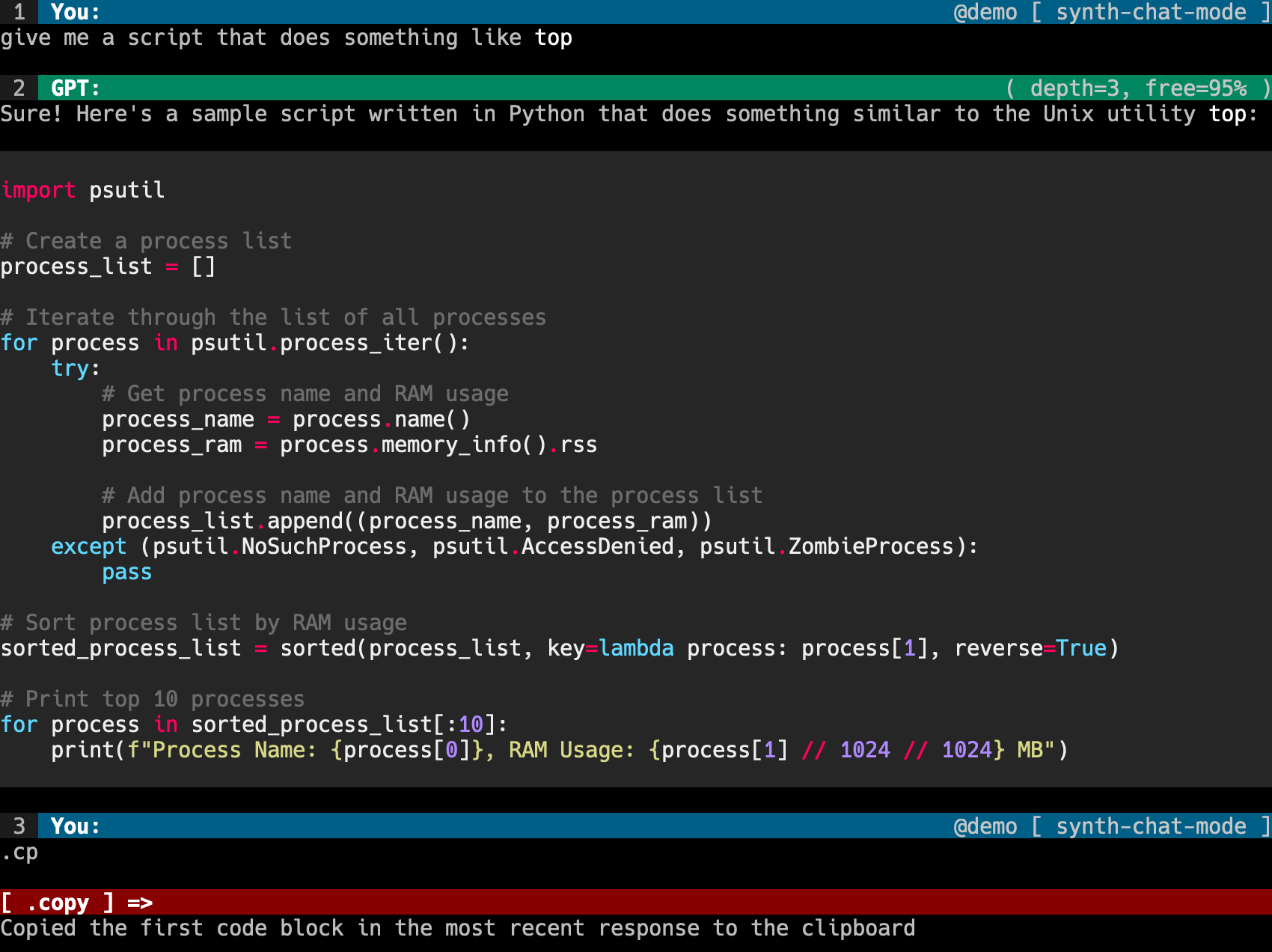
ChatGPT needs a power-user mode. lmtk gives you a terminal UI for interacting with ChatGPT and other GPT-based tools.
The default mode, synth-chat, uses a ChatGPT-like chatbot built directly from GPT-3. It supports features not possible with ChatGPT, including:
- Writing the prefix of the next response
- Giving instructions that will always be followed and never forgetten
This project is still in the early stages of development. It will have bugs and frequent breaking changes.
Install
For now, Python >=3.9 is required. Use pip3 instead of pip if necessary.
pip install -U lmtk[extras]
If you are having trouble with the TensorFlow dependency, you can exclude it:
pip install -U lmtk
This will disable automatic code syntax detection, but most lmtk modes are good about manual syntax annotation.
If you don't have an OpenAI API key create one here and set it:
export OPENAI_API_KEY="<your api key>"
Usage
lmtk @thread-name [-m mode-name]
Use lmtk modes to list available REPL modes and lmtk threads to list open threads.
Inside the REPL, type .help for a list of commands and keyboard shortcuts.
Tips
Conversation Seeds
Conversation seeds give you extremely strong influence over the chatbot's behavior.
.seed You must write your message using only lowercase letters
All future responses will only use lowercase letters (usually). Seeds are never forgotten. Seeds are best phrased as statements of fact or commands. See .help for examples.
Forced Response Prefix
If you aren't getting a response you like, you can directly specify how the next response must start using :>. For example, if you send:
Give me Pong in Pygame :> Here is the code:
Then the response will start with Here is the code:.
Useful Commands
See .help for a full list, but these are some particularly important commands:
.clearorC-x + C-cto clear the screen.exitorC-dto exit the REPL.neworC-x + C-nto reset the thread.redoorC-x + C-rto resample the response.undoorC-x + C-uto rewrite your most recent message
Custom Modes
Add a Python file that looks like this to $LMTK_CONFIG_PATH/plugins/. By default this will be ~/.config/lmtk/plugins/.
See lmtk/modes for more complete examples.
Development
To install lmtk from source:
git clone git@github.com:veered/lmtk.git
cd lmtk
pip install -U flit
flit install -s
Screenshot
1 maintainer

Metadata
1 maintainer
Release files for lmtk 0.4.32
For a detailed explanation of source distributions (sdists) and built distributions (wheels), please see the package formats documentation.
Source distribution (sdist)
| File | Size | Uploaded | Provenance | |
|---|---|---|---|---|
| lmtk-0.4.32.tar.gz | 50.3 kB | Without provenance | Details |
Built distribution (wheel)
| File | Interpreter | ABI | Platform | Reset |
|---|---|---|---|---|
| lmtk-0.4.32-py3-none-any.whl | Python 3 | none | any | Details |
Total release size: 113.2 kB
Release files / lmtk-0.4.32.tar.gz
| Download URL | lmtk-0.4.32.tar.gz |
|---|---|
| Size | 50.3 kB |
| Tags | Source |
|
SHA-256 checksum How to use checksums |
904a3e4fd352703fb161510883ae65fcd3dc556c07307bfc36b4b1efa2e6d042
|
|
BLAKE2b-256 checksum How to use checksums |
89d6a909c9ea04190f2ab15e7214f17454130c4edd97d3eee9a13345954ba684
|
| Upload date | |
|
Uploaded using Trusted Publishing? What is trusted publishing? |
No |
| Uploaded via |
python-requests/2.28.1
|
Release files / lmtk-0.4.32-py3-none-any.whl
| Download URL | lmtk-0.4.32-py3-none-any.whl |
|---|---|
| Size | 62.9 kB |
| Tags | Python 3 |
|
SHA-256 checksum How to use checksums |
b25a0194d59e0898e553bdeb524b433ebbc0526b245affdfb1a724f10abff7c9
|
|
BLAKE2b-256 checksum How to use checksums |
f009555242fc6ddf9a99b3e1fc9d9bbde038b0a0145df64505d9d09476113ca1
|
| Upload date | |
|
Uploaded using Trusted Publishing? What is trusted publishing? |
No |
| Uploaded via |
python-requests/2.28.1
|
Security for lmtk 0.4.32
Provenance
Provenance describes where a file came from. On PyPI, provenance is shared via attestations, which provide a verifiable record of the build or publishing details. View details, limitations and caveats.
No provenance found
None of the files in this release were uploaded with provenance metadata.
A note on package security
PyPI is a repository for distributing packages, not a service for auditing them. While third-party security researchers and our staff do their best to detect and remove malicious packages, PyPI cannot guarantee the quality, security or suitability of any given package.
To learn more about protecting yourself from malicious actors, visit our package security documentation.














