
The Lob API is a comprehensive direct mail and address verification service that helps developers extend their applications into the physical world through automated print and mail capabilities. It provides APIs for creating and managing addresses, verifying US and international addresses, managing bank accounts for check printing, and handling campaigns for bulk mail operations.

Project description
Getting Started with Lob API
Introduction
Lob helps creators extend their applications into the physical world with automated direct mail and address verification APIs.
Get started in the way that works best for you:
- Watch our 10-minute video walkthrough showing how to get started with Lob API collections.
-
Explore our API documentatation: docs.lob.com
-
Read through our Getting Started guide below
Need more help? Contact us at support@lob.com
Getting Started
Sign up for a free Lob account
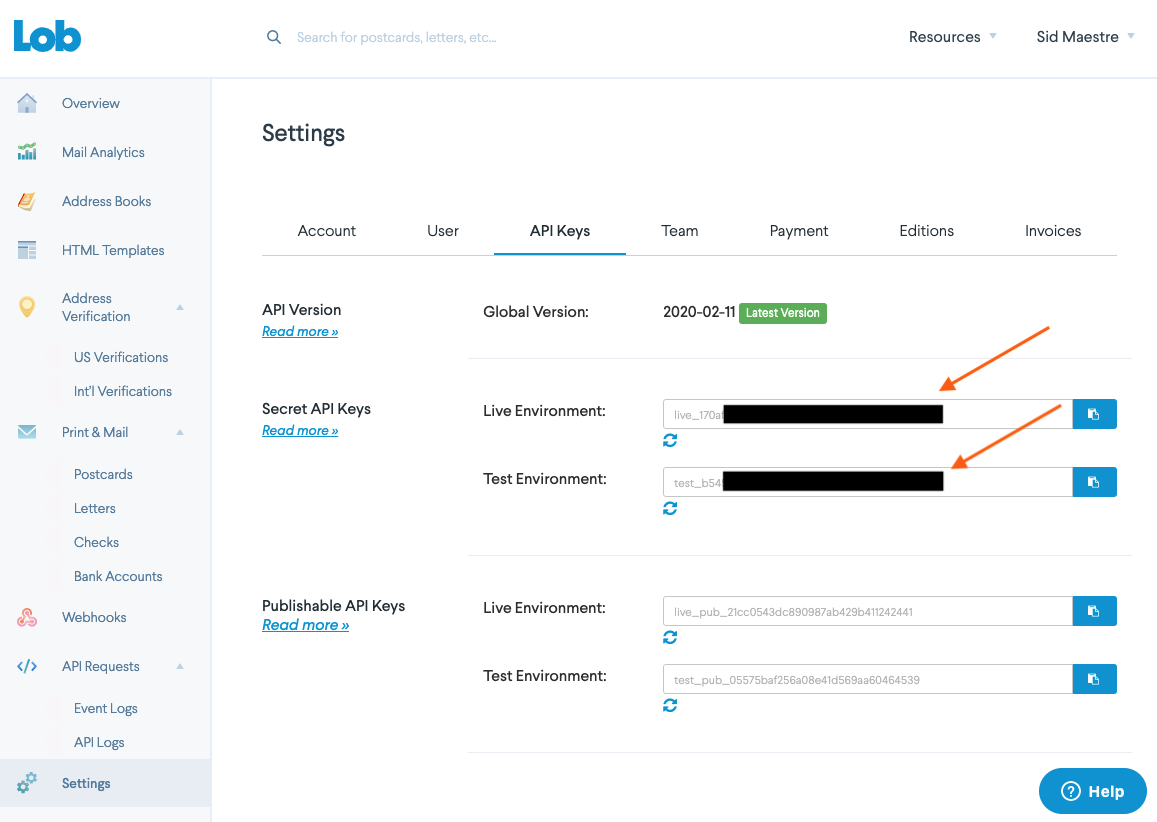
Your API keys are located under Settings.
You'll use the SECRET API KEYS that begin with test_. for your Test API key and live_. for your Live API key.
In order to use the collections in this public workspace, you'll select the Lob API collection and fork it into your personal workspace.
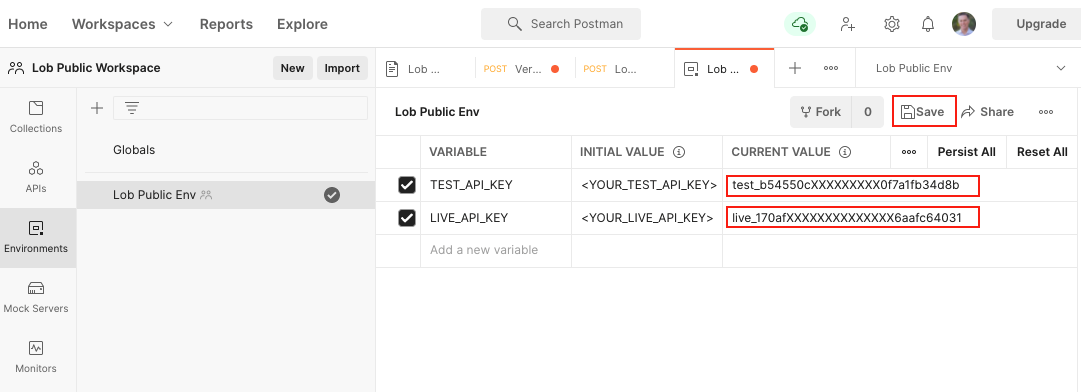
You'll also want to setup environment variables. A short cut is to fork Lob Public Env from Lob's public workspace. You also have the option to create them yourself - see the image below.
Set the Current Value for LIVE_API_KEY and TEST_API_KEY to your Lob "live" and "test" API keys and click Save.
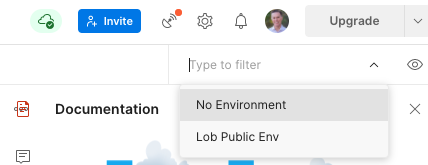
Make sure Lob Public Env is selected in the environment menu.
Start exploring Lob's API collection
The Test API key is used for all print & mail related endpoints while the Live API key is used for the address verification endpoint.
Install the Package
The package is compatible with Python versions 3.7+.
Install the package from PyPi using the following pip command:
pip install lob-api-sdk==1.0.0
You can also view the package at: https://pypi.python.org/pypi/lob-api-sdk/1.0.0
Test the SDK
You can test the generated SDK and the server with test cases. unittest is used as the testing framework and pytest is used as the test runner. You can run the tests as follows:
Navigate to the root directory of the SDK and run the following commands
pip install -r test-requirements.txt
pytest
Initialize the API Client
Note: Documentation for the client can be found here.
The following parameters are configurable for the API Client:
| Parameter | Type | Description |
|---|---|---|
| environment | Environment |
The API environment. Default: Environment.PRODUCTION |
| http_client_instance | HttpClient |
The Http Client passed from the sdk user for making requests |
| override_http_client_configuration | bool |
The value which determines to override properties of the passed Http Client from the sdk user |
| http_call_back | HttpCallBack |
The callback value that is invoked before and after an HTTP call is made to an endpoint |
| timeout | float |
The value to use for connection timeout. Default: 60 |
| max_retries | int |
The number of times to retry an endpoint call if it fails. Default: 0 |
| backoff_factor | float |
A backoff factor to apply between attempts after the second try. Default: 2 |
| retry_statuses | Array of int |
The http statuses on which retry is to be done. Default: [408, 413, 429, 500, 502, 503, 504, 521, 522, 524] |
| retry_methods | Array of string |
The http methods on which retry is to be done. Default: ['GET', 'PUT'] |
| basic_auth_credentials | BasicAuthCredentials |
The credential object for Basic Authentication |
The API client can be initialized as follows:
from lobapi.configuration import Environment
from lobapi.http.auth.basic_auth import BasicAuthCredentials
from lobapi.lobapi_client import LobapiClient

client = LobapiClient(
    basic_auth_credentials=BasicAuthCredentials(
        username='username',
        password='password'
    ),
    environment=Environment.PRODUCTION
)
Authorization
This API uses the following authentication schemes.
List of APIs
- Address Verification Intl
- Address Verification US
- Bank Accounts
- Billing Groups
- Campaign Creatives
- Campaign Uploads
- Card Orders
- Reverse Geocode
- Self Mailers
- Template Versions
- Addresses
- Campaigns
- Cards
- Checks
- Letters
- Postcards
- Templates
- Zipcode
SDK Infrastructure
HTTP
Utilities
Release history Release notifications | RSS feed

Download files
Download the file for your platform. If you're not sure which to choose, learn more about installing packages.
Source Distribution
Built Distribution
Filter files by name, interpreter, ABI, and platform.
If you're not sure about the file name format, learn more about wheel file names.
Copy a direct link to the current filters
File details
Details for the file lob_api_sdk-1.0.0.tar.gz.
File metadata
- Download URL: lob_api_sdk-1.0.0.tar.gz
- Upload date:
- Size: 57.4 kB
- Tags: Source
- Uploaded using Trusted Publishing? No
- Uploaded via: twine/6.1.0 CPython/3.9.13
File hashes
| Algorithm | Hash digest | |
|---|---|---|
| SHA256 |
befafa0ee3b74d369955094b83fafe0ba8bc975356dce0a7e34cfc7251cf1457
|
|
| MD5 |
6b5ce4846f7a505b739cbe38faff8b3e
|
|
| BLAKE2b-256 |
77c845bb0299f3c213616b4b34b7acd4e64c3d37a33fa2cde3cad357be5cf2ac
|
File details
Details for the file lob_api_sdk-1.0.0-py3-none-any.whl.
File metadata
- Download URL: lob_api_sdk-1.0.0-py3-none-any.whl
- Upload date:
- Size: 173.8 kB
- Tags: Python 3
- Uploaded using Trusted Publishing? No
- Uploaded via: twine/6.1.0 CPython/3.9.13
File hashes
| Algorithm | Hash digest | |
|---|---|---|
| SHA256 |
1ec1a76ee790e5bd963d1940d88a5b613aebf57f3556620c2155f5173aa5b533
|
|
| MD5 |
b90ea1778eb94aa90f0e87444ac95577
|
|
| BLAKE2b-256 |
d064d2f2f44a5f3b8cdbe8902e35a917c8242dc177a807f2ad3ec7076a7eb489
|






