
Local Coding Agent
Local execution and safety layer for delegating coding tasks from cloud agents to models on your own machine.


What is Local Coding Agent?
Local Coding Agent lets a cloud coding agent delegate a narrow task to a local model without giving that model unrestricted access to your repository. Connect Codex, Claude Code, Cursor, Windsurf, Cline, OpenCode, Antigravity, or another compatible harness through MCP, the reusable Agent Skill, or the local-agent CLI. The cloud agent stays in charge of the larger task; Local Coding Agent supplies the controlled local execution path.
The calling agent sends a focused goal, a workspace, an allowlist of files, and checks. Your local model returns a proposal for review. The local model proposes; the controller verifies. A change is only reported as applied after the declared file scope held, the patch passed static analysis, and a real external test runner confirmed the configured checks. If a post-apply check fails, the change is rolled back and the rollback is itself verified against recorded file digests. The local model does not receive unrestricted shell or write access to your workspace.
Use the Desktop Harness when you want a Windows interface for local chat, model selection, sessions, task status, and change review. Use the CLI for terminals, scripts, CI, or direct integration with a coding harness. Both use the same controller and safety rules.
You keep control of Git and delivery. Local Coding Agent does not create commits, push branches, publish releases, or download a model on its own.
What the gate refuses
The same gate backs apply_proposal, local-agent apply, and the desktop apply action:
- A patch that touches a file outside the declared scope is rejected before the workspace is touched (
error.kind: patch_outside_scope). - An apply with no targeted check is refused — no external evidence, no apply (
error.kind: apply_requires_checks). - A patch that fails the post-apply checks is rolled back; the result is
"rejected"witherror.kind: post_apply_check_failed. - A rollback that cannot be confirmed against the recorded baseline is reported as
workspace_modified: truewithworkspace_state: "unknown"and risk kindrollback_failed— never as a clean restore.
Choose your download
Current public release: v1.0.4
Choose the CLI release for terminal workflows, scripts, CI, or integration with another AI coding environment. It provides the local-agent command, MCP server, Agent Skill, diagnostics, sessions, model tools, and task delegation.
Download the CLI wheel or CLI source archive. Windows users can download the Desktop Harness installer and verify the published files with SHA256SUMS.txt.
The v1.0.4 release contains the CLI archives and the Windows Desktop Harness installer. Local inference remains local; install Ollama or run a compatible local model server before requesting live model responses.
Desktop Harness
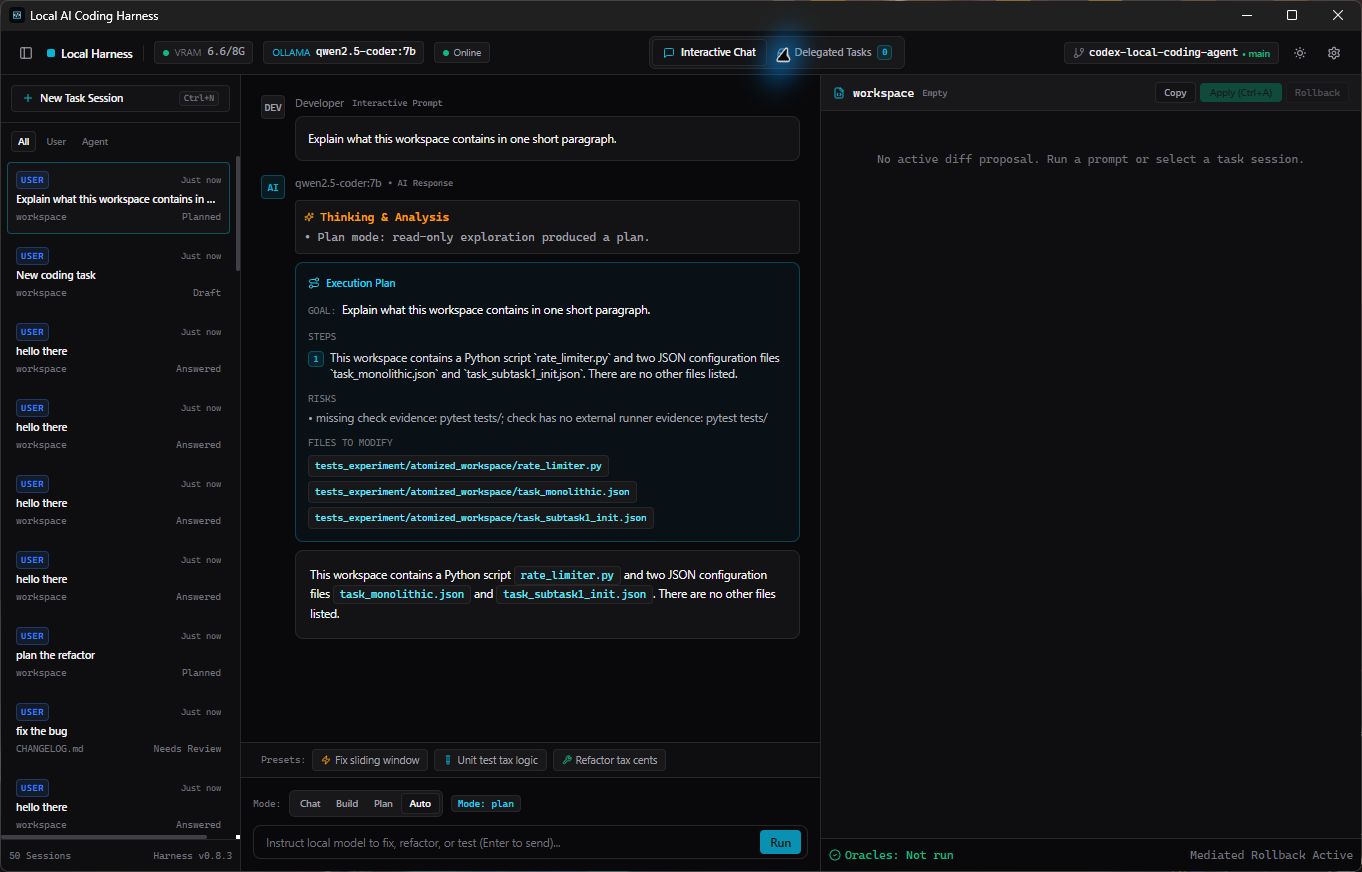
Open the Harness, choose a workspace, select a local model, and start working. The desktop application brings the complete local coding workflow into one focused interface:
- Interactive Chat for questions, explanations, and everyday coding work.
- Chat, Build, Plan, and Auto modes for different kinds of requests.
- Delegated Tasks for handing a focused coding change to a local model.
- Workspace sessions so you can return to previous conversations and tasks.
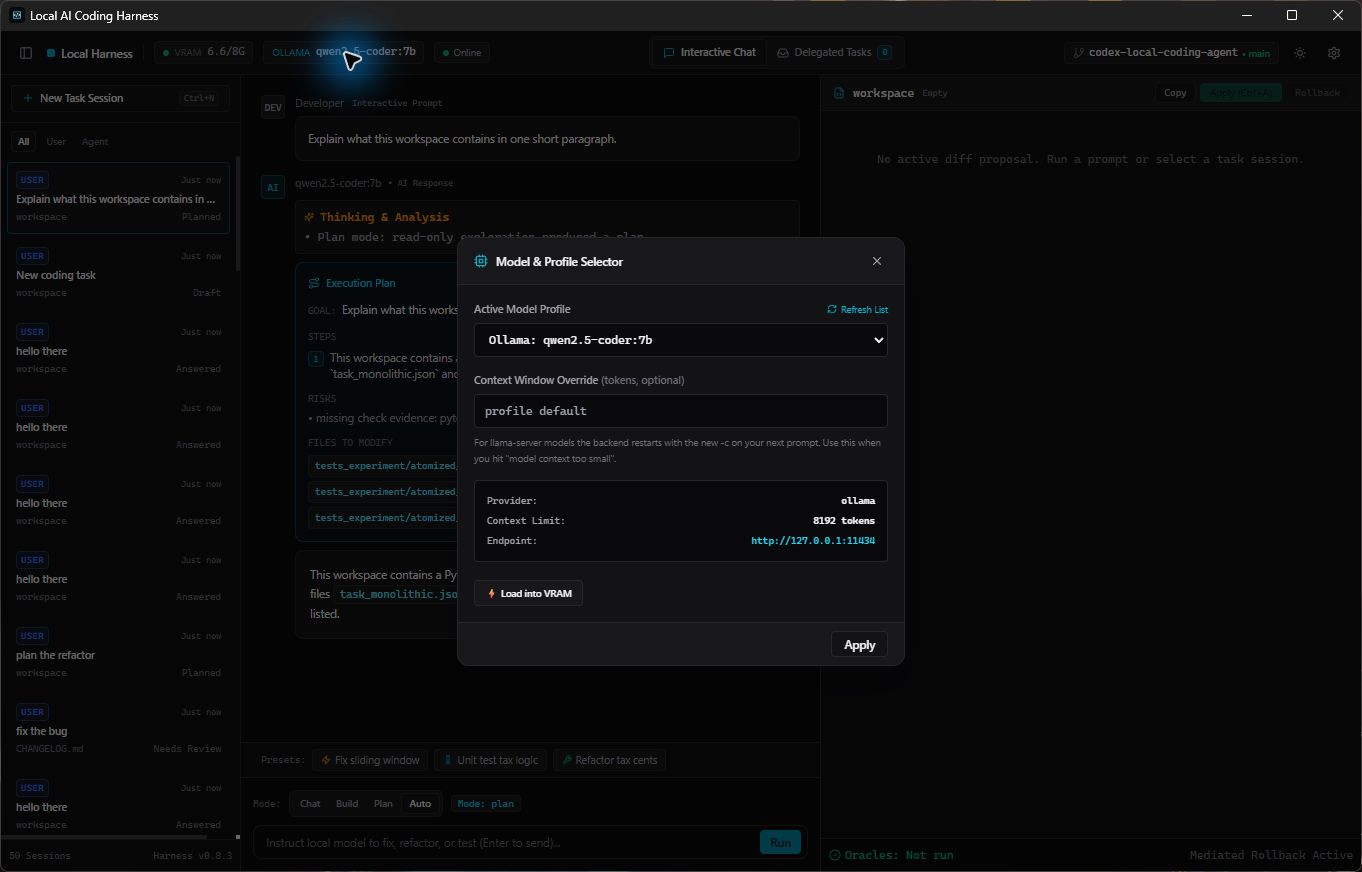
- Model discovery, model profiles, context settings, hardware telemetry, and diagnostics.
- Clear status messages when the local backend is ready, unavailable, or needs attention.
- Reviewable code changes and checks before changes are applied.
The screenshots below show the application loading qwen2.5-coder:7b and returning a real response about the selected workspace.
CLI installation
Requirements:
- Python 3.10 or newer.
- Git on
PATHfor workspace operations. - Ollama or an OpenAI-compatible local model server for live inference.
Install the CLI package:
pipx install "local-coding-agent[mcp]"
Or install from a checkout:
git clone https://github.com/pvnc228/local-coding-agent.git
cd local-coding-agent
python -m pip install -e ".[mcp]"
Check the installation:
local-agent doctor
local-agent test-run --mock
Add --json where supported when the output will be consumed by another tool.
Connect another AI coding agent
Local Coding Agent can provide its capabilities to other AI coding environments through MCP or an Agent Skill:
local-agent init-mcp --auto --write
local-agent init-skill --write
Start the MCP server manually when a client needs an explicit command:
local-agent serve-mcp --workspace . --enable-tasks
See docs/MCP_INTEGRATION.md for client configuration examples and skills/local-coding-agent/SKILL.md for the reusable Agent Skill.
A typical coding request
- Choose a workspace and a local model.
- Ask a question or describe the change you want.
- Inspect the suggested code change in the application.
- Run the relevant checks and apply the change when it looks right.
The application keeps the workflow understandable: you can see what is being changed, which checks are being run, and whether the local backend is available. Commits, tags, pushes, and publishing remain under your control.
CLI commands
| Command | Purpose |
|---|---|
local-agent delegate |
Give a focused coding task to a local model. |
local-agent decompose |
Break a larger request into smaller coding tasks. |
local-agent apply |
Apply a reviewed change and run its checks. |
local-agent chat |
Run a prompt or a persistent chat session. |
local-agent sessions |
List or inspect saved sessions. |
local-agent profiles |
Inspect configured model profiles. |
local-agent memory |
Inspect model memory and VRAM settings. |
local-agent calibrate |
Calculate safe worker bounds for a VRAM budget. |
local-agent benchmark |
Run the local coding benchmark. |
local-agent doctor |
Diagnose Python, Git, Ollama, RAM, VRAM, and models. |
local-agent monitor |
Serve the local metrics dashboard. |
local-agent test-run --mock |
Run deterministic local workflow checks. |
Examples:
local-agent chat "Explain what context_manager.py does"
local-agent chat --repl --session-id refactor-session
local-agent delegate --task task.json --model qwen2.5-coder:7b --json
local-agent apply --patch-file patch.diff --workspace . --file src/foo.py --check "pytest tests/"
local-agent monitor --port 8765
Open http://127.0.0.1:8765/dashboard to view queue load, latency, tokens per second, and change records.
The CLI also exposes preview surfaces that are not part of the stable contract and may change without notice: ui/app, lsp, serve-acp, skeletonize, lint-patch, scan-models, spill-read, and grep. The stable, tested set is the table above plus desktop, chat, serve-mcp, init-mcp, and init-skill.
Field results & limitations
The published numbers come from a 20-task suite, so treat them as directional rather than settled:
- On that suite,
qwen3.8-27b-q4scored 100.0% correctness with a 95% Wilson interval of [83.9%, 100.0%], andqwen3-8b-q6kscored 90.0% [69.9%, 97.2%]. The wide intervals are the small sample size, not a rounding artifact. - Small models handle single-file work in this harness; cross-file coordination (Tier 3 in the capability ladder) needs the host agent to decompose the task into atomic envelopes first.
- Results are model and hardware specific. Reproduce them with
local-agent benchmarkbefore relying on any figure.
See docs/BENCHMARK.md for the methodology and the full table.
Local models
Model profiles describe the provider, model, context window, generation limits, and keep-alive behavior. The Harness can discover installed Ollama models and local GGUF files, while the CLI exposes the same information for scripts and integrations.
local-agent profiles list --json
local-agent memory status --json
Documentation
- Quickstart
- MCP integration
- Security policy
- Changelog
- Architecture reference
- Protocol reference
- Benchmark methodology
License
Local Coding Agent is distributed under the MIT License.
1 maintainer

Metadata
1 maintainer
Release files for local-coding-agent 1.1.0
For a detailed explanation of source distributions (sdists) and built distributions (wheels), please see the package formats documentation.
Source distribution (sdist)
| File | Size | Uploaded | |
|---|---|---|---|
| local_coding_agent-1.1.0.tar.gz | 490.7 kB | Details |
Built distribution (wheel)
| File | Interpreter | ABI | Platform | Reset |
|---|---|---|---|---|
| local_coding_agent-1.1.0-py3-none-any.whl | Python 3 | none | any | Details |
Total release size: 881.4 kB
Release files / local_coding_agent-1.1.0.tar.gz
| Download URL | local_coding_agent-1.1.0.tar.gz |
|---|---|
| Size | 490.7 kB |
| Tags | Source |
|
SHA-256 checksum How to use checksums |
579622abbc5e340ef7d9c2f1355bd42c283f159f094c8ae4a5c3f55cf5b85028
|
|
BLAKE2b-256 checksum How to use checksums |
775d28e1d9495cba87fd9dce835a400255d60a9ff33452194c5ee255f0e5b537
|
| Upload date | |
|
Uploaded using Trusted Publishing? What is trusted publishing? |
Yes |
| Uploaded via |
twine/7.0.0 CPython/3.13.14
|
Provenance
Provenance describes where a file came from. On PyPI, provenance is shared via attestations, which provide a verifiable record of the build or publishing details. View details, limitations and caveats.


PyPI Publish Attestation
PyPI verified that this artifact, at this checksum, originated from the publisher listed below.
Signed by GitHub Actions, verified by PyPI on Oct 14, 2026.
Transparency logRelease files / local_coding_agent-1.1.0-py3-none-any.whl
| Download URL | local_coding_agent-1.1.0-py3-none-any.whl |
|---|---|
| Size | 390.7 kB |
| Tags | Python 3 |
|
SHA-256 checksum How to use checksums |
89d393cadcc690b61d9108a13c5b7618237ff335f0424f8fa6c91d257b96ddc9
|
|
BLAKE2b-256 checksum How to use checksums |
a04203de7c916ce8aa517ff6a3670dfa3628bc966da103e1a293371999c8639c
|
| Upload date | |
|
Uploaded using Trusted Publishing? What is trusted publishing? |
Yes |
| Uploaded via |
twine/7.0.0 CPython/3.13.14
|
Provenance
Provenance describes where a file came from. On PyPI, provenance is shared via attestations, which provide a verifiable record of the build or publishing details. View details, limitations and caveats.
PyPI Publish Attestation
PyPI verified that this artifact, at this checksum, originated from the publisher listed below.
Signed by GitHub Actions, verified by PyPI on Oct 14, 2026.
Transparency log












