
It will help you to manage locally saved markdown to upload to Tistory

Project description
Local First Tistory
Do not be afraid of shutting down blog server.
It will help you organize the posts in local-first, server-last rules.
Why Use This?
If you've ever been in trouble when the blog server were shut down, (especially the one is big-tech and never expecting abnormal!) this script just for you.
You will hold all the data in the local and the script will manage all the things to communicate with the server. You can read the data when you (or the server 😂) are offline or migrate to the other platforms.
Table of Contents
Installation
-
Python >= 3.9
-
To install package:
pip install local-first-tistory
Quick Start
You can use local-first-tistory using $ tistory [command].
To start off, you run:
tistory init
It will handle 3 things:
Authorization
You will see prompts and please follow the instructions.
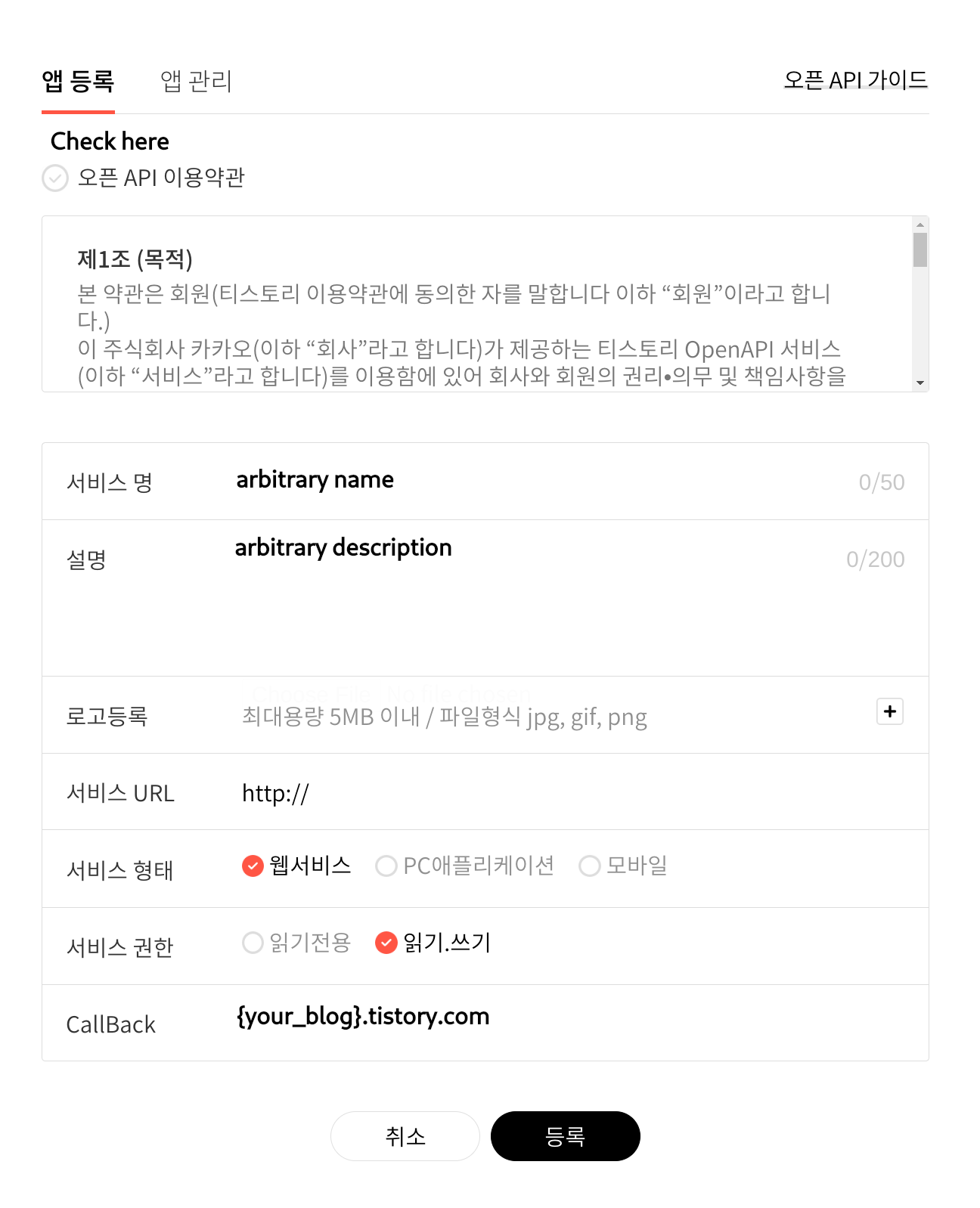
To get App ID and Secret Key:
-
Go to
https://www.tistory.com/guide/api/manage/register -
Fill out your form.
Please be aware of
CallBackcolumn to{blog_name}.tistory.com, nothttp://{blog_name}.tistory.com,https://~norhttps://www.~. -
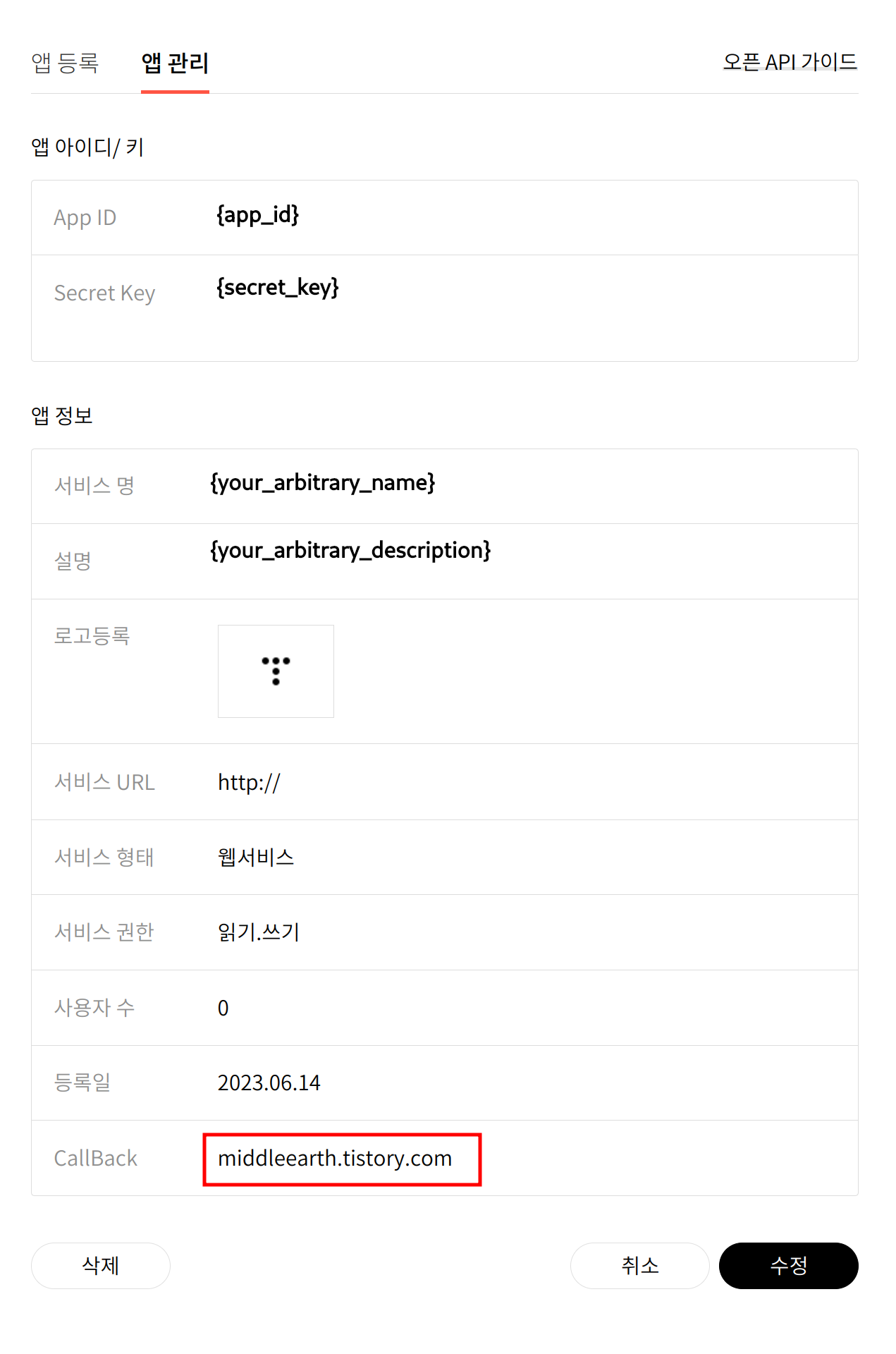
Now you get
App IDandSecret Key. You can checkCallBackcolumn and if it doesn't follow the{blog_name}.tistory.com, you can modify it here. -
Enter
App IDandSecret keywhile following the prompts. -
All the data you input will be stored at
$HOME/.tistory/.env. If anything went wrong, you can modify the data manually.
Default Directory
It will be done automatically. You can check the default directory:
tree -a ~/.tistory

$HOME/.tistory
├── .categories.toml
├── .env
├── .metadata.toml
├── images
└── markdowns
Category Directory
It will create directories according to your categories from blog automatically.
tree -a ~/.tistory/markdowns

$HOME/.tistory/markdowns
├── category1
├── category2
│   ├── category3
│   └── category4
└── category5
Help
$ tistory or $ tistory --help.
Markdown
Markdown Location
You put all your markdown in $HOME/.tistory/markdowns/{your_category}.
Upload Markdowns
tistory md
It will detect all the modified or create file and upload it.
Write Markdown
Put the meta data on very top of the markdown file like:
---
title or t or 제목: your_title [Mandatory]
visibility or vis or v or 공개: [Optional]
published: TIMESTAMP (default: current_time) [Optional]
tag or tags or 태그: tag1,tag2,tag3 (default: '') [Optional]
acceptComment or ac or comment or 댓글: [Optional]
---

Your Content starts from here
visibility(default:private):public:publicor3or공개protected:protectedor1or보호private:privateor0or비공개
acceptComment(default:yes):- To accept:
yesoryortrueortor허용or1 - To deny:
noornorfalseorfor거부or0
- To accept:
You will notice that only title is mandatory and not the others. This is the example:
# markdowns/category/example.md

---
t: This is my first article!
v: public
ac: 허용
tag: my article,first issue
---

And here it is article content!
For more information, go to official API.
Image
Image Location
Put your images you want to upload in $HOME/.tistory/images/.
Upload Images
-
Make sure images extension end with
.png,.jpg,.jpegor.gif. -
Run:
tistory img -
Uploaded image url will be stored at
$HOME/.tistory/.images.tomland you can useurlwhen writing markdown. -
Recommend to upload images first before writing your markdowns since you need
urlin.
Miscellaneous
Category
If you updated category from your blog and to upgrade it:
tistory category
Reauthorization
If something went wrong while tistory init, you can do authorization step independently:
tistory auth
Or you can modify the field at $HOME/.tistory/.env manually.
Release history Release notifications | RSS feed


Download files
Download the file for your platform. If you're not sure which to choose, learn more about installing packages.
Source Distribution
Built Distribution
Filter files by name, interpreter, ABI, and platform.
If you're not sure about the file name format, learn more about wheel file names.
Copy a direct link to the current filters
File details
Details for the file local-first-tistory-0.0.2.tar.gz.
File metadata
- Download URL: local-first-tistory-0.0.2.tar.gz
- Upload date:
- Size: 8.5 kB
- Tags: Source
- Uploaded using Trusted Publishing? No
- Uploaded via: twine/4.0.2 CPython/3.11.3
File hashes
| Algorithm | Hash digest | |
|---|---|---|
| SHA256 |
b0f81fa4e879306135de2edfe949f7e8b245d891b5a4c89bf7b53d50cbbb3106
|
|
| MD5 |
b12ab120e035261d238b5c5e0144381f
|
|
| BLAKE2b-256 |
0034f49121a6ce3383e7f8872d2e62f8785296393bcd17e1ff641c8bad90912c
|
File details
Details for the file local_first_tistory-0.0.2-py3-none-any.whl.
File metadata
- Download URL: local_first_tistory-0.0.2-py3-none-any.whl
- Upload date:
- Size: 10.7 kB
- Tags: Python 3
- Uploaded using Trusted Publishing? No
- Uploaded via: twine/4.0.2 CPython/3.11.3
File hashes
| Algorithm | Hash digest | |
|---|---|---|
| SHA256 |
56497db81b33bdfb615acf9155814ac713fc322e85f3a63ec6ff8d4b9b2820d3
|
|
| MD5 |
8f5fe48e714a56b1591e7a2481555079
|
|
| BLAKE2b-256 |
295e46258b2bda3e6b67f583b22edf5d89aace57989c2c29cb62db1e26c7458d
|






