
local-github
本地快速浏览 Github issue/pr,查看新增 comment/issue/pr
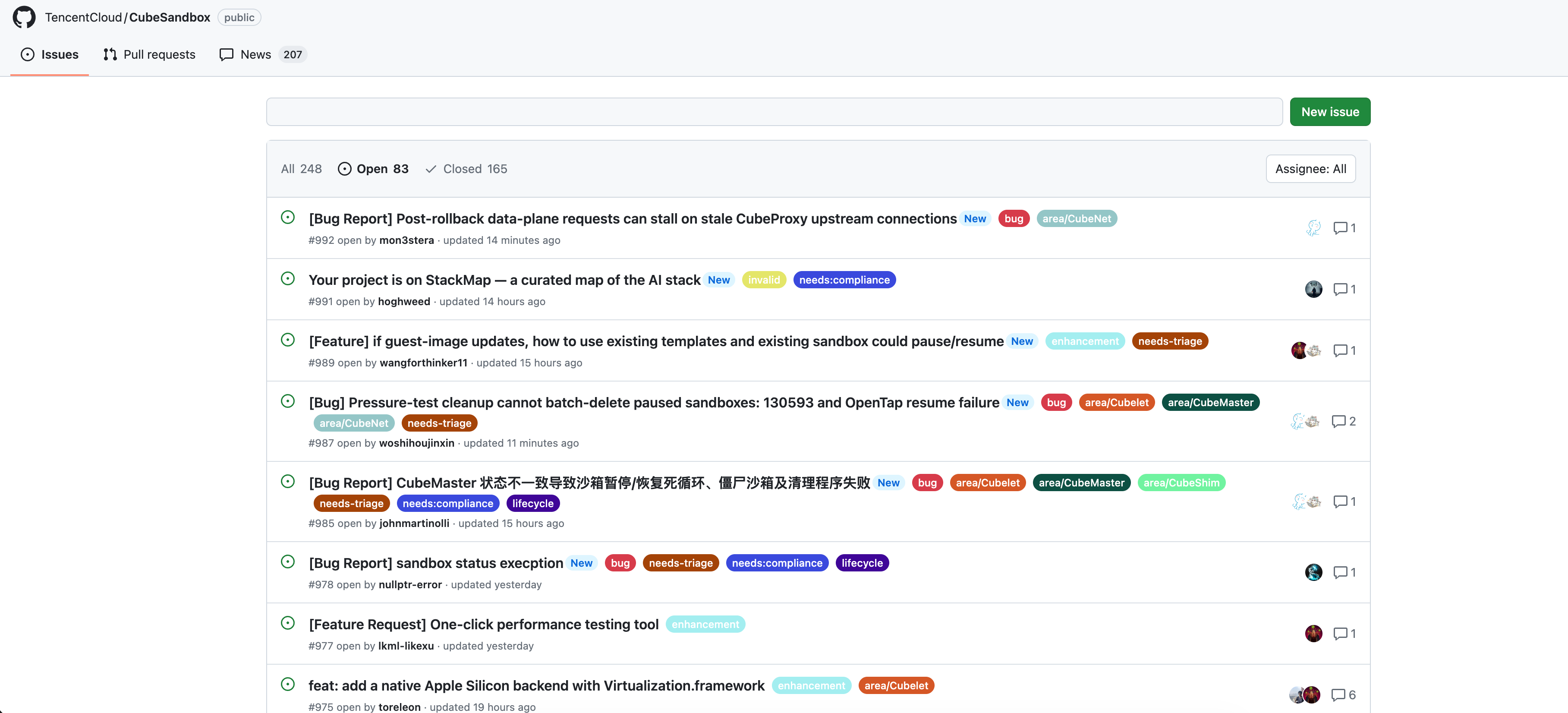
在线体验:https://luzhixing12345.github.io/local-github/
这个项目的起因是在网页端浏览 Github repo 的 issue/pr 之间切换比较慢,因为每次都要重新发起请求。而且作为一个非 member 也不想时时刻刻 watch 新增 issue/pr/comment 收到一堆邮件,但又想知道有哪些内容更新了,谁新增了回复,谁提交了新的 issue/pr,哪些 issue/pr 的 状态更改了,所以诞生了这个项目
基本思路是通过 Github API 获取开源仓库的所有issue/pr信息保存到本地 json,然后本地生成静态页面浏览。考虑到绝大部分项目的 update 没有那么频繁,所以这种把数据拉到本地查看的方案也还好。这个项目的页面完全仿照 Github 的页面,几乎可以说 1:1 复刻,然后去掉了一些不重要的组件。
Quick start
pip install local_github
同步数据前,需要在当前目录创建 .github-token 文件:
- 打开 https://github.com/settings/tokens/new 创建 Personal Access Token,使用个人 Access Token 后抓取 Github 信息没有限制,否则有爬取速率的限制
- 给一个读仓库的权限
.github-token已被.gitignore忽略,请勿将 Token 提交到版本控制。
同步仓库信息
使用 sync 同步一个仓库的信息,此过程会获取所有的 issue/issue comments/pr/pr comments
local-github sync owner/repo

# local-github sync https://github.com/TencentCloud/CubeSandbox
同步数据后会自动构建静态网页,打开本地的一个 http 服务器,并给出一个 Url 链接
下载的仓库数据保存在 docs/data/github/<owner>/<repo>,与生成的静态网页统一放在 docs 目录下。
初次构建获取数据量很大的话会比较慢,之后的再次 sync 都是增量获取会很快
如果只是希望查看网页不需要同步可以使用 server
local-github server
使用沉浸式翻译的话建议在设置->进阶设置中添加 http://127.0.0.1:8000/docs/repos 为仅译文模式
相关功能介绍
- pr 一栏默认不会展示 code diff 的信息,需要手动点击 load diff 之后才会获取并展示
- news 一栏中可以看到两次 sync 之间的差异,有哪些 issue/pr/comment 更新了
- 可以直接在搜索框输入查询对应的 issue/pr,也可以搜索用户名查询某个用户参与的issue/pr/comment
- 可以在 assignee 中查询 issue/pr 被指定的对象进行集中处理
- issue/pr 都有一个跳转的小图标,可以直接跳转到对应的 Github 页面进行处理
1 maintainer

Metadata
1 maintainer
Release files for local_github 0.1.6
For a detailed explanation of source distributions (sdists) and built distributions (wheels), please see the package formats documentation.
Source distribution (sdist)
| File | Size | Uploaded | Provenance | Actions |
|---|---|---|---|---|
| local_github-0.1.6.tar.gz | 39.0 kB | Without provenance | Details for local_github-0.1.6.tar.gz |
Built distribution (wheel)
| File | Interpreter | ABI | Platform | Actions Reset |
|---|---|---|---|---|
| local_github-0.1.6-py3-none-any.whl | Python 3 | none | any | Details for local_github-0.1.6-py3-none-any.whl |
Total release size: 80.7 kB
Release files / local_github-0.1.6.tar.gz
| Download URL | local_github-0.1.6.tar.gz |
|---|---|
| Size | 39.0 kB |
| Tags | Source |
|
SHA-256 checksum How to use checksums |
fc0e6aea459c53ed27c3fb6d0fcf5c0212bcb8f486363b4268882098300903c4
|
|
BLAKE2b-256 checksum How to use checksums |
83897f753e90e5717afc7e57d14c1bad525181a305ed0685c8744c2661b9ce56
|
| Upload date | |
|
Uploaded using Trusted Publishing? What is trusted publishing? |
No |
| Uploaded via |
poetry/2.4.1 CPython/3.13.14 Darwin/25.5.0
|
Release files / local_github-0.1.6-py3-none-any.whl
| Download URL | local_github-0.1.6-py3-none-any.whl |
|---|---|
| Size | 41.8 kB |
| Tags | Python 3 |
|
SHA-256 checksum How to use checksums |
c1ec9fc6a0e63ca01c5c86b3eed05beee386255e27a885f6c8cdcdc70330bd93
|
|
BLAKE2b-256 checksum How to use checksums |
a79138ebbd45976d7e9e09dc8c16eb8a13e2971039afef3fb3732585b4bef6ad
|
| Upload date | |
|
Uploaded using Trusted Publishing? What is trusted publishing? |
No |
| Uploaded via |
poetry/2.4.1 CPython/3.13.14 Darwin/25.5.0
|
Security for local_github 0.1.6
Provenance
Provenance describes where a file came from. On PyPI, provenance is shared via attestations, which provide a verifiable record of the build or publishing details. View details, limitations and caveats.
No provenance found
None of the files in this release were uploaded with provenance metadata.
A note on package security
PyPI is a repository for distributing packages, not a service for auditing them. While third-party security researchers and our staff do their best to detect and remove malicious packages, PyPI cannot guarantee the quality, security or suitability of any given package.
To learn more about protecting yourself from malicious actors, visit our package security documentation.














