
local-github
本地快速浏览 Github issue/pr,查看新增 comment/issue/pr
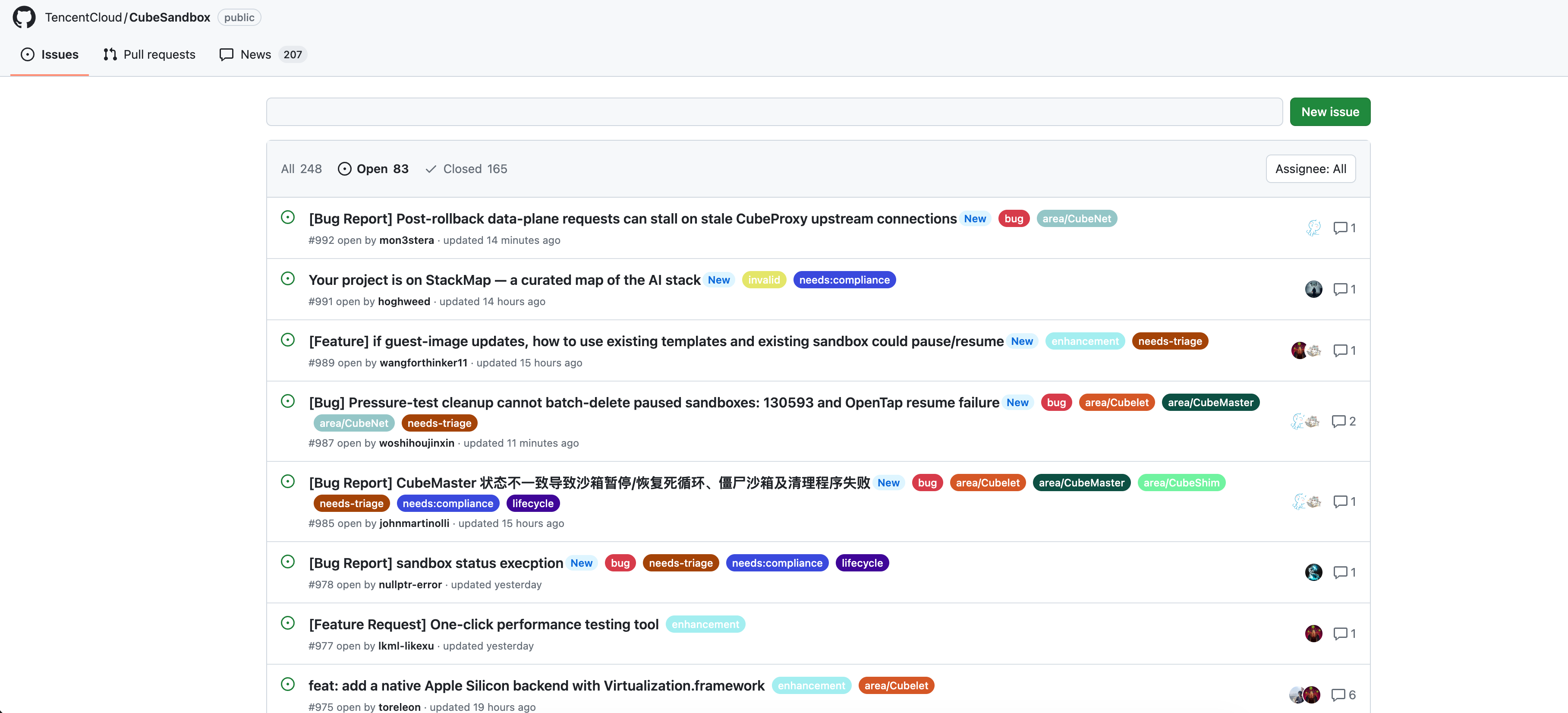
在线体验:https://luzhixing12345.github.io/local-github/
这个项目的起因是在网页端浏览 Github repo 的 issue/pr 之间切换比较慢,因为每次都要重新发起请求。而且作为一个非 member 也不想时时刻刻 watch 新增 issue/pr/comment 收到一堆邮件,但又想知道有哪些内容更新了,谁新增了回复,谁提交了新的 issue/pr,哪些 issue/pr 的 状态更改了,所以诞生了这个项目
基本思路是通过 Github API 获取开源仓库的所有issue/pr信息保存到本地 json,然后本地生成静态页面浏览。考虑到绝大部分项目的 update 没有那么频繁,所以这种把数据拉到本地查看的方案也还好。这个项目的页面完全仿照 Github 的页面,几乎可以说 1:1 复刻,然后去掉了一些不重要的组件。
Quick start
pip install local_github
同步数据前,需要在当前目录创建 .github-token 文件:
- 打开 https://github.com/settings/tokens/new 创建 Personal Access Token,使用个人 Access Token 后抓取 Github 信息没有限制,否则有爬取速率的限制
- 给一个读仓库的权限
.github-token已被.gitignore忽略,请勿将 Token 提交到版本控制。
同步仓库信息
使用 sync 同步一个仓库的信息,此过程会获取所有的 issue/issue comments/pr/pr comments
local-github sync owner/repo

# local-github sync https://github.com/TencentCloud/CubeSandbox
同步数据后会自动构建静态网页,打开本地的一个 http 服务器,并给出一个 Url 链接
下载的仓库数据保存在 docs/data/github/<owner>/<repo>,与生成的静态网页统一放在 docs 目录下。
初次构建获取数据量很大的话会比较慢,之后的再次 sync 都是增量获取会很快
如果只是希望查看网页不需要同步可以使用 server
local-github server
使用沉浸式翻译的话建议在设置->进阶设置中添加 http://127.0.0.1:8000/docs/repos 为仅译文模式
相关功能介绍
- pr 一栏默认不会展示 code diff 的信息,需要手动点击 load diff 之后才会获取并展示
- news 一栏中可以看到两次 sync 之间的差异,有哪些 issue/pr/comment 更新了
- 可以直接在搜索框输入查询对应的 issue/pr,也可以搜索用户名查询某个用户参与的issue/pr/comment
- 可以在 assignee 中查询 issue/pr 被指定的对象进行集中处理
- issue/pr 都有一个跳转的小图标,可以直接跳转到对应的 Github 页面进行处理
1 maintainer

Release files for local_github 0.1.6
For a detailed explanation of source distributions (sdists) and built distributions (wheels), please see the package formats documentation.
Source distribution (sdist)
| File | Size | Uploaded | |
|---|---|---|---|
| local_github-0.1.6.tar.gz | 39.0 kB | Details |
Built distribution (wheel)
| File | Interpreter | ABI | Platform | Reset |
|---|---|---|---|---|
| local_github-0.1.6-py3-none-any.whl | Python 3 | none | any | Details |
Total release size: 80.7 kB
Release files / local_github-0.1.6.tar.gz
| Download URL | local_github-0.1.6.tar.gz |
|---|---|
| Size | 39.0 kB |
| Tags | Source |
|
SHA-256 checksum How to use checksums |
fc0e6aea459c53ed27c3fb6d0fcf5c0212bcb8f486363b4268882098300903c4
|
|
BLAKE2b-256 checksum How to use checksums |
83897f753e90e5717afc7e57d14c1bad525181a305ed0685c8744c2661b9ce56
|
| Upload date | |
|
Uploaded using Trusted Publishing? What is trusted publishing? |
No |
| Uploaded via |
poetry/2.4.1 CPython/3.13.14 Darwin/25.5.0
|
Release files / local_github-0.1.6-py3-none-any.whl
| Download URL | local_github-0.1.6-py3-none-any.whl |
|---|---|
| Size | 41.8 kB |
| Tags | Python 3 |
|
SHA-256 checksum How to use checksums |
c1ec9fc6a0e63ca01c5c86b3eed05beee386255e27a885f6c8cdcdc70330bd93
|
|
BLAKE2b-256 checksum How to use checksums |
a79138ebbd45976d7e9e09dc8c16eb8a13e2971039afef3fb3732585b4bef6ad
|
| Upload date | |
|
Uploaded using Trusted Publishing? What is trusted publishing? |
No |
| Uploaded via |
poetry/2.4.1 CPython/3.13.14 Darwin/25.5.0
|














