
A framework that replace traditional RAG pipelines. Ingest any number of documents in multiple workspaces (channels, departments, etc.), index it with BM25, and let the agent search, fetch, and reason over it, exactly like searching the web, but entirely on your machine. No vector store, no embedding needed.
Verified details
These details have been verified by PyPIProject links
GitHub Statistics
Maintainers

Project description
Local Search Agent
Give your AI agent a search engine for your local files.
What is this?
Local Search Agent is a Python framework that gives your AI agent a search engine for your local files and lets it search, fetch, and reason over your local documents — the same way a researcher searches the web, but entirely on your machine.
Point it at a folder. Ask a question. The agent searches your documents, reads the relevant ones, and gives you an answer with citations — no cloud upload, no API calls to external search services, no embeddings, no vector stores.
"What was the AWS spend in Q3?" → agent searches index → fetches relevant docs → answers with sources
Why not RAG?
Traditional RAG (Retrieval-Augmented Generation) has a fundamental problem: it converts your documents into embeddings and stores them in a vector database. That means:
- Stale indexes — embeddings go out of date silently. You never know if the agent is reading your latest documents or a six-month-old snapshot
- Black-box retrieval — you can't see why a document was retrieved or not. Debugging poor answers is guesswork
- Chunking anxiety — split too small and you lose context. Split too large and retrieval quality degrades. There's no right answer
- Infrastructure overhead — a vector database is another service to run, maintain, and pay for
- Semantic drift — embeddings are sensitive to how questions are phrased. A question about "cloud expenditure" may never match a document that says "AWS spend"
Local Search Agent takes a different approach: BM25 keyword search via Meilisearch, structured metadata, and a LangGraph agent loop with tools. The agent searches your document index the same way a developer searches Stack Overflow — with real queries, real results, and full transparency into what was retrieved and why.
The result is deterministic, auditable, and fast. You can see exactly what the agent fetched for every answer.
How it works
1. INGEST     Your documents → parsed, cleaned, chunked, indexed into Meilisearch
2. SERVE      FastAPI file server makes documents available to the agent via HTTP
3. SEARCH     LangGraph agent loop: search_local_index → fetch_local_url → reason
4. ANSWER     Agent returns an answer with inline source citations
Everything runs locally. Meilisearch downloads automatically on first use, no manual setup.
Screenshots
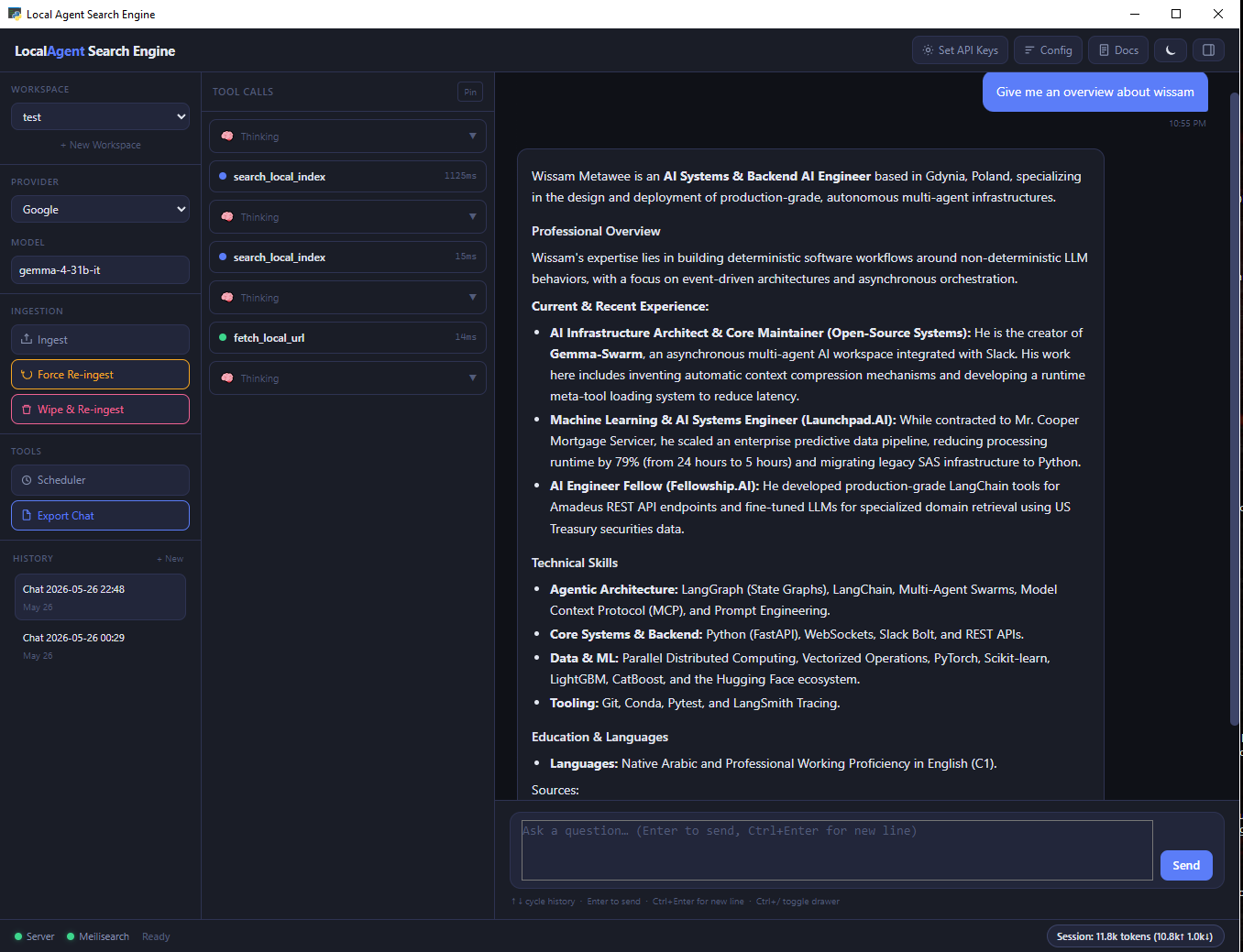
Desktop UI
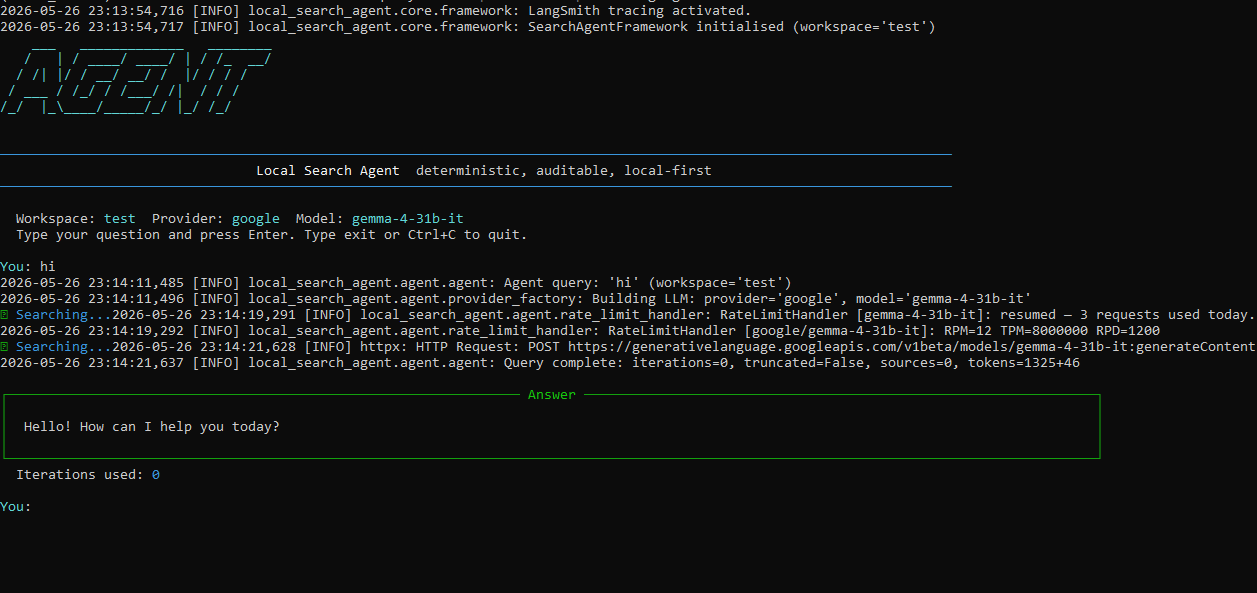
CLI Interactive Mode
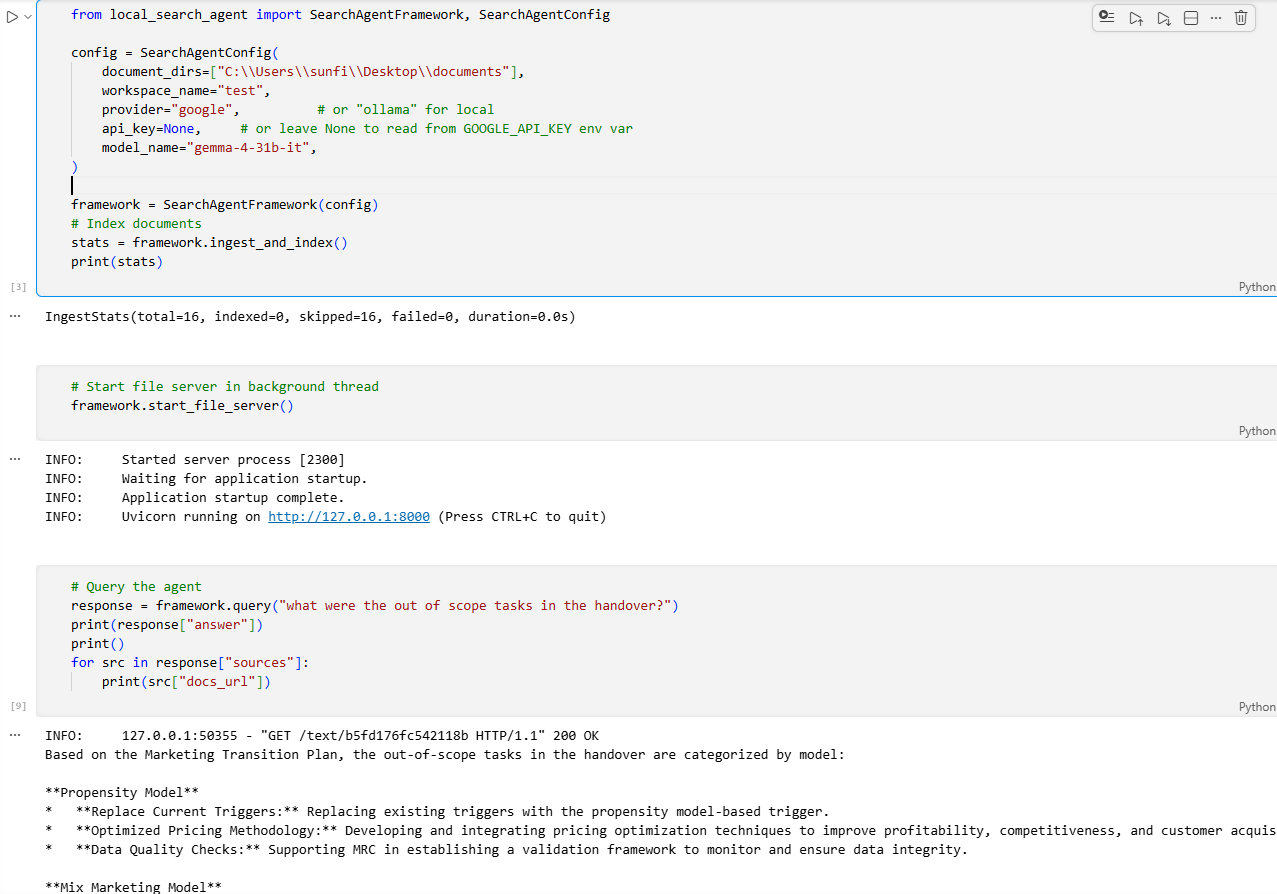
Python API
Install
pip install local-search-agent
Set your API key
# Google AI Studio (free tier — recommended) or paid from openai or anthropic
local-search config set-key --provider google --key YOUR_KEY

# Or use Ollama for a fully local, zero-cost setup (no key needed)
# Install from https://ollama.com
# Download any model that support function calling and system instructions:
`ollama pull gemma4:e2b` (7.2GB) or `ollama pull gemma4:e4b` (9.6GB)
Quick Start
Desktop UI
local-search ui
The desktop window opens. Create a workspace, point it at a folder, ingest, and start asking questions.
CLI
# Create a workspace and ingest documents
local-search workspace create finance "C:\my_docs"
local-search ingest --workspace finance --dirs "C:\my_docs"

# Start the file server (keep this running)
local-search serve --workspace finance

# Ask a question
local-search query "What was the AWS spend in Q3?" --workspace finance --provider google

# Use interactive mode
local-search --workspace finance --provider google
Python API
from local_search_agent import SearchAgentFramework, SearchAgentConfig

config = SearchAgentConfig(
    document_dirs=["C:/my_docs"],
    workspace_name="finance",
    provider="google",
)

framework = SearchAgentFramework(config)
framework.ingest_and_index()
framework.start_file_server()

response = framework.query("What was the AWS spend in Q3?")
print(response["answer"])
Supported File Types
| Format | Extension |
|---|---|
.pdf |
|
| Word | .docx |
| Excel | .xlsx |
| PowerPoint | .pptx |
| HTML | .html, .htm |
| Plain text | .txt, .md |
| CSV | .csv |
| JSON | .json |
| XML | .xml |
.eml |
Key Features
- One command install —
pip install local-search-agent. Meilisearch downloads automatically - No embeddings, no vector stores — BM25 search with structured metadata. Fast, deterministic, auditable
- Native desktop UI — pywebview window with live streaming agent responses, workspace management, and chat history
- Multi-provider LLM — Google, Ollama (local), OpenAI, Anthropic
- Multi-workspace — isolate document collections by department, project, channel, or topic. Each workspace is its own search index
- Incremental sync — background scheduler re-indexes only changed files. A 10,000-document corpus with 50 changes re-indexes only the 50
- Full CLI parity — everything you can do in the UI you can do from the terminal
- Python API — embed the framework directly in your own application
- Cross-platform — Windows, macOS, Linux
Documentation
| Guide | Description |
|---|---|
| Getting Started | First steps, quick start for UI, CLI, and Python API |
| Installation | Full install guide, API keys, Ollama setup, platform notes |
| Architecture | Full architrecture, design guide |
| CLI Reference | All commands and flags |
| Python API Reference | Full API documentation |
| Configuration | All config options and patterns |
| Ingestion | How ingestion works, supported formats, chunking, scheduler |
| Multi-Workspace | Managing multiple document collections |
| Semantic Search | Experimental: concept extraction, query expansion, link graph |
| Troubleshooting | Common issues and fixes |
Contributing
Contributions are welcome. Clone the repo and install in editable mode with dev dependencies:
git clone https://github.com/wiss84/local-search-agent
cd local-search-agent
pip install -e ".[dev]"
Run tests before submitting a PR:
pytest tests/
ruff check .
License
MIT — see LICENSE for details.
Built by Wissam Metawee
Project details
Verified details
These details have been verified by PyPIProject links
GitHub Statistics
Maintainers
Release history Release notifications | RSS feed

Download files
Download the file for your platform. If you're not sure which to choose, learn more about installing packages.
Source Distribution
Built Distribution
Filter files by name, interpreter, ABI, and platform.
If you're not sure about the file name format, learn more about wheel file names.
Copy a direct link to the current filters
File details
Details for the file local_search_agent-0.1.0.tar.gz.
File metadata
- Download URL: local_search_agent-0.1.0.tar.gz
- Upload date:
- Size: 1.8 MB
- Tags: Source
- Uploaded using Trusted Publishing? Yes
- Uploaded via: twine/6.1.0 CPython/3.13.12
File hashes
| Algorithm | Hash digest | |
|---|---|---|
| SHA256 |
1c7ad631570505884d218d305490b97f3136f2944ff73575c6f66191d21c1204
|
|
| MD5 |
86f1d51a682eea2a5dc01477120b6108
|
|
| BLAKE2b-256 |
b14135b31aa887ea8459cb4db7254276fc38d84367a3920244f3b8aac9defd60
|
Provenance
The following attestation bundles were made for local_search_agent-0.1.0.tar.gz:
Publisher:
ci-cd.yml on wiss84/local-search-agent
-
Statement:
-
Statement type:
https://in-toto.io/Statement/v1 -
Predicate type:
https://docs.pypi.org/attestations/publish/v1 -
Subject name:
local_search_agent-0.1.0.tar.gz -
Subject digest:
1c7ad631570505884d218d305490b97f3136f2944ff73575c6f66191d21c1204 - Sigstore transparency entry: 1652336979
- Sigstore integration time:
-
Permalink:
wiss84/local-search-agent@759279011a80f1768dc6091f61e573bc0531be59 -
Branch / Tag:
refs/tags/v0.1.0 - Owner: https://github.com/wiss84
-
Access:
public
-
Token Issuer:
https://token.actions.githubusercontent.com -
Runner Environment:
github-hosted -
Publication workflow:
ci-cd.yml@759279011a80f1768dc6091f61e573bc0531be59 -
Trigger Event:
push
-
Statement type:
File details
Details for the file local_search_agent-0.1.0-py3-none-any.whl.
File metadata
- Download URL: local_search_agent-0.1.0-py3-none-any.whl
- Upload date:
- Size: 1.8 MB
- Tags: Python 3
- Uploaded using Trusted Publishing? Yes
- Uploaded via: twine/6.1.0 CPython/3.13.12
File hashes
| Algorithm | Hash digest | |
|---|---|---|
| SHA256 |
ff8d8457bbf66776652b069fc7befe577946b391b6265757c278a0d58af3ef64
|
|
| MD5 |
8055899236268f2b86e03b4893c5e8fb
|
|
| BLAKE2b-256 |
58ccac66e213554a07a856f4579a479834eaad805372548984f15cadbf4d5c9d
|
Provenance
The following attestation bundles were made for local_search_agent-0.1.0-py3-none-any.whl:
Publisher:
ci-cd.yml on wiss84/local-search-agent
-
Statement:
-
Statement type:
https://in-toto.io/Statement/v1 -
Predicate type:
https://docs.pypi.org/attestations/publish/v1 -
Subject name:
local_search_agent-0.1.0-py3-none-any.whl -
Subject digest:
ff8d8457bbf66776652b069fc7befe577946b391b6265757c278a0d58af3ef64 - Sigstore transparency entry: 1652337386
- Sigstore integration time:
-
Permalink:
wiss84/local-search-agent@759279011a80f1768dc6091f61e573bc0531be59 -
Branch / Tag:
refs/tags/v0.1.0 - Owner: https://github.com/wiss84
-
Access:
public
-
Token Issuer:
https://token.actions.githubusercontent.com -
Runner Environment:
github-hosted -
Publication workflow:
ci-cd.yml@759279011a80f1768dc6091f61e573bc0531be59 -
Trigger Event:
push
-
Statement type:






