

Manual · Demo video · Example report
LocalAlibiScan is a local, read-only tool that tells you what every project on your disk is, what state it is in and what changed — and proves every statement with the file and line it came from.

Why
- Facts with proof. Code extracts the facts; an LLM (optional) only writes prose about them. Every statement is a claim with a status and evidence.
- Your whole disk, not one repository. One dashboard for every project in a folder, including loose script folders without git or manifests.
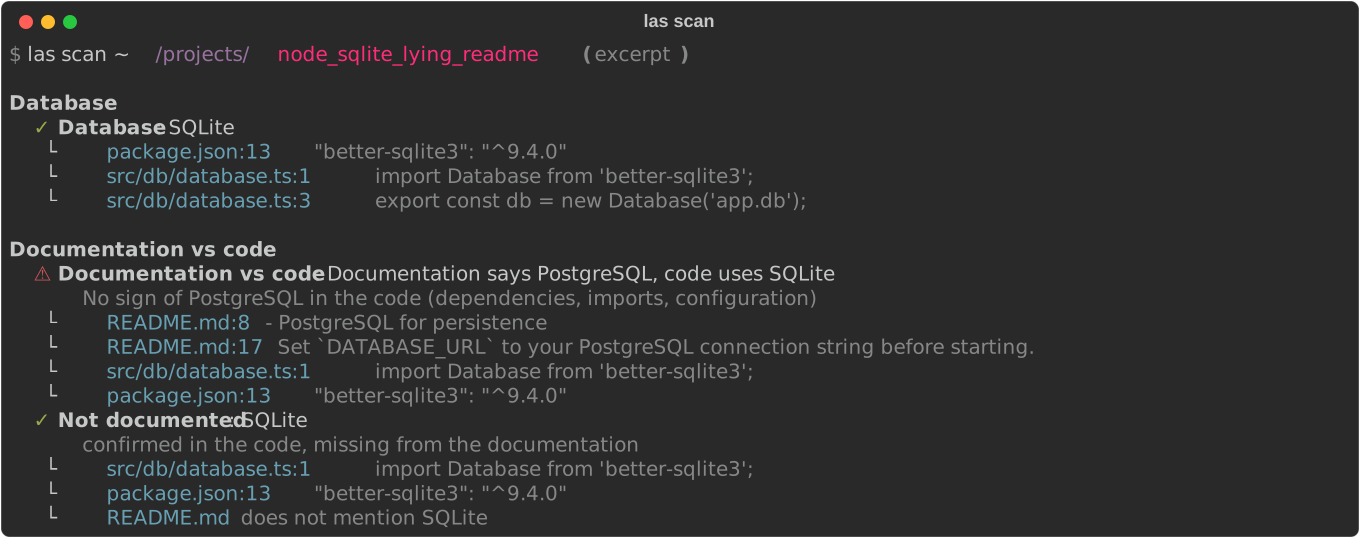
- Documentation that lies. README vs code, with proof on both sides — and it never edits anything.
- Changes in architecture language. "An OpenAI service appeared" and
"New route
DELETE /notes/:id", not "+42 lines". - Works without an LLM. Everything essential is deterministic. A local Ollama model is an extra, never a requirement.
Install
pipx install localalibiscan
Python 3.11+ on macOS, Linux or Windows. The commands localalibiscan and the
shortcut las are equivalent.
Prefer a window to a terminal? Install the optional extra for the
graphical interface: pipx install 'localalibiscan[ui]'.
Quick start
las dashboard ~/code            # every project under ~/code (add --html for a static report)
las scan ~/code/my-app          # full profile, one line of evidence per claim (--evidence for all)
las check ~/Downloads           # just the verdict: project, root, subfolder, probable project or not a project
las refresh ~/code/my-app       # what changed since the last scan, in architecture terms
las history ~/code/my-app       # one line per previous scan
las explain ~/code/my-app       # "explain this project": fixed questions answered with facts
las ask ~/code/my-app "Where is authentication done?"
las files ~/code/my-app         # files that would be analysed (respects .gitignore)
las config --init               # create ~/.localalibi/config.toml
las ui ~/code                   # the same, in a local graphical interface (extra [ui])
las dashboard --html writes a single self-contained file to
~/.localalibi/dashboard.html (no server, no external resources). See an
example report built from well-known open-source projects
(Express, Flask, httpx, Vite, the FastAPI full-stack template, …).
The interface is in English by default and also speaks Portuguese:
las --lang-ui pt scan ., LOCALALIBI_LANG=pt, or language = "pt" under [ui]
in the configuration. The facts are the same in every language.
Graphical interface
The same facts and evidence in a window: las ui opens a local interface
(Streamlit) in your browser. It is an optional extra, so the base install stays small.
pipx install 'localalibiscan[ui]'
las ui ~/code                   # http://127.0.0.1:8501 — listens on this machine only
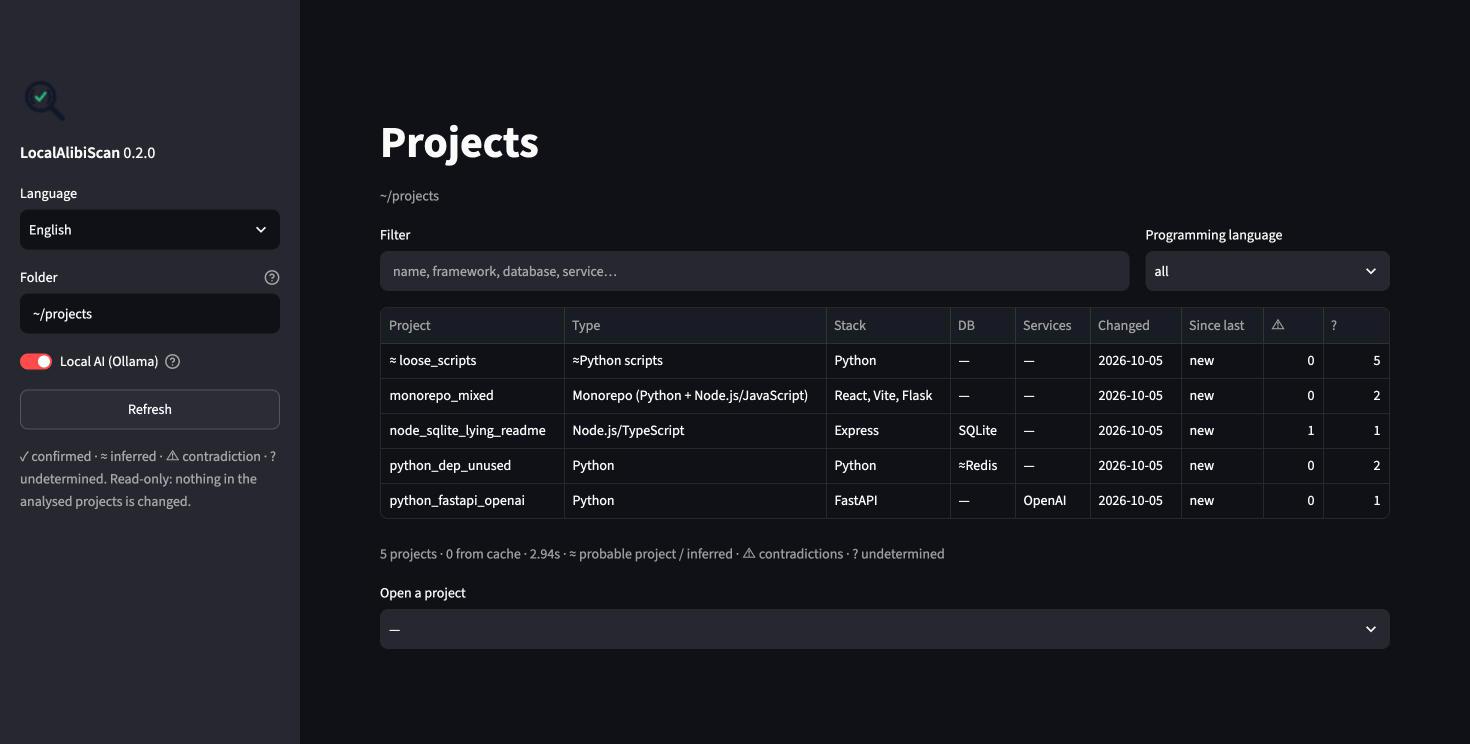
Pick a project to see every claim by section, open its evidence with the lines around the cited one, compare any two analyses, and use explain and ask (with or without the local AI). English or Portuguese, from the sidebar.
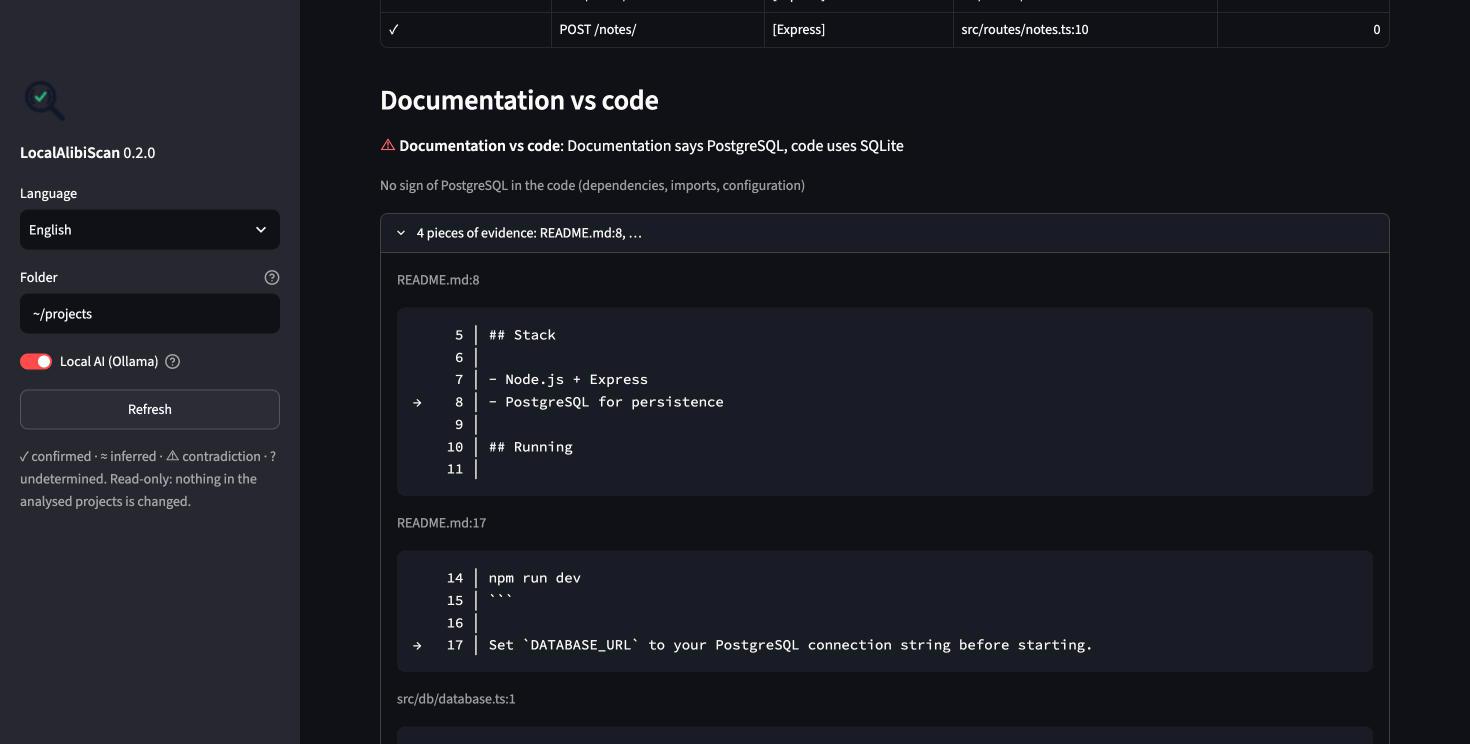
It keeps every guarantee below: read-only, no project code run, 127.0.0.1
only and Streamlit's usage statistics off. More in the manual.
Claims
Everything shown is a Claim:
{
  "id": "db.sqlite",
  "category": "database",
  "label": "Database",
  "value": "SQLite",
  "status": "confirmed",
  "evidence": [
    {"file": "package.json", "line": 13, "snippet": "\"better-sqlite3\": \"^9.4.0\"", "kind": "dependency"},
    {"file": "src/db/database.ts", "line": 3, "snippet": "export const db = new Database('app.db');", "kind": "code"}
  ],
  "source": "detector:database"
}
| Status | Symbol | Meaning |
|---|---|---|
confirmed |
✓ | Proven by strong evidence (dependency and usage in code, or explicit code) |
inferred |
≈ | Weak evidence (only a dependency, only a config hint, or AI prose written from facts) |
contradiction |
⚠ | Two sources disagree (e.g. README vs code) |
unknown |
? | Could not be determined — never invented |
A dependency that is declared but never imported stays ≈; usage in code
without a declared dependency is ✓ with a note.
What it detects
- Folder verdict — project, folder of projects, subfolder of a project, probable project (loose scripts/notebooks) or not a project.
- Inventory — languages, manifests (
package.json,requirements.txt,pyproject.toml,go.mod,Cargo.toml,composer.json) with line numbers, project type, monorepo components, entry points, main folders, docs. - Code (tree-sitter: Python, JavaScript, TypeScript) — databases and ORMs, frameworks, external services (OpenAI, Anthropic, Ollama, Stripe, AWS, Supabase, …), HTTP routes (FastAPI, Flask, Express, Fastify, Next.js) and a ranking of the most important files. Tests, examples, playgrounds and templates never count as evidence.
- Docs vs code — contradictions, "only in the docs" and "not documented".
- History — snapshots with file hashes (works without git).
Known limitations are listed in docs/limitacoes.md.
Guarantees
- Read-only. The only writes go to
<project>/.localalibi/(which ignores itself in git) and~/.localalibi/. Any other write raises an exception. - Never runs project code — no scripts, tests or
npm install. Git is only used through read commands (rev-parse,log,status). - No network, except an optional Ollama server on
localhost. The optional interface (las ui) listens on127.0.0.1only and has usage statistics turned off. - The LLM never creates facts. It receives claims (never code), must cite
claim ids (or
file:lineinlas ask), and a validator drops every sentence without a valid citation. Without Ollama, you get facts only.
Configuration
~/.localalibi/config.toml (create it with las config --init):
[ui]
language = "en"              # interface language: "en" or "pt"

[scan]
ignore = ["vendor"]          # extra folders to skip (node_modules, .venv, dist, ... are always skipped)
max_file_size = 1048576      # larger files are listed but not read

[dashboard]
depth = 2                    # how deep to look for projects

[ollama]
url = "http://localhost:11434"   # only localhost is accepted
model = "qwen2.5-coder:7b"
timeout = 180
Environment variables LOCALALIBI_LANG, LOCALALIBI_OLLAMA_MODEL and
LOCALALIBI_OLLAMA_URL override the file; las --lang-ui overrides everything.
The full manual is at https://deltaxmodules.github.io/LocalAlibiScan/, with a 90-second demo video.
Development
uv venv -p 3.12 .venv && uv pip install -p .venv -e '.[dev]'
.venv/bin/pytest
The tool was built phase by phase from SPEC.md (in Portuguese);
contributor rules live in CLAUDE.md. Test projects are in
tests/fixtures/. The manual is in site/ (VitePress; cd site && npx vitepress dev .), its
reference pages are generated with python scripts/gen_reference.py, the screenshots and example
report with python scripts/gen_captures.py, and the demo video and GIF
are recorded with scripts/demo-video.sh (how).
License
1 maintainer

Metadata
1 maintainer
Release files for localalibiscan 0.2.1
For a detailed explanation of source distributions (sdists) and built distributions (wheels), please see the package formats documentation.
Source distribution (sdist)
| File | Size | Uploaded | |
|---|---|---|---|
| localalibiscan-0.2.1.tar.gz | 238.1 kB | Details |
Built distribution (wheel)
| File | Interpreter | ABI | Platform | Reset |
|---|---|---|---|---|
| localalibiscan-0.2.1-py3-none-any.whl | Python 3 | none | any | Details |
Total release size: 355.0 kB
Release files / localalibiscan-0.2.1.tar.gz
| Download URL | localalibiscan-0.2.1.tar.gz |
|---|---|
| Size | 238.1 kB |
| Tags | Source |
|
SHA-256 checksum How to use checksums |
5ff09c2db029156970ffef0ac46f9a9122f6774782488d9ba76f529c6bf8eed1
|
|
BLAKE2b-256 checksum How to use checksums |
3c6f12f80ffc851a0319e1ed09f7fe105a2a5a07d420586aa118b1e282dba020
|
| Upload date | |
|
Uploaded using Trusted Publishing? What is trusted publishing? |
Yes |
| Uploaded via |
twine/7.0.0 CPython/3.13.14
|
Provenance
Provenance describes where a file came from. On PyPI, provenance is shared via attestations, which provide a verifiable record of the build or publishing details. View details, limitations and caveats.


PyPI Publish Attestation
PyPI verified that this artifact, at this checksum, originated from the publisher listed below.
Signed by GitHub Actions, verified by PyPI on Oct 5, 2026.
Transparency logRelease files / localalibiscan-0.2.1-py3-none-any.whl
| Download URL | localalibiscan-0.2.1-py3-none-any.whl |
|---|---|
| Size | 116.8 kB |
| Tags | Python 3 |
|
SHA-256 checksum How to use checksums |
e5b17df8d6d5cf37d0f44dac2190aeb7ad5ed2de37269a254dbd836d60488326
|
|
BLAKE2b-256 checksum How to use checksums |
fab9425f00143816a307927e3111346220b233b2eb342931c243583f444381b6
|
| Upload date | |
|
Uploaded using Trusted Publishing? What is trusted publishing? |
Yes |
| Uploaded via |
twine/7.0.0 CPython/3.13.14
|
Provenance
Provenance describes where a file came from. On PyPI, provenance is shared via attestations, which provide a verifiable record of the build or publishing details. View details, limitations and caveats.
PyPI Publish Attestation
PyPI verified that this artifact, at this checksum, originated from the publisher listed below.
Signed by GitHub Actions, verified by PyPI on Oct 5, 2026.
Transparency log













