





Agentic coding. Local models. On your Mac.
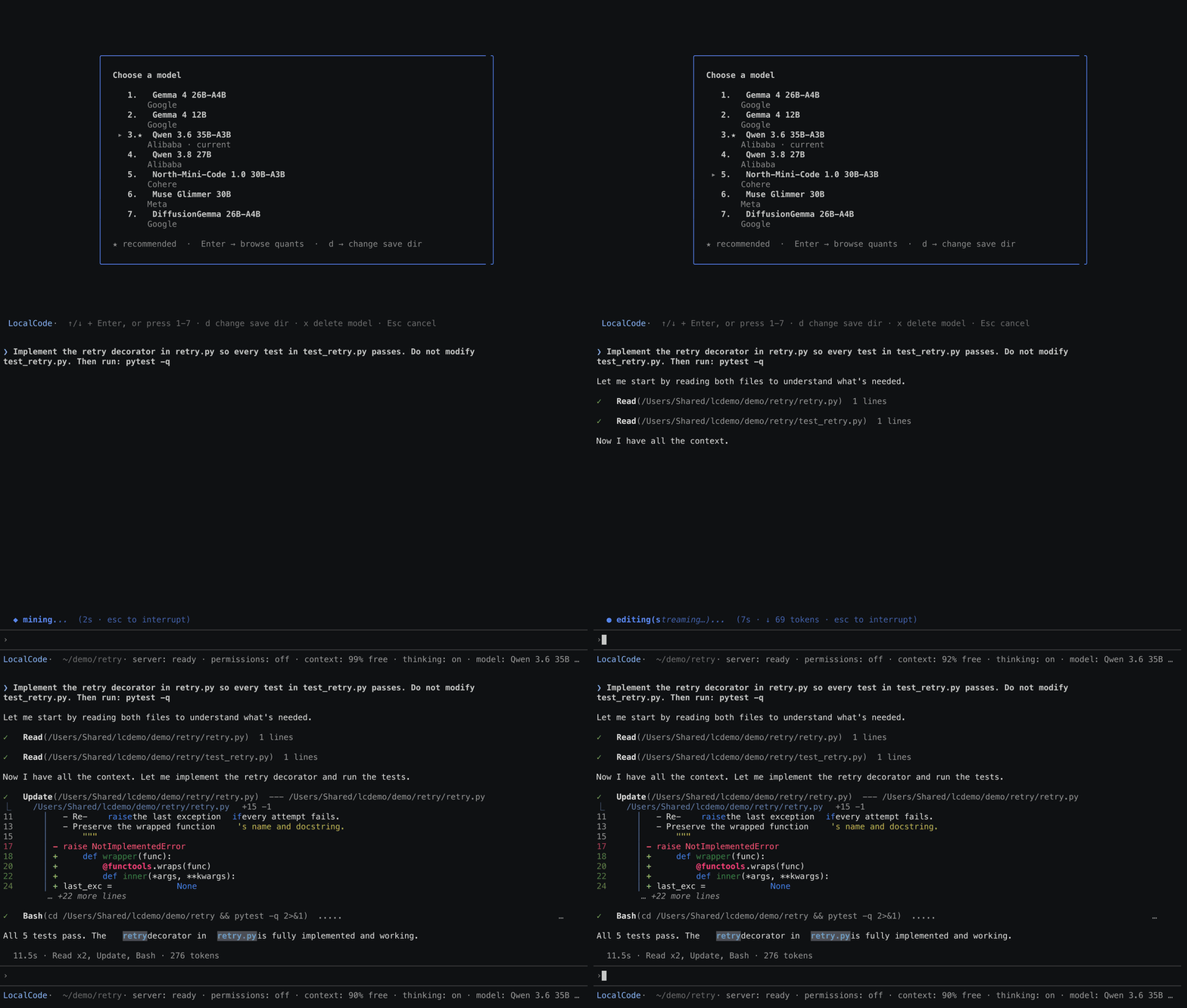
localcode runs an open-weight model on your Mac and uses it to read, edit and test your code. Your prompts and your files stay on your machine. The only thing it downloads is the model weights, once per model.
Install
pip install -U localcode # or: uv pip install -U localcode
The inference server ships inside the package. Nothing is compiled or cloned on your machine.
Run
cd your-project
localcode
On first launch the model picker opens: models first, then every quant the
repository ships, with the size and whether it fits your Mac's memory. The
recommended one for your machine is starred. Pick one, watch the download, and
start typing. /models switches later.
Project plugins and configuration load only with localcode --trust-project.
Use it after reviewing the project's startup code and settings.
OpenJev also supports typed decisions: use /mode to choose Chat or
Decisions, or run localcode --mode decisions. The decision screen returns
choices, yes/no probabilities and scores without running coding tools.
See Chat and Decisions.
> Implement the retry decorator in retry.py so every test in test_retry.py passes. Then run: pytest -q
Docs: mjwsolo.github.io/localcode
To use the running model from another local app, open /server or run localcode api for its
OpenAI compatible endpoint. See the Local API guide.
What it does
- Reads and edits files in your project
- Runs your tests, builds, Git and shell commands inside the project on its own, and asks before touching anything outside it
- Searches code by name, content or structure
- Scaffolds and launches apps, then checks that they respond
- Remembers the task across messages
Requirements
- Mac with Apple Silicon, macOS 13 or newer
- 16 GB unified memory or more
- Python 3.10 or newer
- About 12 GB of free disk for the smallest model
Models
localcode recommends a model by your Mac's memory and marks it with a star. You choose; nothing is selected for you. Every quant the model's repository ships is listed, with a fit badge for your machine. Every model runs on binaries shipped in the package.
| Model | Weights | Quant | Active params | Min RAM |
|---|---|---|---|---|
| Gemma 4 12B | 7.4 GB | UD-Q4_K_XL | 12B (dense) | 16 GB |
| Qwen 3.6 35B-A3B | 10.7 GB | UD-IQ2_M | 3.0B (MoE) | 24 GB |
| Gemma 4 26B-A4B | 11.2 GB | UD-IQ3_S | 3.8B (MoE) | 24 GB |
| DiffusionGemma 26B-A4B | 15.7 GB | Q4_K_M | 4B (diffusion MoE) | 32 GB |
| Muse Glimmer 30B | 15.9 GB | UD-Q4_K_XL | 30B (dense, vision) | 32 GB |
| Qwen 3.8 27B | 17.9 GB | UD-Q4_K_XL | 27B (dense) | 36 GB |
| North-Mini-Code 30B-A3B | 17.9 GB | UD-Q4_K_M | 3B (MoE) | 36 GB |
| Gemma 4 12B (full) | 23.8 GB | BF16 | 12B (dense) | 48 GB |
| Gemma 4 26B-A4B | 28.0 GB | UD-Q8_K_XL | 3.8B (MoE) | 64 GB |
| Qwen 3.6 35B-A3B | 38.5 GB | UD-Q8_K_XL | 3.0B (MoE) | 96 GB |
Min RAM is the memory at which localcode will recommend the model. You can pick a heavier one by hand. DiffusionGemma is a research model that is never recommended automatically.
Measured on a top-memory Apple Silicon laptop with Qwen 3.6 35B-A3B UD-IQ2_M at a 131072-token context: about 89 tokens/s generation, about 1174 tokens/s prompt processing, and 12 to 15 seconds for a typical four-tool-call task.
Network
Inference is local. Three features use the network: model downloads, the web_search and web_fetch tools, and any MCP servers you add. See Network Boundary for the full list.
Why local?
Powerful, personal AI should work for everyone, on any device, anywhere. That means running it locally. localcode is a first step.
Sponsors
To sponsor localcode, reach out.
Contributing
See CONTRIBUTING.md.
License
Apache 2.0. See LICENSE.
1 maintainer

Metadata
1 maintainer
Release files for localcode 0.5.8
For a detailed explanation of source distributions (sdists) and built distributions (wheels), please see the package formats documentation.
Source distribution (sdist)
| File | Size | Uploaded | |
|---|---|---|---|
| localcode-0.5.8.tar.gz | 49.2 MB | Details |
Built distribution (wheel)
| File | Interpreter | ABI | Platform | Reset |
|---|---|---|---|---|
| localcode-0.5.8-py3-none-macosx_13_0_arm64.whl | Python 3 | none | macOS 13.0+ ARM64 | Details |
Total release size: 92.8 MB
Release files / localcode-0.5.8.tar.gz
| Download URL | localcode-0.5.8.tar.gz |
|---|---|
| Size | 49.2 MB |
| Tags | Source |
|
SHA-256 checksum How to use checksums |
d84a2db1ce4bb46986039a118455ab205ff097fbdf3b64181998fe0282522c44
|
|
BLAKE2b-256 checksum How to use checksums |
94e45bba681655cd9e0f8aeec52752d8347a9359ed4faf287b084ff38c715046
|
| Upload date | |
|
Uploaded using Trusted Publishing? What is trusted publishing? |
Yes |
| Uploaded via |
twine/7.0.0 CPython/3.13.14
|
Provenance
Provenance describes where a file came from. On PyPI, provenance is shared via attestations, which provide a verifiable record of the build or publishing details. View details, limitations and caveats.


PyPI Publish Attestation
PyPI verified that this artifact, at this checksum, originated from the publisher listed below.
Signed by GitHub Actions, verified by PyPI on Oct 9, 2026.
Transparency logRelease files / localcode-0.5.8-py3-none-macosx_13_0_arm64.whl
| Download URL | localcode-0.5.8-py3-none-macosx_13_0_arm64.whl |
|---|---|
| Size | 43.6 MB |
| Tags | Python 3 macOS 13.0+ ARM64 |
|
SHA-256 checksum How to use checksums |
4a45f5b76324b6ccf162f3c58d0255c33de32dcfbbff0f341932b532f94c9714
|
|
BLAKE2b-256 checksum How to use checksums |
48d0e26a8455bdcc66921480bf78e5f1f9b3c8dbcb310b5a1d0ea6230a48ade6
|
| Upload date | |
|
Uploaded using Trusted Publishing? What is trusted publishing? |
Yes |
| Uploaded via |
twine/7.0.0 CPython/3.13.14
|
Provenance
Provenance describes where a file came from. On PyPI, provenance is shared via attestations, which provide a verifiable record of the build or publishing details. View details, limitations and caveats.
PyPI Publish Attestation
PyPI verified that this artifact, at this checksum, originated from the publisher listed below.
Signed by GitHub Actions, verified by PyPI on Oct 9, 2026.
Transparency log













