
localmend


Find out why your coding agent is slow or wrong on a local model, and fix it.
Quick start · Connect your app · Diagnose · Results · Troubleshooting · FAQ
uv tool install git+https://github.com/rodricksz4h5/localmend
localmend check        # is your model server set up for coding agents? (about a minute)
Coding agents (Claude Code, OpenCode, Aider, Hermes, Qwen Code, Codex CLI, …) are built for big cloud models. Point them at a 4B–9B model on your own machine and they often waste minutes per task, or say "done" without checking. localmend sits between your agent and your model server (llama.cpp, Ollama or LM Studio), shows you what is going wrong, and fixes what a proxy can fix, without changing the agent or the model.
your agent ──► localmend :4747 ──► llama.cpp / Ollama / LM Studio
localmend check: is your model server set up for agents?localmend serve: the proxy, with fixes for the problems belowlocalmend doctor: what does your agent waste time on? (reads a recorded session)localmend report: every request of a recorded session, one line each
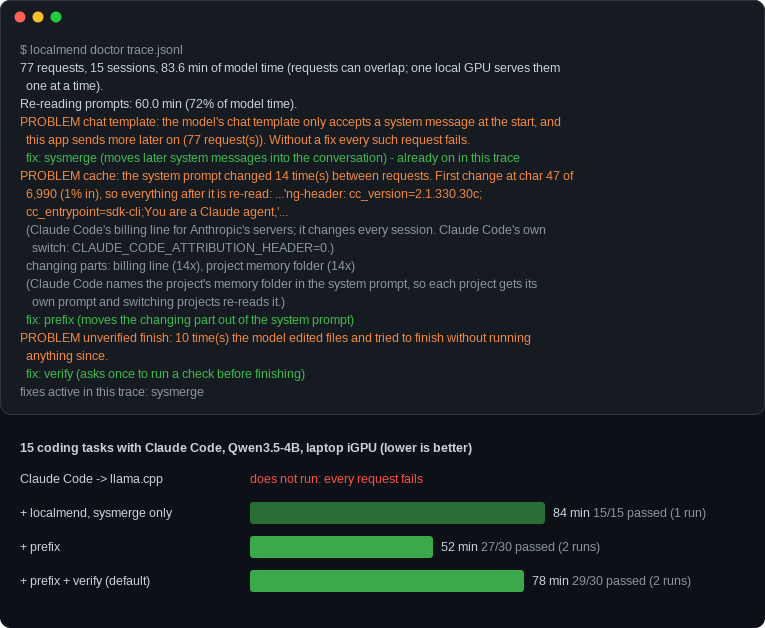
Claude Code + Qwen3.5-4B on a laptop without a GPU: every request fails → works; 15 tasks in 52 min instead of 84. One laptop, one or two runs per setup; your numbers will differ. All results.
Why
Coding agents are built for big cloud models. On a 4B–9B model on a laptop, three things go wrong that a proxy can fix:
- The prompt cache never hits. Agents put the date, working directory or a file list in their system prompt, so the server re-reads ~10–20k tokens: ~3 minutes before the first word of each new session.
- The model says "done" without checking. Small models edit a file and stop without running anything, and the agent believes it.
- Housekeeping calls eat the GPU. A thinking model reasons for thousands of tokens about a five-word thread title while the real work waits: 100–800 s per title in our runs.
Per app
Measured on one laptop without a GPU (i7-1260P, Intel Iris Xe, 16 GB), Qwen3.5-4B unless noted. Each row links to the full numbers and caveats.
| App | What doctor found |
What localmend changes |
|---|---|---|
| OpenCode 2.3 / 1.19 | Changing prompt, slow title requests, finishes without testing | 3 wrong answers → 0 (2.3); 1.6x faster (1.19); 2.2x on Ollama |
| Claude Code | Fails outright on Qwen3.5 + llama.cpp (late system message); billing line breaks the cache | Works at all; 84 → 52 min for 15 tasks |
| Hermes Agent | Workspace info in the prompt: full re-read per task | 31% faster, same results (15/15) |
| Aider | Commit message request thinks for 10+ min, then retried | Commit messages in 7–12 s; 3/3 tasks done |
| Qwen Code | Memory folder path in the prompt: full re-read per task | Re-reads 16 → 4, but total time about even |
| Cline CLI | Healthy: small prompt, tests its own work | Nothing needed |
| Codex CLI | Fails outright on Qwen3.5 + llama.cpp (developer message after its instructions) | Works at all; the 4B model still can't edit files with it |
| Free Claude Code (Claude Code via FCC) | Every new task re-reads the whole prompt; FCC gives up after 120 s and resends | 16.4 → 10.1 min for 3 tasks, no more timeouts |
| Odysseus (chat) | think: false ignored by Ollama |
2.7x less waiting |
| Gemma 4 E4B (Ollama) | Same problems, model-specific cache limits | 14/15 vs 13/15 with OpenCode; no help with Claude Code |
One run per setup unless noted, so treat small differences as noise. Reproduce with bench/.
Not for you if…
- You use a cloud model. localmend is for local servers; cloud APIs cache prompts differently.
- Your agent is already healthy. Cline CLI needed nothing in our runs. Run
doctoron your own sessions first: it says when there's nothing to fix. - Claude Code with Gemma 4 on Ollama. Connecting Claude Code to Ollama directly worked as well or better in our runs.
- You expect a 4B model to drive Codex CLI. localmend makes Codex work at all, but its file editing tool isn't offered to models it doesn't know, and that a proxy can't fix.
Quick start
# 1. a local model server, e.g. llama.cpp
llama-server -m Qwen3.5-4B-Q4_K_M.gguf --jinja -ngl 99 -c 32768 --port 8080   # agents need 20k+

#    or Ollama: OLLAMA_CONTEXT_LENGTH=32768 OLLAMA_IGPU_ENABLE=1 ollama serve   (upstream :11434)

# 2. the proxy (uv brings its own Python if yours is older than 3.10)
uv tool install git+https://github.com/rodricksz4h5/localmend      # or: pipx install git+...
localmend check --upstream http://127.0.0.1:8080     # a minute: is the server set up for agents?
localmend serve --upstream http://127.0.0.1:8080

# 3. point your agent at http://127.0.0.1:4747/v1, see "Connect your app" below
Each request prints one line: time, prompt tokens read vs reused, thinking length, and which fixes
fired (--quiet turns this off).
On a Mac
brew install llama.cpp                 # Metal (Apple GPU) support is built in
llama-server -m Qwen3.5-4B-Q4_K_M.gguf --jinja -c 32768 --port 8080

# or the Ollama app: raise its context length in Settings, or
launchctl setenv OLLAMA_CONTEXT_LENGTH 32768    # then quit and reopen Ollama
No OLLAMA_IGPU_ENABLE there: on Apple Silicon Ollama uses the GPU by itself. mlx_lm.server
also speaks the OpenAI API, so localmend can sit in front of it too.
LM Studio
Use --upstream http://127.0.0.1:1234. Tested on LM Studio 0.4.29 (Windows) with check and single
requests, no full agent run yet: it accepts a late system message, ignores the usual no-thinking
switch but honours reasoning_effort: "none", which localmend sends to it, and check reads its
loaded context size (raise it with lms load <model> -c 32768).
Connect your app
Start the proxy in front of your model server, then point the app at http://127.0.0.1:4747/v1
(any API key works, e.g. local; with llama.cpp any model name works, with Ollama use its name,
e.g. qwen3.5:4b):
localmend serve --upstream http://127.0.0.1:8080 # llama.cpp; Ollama: http://127.0.0.1:11434
OpenCode
A provider in opencode.json:
{
  "provider": {"local": {
    "npm": "@ai-sdk/openai-compatible",
    "options": {"baseURL": "http://127.0.0.1:4747/v1"},
    "models": {"qwen": {"tool_call": true, "limit": {"context": 32768, "output": 4096}}}
  }},
  "model": "local/qwen"
}
Claude Code
export ANTHROPIC_BASE_URL=http://127.0.0.1:4747     # just the address, no /v1
export ANTHROPIC_AUTH_TOKEN=local
export ANTHROPIC_MODEL=qwen ANTHROPIC_DEFAULT_HAIKU_MODEL=qwen   # llama-server takes any name; Ollama: e.g. qwen3.5:4b
export CLAUDE_CODE_MAX_CONTEXT_TOKENS=32768         # your server's context; else Claude Code assumes 1M and overflows it
export CLAUDE_CODE_MAX_OUTPUT_TOKENS=4096           # needed with the line above: Claude Code keeps room for a 32k
                                                    # reply, so a 32k window looks full and it compacts every turn
export API_TIMEOUT_MS=3600000                       # a session's first request can take minutes on a laptop
claude
PowerShell:
$env:ANTHROPIC_BASE_URL="http://127.0.0.1:4747"; $env:ANTHROPIC_AUTH_TOKEN="local"; $env:ANTHROPIC_MODEL="qwen"
$env:ANTHROPIC_DEFAULT_HAIKU_MODEL="qwen"; $env:CLAUDE_CODE_MAX_CONTEXT_TOKENS="32768"; $env:CLAUDE_CODE_MAX_OUTPUT_TOKENS="4096"
$env:API_TIMEOUT_MS="3600000"
claude
Hermes Agent
In config.yaml (64k context or more, Hermes' own minimum):
model:
  provider: custom
  base_url: http://127.0.0.1:4747/v1
  default: qwen
  context_length: 65536
Aider
OPENAI_API_BASE=http://127.0.0.1:4747/v1 OPENAI_API_KEY=local aider --model openai/qwen
Qwen Code
qwen --auth-type openai --openai-base-url http://127.0.0.1:4747/v1 --openai-api-key local -m qwen
Cline CLI
cline auth -p openai -k local -m qwen -b http://127.0.0.1:4747/v1
Codex CLI
In ~/.codex/config.toml:
model = "qwen"
model_provider = "local"
model_context_window = 32768

[model_providers.local]
name = "local"
base_url = "http://127.0.0.1:4747/v1"
wire_api = "responses"
Free Claude Code (FCC)
In ~/.fcc/.env, point its local provider at localmend instead of the model server, and start
localmend with --upstream set to the model server:
MODEL="llamacpp/qwen"
LLAMACPP_BASE_URL="http://127.0.0.1:4747/v1"
(Measured with llama.cpp. FCC's LM Studio and Ollama providers speak the same API, so
LM_STUDIO_BASE_URL / OLLAMA_BASE_URL pointed at localmend should work the same way; not measured yet.)
Anything else with an "OpenAI-compatible" provider setting (Continue, Kilo, Goose, Open WebUI, …):
base URL http://127.0.0.1:4747/v1. These are not measured yet; run doctor on a session to see
whether localmend helps.
What it does
| What | Measured effect | |
|---|---|---|
| check | Tests your model server the way an agent will use it, in about a minute: context size, prompt reading speed, cache reuse, chat template, thinking switch, GPU. Each problem comes with what to do. | — |
| doctor | Reads a recorded session and tells you which of these problems your agent has, where in the prompt the cache breaks, and how much time each one cost. | — |
| prefix fix | Moves the changing parts of the system prompt (date, cwd, env block) into the first user message, so the prefix is byte-identical across sessions. Known patterns plus automatic learning of the volatile region. | new session's first request: 167 s → 6.6 s |
| verify fix | If the model edited files, ran nothing since, and is about to give its final answer, the answer is held and the model is asked once to run one quick check. A few turns later it is asked to wrap up. The agent never sees any of this, and the server's prompt cache stays valid throughout. | failures 3 → 0 on OpenCode 2.3 |
| sidecalls fix | Recognised side requests (title generation, memory extraction) get thinking off; titles also get a short output cap. Agent turns are never touched. | title: 100–800 s → ~10 s |
| think-flag fix | If the app asks for no thinking with think: false, which Ollama's OpenAI-style endpoint silently ignores, the server's own switch is sent instead. Only acts on an explicit false. |
Odysseus chat: 2.7x less waiting |
| sysmerge fix | Many chat templates (Qwen3.x and others) accept one system message, first, and fail the request otherwise ("System message must be at the beginning"). Claude Code and some other apps send more later on. When the server rejects a request for this, the later system messages are moved into the conversation at the same spot and the request is retried; from then on this is done up front for that model. | Claude Code + Qwen3.5: every request fails → works |
Every fix is on by default and can be switched off (--no-prefix, --no-verify, --no-sidecalls, --no-think-flag,
--no-sysmerge). --observe turns them all off except sysmerge, which only acts on requests the server
would otherwise refuse. Verify costs time (about 1.5x on OpenCode 2.3) for fewer wrong answers; use
--no-verify if you prefer speed.
Diagnose your own setup
First the server on its own, about a minute, no agent needed:
localmend check --upstream http://127.0.0.1:11434 # Ollama; llama.cpp is the default :8080
Example output (Ollama left at its defaults)
ok server: ollama at http://127.0.0.1:11434, model qwen3.5:4b
PROBLEM context: 4,096 tokens. Coding agents send 10-22k tokens per request before any work, ...
  do: set OLLAMA_CONTEXT_LENGTH=32768 and restart Ollama (or raise it in the app's Settings)
ok speed: reads 39 prompt tokens/s, so an agent's ~14k-token prompt takes ~355 s to read whenever the cache misses.
ok cache: a second prompt with the same start skipped the shared part (reused 1,325 of 1,837 tokens, ...
PROBLEM gpu: Ollama runs this model on the CPU only, which is several times slower.
  do: On Intel/AMD integrated GPUs Ollama skips the GPU unless you set OLLAMA_IGPU_ENABLE=1 and restart it ...
ok chat template: accepts a system message after the start.
PROBLEM thinking: the app's `think: false` is ignored, so the model thinks anyway (19 s for a one-number answer). ...
  do: run your app through `localmend serve`, which sends the server's own no-thinking switch.
Real output on the test laptop; reading speed varies from run to run.
Then what your agent actually does with it:
localmend serve --observe --upstream http://127.0.0.1:11434   # all fixes off, records a trace
# ... use your agent normally for a few tasks, then stop with Ctrl+C: the report prints ...
localmend doctor                                               # the same report again, any time (newest trace)
localmend report                                               # every request, one line each
Both also take a file: localmend doctor FILE, localmend report FILE.
Example doctor report
151 requests, 12 sessions, 92.1 min of model time
Re-reading prompts: 28.5 min (31% of model time).
PROBLEM cache: the system prompt changed 14 time(s) between requests. First change at
  char 21,754 of 22,328 (97% in) ...
  do: run your app through `localmend serve` ...: its prefix fix moves the changing part out ...
PROBLEM side calls: 16 title request(s) took 6.2 min ...
  do: ... its sidecalls fix turns thinking off and caps the answer for these short requests.
PROBLEM unverified finish: 14 time(s) the model edited files and tried to finish
  without running anything since.
  do: ... its verify fix asks once to run a check before finishing.
Traces contain your full prompts, code and the model's answers. So --observe saves them in
your own user folder, never in your project (where they could be committed by accident):
%LOCALAPPDATA%\localmend\traces on Windows, ~/Library/Application Support/localmend/traces on
macOS, ~/.local/share/localmend/traces on Linux. One file per run; on Linux and macOS only you can
read them. --trace FILE lets you choose the file. Read a trace before sharing it.
Other ways to do this
Some of this you can do without localmend, and some tools do one part of it:
- Claude Code's own switches. With a Claude model name (
ANTHROPIC_MODEL=claude-sonnet-4-5) it doesn't send the late system message, andCLAUDE_CODE_ATTRIBUTION_HEADER=0plusclaude --exclude-dynamic-system-prompt-sectionskeep its prompt stable. It then sends a bigger prompt (~22k tokens instead of ~14k): 62 min for our 15 tasks, against 52 through localmend without verify. Details. - llama.cpp's
--cache-reusecan reuse chunks of a prompt after a change, but not on hybrid models like Qwen3.5, and Ollama has nothing like it. Moving the changing text out of the system prompt works on every server. If your llama-server runs several slots (-np), a new session may also land in a slot that holds a different prompt. - A patched chat template fixes the "System message must be at the beginning" error for one model on one server (one collection).
| finds the cause | fixes it | verify | side calls / thinking | |
|---|---|---|---|---|
| cachekeeper | cache misses, live | no (observe only) | no | no |
| local-llm-kv-cache | no | saves llama.cpp's cache to disk | no | no |
| ollama-nothink-proxy | no | no | no | thinking off for every request |
| Free Claude Code | no (fcc-doctor collects settings for bug reports) |
routes 12 agents to 61 providers, free cloud tiers first | no | per-model thinking settings |
| localmend | cache, side calls, thinking, unverified finish, timeouts (doctor) |
yes | yes | only for side calls and an explicit think: false |
What localmend adds: one tool that both finds and fixes these problems, for any app and any local server, with measured results. Free Claude Code solves a different problem (which provider, for free) and works with localmend in front of your local server. cachekeeper's live view of cache misses is more detailed than ours; use it alongside if that's what you need (it defaults to port 4141, ours to 4747).
Troubleshooting
Requests return 502. The model server isn't running, or llama.cpp is still loading the model.
localmend picks it up as soon as it answers; check the --upstream address (with or without /v1).
Ollama gives nonsense, or the agent forgets its tools. Ollama's default context is 4096 tokens
and longer prompts are cut silently from the front: an agent's 10k system prompt arrives as 2k. Set
OLLAMA_CONTEXT_LENGTH=32768 (or at least 20k). check and serve warn about this.
Ollama is very slow on an Intel laptop. On Intel iGPUs Ollama runs on the CPU unless
OLLAMA_IGPU_ENABLE=1 (check with ollama ps). On our laptop that took prompt reading from 54 to 88
tokens/s.
The app shows no streaming for some answers. After an edit with no check yet, verify reads the
answer in full before passing it on. Apps with a short first-byte timeout may give up first;
--no-verify turns this off.
Claude Code compacts the conversation every turn. Set CLAUDE_CODE_MAX_OUTPUT_TOKENS=4096 along
with CLAUDE_CODE_MAX_CONTEXT_TOKENS (see Claude Code).
The app gives up while the model is still reading the prompt. A new session's first request can
take minutes on a laptop. Raise the app's timeout (Claude Code: API_TIMEOUT_MS; Free Claude Code:
HTTP_READ_TIMEOUT). doctor reports these give-ups.
A web UI gets 403. localmend refuses requests from web pages on other sites. Apps on
localhost, browser extensions and VS Code webviews are allowed; see SECURITY.md.
Something printed "prefix learned a changing part". When the prefix fix learns a changing part of an agent's system prompt, it prints that part once, so nobody's prompt is rewritten silently. Learning only happens for agents (requests with tools), never for plain chat apps.
Known limits
/v1/chat/completionsgets every fix;/v1/messages(Claude Code) gets prefix, sysmerge and verify;/v1/responses(Codex CLI) gets sysmerge only, anddoctorreads it. Everything else (Ollama's native/api/chat, embeddings) passes through untouched.- The wrap-up budget is per task: a new message from you in the same chat resets it.
- Ollama ignores
tool_choice, so there the wrap-up is a request, not a rule. On llama.cpp's/v1/messagesit is only partly kept: in the Claude Code benchmark the model still called a tool in 7 of 12 wrap-ups (the next wrap-up then asks again).
FAQ
Why not just tell the agent "run the tests before you finish" (e.g. in AGENTS.md)? Try
it: if it works for your model, use --no-verify. We haven't measured it against verify
yet. Verify only steps in when the model edited code and ran nothing since, and only once
per task.
Does it send anything anywhere? No. It only talks to the --upstream you give it. Traces
are written only if you ask for one.
Is it safe to run? It listens on 127.0.0.1 only and refuses requests from web pages on other
sites. --host 0.0.0.0 opens it to your network without a password. Details and how to report a
problem: SECURITY.md.
Status
Early. Works with any OpenAI-compatible chat completions server (streaming and non-streaming), and with Anthropic Messages servers for Claude Code (tested on llama.cpp and Ollama). All measurements so far are from one Windows laptop (Intel iGPU) with Qwen3.5-4B and Gemma 4 E4B; the tests also pass on Linux and macOS. More models, apps and machines (Apple Silicon first) are next.
Development
pip install -e . pytest
python -m pytest -q       # no model server needed
1 maintainer

Metadata
1 maintainer
Release files for localmend 0.1.0
For a detailed explanation of source distributions (sdists) and built distributions (wheels), please see the package formats documentation.
Source distribution (sdist)
| File | Size | Uploaded | Provenance | Actions |
|---|---|---|---|---|
| localmend-0.1.0.tar.gz | 109.4 kB | With provenance | Details for localmend-0.1.0.tar.gz |
Built distribution (wheel)
| File | Interpreter | ABI | Platform | Actions Reset |
|---|---|---|---|---|
| localmend-0.1.0-py3-none-any.whl | Python 3 | none | any | Details for localmend-0.1.0-py3-none-any.whl |
Total release size: 167.8 kB
Release files / localmend-0.1.0.tar.gz
| Download URL | localmend-0.1.0.tar.gz |
|---|---|
| Size | 109.4 kB |
| Tags | Source |
|
SHA-256 checksum How to use checksums |
5d25f475ce8e22a04a77c70e8a806a43d8978d75dffbea0c7635dfc79584c2cd
|
|
BLAKE2b-256 checksum How to use checksums |
c466d2c08120d857669f46db629041289e3c76bd9113ccd2d9086f0a7f5cb965
|
| Upload date | |
|
Uploaded using Trusted Publishing? What is trusted publishing? |
Yes |
| Uploaded via |
twine/7.0.0 CPython/3.13.16
|
Provenance
Provenance describes where a file came from. On PyPI, provenance is shared via attestations, which provide a verifiable record of the build or publishing details. View details, limitations and caveats.


PyPI Publish Attestation
PyPI verified that this artifact, at this checksum, originated from the publisher listed below.
Signed by GitHub Actions, verified by PyPI on Nov 27, 2026.
Transparency logRelease files / localmend-0.1.0-py3-none-any.whl
| Download URL | localmend-0.1.0-py3-none-any.whl |
|---|---|
| Size | 58.4 kB |
| Tags | Python 3 |
|
SHA-256 checksum How to use checksums |
d6097129ca402ad31c18ac6f04e277c12aad87116d1ad0ed5f2548ccf1ea282d
|
|
BLAKE2b-256 checksum How to use checksums |
4dfbf4a6ffebbe2039793b2800c4046c2ecde17188d5c99586f632a6ce77b47d
|
| Upload date | |
|
Uploaded using Trusted Publishing? What is trusted publishing? |
Yes |
| Uploaded via |
twine/7.0.0 CPython/3.13.16
|
Provenance
Provenance describes where a file came from. On PyPI, provenance is shared via attestations, which provide a verifiable record of the build or publishing details. View details, limitations and caveats.
PyPI Publish Attestation
PyPI verified that this artifact, at this checksum, originated from the publisher listed below.
Signed by GitHub Actions, verified by PyPI on Nov 27, 2026.
Transparency logSecurity for localmend 0.1.0
Provenance
Provenance describes where a file came from. On PyPI, provenance is shared via attestations, which provide a verifiable record of the build or publishing details. View details, limitations and caveats.
Full provenance
Both files in this release have been uploaded with provenance metadata.
Attestation for localmend-0.1.0.tar.gz
PyPI Publish Attestation
PyPI verified that this artifact, at this checksum, originated from the publisher listed below.
Signed by GitHub Actions, verified by PyPI on Nov 27, 2026.
Transparency logA note on package security
PyPI is a repository for distributing packages, not a service for auditing them. While third-party security researchers and our staff do their best to detect and remove malicious packages, PyPI cannot guarantee the quality, security or suitability of any given package.
To learn more about protecting yourself from malicious actors, visit our package security documentation.













