

Locals
Run many AI agents at once on your Mac, up to 3x faster.
A local server made for agents rather than plain chat: tool calls, long
conversations and many agents working at the same time. For OpenCode,
OpenHands, Cline, Aider, Claude Code and any OpenAI, Anthropic or Ollama app.


Getting started · Agents · Benchmarks · Documentation · Paper
curl -LsSf https://raw.githubusercontent.com/Generated-Computers/Locals/main/install.sh | sh
Then, in a new Terminal window:
locals code ~/my-project
That is all. The first time, Locals downloads a model that suits your Mac (about 3 GB), starts it in the background and opens the OpenCode assistant in your project. Nothing leaves your computer.
What it is
Locals runs AI models on your own Mac for agents, not for chatting with a raw model. An agent works differently from a person in a chat. It calls tools, and every call has to be right. It sends a long prompt that grows a little every turn. And it rarely works alone: coding assistants run helpers in parallel, and teams of agents split one task between them. Locals is built for this work, from the way it computes a batch of requests on your Mac's graphics chip to the way it writes a tool call, so a team of agents gets its answers up to three times faster than with the standard way of running models on a Mac.
It works with the coding agents you may already use, such as OpenCode, Cline, Aider, OpenHands and Claude Code, and with any app or program that talks to OpenAI, Anthropic or Ollama. Everything stays on your computer.
Locals is built on the paper Breaking the Space Barrier and its Application to Language Model Inference (Arip Asadulaev, 2026). A JSON format or a tool call can be described as a graph, and checking a reply against it as finding a path in that graph. The paper does this in less memory than Savitch's classical bound and turns it into an inference engine: text the format already decides is written without running the model, the checks run on the graphics chip, and a format needs about 3 MB of memory instead of up to 1.5 GB. With it, sixteen tool-calling agents finish 2.5 times sooner than with mlx-lm and llguidance.
Made for agents
- Many agents at once. Requests from every agent are computed together, with GPU kernels written for a few requests at a time, so eight agents working at once finish in about the time two would need one after the other.
- Tool calls that always parse. Replies are written in each model's own tool-call format under a grammar applied on the GPU, so an agent can call only the tools it offered, every argument arrives in the type its schema asks for, and a reply cut off by its length limit still closes its call. Requests for JSON follow their schema the same way.
- Each turn picks up where the last one ended. Locals keeps every conversation between turns, and the long system prompt an agent tool starts with (3,000 to 16,000 tokens) on disk across restarts, so an agent's next turn reads only what it added: the next turn of a 138,000-token conversation starts after 2.4 seconds.
- Guards made for agents. A small model can repeat itself or call the same tool forever; Locals notices and stops both. A memory guard keeps many agents with long prompts from ending in an out-of-memory error, and an agent that hangs up frees the server at once.
- One command per agent tool.
locals codeopens OpenCode in your project, andlocals launchconnects Hermes Agent, OpenClaw, Claude Code, Kilo Code, Cline, OpenHands and Aider. - A team of agents for bigger tasks.
locals runsplits a task into parts, gives each part to several agents at once, each in its own copy of your project, and lets your tests decide.
Results at a glance
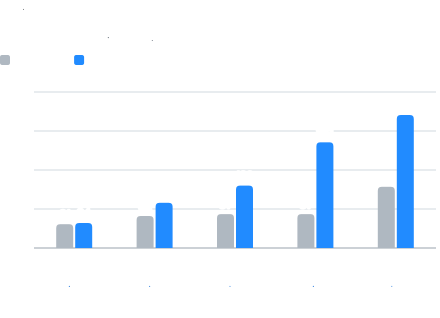
mlx-lm, the standard way of running models on a Mac, answers several requests together, but it gets no faster from four of them to eight: it writes 87 tokens per second for four requests and the same 87 for eight. Locals keeps getting faster as requests are added, up to three times mlx-lm's speed with eight at once.
It is faster for a single agent too: when the reply repeats a file it is rewriting, after a restart, and in long conversations. The table has these cases, on a MacBook Pro with an M2 Pro and 16 GB and Qwen3.5-4B, the default model.
| On a MacBook Pro with an M2 Pro and 16 GB, Qwen3.5-4B | Without Locals | With Locals | |
|---|---|---|---|
| 8 requests at once | 87 tokens/s (mlx-lm) | 271 tokens/s | 3.1x |
| 8 agents asking at once: time to the first word | 42 s (Ollama) | 1.6 s | 26x sooner |
| One agent rewriting a 100-line file | 43 tokens/s (mlx-lm) | 128 tokens/s | 3.0x |
| An agent's first request after a restart | 16 s (mlx-lm) | 1.7 s | 9.6x sooner |
| A follow-up question about a 48,000-token document | out of memory (mlx-lm) | 0.6 s | |
| 16 coding agents calling tools (Qwen3.5-2B, from the paper) | 75 s (mlx-lm) | 29 s | 2.5x |
| 40 programming problems from LiveCodeBench, 8 at a time (from the paper) | 20 min (mlx-lm) | 8 min | 2.5x |
![Qwen3.5-4B through the server, 1 to 16 requests at once. M2 Pro · 16 GB: mlx-lm [51, 79, 88, 75, 124], Locals [65, 116, 150, 244, 310]. M2 Max · 96 GB: mlx-lm [91, 121, 142, 152, 267], Locals [104, 177, 244, 403, 530]. M5 Pro · 24 GB: mlx-lm [86, 151, 232, 258, 333], Locals [90, 161, 253, 382, 508].](https://pypi-camo.freetls.fastly.net/16446d82934fae5706061ea0798c359c48878a62/68747470733a2f2f7261772e67697468756275736572636f6e74656e742e636f6d2f47656e6572617465642d436f6d7075746572732f4c6f63616c732f6d61696e2f646f63732f6173736574732f6368617274732f6d6163732e737667)
Bigger models gain more on the M2 Max: 3.0x for Qwen3.5-9B and 3.1x for a 27B
model with eight requests at once. On the M5 Pro the gain is smaller, because
mlx-lm is much faster there: MLX has its own kernels for the M5's neural
accelerators, and these numbers were measured before Locals had its own. M1, M3
and M4 chips have not been measured yet: results from them are welcome as
issues, with the output
of locals bench and locals tune --report.
Benchmarks
Every table, and how each was measured, is in
Benchmarks. Unless a chart says otherwise, it was
measured on a MacBook Pro with an M2 Pro (19-core GPU) and 16 GB, with
Qwen3.5-4B (mlx-community/Qwen3.5-4B-MLX-4bit), MLX 0.32 and mlx-lm 0.32.
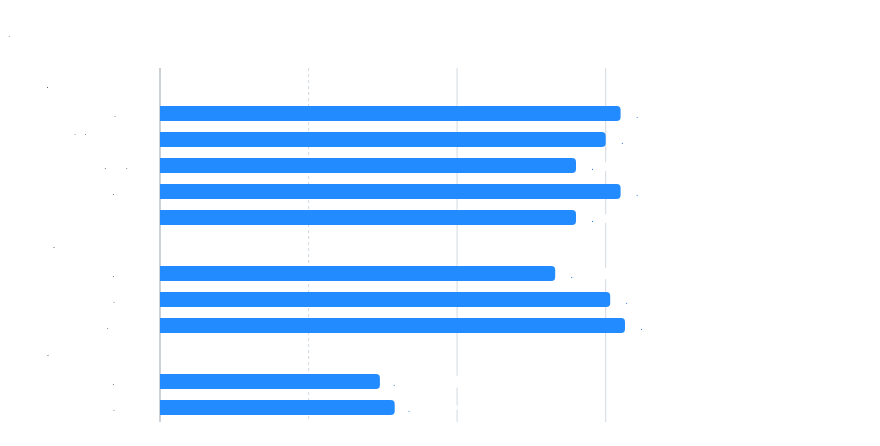
Models quantized to 4 bits in the usual way (in groups of 64) gain 2.3x to 3.3x with 8 requests at once; other formats run at mlx-lm's speed (below).
Against other servers

Ollama 0.40.5, Magnitude 0.2.9 and llama.cpp b11724, one at a time on the GPU,
each with its own 4-bit build of the model, measured with SemiAnalysis's
InferenceX client (temperature 0, replies of natural length). The tables for
1,000- and 8,000-token prompts and for Gemma 4 are in
Benchmarks.
Long prompts
No pause while a long prompt is read. When an agent sends an 8,000-token prompt while others are getting answers, Locals reads it in the same passes as their next tokens, so their replies keep streaming: the longest gap in them went from 12 s to 3 s, with the same throughput, against reading the prompt on its own. A 3,000-token request that arrives during a 30,000-token one gets its first token after 7 s instead of 41.
Where Locals is not faster
- One request alone, with nothing to reuse: about the same as mlx-lm (64 against 61 tokens per second on the M2 Pro). It is faster alone when the reply repeats the prompt (file rewrites) or the prompt is cached.
- Prompt-bound work: reading a prompt is limited by the GPU's arithmetic. With 8,000-token prompts and 8 requests at once the server writes 57 tokens per second; most of the time goes into reading.
- Formats outside the tuned kernels: 4-bit affine quantization in groups of 64 is covered; mxfp4 (a mixture-of-experts model, Mellum) ran at mlx-lm's speed.
- The M5's neural accelerators: MLX's own kernels already use them, so the
gain there is 1.5x, not 3x (before Locals' own
naxkernel, which is experimental).
Works with your agents








Locals works with the coding agents and assistants people already use, on a model running on your Mac. All of these but Roo Code were tested end to end with Qwen3.5-4B on a 16 GB Mac (Cline and Kilo Code through their command-line versions), on real tasks such as writing a program, running it and reporting what it printed. One command starts Locals and connects the tool to it:
| Tool | Run |
|---|---|
| Hermes Agent | locals launch hermes |
| Kilo Code | locals launch kilo |
| OpenCode | locals code ~/my-project |
| OpenHands | locals launch openhands |
| Cline | locals launch cline |
| Aider | locals launch aider |
| Roo Code | in VS Code, the settings from locals launch editor (how) |
| OpenClaw | locals launch openclaw |
| Claude Code | locals launch claude (through Anthropic's Messages API, which Locals also answers) |
locals launch list shows every tool it can open. Locals keeps running in the
background after you close a tool: locals status shows what it is doing and
locals stop stops it.
The logos belong to their projects and are shown only to say that Locals works with these tools.
Getting started
You need a Mac with Apple silicon (M1 or newer) and macOS 14 or newer. A Mac with 16 GB of memory gives the best results; with 8 GB, use one of the smaller models.
Open the Terminal app and run:
curl -LsSf https://raw.githubusercontent.com/Generated-Computers/Locals/main/install.sh | sh
Then open a new Terminal window (the installer adds Locals to your shell's PATH, which only new windows read) and start a coding assistant on one of your projects:
locals code ~/my-project
After the first start, which downloads the model, Locals starts in seconds.
- OpenCode uses Locals as its default model from then on, so plain
opencodeuses it too;locals disconnect opencodegives OpenCode its own settings back. - To update Locals, run the install command again.
- To remove it, run
locals stop,locals disconnect opencodeanduv tool uninstall locals. - With the uv package manager, you can install with
uv tool install --python 3.12 git+https://github.com/Generated-Computers/Localsinstead.
Coming from Ollama, LM Studio, mlx-lm or llama.cpp
Locals installs next to them and changes nothing of theirs: it has its own port (8321) and its own folders. Only the memory is shared, so quit the other one while Locals runs; two models at once rarely fit. Locals remembers the model and port you start it with for later commands.
Ollama. Quit Ollama, then let Locals answer on Ollama's port. Apps set up
for Ollama (Open WebUI, Raycast, Continue) and the ollama command itself keep
working unchanged, whatever model name they ask for:
osascript -e 'quit app "Ollama"'      # or: brew services stop ollama
locals launch --model qwen3.5:4b ollama
Ollama's model names work in Locals, and for a model Locals does not know it
names the MLX version on Hugging Face to use instead. Ollama's own downloads
are in its own format (GGUF for most models), so a model is downloaded once
more, in MLX's. To
go back, run locals stop and start Ollama.
LM Studio. LM Studio's MLX models run in Locals where they are, with no second download. Stop LM Studio's server and start Locals on its port, so apps that use it keep working:
locals start --model ~/.lmstudio/models/mlx-community/Qwen3.5-4B-MLX-4bit --port 1234
mlx-lm. The same models and the same download folder, so nothing downloads
again. locals serve takes the place of mlx_lm.server, with the same API:
locals serve --model mlx-community/Qwen3.5-4B-MLX-4bit --port 8080
llama.cpp. Locals runs MLX models, not GGUF files; give it one and it names
the MLX version of the same model. Start it on llama-server's port to keep
your clients:
locals start --model qwen --port 8080
Any other server with the OpenAI API (vLLM, LocalAI): point your client at
http://127.0.0.1:8321/v1, or start Locals on the port the client already uses
with --port.
Examples
Work on a project with an assistant. This opens OpenCode in your project, where you can ask for changes in plain words and watch it read, edit and test your code:
locals code ~/my-project
Give it one task and get the result. The assistant does the task from start to finish without opening a window, and prints what it did:
locals code ~/my-project --run "add a --verbose flag to cli.py and run the tests"
Let a team of agents do a bigger task. Several agents work on the parts of the task at the same time, each in its own copy of your project, and your tests decide when it is done. Your project is changed only when the tests pass:
locals run "write wordcount.py with a function count_words(text) and tests in test_wordcount.py" \
    --dir ~/my-project --check "python3 -m pytest -q"
Ask a question about your code. An agent reads the project and prints the answer:
locals run "Which function parses dates, and which format does it expect?" --dir ~/my-project
Chat with the model in the Terminal, like a private chatbot:
locals chat
Turn text into structured data. Describe the fields you want in a JSON schema,
for example in a file called person.json:
{"type": "object",
 "properties": {"name": {"type": "string"}, "age": {"type": "integer"}, "email": {"type": "string"},
                "status": {"enum": ["pending", "approved", "rejected"]}, "tags": {"type": "array", "items": {"type": "string"}}},
 "required": ["name", "age", "email", "status", "tags"]}
Then the answer always follows it, field by field:
locals generate --prompt "Ana Silva, 29, ana@example.com, application approved, tags: vip, early" \
    --schema person.json
{"name":"Ana Silva","age":29,"email":"ana@example.com","status":"approved","tags":["vip","early"]}
Use it in apps and editors
Start Locals once with the model you want; it keeps running in the background:
locals start --model qwen
The OpenCode app. Run locals setup --model qwen once, then choose Locals in
OpenCode's model list. This works in the desktop app, the editor extension and
the Terminal version alike.
Kilo Code, Cline and Roo Code in VS Code, and Continue, Zed and JetBrains.
Choose the provider called "OpenAI Compatible" and enter these values. Run
locals launch editor to print them for the model that is running.
| Setting | What to enter |
|---|---|
| Base URL | http://127.0.0.1:8321/v1 |
| API key | any text, for example local |
| Model | the model's name from the table below, for example locals/qwen3.5-4b |
| Context window | the number locals launch editor prints, if the extension asks for it |
Apps that work with Ollama, such as Open WebUI or Raycast, need no settings:
run locals launch ollama.
Models
Locals picks a model that fits your Mac's memory, so most people never need to
change it. To use another one, start Locals with its name, for example
locals start --model lfm. Locals runs one model at a time. The last two
columns are speeds in tokens per second (tps) with 8 requests at once, on the
M2 Pro with 16 GB above.
| Model | Start it with | Name in your editor | Size | mlx-lm | Locals |
|---|---|---|---|---|---|
| Qwen3.5-4B (the default) | --model qwen |
locals/qwen3.5-4b |
2.8 GB | 87 tps | 271 tps |
| LFM2.5-2.6B | --model lfm |
locals/lfm2.5-2.6b |
1.5 GB | 144 tps | 404 tps |
| MiniCPM5-2B | --model minicpm |
locals/minicpm5-2b |
1.3 GB | 160 tps | 478 tps |
| Gemma 4 E4B | --model gemma |
locals/gemma-4-e4b-it |
4.8 GB | 80 tps | 224 tps |
On a Mac with less than 12 GB of memory, the default is Qwen3.5-2B instead
(--model qwen3.5-2b; locals/qwen3.5-2b in your editor).
Each model also has a thinking mode, in which it reasons before it answers: add
-thinking to the name, for example locals/lfm2.5-2.6b-thinking. The smaller
models are good choices for a Mac with 8 GB of memory, and other models made for
Apple silicon on Hugging Face work too.
Conversations can be long: up to about 178,000 tokens with the default model on a 16 GB Mac, a few hundred pages of text. On the M2 Pro, reading a 170,000-token document takes about 12 minutes the first time, and follow-up questions about it start in 2 seconds. OpenCode is set up for 32,000 tokens, and OpenClaw, Hermes Agent and Kilo Code for 64,000, which keeps each of their steps quick.
Using it from your own code
Locals understands the same requests as the OpenAI and Ollama services, so
programs written for them work with it unchanged. Start Locals with
locals start, then point your program at http://127.0.0.1:8321/v1:
from openai import OpenAI

client = OpenAI(base_url="http://127.0.0.1:8321/v1", api_key="local")
reply = client.chat.completions.create(
    model="locals",  # the model the server runs
    messages=[{"role": "user", "content": "Write a haiku about the sea."}],
)
print(reply.choices[0].message.content)
Send many requests at once, from threads or with an async client, and Locals
answers them together; that is where it is fastest. Streaming, answers in a
fixed JSON format, function calls, the Ollama library and plain curl all work
as well; the examples show each of them.
Privacy and safety
Everything runs on your Mac. Locals only accepts requests from apps on your own
computer, so a website you visit cannot use it. When a team of agents works on a
task (locals run, locals solve), the commands they run can change files only
in their own copy of your project, and in the temporary and cache folders that
tools write to. locals code runs OpenCode in your project itself, as OpenCode
always runs.
If something does not work
Run locals status, or open http://127.0.0.1:8321 in your browser, to see whether
Locals is running and what it is doing. On a chip other than the M2 Pro and
M2 Max, whose tuning ships with Locals, it tunes itself to your chip the first
time, in the background while it is idle: 10 to 20 minutes of idle time in all.
You can use it during that time, and it gets faster once it finishes.
Questions and problems are welcome as issues on GitHub.
Documentation
| Topic | Page |
|---|---|
How Locals works: the server, the batch engine, the prompt cache, the team of agents behind locals run, and every setting |
How Locals works |
| Every benchmark, and how it was measured | Benchmarks |
| Every table with its date, commit and command; the M2 Max | Measurements, M2 Max |
| Why Locals is faster than mlx-lm, part by part | Why Locals is faster |
Streaming, JSON, function calls, the Ollama library and curl |
Examples |
| The tests, and the end-to-end suite with real agent tools | Tests, End to end |
| Working on Locals itself | CONTRIBUTING.md |
To work on Locals:
git clone https://github.com/Generated-Computers/Locals
cd Locals
uv sync --extra dev
uv run pytest tests -q -m "not model"
Citation
If you use Locals in your research, please cite the paper:
@article{asadulaev2026breaking,
  title   = {Breaking the Space Barrier and its Application to Language Model Inference},
  author  = {Asadulaev, Arip},
  journal = {arXiv preprint arXiv:2610.09139},
  year    = {2026}
}
License
Locals is released under the MIT license. It is made by Generated Computers.
1 maintainer

Metadata
1 maintainer
Release files for locals 0.2.0
For a detailed explanation of source distributions (sdists) and built distributions (wheels), please see the package formats documentation.
Source distribution (sdist)
| File | Size | Uploaded | Provenance | |
|---|---|---|---|---|
| locals-0.2.0.tar.gz | 553.7 kB | With provenance | Details |
Built distribution (wheel)
| File | Interpreter | ABI | Platform | Reset |
|---|---|---|---|---|
| locals-0.2.0-py3-none-any.whl | Python 3 | none | any | Details |
Total release size: 990.9 kB
Release files / locals-0.2.0.tar.gz
| Download URL | locals-0.2.0.tar.gz |
|---|---|
| Size | 553.7 kB |
| Tags | Source |
|
SHA-256 checksum How to use checksums |
073e9239f2b5dd436f05b404a4ad7d5913ad5de0a38f79803e413b1f3e7bc782
|
|
BLAKE2b-256 checksum How to use checksums |
add044a67c6c1891235516d43a19cbec3cc015760b5d584e0280276b3cd45717
|
| Upload date | |
|
Uploaded using Trusted Publishing? What is trusted publishing? |
Yes |
| Uploaded via |
twine/7.0.0 CPython/3.13.16
|
Provenance
Provenance describes where a file came from. On PyPI, provenance is shared via attestations, which provide a verifiable record of the build or publishing details. View details, limitations and caveats.


PyPI Publish Attestation
PyPI verified that this artifact, at this checksum, originated from the publisher listed below.
Signed by GitHub Actions, verified by PyPI on Oct 21, 2026.
Transparency logRelease files / locals-0.2.0-py3-none-any.whl
| Download URL | locals-0.2.0-py3-none-any.whl |
|---|---|
| Size | 437.2 kB |
| Tags | Python 3 |
|
SHA-256 checksum How to use checksums |
8ce1f2c0cf81f4474fa3e7e04824ba66702bd8ea02261340995c13c55f088b0c
|
|
BLAKE2b-256 checksum How to use checksums |
69ddb2a339d18beb814fb0702d220ef51b0145f601d1c96f1b176e4f471c940c
|
| Upload date | |
|
Uploaded using Trusted Publishing? What is trusted publishing? |
Yes |
| Uploaded via |
twine/7.0.0 CPython/3.13.16
|
Provenance
Provenance describes where a file came from. On PyPI, provenance is shared via attestations, which provide a verifiable record of the build or publishing details. View details, limitations and caveats.
PyPI Publish Attestation
PyPI verified that this artifact, at this checksum, originated from the publisher listed below.
Signed by GitHub Actions, verified by PyPI on Oct 21, 2026.
Transparency logSecurity for locals 0.2.0
Provenance
Provenance describes where a file came from. On PyPI, provenance is shared via attestations, which provide a verifiable record of the build or publishing details. View details, limitations and caveats.
Full provenance
All 2 files in this release have been uploaded with provenance metadata.
Attestation for locals-0.2.0.tar.gz
PyPI Publish Attestation
PyPI verified that this artifact, at this checksum, originated from the publisher listed below.
Signed by GitHub Actions, verified by PyPI on Oct 21, 2026.
Transparency logA note on package security
PyPI is a repository for distributing packages, not a service for auditing them. While third-party security researchers and our staff do their best to detect and remove malicious packages, PyPI cannot guarantee the quality, security or suitability of any given package.














