
A lightweight, elegant CLI for LLM interaction.
Verified details
These details have been verified by PyPIProject links
GitHub Statistics
Maintainers

This project has been archived.
The maintainers of this project have marked this project as archived. No new releases are expected.
Project description
🔮 Local Sage



A human-in-the-loop LLM interface that embraces the command line.

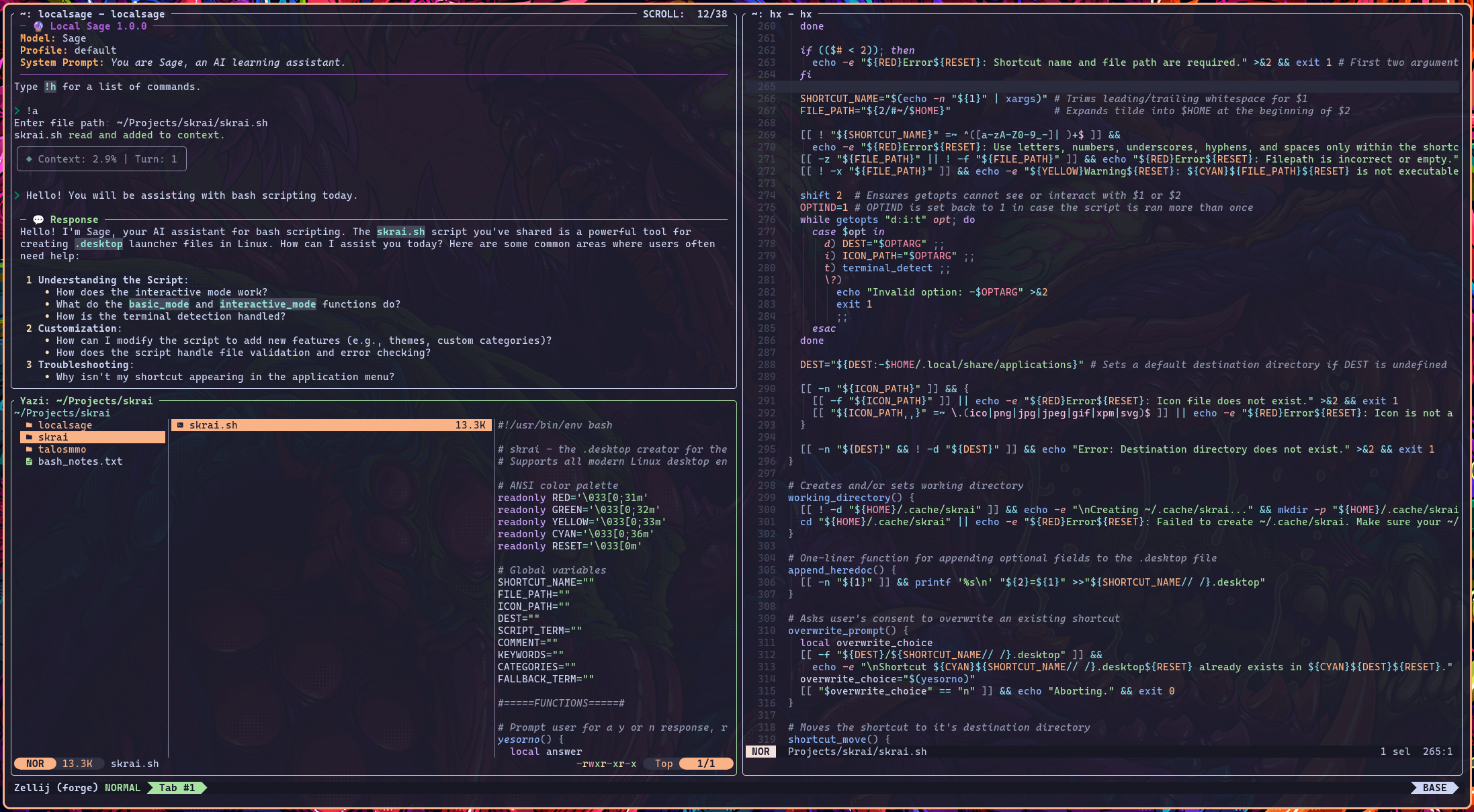
Local Sage running in Zellij, alongside Helix and Yazi.
About 🔎
Local Sage is an open-source stateful CLI for interacting with LLMs in shell-based workflows.
Featuring live Markdown rendering with inline math conversion for a silky smooth chatting experience. Designed to hook into any OpenAI API endpoint, and tested with local LLMs hosted via llama.cpp.
Additional Features:
-
Standard Output Rendering: History is persistent and scrollable, even after exiting the CLI.
-
Standard Input Piping: Pipe stdin directly into Local Sage from the command line or a script.
Example:ps aux | localsage "What process is consuming the most memory?" -
Fancy Prompts: Command completion, path completion, and in-memory history for a shell-native UX.
-
Website Scraping: Scrape a website with a simple command, and attach it's contents to the current session.
-
Context-aware Attachment: Attachments are replaced on re-attachment and can be purged from a session, restoring context.
Note: Entire directories can be attached at once. Attached website content can be purged from a session as well. -
Automated Environment Context: Your model sees your username, your OS name, and the contents of your current working directory.
Note: When changing the working directory with the!cdcommand, your model is aware. Environment context mutates. -
Session Management: Load, save, delete, reset, and summarize sessions.
-
Profile Management: Save, delete, and switch model profiles.
-
Context & Throughput Monitoring: Shown through a subtle status panel.
-
Built-in Markdown themes: Customize your output with a variety of built-in Markdown themes. Available themes are listed here.
Check out the Under the Hood section if you want to learn more!
Compatibility 🔩
Python 3.10 or later required.
The big three (Linux, macOS, and Windows) are all supported. Ensure your terminal emulator has relatively modern features. Alacritty works well. So does kitty and Ghostty.
You can use non-local models with Local Sage if desired. If you set an API key, the CLI will store it safely in your OS's built-in credential manager via keyring. Setting the OPENAI_API_KEY environment variable works as well, and overrides all other options.
Installation 💽
Install a Python package manager for your OS. Both uv and pipx are highly recommended.
For uv, open your terminal and type:
uv tool install localsage
Or, for pipx, type:
pipx install localsage
Type localsage into your terminal to launch the CLI. Type !h to view command usage.
Getting Started ✔️
Configuration is done entirely through interactive commands. You never have to touch a config file.
- Configure a profile with
!profile add. API endpoint format:http://ipaddress:port/v1. - Type
!profile switchto switch to your new profile. - Use
!ctxto set your context length. - (Optional) Set your own system prompt with
!promptor an API key with!key.
[!TIP] If you press
tabwhile at the main prompt, you can access a command completer for easy command use.
Dependencies 🧰
Local Sage is designed with minimal dependencies, keeping the download light and minimizing library bloat.
- Rich - Used extensively throughout. Panels, live rendering, etc.
- prompt_toolkit - Prompts and completers, also used extensively.
- OpenAI - Provides all API interaction as well as the conversation history list.
- keyring - Safely handles API keys on all platforms.
- tiktoken - Provides tokenization and enables context length calculation.
- platformdirs - Detects default directories across operating systems.
- pylatexenc - Absolutely vital for live math sanitization.
- pyperclip - For copying code blocks to the system clipboard.
- trafilatura - For extracting text from web pages.
File Locations 📁
Your config file, session files, and error logs are stored in your user's data directory.
| OS | Directory |
|---|---|
| Linux: | ~/.local/share/LocalSage |
| macOS: | ~/Library/Application Support/LocalSage |
| Windows: | %localappdata%/LocalSage |
Commands 📄
All usage charts are present below. You can render them within the CLI by typing !h.
| Profile Management | Manage multiple models & API endpoints |
|---|---|
!profile add |
Add a new model profile. Prompts for alias, model name, and API endpoint. |
!profile remove |
Remove an existing profile. |
!profile list |
List configured profiles. |
!profile switch |
Switch between profiles. |
| Configuration | Main configuration commands |
|---|---|
!config |
Display your current configuration settings and default directories. |
!consume |
Toggle reasoning panel consumption. |
!ctx |
Set maximum context length (for CLI functionality). |
!key |
Set an API key, if needed. Your API key is stored in your OS keychain. |
!prompt |
Set a new system prompt. Takes effect on your next session. |
!rate |
Set the current refresh rate (default is 30). Higher refresh rate = higher CPU usage. |
!theme |
Change your Markdown theme. Built-in themes can be found at https://pygments.org/styles/ |
| Session Management | Session management commands |
|---|---|
!s or !save |
Save the current session. |
!l or !load |
Load a saved session, including a scrollable conversation history. |
!sum or !summary |
Prompt your model for summarization and start a fresh session with the summary. |
!sessions |
List all saved sessions. |
!reset |
Reset for a fresh session. |
!delete |
Delete a saved session. |
!clear |
Clear the terminal window. |
!q or !quit |
Exit Local Sage. |
Ctrl + C |
Abort mid-stream, reset the turn, and return to the root prompt. Also acts as an immediate exit. |
| WARNING | Using Ctrl + C as an immediate exit does not trigger an autosave! |
| Context Management | Manage context & attachments |
|---|---|
!a or !attach |
Attaches a file or directory to the current session. Child directories are not attached. |
!web |
Scrapes a website, and attaches the contents to the current session. |
!attachments |
List all current attachments. |
!purge |
Choose a specific attachment and purge it from the session. Recovers context length. |
!purge all |
Purges all attachments from the current session. |
!cd |
Change the current working directory. |
!cp |
Copy all code blocks from the last response. |
| FILE TYPES | All text-based file types are acceptable. No PDFS. |
| NOTE | If you ever attach a problematic file, !purge can be used to rescue the session. |
Docker 🐋
This is a general guide for running Local Sage in a Docker container. The docker commands below are suggested templates, feel free to edit them as necessary.
A bash script, containerize.sh, is available to Linux & macOS users for convenient dockerization. You may have to run it with elevated permissions.
Start by creating and setting a working directory.
If you'd like to use the script, perform the following:
# 1) Clone the repo:
git clone https://github.com/Kyleg142/localsage

# 2) Build the image:
chmod u+x containerize.sh
./containerize.sh build

# 3) Run the container with sane defaults:
./containerize.sh run
Or, if you run a non-containerized backend/API on the same machine:
./containerize.sh run local
The script stores persistent files in /var/lib/LocalSage.
Dockerizing Local Sage manually:
# 1) Clone the repo:
git clone https://github.com/Kyleg142/localsage

# 2) Build the image
docker image build -t python-localsage .

# 3) Run the container
docker run -it --rm \
  --name localsage \
  -e OPENAI_API_KEY \
  -v /home/<YourUsername>/.local/share/LocalSage:/root/.local/share/LocalSage \
  python-localsage
For Windows users, here is the equivalent docker run command in PowerShell:
docker run -it --rm `
  --name localsage `
  -e OPENAI_API_KEY `
  -v "${env:LOCALAPPDATA}/LocalSage:/root/.local/share/LocalSage" `
  python-localsage
Notes on Networking
You may have to add specific options to your docker run command if you are running a non-containerized backend/API on the same machine. ./containerize.sh run local applies these options automatically.
Local Linux
- Add
--network hostto yourdocker runoptions to allow the container to reach services on localhost. - Follow the Getting Started section above.
Local Windows/Mac
- Add
--add-host=host.docker.internal:host-gatewayto yourdocker runoptions. - Run the container, type
!profile addto create a new profile. Set the API endpoint tohttp://host.docker.internal:8080/v1when prompted. - Ensure your API endpoint (llama.cpp, vllm, etc.) is listening on
0.0.0.0:8080.
Display Notes 🖥️
Typing into the terminal while streaming is active may cause visual artifacting. Avoid typing into the terminal until the current generation finishes.
A monospaced Nerd font is HIGHLY recommended. It ensures that Markdown, math, and icons all align well on-screen. The root prompt uses a Nerd font chevron.
Under the Hood 🛠️
Context-Aware Attachment
When a file (or directory) is attached to a session, a wrapper is applied to the contents before being appended to the session history. This wrapper enables attachment detection via regex, for file management.
If you re-attach a file, context consumption is massively reduced by removing the entry containing the file contents from the session history and then appending the new copy. You can also completely remove a file from a session via the !purge command, which restores context spent.
A similar wrapper is applied to website content. That means !purge can also be used to remove scraped website content from the conversation history.
Automated Environment Awareness
Your model is provided with basic environment context that mutates depending on the current working directory.
This is what your model can see...
[ENVIRONMENT CONTEXT]                        # Header
Current User: {USER_NAME}                    # Your username
Operating System: {system_info}              # Your operating system
Working Directory: {wd}                      # Current working directory, mutates when using !cd
Visible Files: {", ".join(files[:20])}       # Up to 20 visible file names, mutates when using !cd
Visible Directories: {", ".join(dirs[:20])}  # Up to 20 visible directory names, mutates when using !cd
Rendering & Streaming
At its core, Local Sage uses the Rich library combined with a custom math sanitizer to render live Markdown and readable inline math. Chunk processing is frame-synchronized to the refresh rate of a rich.live display, meaning that the entire rendering process occurs at a customizable interval. Effectively a hand-rolled, lightweight, synchronized rendering engine running right in your terminal.
You can adjust the refresh rate using the !rate command (30 FPS by default).
Limitations 🛑
Once the live panel group fills the terminal viewport, real-time rendering cannot continue due to terminal constraints. By default, the Response panel consumes the Reasoning panel to conserve space (toggleable with the !consume command).
This should only be noticeable on large responses that consume over an entire viewport's worth of vertical space.
Local Sage is text-only. This limitation keeps Local Sage portable, lightweight, and backend-agnostic.
Versioning 🔧
The project follows basic versioning:
- 1.0.x - Minor patches consisting of bug fixes and tweaks
- 1.x.0 - Major patches consisting of large feature expansions or necessary refactors.
License ⚖️
Local Sage is released under the MIT License.
AI Use 🤖
"I believe that a human-in-the-loop is both an obligation and a necessity when working with AI. Local Sage was written under that belief."
I use AI for theory-crafting, code review, and snippet generation. For example, most of the regex seen in math_sanitizer.py was generated and tuned by iteratively prompting GPT 5.1 and then ran against a pytest suite to prevent regression. The architecture of Local Sage is written and tuned by hand, and all documentation you see here is written by hand as well. This is NOT a 'vibe-coded' project.
Closing Notes 🫵
Local Sage is an open-source, single-dev project built purely for the love of the game. Please be kind!
Contributions are always welcome! See Contributing.
Project details
Verified details
These details have been verified by PyPIProject links
GitHub Statistics
Maintainers
Release history Release notifications | RSS feed


Download files
Download the file for your platform. If you're not sure which to choose, learn more about installing packages.
Source Distribution
Built Distribution
Filter files by name, interpreter, ABI, and platform.
If you're not sure about the file name format, learn more about wheel file names.
Copy a direct link to the current filters
File details
Details for the file localsage-1.4.3.tar.gz.
File metadata
- Download URL: localsage-1.4.3.tar.gz
- Upload date:
- Size: 37.9 kB
- Tags: Source
- Uploaded using Trusted Publishing? Yes
- Uploaded via: twine/6.1.0 CPython/3.13.7
File hashes
| Algorithm | Hash digest | |
|---|---|---|
| SHA256 |
29ab8eefa4ce7a1d8ebb4684201f8647059c3dbd2519e74815726ed953d465a4
|
|
| MD5 |
fe63d04692e21ccb5df4f98dc83f2593
|
|
| BLAKE2b-256 |
506c3d618635a215a2417cf87cf2940d210c28f2770e011db50fcf4caf597fdc
|
Provenance
The following attestation bundles were made for localsage-1.4.3.tar.gz:
Publisher:
python-publish.yml on Kyleg142/localsage
-
Statement:
-
Statement type:
https://in-toto.io/Statement/v1 -
Predicate type:
https://docs.pypi.org/attestations/publish/v1 -
Subject name:
localsage-1.4.3.tar.gz -
Subject digest:
29ab8eefa4ce7a1d8ebb4684201f8647059c3dbd2519e74815726ed953d465a4 - Sigstore transparency entry: 855032056
- Sigstore integration time:
-
Permalink:
Kyleg142/localsage@0c35a4d87c2701f1c5eac73196859ee640edf0a0 -
Branch / Tag:
refs/tags/v1.4.3 - Owner: https://github.com/Kyleg142
-
Access:
public
-
Token Issuer:
https://token.actions.githubusercontent.com -
Runner Environment:
github-hosted -
Publication workflow:
python-publish.yml@0c35a4d87c2701f1c5eac73196859ee640edf0a0 -
Trigger Event:
release
-
Statement type:
File details
Details for the file localsage-1.4.3-py3-none-any.whl.
File metadata
- Download URL: localsage-1.4.3-py3-none-any.whl
- Upload date:
- Size: 36.6 kB
- Tags: Python 3
- Uploaded using Trusted Publishing? Yes
- Uploaded via: twine/6.1.0 CPython/3.13.7
File hashes
| Algorithm | Hash digest | |
|---|---|---|
| SHA256 |
bad60377ed68c810becae95831067860a8032180fa4b69ad499c9bf8c8b6810b
|
|
| MD5 |
10963433d51efafd2b0f7a752c124b42
|
|
| BLAKE2b-256 |
0e46768bc28e140367d4e0ac6c9add94d517247865dca582a33b2cba4d71dd2e
|
Provenance
The following attestation bundles were made for localsage-1.4.3-py3-none-any.whl:
Publisher:
python-publish.yml on Kyleg142/localsage
-
Statement:
-
Statement type:
https://in-toto.io/Statement/v1 -
Predicate type:
https://docs.pypi.org/attestations/publish/v1 -
Subject name:
localsage-1.4.3-py3-none-any.whl -
Subject digest:
bad60377ed68c810becae95831067860a8032180fa4b69ad499c9bf8c8b6810b - Sigstore transparency entry: 855032058
- Sigstore integration time:
-
Permalink:
Kyleg142/localsage@0c35a4d87c2701f1c5eac73196859ee640edf0a0 -
Branch / Tag:
refs/tags/v1.4.3 - Owner: https://github.com/Kyleg142
-
Access:
public
-
Token Issuer:
https://token.actions.githubusercontent.com -
Runner Environment:
github-hosted -
Publication workflow:
python-publish.yml@0c35a4d87c2701f1c5eac73196859ee640edf0a0 -
Trigger Event:
release
-
Statement type:






