







Loci /ˈloʊsaɪ/ (LOH-sy, or LOH-kee the way a Roman would have said it) is Latin for "places," the plural of locus. The name comes from the method of loci, the classical memory technique where you store what you want to remember by putting it somewhere — a room, a road, a building you already know by heart — and retrieve it by walking back through. The word keeps that spatial sense wherever it turns up: in mathematics a locus is the set of points satisfying a condition, in genetics the fixed position of a gene on a chromosome, and a locus classicus is the one authoritative passage on a subject. The root always points at a specific, defined place.
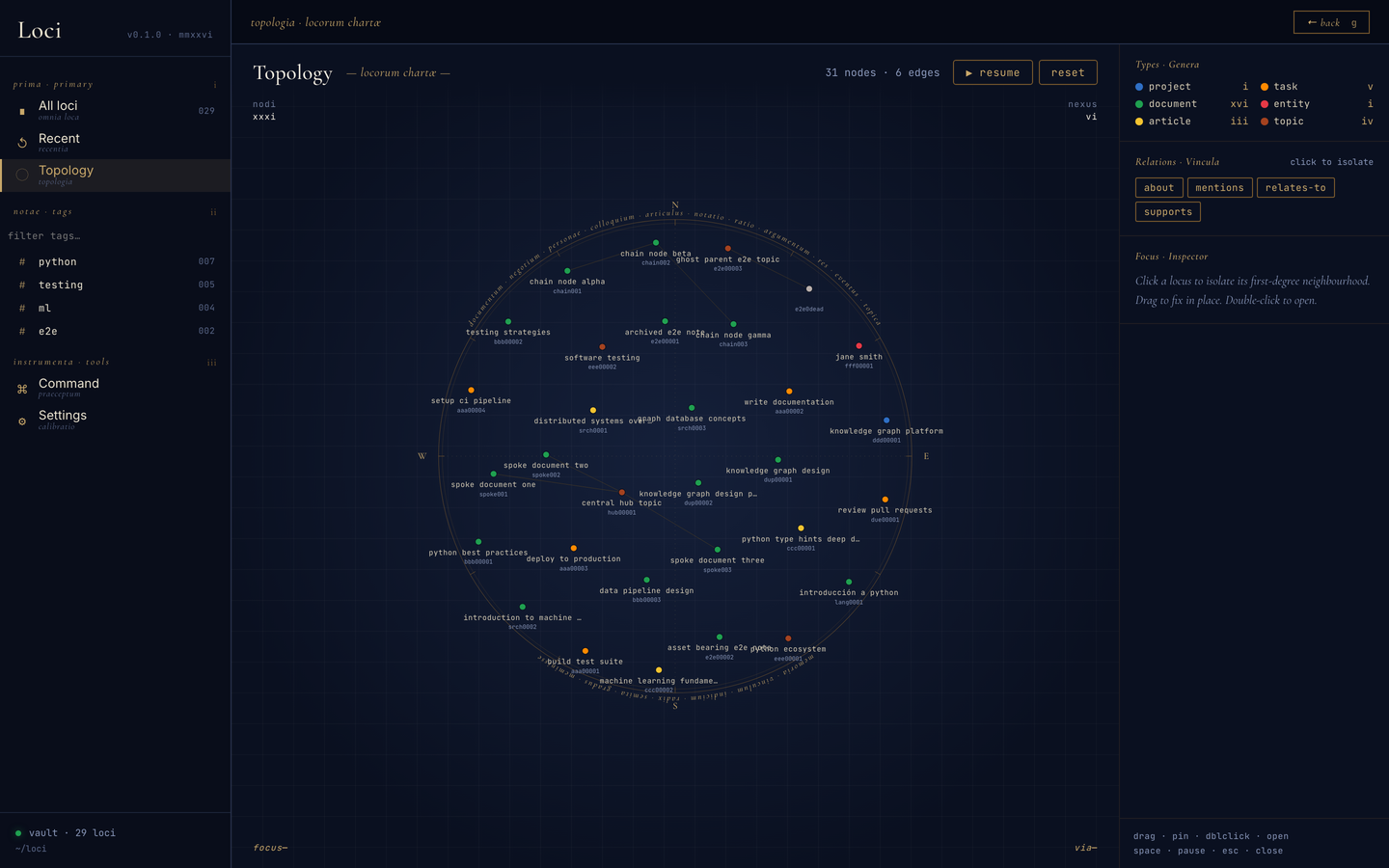
Loci builds that space for your digital life. It is a personal knowledge system on plain Markdown files with YAML frontmatter, organised as a graph: every note, article, task, book, person, and conversation you save becomes a node with a stable UID, a declared type, and typed relationships to other nodes. The files can also point outward — to a PDF on a drive, a book on a shelf, a message in an inbox — recording where a thing lives instead of making you move it. You and your agents navigate it the way a memory palace is navigated: by association, by position, by path.
It has three faces over one vault. An MCP server with skills that teach
Claude to read the ontology before it writes, so it uses your vocabulary rather
than inventing one. A local web app for browsing, filtering, reading, and
walking the graph. And the files themselves, which open, grep, and commit
in any editor with nothing else running. The goal is one place where your
thinking accumulates, in a form no platform owns.
Quick start
Requires Python 3.13+ and uv.
1. Install from PyPI
uv tool install loci-vault
The package is loci-vault; the commands it installs are loci and loci-mcp.
2. Wire it into Claude Code
loci skills
claude mcp add --scope user loci loci-mcp
The first installs the skills into ~/.claude/skills/; the second registers
the MCP server.
3. Point it at a vault
Restart Claude Code and tell it where the vault should live: "point Loci at ~/vault". Then:
Save this article to my loci vault: https://example.com/post
What does my loci vault know about stoicism?
4. Run it
The package installs two console scripts, and they are separate processes:
| Command | What it is |
|---|---|
loci |
The web UI and its HTTP backend, on http://127.0.0.1:8765. Change it with --host / --port (or LOCI_UI_HOST / LOCI_UI_PORT). |
loci-mcp |
The stdio MCP server. Claude Code launches it for you once registered in step 2; you don't start it by hand. |
loci needs a vault and exits with an error if none is configured yet (step 3
sets one). To use a specific vault for one run: LOCI_VAULT_ROOT=~/vault loci.
Upgrading, running from a checkout, and sync are all in docs/setup.md.
Documentation
| The problem | Why Loci exists, and why a Markdown folder or a PKM app alone doesn't cover it |
| Setup | Install from PyPI, a release wheel, or a checkout; upgrading; sync and backup |
| Examples | One prompt per scenario: saving each kind of thing, retrieving, updating, extending the ontology |
| Using Loci | How to think about it as a system, the scenarios it's built for, saving, querying, the UI, the vault layout |
| The ontology | Types, relations, schemes, and how the registries are versioned |
| Development | Repo layout, daily commands, testing, releasing |
| Status and roadmap | What's stable, what's partial, what's next |
| File saving · Execution flows · Diagrams · Testing | Deeper reference |
Work in progress, and a personal one: the core is used every day, the edges are uneven. Status says which is which.
Licence
Noncommercial use is free. Personal use, research, teaching, and charities are all permitted purposes, including modifying and redistributing.
Commercial use needs a separate licence from the owner. If you want to use Loci in or for a business, open an issue and ask.
This makes Loci source-available rather than open source: the OSI definition forbids restricting commercial use, so it will not carry an OSI badge and GitHub reports its licence as "Other". The choice is deliberate, and it is the restrictive end on purpose, since a licence can be loosened later but never tightened.
Your vault is yours. The licence covers this software, not the notes you write with it.
Contributing
See CONTRIBUTING.md.
Pull requests are gated on a signed Contributor Licence Agreement. A bot posts the sentence to reply with; you sign once. You keep your copyright, and the grant is what keeps commercial licensing and a future move to AGPL or MIT possible.
1 maintainer

Metadata
1 maintainer
Release files for loci-vault 0.7.0
For a detailed explanation of source distributions (sdists) and built distributions (wheels), please see the package formats documentation.
Source distribution (sdist)
| File | Size | Uploaded | Provenance | Actions |
|---|---|---|---|---|
| loci_vault-0.7.0.tar.gz | 2.5 MB | With provenance | Details for loci_vault-0.7.0.tar.gz |
Built distribution (wheel)
| File | Interpreter | ABI | Platform | Actions Reset |
|---|---|---|---|---|
| loci_vault-0.7.0-py3-none-any.whl | Python 3 | none | any | Details for loci_vault-0.7.0-py3-none-any.whl |
Total release size: 2.9 MB
Release files / loci_vault-0.7.0.tar.gz
| Download URL | loci_vault-0.7.0.tar.gz |
|---|---|
| Size | 2.5 MB |
| Tags | Source |
|
SHA-256 checksum How to use checksums |
c466948d511218fe7c643ac005bec17c4416103d61c29bb44e556ddf8d68ff3b
|
|
BLAKE2b-256 checksum How to use checksums |
adfff763867e28e2e285434be85d7d5cb0dfba956cdca0822cdbae799ea09b02
|
| Upload date | |
|
Uploaded using Trusted Publishing? What is trusted publishing? |
Yes |
| Uploaded via |
twine/7.0.0 CPython/3.13.16
|
Provenance
Provenance describes where a file came from. On PyPI, provenance is shared via attestations, which provide a verifiable record of the build or publishing details. View details, limitations and caveats.


PyPI Publish Attestation
PyPI verified that this artifact, at this checksum, originated from the publisher listed below.
Signed by GitHub Actions, verified by PyPI on Nov 3, 2026.
Transparency logRelease files / loci_vault-0.7.0-py3-none-any.whl
| Download URL | loci_vault-0.7.0-py3-none-any.whl |
|---|---|
| Size | 316.4 kB |
| Tags | Python 3 |
|
SHA-256 checksum How to use checksums |
a47e688fa73349e8ec47e0c3530958784bb4ab458666145c42a9c3e851bba153
|
|
BLAKE2b-256 checksum How to use checksums |
c06abff31dcb800d0f22d7f3d844dc466d5d320a5d1a243735f835d43bf5a22e
|
| Upload date | |
|
Uploaded using Trusted Publishing? What is trusted publishing? |
Yes |
| Uploaded via |
twine/7.0.0 CPython/3.13.16
|
Provenance
Provenance describes where a file came from. On PyPI, provenance is shared via attestations, which provide a verifiable record of the build or publishing details. View details, limitations and caveats.
PyPI Publish Attestation
PyPI verified that this artifact, at this checksum, originated from the publisher listed below.
Signed by GitHub Actions, verified by PyPI on Nov 3, 2026.
Transparency logSecurity for loci-vault 0.7.0
Provenance
Provenance describes where a file came from. On PyPI, provenance is shared via attestations, which provide a verifiable record of the build or publishing details. View details, limitations and caveats.
Full provenance
All 2 files in this release have been uploaded with provenance metadata.
Attestation for loci_vault-0.7.0.tar.gz
PyPI Publish Attestation
PyPI verified that this artifact, at this checksum, originated from the publisher listed below.
Signed by GitHub Actions, verified by PyPI on Nov 3, 2026.
Transparency logA note on package security
PyPI is a repository for distributing packages, not a service for auditing them. While third-party security researchers and our staff do their best to detect and remove malicious packages, PyPI cannot guarantee the quality, security or suitability of any given package.
To learn more about protecting yourself from malicious actors, visit our package security documentation.













